
Android之Button自定义点击效果
我们在界面上经常会用到button按钮,但通常button点击后看不到点击的效果,如果用户连续点击了两次,就会报NAR错误,这样交互性就比较差了。如果我们自定义了button点击效果,比如我们点击了button能让我们看到我们确实点击了button按钮,这样就会有效的避免重复点击了。
自定义点击效果有两种方式,一种是在xml中定义,另一种是在代码中定义。
首先看一下如何在xml中定义:
在drawable下新建selector.xml文件:
- <?xml version="1.0" encoding="utf-8"?>
- <selector xmlns:android="http://schemas.android.com/apk/res/android">
- <item android:drawable="@drawable/button_press" android:state_pressed="true"/>
- <item android:drawable="@drawable/button_nomal" android:state_focused="false" android:state_pressed="false"/>
- <item android:drawable="@drawable/button_focus" android:state_focused="true"/>
- <item android:drawable="@drawable/button_nomal" android:state_focused="false"/>
- </selector>
定义了两种状态 一种是按下 一种是获得焦点。 drawable分别引用了这三张图片
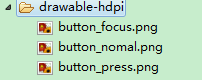
然后在main.xml下添加button按钮
- <Button
- android:id="@+id/button1"
- android:layout_width="wrap_content"
- android:layout_height="wrap_content"
- android:text="button效果演示"
- android:background="@drawable/selector" />
在MainActivtiy中得到button
- Button button1=(Button) this.findViewById(R.id.button1);
- button1.setOnClickListener(new View.OnClickListener() {
- @Override
- public void onClick(View v) {
- // TODO Auto-generated method stub
- Toast.makeText(getApplicationContext(), "你点击了button按钮", Toast.LENGTH_SHORT).show();
- }
- });
下面看下点击效果:
点击button前:
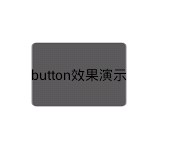
当按下button按钮时:
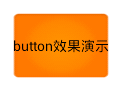
接下来 看下第二种实现方式,在代码中实现:
首先在main.xml中添加:
- <Button
- android:id="@+id/button2"
- android:layout_width="wrap_content"
- android:layout_height="wrap_content"
- android:text="button效果演示"
- android:background="@drawable/button_nomal"/>
接下面在MainActivity中实现:
- Button button2=(Button) this.findViewById(R.id.button2);
- button2.setOnTouchListener(new OnTouchListener() {
- @Override
- public boolean onTouch(View v, MotionEvent event) {
- // TODO Auto-generated method stub
- if(event.getAction()==MotionEvent.ACTION_DOWN){
- v.setBackgroundResource(R.drawable.button_press);
- }else if(event.getAction()==MotionEvent.ACTION_UP){
- v.setBackgroundResource(R.drawable.button_nomal);
- }
- return false;
- }
- });
在这类绑定了button的OnTouchListener监听,因为OnClickListener继承了OnTouchListener。运行效果和上面一样,这里不做过多解释。
Android之Button自定义点击效果的更多相关文章
- Android 纯代码加入点击效果
项目中非常多的Button, 同一时候配置非常多button切图,Selector是不是非常烦, 使用以下这个类,就能够直接为Button添加点击效果. 不用多个图片,不用Selector. 使用方法 ...
- Android checkbox 自定义点击效果
安卓默认的效果 自定义后的效果 前面的图片当然可以自己修改. 实现这个效果的步骤如下 1.建立 一个selector 的xml <?xml ver ...
- Android MaterialDesign之水波点击效果的几种实现方法
什么是水波点击的效果? 下面是几种不同的实现方法的效果图以及实现方法 Video_2016-08-31_003846 如何实现? 方法一 使用官方提供的RippleDrawable类 优点:使用方 ...
- Android之水波纹点击效果(RippleView)
Android5.0后各种炫的效果纷纷出来,写这篇博客主要是讲的是按钮点击效果带有的水波纹(波浪式). 当然我写的这个是自定义来实现的,在低版本(5.0一下)也可以实现点击效果.看看效果图: 上图可看 ...
- 如何让LinearLayout也有类似Button的点击效果?
有的时候,我们希望LinearLayout布局也有点击的效果,这时候我们不仅需要一个作为背景的selector,还要设置一些其它属性才行: android:clickable="true&q ...
- android 总结(样式)—跑马灯 button的点击效果 RadioGroup 实现滑动的效果 button 下面有阴影 卡片样式
<Button android:layout_width="wrap_content" android:layout_height="wrap_content&qu ...
- Android ImageButton | Button | TextView 点击和触摸效果
ImageButton------------------------------------------------> 一.Java 代码: 在drawable目录下添加新的xml文件 bu ...
- android自定义控件(4)-自定义水波纹效果
一.实现单击出现水波纹单圈效果: 照例来说,还是一个自定义控件,观察这个效果,发现应该需要重写onTouchEvent和onDraw方法,通过在onTouchEvent中获取触摸的坐标,然后以这个坐标 ...
- Android解决button反复点击问题
public class BaseActivity extends Activity { protected boolean isDestroy; //防止反复点击设置的标志.涉及到点击打开其它Act ...
随机推荐
- LINQ Operators之过滤(Filtering)
转:http://www.cnblogs.com/lifepoem/archive/2011/11/16/2250676.html 在本系列博客前面的篇章中,已经对LINQ的作用.C# 3.0为LIN ...
- 转载: SQL Server中的索引
http://www.blogjava.net/wangdetian168/archive/2011/03/07/347192.html 1 SQL Server中的索引 索引是与表或视图关联的磁盘上 ...
- Threads Events QObjects
Events and the event loop Being an event-driven toolkit, events and event delivery play a central ro ...
- LeetCode Majority Element(简单题)
题意: 给一个数组,其中有一个元素的出现次数已经超过数组的一半大小,请找出这个元素? 思路: 可以扫一遍数组,将这个出现次数过多的元素抵消其他的元素,最后必定留下1个以上的元素,就是它自己了. pyt ...
- 【题解】【数组】【查找】【Leetcode】Search in Rotated Sorted Array
Suppose a sorted array is rotated at some pivot unknown to you beforehand. (i.e., 0 1 2 4 5 6 7 migh ...
- [转载] 已知strcpy的函数原型:char *strcpy(char *strDest, const char *strSrc),编写函数 strcpy(C++版)
已知strcpy的函数原型:char *strcpy(char *strDest, const char *strSrc)其中strDest 是目的字符串,strSrc 是源字符串.不调用C++/C ...
- Android开源项目大全之工具库
http://www.neast.cn/forum.php?mod=viewthread&tid=5487&fromuid=5
- Codeforces Round #110 (Div. 2)
Codeforces Round #110 (Div. 2) C. Message 题意 给两个长度不超过2000的字符串\(s,u\),仅由小写字母构成. 找出\(s\)的一个子串\(t\),通过3 ...
- spark_updateStateByKey
java核心代码 JavaPairDStream<String, Integer> wordCounts = pair.updateStateByKey(new Function2< ...
- 黑马程序员——JAVA基础之JDK1.5新特性高级for循环和可变参数
------- android培训.java培训.期待与您交流! ---------- 高级for循环 格式: for(数据类型 变量名 : 被遍历的集合(Collection)或者数组) { ...