
Android之水波纹点击效果(RippleView)
Android5.0后各种炫的效果纷纷出来,写这篇博客主要是讲的是按钮点击效果带有的水波纹(波浪式)。
当然我写的这个是自定义来实现的,在低版本(5.0一下)也可以实现点击效果。看看效果图:
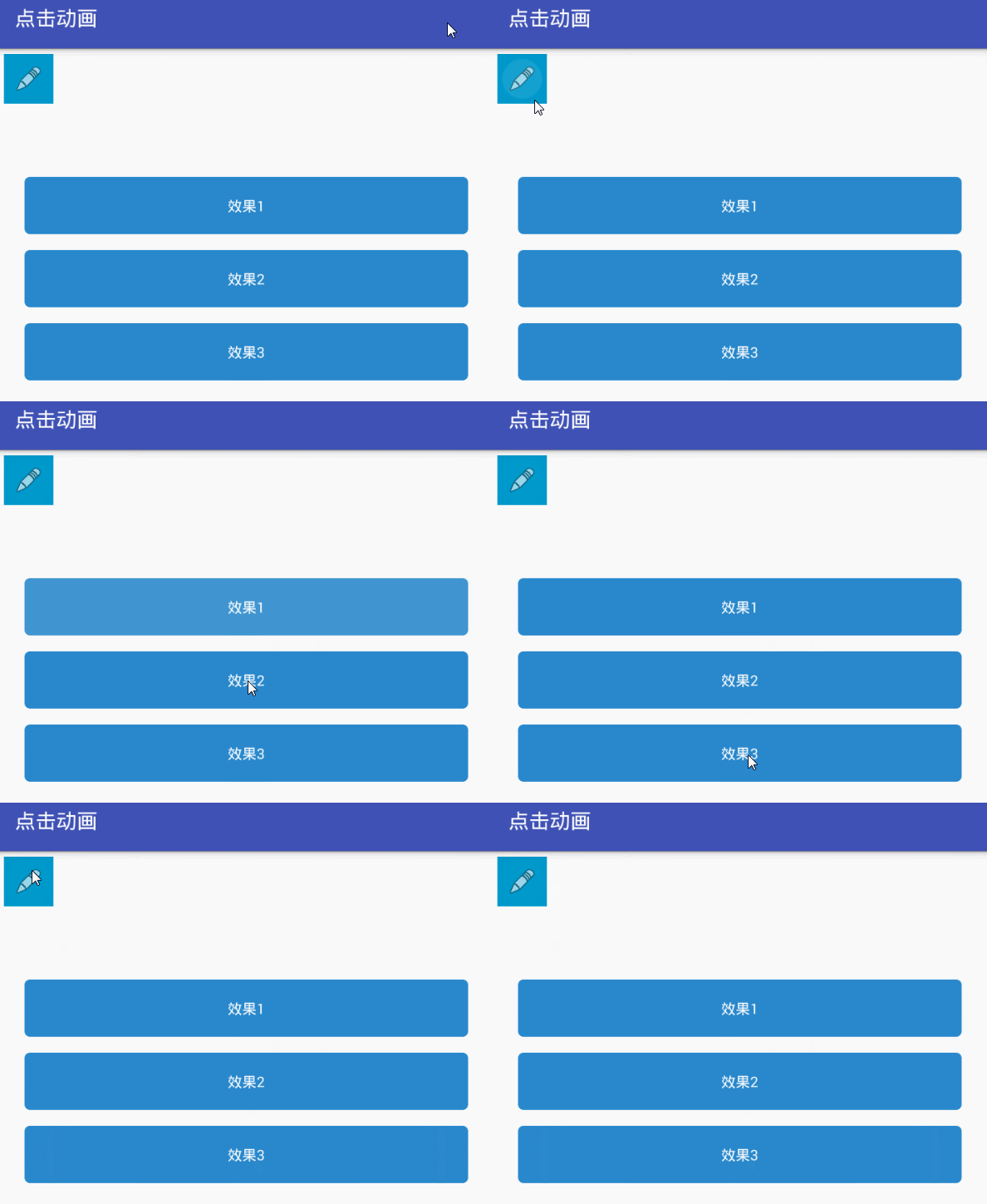
上图可看出 点击有抖动效果和不抖动效果。
布局代码:
<?xml version="1.0" encoding="utf-8"?>

<LinearLayout xmlns:android="http://schemas.android.com/apk/res/android"

    xmlns:ripple="http://schemas.android.com/apk/res-auto"

    xmlns:tools="http://schemas.android.com/tools"

    android:id="@+id/activity_main"

    android:layout_width="match_parent"

    android:layout_height="match_parent"

    android:orientation="vertical"

    tools:context="com.zq.waveeffects.MainActivity">

    <!--其他属性自行测试-->

    <com.zq.waveeffects.RippleView

        android:id="@+id/more"

        android:layout_width="?android:actionBarSize"

        android:layout_height="?android:actionBarSize"

        android:layout_margin="5dp"

        ripple:rv_centered="true">

        <ImageView

            android:layout_width="88dp"

            android:layout_height="88dp"

            android:layout_gravity="center"

            android:background="@android:color/holo_blue_dark"

            android:padding="10dp"

            android:src="@android:drawable/ic_menu_edit" />

    </com.zq.waveeffects.RippleView>

    <com.zq.waveeffects.RippleView

        android:layout_width="wrap_content"

        android:layout_height="wrap_content"

        android:layout_marginLeft="25dp"

        android:layout_marginRight="25dp"

        android:layout_marginTop="65dp"

        ripple:rv_type="rectangle"

        ripple:rv_zoom="true">

        <!-- ripple:rv_type="doubleRipple"  控制类型

             ripple:rv_zoom="true"  是否抖动

        -->

        <TextView

            android:id="@+id/my_comment_submit"

            android:layout_width="match_parent"

            android:layout_height="55dp"

            android:background="@drawable/border_red_roval_sign"

            android:gravity="center"

            android:text="效果1"

            android:textColor="@android:color/white" />

    </com.zq.waveeffects.RippleView>

    <com.zq.waveeffects.RippleView

        android:layout_width="wrap_content"

        android:layout_height="wrap_content"

        android:layout_marginLeft="25dp"

        android:layout_marginRight="25dp"

        android:layout_marginTop="15dp"

        ripple:rv_type="simpleRipple"

        ripple:rv_zoom="false">

        <TextView

            android:layout_width="match_parent"

            android:layout_height="55dp"

            android:background="@drawable/border_red_roval_sign"

            android:gravity="center"

            android:text="效果2"

            android:textColor="@android:color/white" />

    </com.zq.waveeffects.RippleView>

    <com.zq.waveeffects.RippleView

        android:layout_width="wrap_content"

        android:layout_height="wrap_content"

        android:layout_marginLeft="25dp"

        android:layout_marginRight="25dp"

        android:layout_marginTop="15dp"

        ripple:rv_type="doubleRipple"

        ripple:rv_zoom="false">

        <TextView

            android:layout_width="match_parent"

            android:layout_height="55dp"

            android:background="@drawable/border_red_roval_sign"

            android:gravity="center"

            android:text="效果3"

            android:textColor="@android:color/white" />

    </com.zq.waveeffects.RippleView>

</LinearLayout>
自定义的RippleView代码比较多,直接下载源码即可;
源码点击下载
Android之水波纹点击效果(RippleView)的更多相关文章
- android: Android水波纹点击效果
Android API 21及以上新增了ripple标签用来实现水波纹的效果.我们可以通过设置ripple背景来实现一些View点击效果. 该水波纹效果有两种:一种是有界的(点击后类似于一个矩形向四周 ...
- Android 水波纹点击效果(Ripple Effect)
上周Android发布了Android M的Preview版本.但想必Android5.0很多炫酷效果,多数开发者还没有使用过,那更不要说广大用户了. 本文介绍的是Android5.0中其中一个炫酷的 ...
- 兼容Android的水波纹效果
Android的水波纹效果只有高版本才有,我们希望自己的应用在低版本用低版本的阴影,高版本用水波纹,这怎么做呢?其实,只要分drawable和drawablev21两个文件夹就好了. 普通情况下的se ...
- Android之Button自定义点击效果
我们在界面上经常会用到button按钮,但通常button点击后看不到点击的效果,如果用户连续点击了两次,就会报NAR错误,这样交互性就比较差了.如果我们自定义了button点击效果,比如我们点击了b ...
- android selector设置button点击效果(具体)以及常见问题
button的点击效果学习起来其实比較easy,此点对开发人员来说也是使用的比較频繁的一个知识点,与它相关的还有编辑框的获取焦点时改变背景颜色.选择button选择时改变字体颜色等等.这些其实都是用到 ...
- Android 纯代码加入点击效果
项目中非常多的Button, 同一时候配置非常多button切图,Selector是不是非常烦, 使用以下这个类,就能够直接为Button添加点击效果. 不用多个图片,不用Selector. 使用方法 ...
- Android5.0以上的项目都会有的按钮点击特效--水波纹
<?xml version="1.0" encoding="utf-8"?> <shape xmlns:android="http: ...
- Android特效专辑(十)——点击水波纹效果实现,逻辑清晰实现简单
Android特效专辑(十)--点击水波纹效果实现,逻辑清晰实现简单 这次做的东西呢,和上篇有点类似,就是用比较简单的逻辑思路去实现一些比较好玩的特效,最近也是比较忙,所以博客更新的速度还得看时间去推 ...
- android自定义控件(4)-自定义水波纹效果
一.实现单击出现水波纹单圈效果: 照例来说,还是一个自定义控件,观察这个效果,发现应该需要重写onTouchEvent和onDraw方法,通过在onTouchEvent中获取触摸的坐标,然后以这个坐标 ...
随机推荐
- 170525、解决maven隐式依赖包版本问题
今天在使用dubbo2.5.3版本的时候,启动项目的时候发现一个问题,tomcat启动一直报错 Caused by: java.lang.IllegalStateException: Context ...
- 常用meta标签及说明
1.charset 定义文档的字符编码 例如: <meta charset="UTF-8"> 2. name 把 content 属性关联到一个名称,其属性有 ...
- 您好,python的请求es的http库是urllib3, 一个请求到贵司的es节点,想了解下,中间有哪些网关啊?冒昧推测,贵司的部分公共网关与python-urllib3的对接存在异常?
您好,python的请求es的http库是urllib3, 一个请求到贵司的es节点,想了解下,中间有哪些网关啊?冒昧推测,贵司的部分公共网关与python-urllib3的对接存在异常? 负载均衡( ...
- python3安装后无法使用退格键的问题
# 安装readline模块 yum -y install readline-devel # 进入Python安装目录 cd /usr/python/Python- # 重新安装 ./configur ...
- day14(编码实战-用户登录注册)
day14 案例:用户注册登录 要求:3层框架,使用验证码 功能分析 注册 登录 1.1 JSP页面 regist.jsp 注册表单:用户输入注册信息: 回显错误信息:当注册失败时,显示错误信 ...
- shell export 命令
export 命令作用是 把变量导出 也可以用export来定义环境变量 导入 定义的变量 这样的话类似于python面向对象的self.变量 一样 在脚本到处调用这个变量
- centos shell编程3【告警系统】 没有服务器端和客户端的概念 main.sh mon.conf load.sh 502.sh mail.php mail.sh disk.sh 第三十七节课
centos shell编程3[告警系统] 没有服务器端和客户端的概念 main.sh mon.conf load.sh 502.sh mail.php mail.sh disk.sh 第三十七 ...
- mac 安装homobrew 报错解决
按照官网(https://brew.sh/index_zh-cn.html)给的命令: /usr/bin/ruby -e "$(curl -fsSL https://raw.gith ...
- 菜单条 Menu Bar Action
//.h /***Action**/ QAction * act_openImage; QAction * act_openVideo; QAction * act_openAudio; /***Me ...
- WordPress配置
1.准备工作: 下载comsenzexp.exe 下载wordpress.zip 2.安装comsenzexp.exe,安装有个wwwroot目录: 3.解压wordpress.zip,然后ctrl+ ...