
Think Python - Chapter 8 - Strings
8.1 A string is a sequence
A string is a sequence of characters. You can access the characters one at a time with the bracket operator:
>>> fruit = 'banana'

>>> letter = fruit[1]
The second statement selects character number 1 from fruit and assigns it to letter. The expression in brackets is called an index. The index indicates which character in the sequence you want (hence the name). But you might not get what you expect:
>>> print letter

a
For most people, the first letter of 'banana' is b, not a. But for computer scientists, the index is an offset from the beginning of the string, and the offset of the first letter is zero.
>>> letter = fruit[0]

>>> print letter

b
So b is the 0th letter (“zero-eth”) of 'banana', a is the 1th letter (“one-eth”), and n is the 2th (“two-eth”) letter. You can use any expression, including variables and operators, as an index, but the value of the index has to be an integer. Otherwise you get:
>>> letter = fruit[1.5]

TypeError: string indices must be integers, not float
8.2 len
len is a built-in function that returns the number of characters in a string:
>>> fruit = 'banana'

>>> len(fruit)

6
To get the last letter of a string, you might be tempted to try something like this:
>>> length = len(fruit)

>>> last = fruit[length]

IndexError: string index out of range
The reason for the IndexError is that there is no letter in 'banana' with the index 6. Since we started counting at zero, the six letters are numbered 0 to 5. To get the last character, you have to subtract 1 from length:
>>> last = fruit[length-1]

>>> print last

a
Alternatively, you can use negative indices, which count backward from the end of the string. The expression fruit[-1] yields the last letter, fruit[-2] yields the second to last, and so on.
8.3 Traversal with a for loop
A lot of computations involve processing a string one character at a time. Often they start at the beginning, select each character in turn, do something to it, and continue until the end. This pattern of processing is called a traversal. One way to write a traversal is with a while loop:
index = 0

while index < len(fruit):

    letter = fruit[index]

    print letter

    index = index + 1
This loop traverses the string and displays each letter on a line by itself. The loop condition is index < len(fruit), so when index is equal to the length of the string, the condition is false, and the body of the loop is not executed. The last character accessed is the one with the index len(fruit)-1, which is the last character in the string.
Another way to write a traversal is with a for loop:
for char in fruit:

print char
Each time through the loop, the next character in the string is assigned to the variable char. The loop continues until no characters are left.
The following example shows how to use concatenation (string addition) and a for loop to generate an abecedarian series (that is, in alphabetical order). In Robert McCloskey’s book MakeWay for Ducklings, the names of the ducklings are Jack, Kack, Lack, Mack, Nack, Ouack, Pack, and Quack. This loop outputs these names in order:
prefixes = 'JKLMNOPQ'

suffix = 'ack'

for letter in prefixes:

print letter + suffix

The output is:

Jack

Kack

Lack

Mack

Nack

Oack

Pack

Qack
Of course, that’s not quite right because “Ouack” and “Quack” are misspelled.
8.4 String slices
A segment of a string is called a slice. Selecting a slice is similar to selecting a character:
>>> s = 'Monty Python'

>>> print s[0:5]

Monty

>>> print s[6:12]

Python
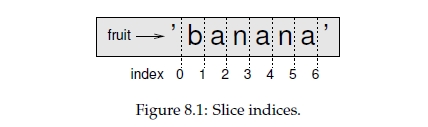
The operator [n:m] returns the part of the string from the “n-eth” character to the “m-eth” character, including the first but excluding the last. This behavior is counterintuitive, but it might help to imagine the indices pointing between the characters, as in Figure 8.1.
If you omit the first index (before the colon), the slice starts at the beginning of the string. If you omit the second index, the slice goes to the end of the string:
>>> fruit = 'banana'

>>> fruit[:3]

'ban'

>>> fruit[3:]

'ana'
If the first index is greater than or equal to the second the result is an empty string, represented by two quotation marks:
>>> fruit = 'banana'

>>> fruit[3:3]

''
An empty string contains no characters and has length 0, but other than that, it is the same as any other string.
8.5 Strings are immutable
It is tempting to use the [] operator on the left side of an assignment, with the intention of changing a character in a string. For example:
>>> greeting = 'Hello, world!'

>>> greeting[0] = 'J'

TypeError: 'str' object does not support item assignment
The “object” in this case is the string and the “item” is the character you tried to assign. For now, an object is the same thing as a value, but we will refine that definition later. An item is one of the values in a sequence.
The reason for the error is that strings are immutable, which means you can’t change an existing string. The best you can do is create a new string that is a variation on the original:
>>> greeting = 'Hello, world!'

>>> new_greeting = 'J' + greeting[1:]

>>> print new_greeting

Jello, world!
This example concatenates a new first letter onto a slice of greeting. It has no effect on the original string.
8.6 Searching
What does the following function do?
def find(word, letter):

    index = 0

    while index < len(word):

        if word[index] == letter:

            return index

        index = index + 1

    return -1
In a sense, find is the opposite of the [] operator. Instead of taking an index and extracting the corresponding character, it takes a character and finds the index where that character appears. If the character is not found, the function returns -1.
This is the first example we have seen of a return statement inside a loop. If word[index] == letter, the function breaks out of the loop and returns immediately.
If the character doesn’t appear in the string, the program exits the loop normally and returns -1.
This pattern of computation—traversing a sequence and returning when we find what we are looking for—is called a search.
8.7 Looping and counting
The following program counts the number of times the letter a appears in a string:
word = 'banana'

count = 0

for letter in word:

    if letter == 'a':

        count = count + 1

    print count
This program demonstrates another pattern of computation called a counter. The variable count is initialized to 0 and then incremented each time an a is found. When the loop exits, count contains the result—the total number of a’s.
8.8 String methods
A method is similar to a function—it takes arguments and returns a value—but the syntax is different. For example, the method upper takes a string and returns a new string with all uppercase letters:
Instead of the function syntax upper(word), it uses the method syntax word.upper().
>>> word = 'banana'

>>> new_word = word.upper()

>>> print new_word

BANANA
This form of dot notation specifies the name of the method, upper, and the name of the string to apply the method to, word. The empty parentheses indicate that this method
takes no argument.
A method call is called an invocation; in this case, we would say that we are invoking upper on the word.
As it turns out, there is a string method named find that is remarkably similar to the function we wrote:
>>> word = 'banana'

>>> index = word.find('a')

>>> print index

1
In this example, we invoke find on word and pass the letter we are looking for as a parameter. Actually, the find method is more general than our function; it can find substrings, not just characters:
>>> word.find('na')

2
It can take as a second argument the index where it should start:
>>> word.find('na', 3)

4
And as a third argument the index where it should stop:
>>> name = 'bob'

>>> name.find('b', 1, 2)

-1
This search fails because b does not appear in the index range from 1 to 2 (not including 2).
8.9 The in operator
the following function prints all the letters from word1 that also appear in word2:
def in_both(word1, word2):

    for letter in word1:

        if letter in word2:

            print letter
With well-chosen variable names, Python sometimes reads like English. You could read this loop, “for (each) letter in (the first) word, if (the) letter (appears) in (the second) word, print (the) letter.”
Here’s what you get if you compare apples and oranges:
>>> in_both('apples', 'oranges')

a

e

s
8.10 String comparison
The relational operators work on strings. To see if two strings are equal:
if word == 'banana':

    print 'All right, bananas.'
Other relational operations are useful for putting words in alphabetical order:
if word < 'banana':

    print 'Your word,' + word + ', comes before banana.'

elif word > 'banana':

    print 'Your word,' + word + ', comes after banana.'

else:

    print 'All right, bananas.'
Python does not handle uppercase and lowercase letters the same way that people do. All the uppercase letters come before all the lowercase letters, so:
Your word, Pineapple, comes before banana. A common way to address this problem is to convert strings to a standard format, such as all lowercase, before performing the comparison. Keep that in mind in case you have to defend yourself against a man armed with a Pineapple.
Think Python - Chapter 8 - Strings的更多相关文章
- <Web Scraping with Python>:Chapter 1 & 2
<Web Scraping with Python> Chapter 1 & 2: Your First Web Scraper & Advanced HTML Parsi ...
- Think Python - Chapter 18 - Inheritance
In this chapter I present classes to represent playing cards, decks of cards, and poker hands.If you ...
- Think Python - Chapter 17 - Classes and methods
17.1 Object-oriented featuresPython is an object-oriented programming language, which means that it ...
- Think Python - Chapter 12 Tuples
12.1 Tuples are immutable(元组是不可变的)A tuple is a sequence of values. The values can be any type, and t ...
- Think Python - Chapter 11 - Dictionaries
Dictionaries A dictionary is like a list, but more general. In a list, the indices have to be intege ...
- Think Python - Chapter 10 - Lists
10.1 A list is a sequenceLike a string, a list is a sequence of values. In a string, the values are ...
- Think Python - Chapter 03 - Functions
3.1 Function callsIn the context of programming, a function is a named sequence of statements that p ...
- Natural Language Processing with Python - Chapter 0
一年之前,我做梦也想不到会来这里写技术总结.误打误撞来到了上海西南某高校,成为了文科专业的工科男,现在每天除了膜ha,就是恶补CS.导师是做计算语言学的,所以当务之急就是先自学计算机自然语言处理,打好 ...
- Think Python - Chapter 16 - Classes and functions
16.1 TimeAs another example of a user-defined type, we’ll define a class called Time that records th ...
随机推荐
- Linux CC攻击脚本
CC(ChallengeCollapsar)主要是用来攻击页面的.大家都有这样的经历,就是在访问论坛时,如果这个论坛比较大,访问的人比较多,打开页面的速度会比较慢,访问的人越多,论坛的页面越多,数据库 ...
- Java: constructor 构造代码块
构造器与类同名 每个类可以有1一个以上的构造器 构造器可以有0个,1个或者多个参数 构造器没有返回值,不可以写return 构造器总是伴随着new操作一起调用 构造函数的作用:可以用于给对象进行初始化 ...
- 在Android应用中使用OpenGL
Android为OpenGL ES支持提供了GLSurfaceView组件,这个组件用于显示3D图形.GLSurfaceView本身并不提供绘制3D图形的功能,而是由GLSurfaceView.Re ...
- myeclipse中导入的jquery文件报错(出现红叉叉,提示语法错误)
转自:http://blog.csdn.net/simplty/article/details/7661504
- EF Code-First数据迁移的尝试
Code-First的方式虽然省去了大量的sql代码,但增加了迁移的操作.尝试如下: 1.首先要在“扩展管理器”里搜索并安装NuGet“库程序包管理器”,否则所有命令都不能识别,会报CommandNo ...
- MySql 性能优化杂记
前一段时间接触MySql 服务器,关于查询忧化方面整理,优化主要唯绕几个工具函数 : show profiling , explain , 索引 , limit 如果上司抱怨服务器查询太慢,这时候 ...
- 远程连接Windows2008R2时服务器报Terminal Services错误的解决办法
症状: 使用终端服务客户端连接到Windows Server2008 R2的机器时,如果客户端选项中选择了打印机(注1)时,它可能会在在系统事件日志中记录一个TerminalServices打印机错误 ...
- 单位服务器发布tomcat的项目外网访问
首先 要有 外网IP 路由器做设置 开放端口(netstat -nao) 首先你要确定你有一个外网ip地址.如果你分配到的是一个局域网IP地址需要经过一系列的转换为外网ip地址 跟部署tomcat ...
- ios 8.4 Xcode6.4 设置LaunchImage图片
Step1 1.点击Image.xcassets 进入图片管理,然后右击,弹出"New Launch Image" 2.如图,右侧的勾选可以让你选择是否要对ipad,横屏,竖屏,以 ...
- Hibernate对象映射类型
Hibernate understands both the Java and JDBC representations of application data. The ability to rea ...