
Think Python - Chapter 16 - Classes and functions
16.1 Time
As another example of a user-defined type, we’ll define a class called Time that records the time of day. The class definition looks like this:
class Time(object):

"""Represents the time of day.

attributes: hour, minute, second

"""
We can create a new Time object and assign attributes for hours, minutes, and seconds:
time = Time()

time.hour = 11

time.minute = 59

time.second = 30
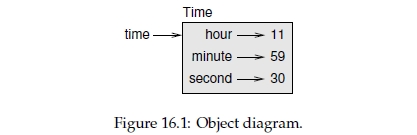
The state diagram for the Time object looks like Figure 16.1.
Exercise 16.1. Write a function called print_time that takes a Time object and prints it in the form hour:minute:second. Hint: the format sequence '%.2d' prints an integer using at least two digits, including a leading zero if necessary.
Exercise 16.2. Write a boolean function called is_after that takes two Time objects, t1 and t2, and returns True if t1 follows t2 chronologically and False otherwise. Challenge: don’t use an if statement.
16.2 Pure functions
In the next few sections, we’ll write two functions that add time values. They demonstrate two kinds of functions: pure functions and modifiers. They also demonstrate a development plan I’ll call prototype and patch, which is a way of tackling a complex problem by starting with a simple prototype and incrementally dealing with the complications.
Here is a simple prototype of add_time:
def add_time(t1, t2):

    sum = Time()

    sum.hour = t1.hour + t2.hour

    sum.minute = t1.minute + t2.minute

    sum.second = t1.second + t2.second

    return sum
The function creates a new Time object, initializes its attributes, and returns a reference to the new object. This is called a pure function because it does not modify any of the objects passed to it as arguments and it has no effect, like displaying a value or getting user input, other than returning a value.
To test this function, I’ll create two Time objects: start contains the start time of a movie, like Monty Python and the Holy Grail, and duration contains the run time of the movie, which is one hour 35 minutes. add_time figures out when the movie will be done.
>>> start = Time()

>>> start.hour = 9

>>> start.minute = 45

>>> start.second = 0

>>> duration = Time()

>>> duration.hour = 1

>>> duration.minute = 35

>>> duration.second = 0

>>> done = add_time(start, duration)

>>> print_time(done)

10:80:00
The result, 10:80:00 might not be what you were hoping for. The problem is that this function does not deal with cases where the number of seconds or minutes adds up to more than sixty. When that happens, we have to “carry” the extra seconds into the minute column or the extra minutes into the hour column.
Here’s an improved version:
def add_time(t1, t2):

    sum = Time()

    sum.hour = t1.hour + t2.hour

    sum.minute = t1.minute + t2.minute

    sum.second = t1.second + t2.second

    if sum.second >= 60:

        sum.second -= 60

        sum.minute += 1

    if sum.minute >= 60:

        sum.minute -= 60

        sum.hour += 1

    return sum
Although this function is correct, it is starting to get big. We will see a shorter alternative later.
16.3 Modifiers
Sometimes it is useful for a function to modify the objects it gets as parameters. In that case, the changes are visible to the caller. Functions that work this way are called modifiers. increment, which adds a given number of seconds to a Time object, can be written naturally as a modifier. Here is a rough draft:
def increment(time, seconds):

    time.second += seconds

    if time.second >= 60:

        time.second -= 60

        time.minute += 1

    if time.minute >= 60:

        time.minute -= 60

        time.hour += 1
The first line performs the basic operation; the remainder deals with the special cases we saw before. Is this function correct? What happens if the parameter seconds is much greater than sixty? In that case, it is not enough to carry once; we have to keep doing it until time.second is less than sixty. One solution is to replace the if statements with while statements. That would make the function correct, but not very efficient.
Exercise 16.3. Write a correct version of increment that doesn’t contain any loops.
Anything that can be done with modifiers can also be done with pure functions. In fact, some programming languages only allow pure functions. There is some evidence that programs that use pure functions are faster to develop and less error-prone than programs that use modifiers. But modifiers are convenient at times, and functional programs tend to be less efficient.
In general, I recommend that you write pure functions whenever it is reasonable and resort to modifiers only if there is a compelling advantage. This approach might be called a functional programming style.
Exercise 16.4. Write a “pure” version of increment that creates and returns a new Time object rather than modifying the parameter.
16.4 Prototyping versus planning
The development plan I am demonstrating is called “prototype and patch.” For each function, I wrote a prototype that performed the basic calculation and then tested it, patching errors along the way.
This approach can be effective, especially if you don’t yet have a deep understanding of the problem. But incremental corrections can generate code that is unnecessarily complicated—since it deals with many special cases—and unreliable—since it is hard to know if you have found all the errors.
An alternative is planned development, in which high-level insight into the problem can make the programming much easier. In this case, the insight is that a Time object is really a three-digit number in base 60 (see http://en.wikipedia.org/wiki/Sexagesimal.)! The second attribute is the "ones column," the minute attribute is the "sixties column," and the hour attribute is the "thirty-six hundreds column."
When we wrote add_time and increment, we were effectively doing addition in base 60, which is why we had to carry from one column to the next.
This observation suggests another approach to the whole problem—we can convert Time objects to integers and take advantage of the fact that the computer knows how to do integer arithmetic.
Here is a function that converts Times to integers:
def time_to_int(time):

    minutes = time.hour * 60 + time.minute

    seconds = minutes * 60 + time.second

    return seconds
And here is the function that converts integers to Times (recall that divmod divides the first argument by the second and returns the quotient and remainder as a tuple).
def int_to_time(seconds):

    time = Time()

    minutes, time.second = divmod(seconds, 60)

    time.hour, time.minute = divmod(minutes, 60)

    return time
You might have to think a bit, and run some tests, to convince yourself that these functions are correct. One way to test them is to check that time_to_int(int_to_time(x)) == x for many values of x. This is an example of a consistency check.
Once you are convinced they are correct, you can use them to rewrite add_time:
def add_time(t1, t2):

    seconds = time_to_int(t1) + time_to_int(t2)

    return int_to_time(seconds)
This version is shorter than the original, and easier to verify.
Exercise 16.5. Rewrite increment using time_to_int and int_to_time.
In some ways, converting from base 60 to base 10 and back is harder than just dealing with times. Base conversion is more abstract; our intuition for dealing with time values is better.
But if we have the insight to treat times as base 60 numbers and make the investment of writing the conversion functions (time_to_int and int_to_time), we get a program that is shorter, easier to read and debug, and more reliable.
It is also easier to add features later. For example, imagine subtracting two Times to find the duration between them. The naive approach would be to implement subtraction with borrowing. Using the conversion functions would be easier and more likely to be correct.
Ironically, sometimes making a problem harder (or more general) makes it easier (because there are fewer special cases and fewer opportunities for error).
16.5 Debugging
A Time object is well-formed if the values of minute and second are between 0 and 60 (including 0 but not 60) and if hour is positive. hour and minute should be integral values, but we might allow second to have a fraction part.
Requirements like these are called invariants because they should always be true. To put it a different way, if they are not true, then something has gone wrong.
Writing code to check your invariants can help you detect errors and find their causes. For example, you might have a function like valid_time that takes a Time object and returns False if it violates an invariant:
def valid_time(time):

    if time.hour < 0 or time.minute < 0 or time.second < 0:

        return False

    if time.minute >= 60 or time.second >= 60:

        return False

    return True
Then at the beginning of each function you could check the arguments to make sure they are valid:
def add_time(t1, t2):

    if not valid_time(t1) or not valid_time(t2):

        raise ValueError('invalid Time object in add_time')

    seconds = time_to_int(t1) + time_to_int(t2)

    return int_to_time(seconds)
Or you could use an assert statement, which checks a given invariant and raises an exception if it fails:
def add_time(t1, t2):

    assert valid_time(t1) and valid_time(t2)

    seconds = time_to_int(t1) + time_to_int(t2)

    return int_to_time(seconds)
assert statements are useful because they distinguish code that deals with normal conditions from code that checks for errors.
Think Python - Chapter 16 - Classes and functions的更多相关文章
- Think Python - Chapter 17 - Classes and methods
17.1 Object-oriented featuresPython is an object-oriented programming language, which means that it ...
- Think Python - Chapter 15 - Classes and objects
15.1 User-defined typesWe have used many of Python’s built-in types; now we are going to define a ne ...
- Think Python - Chapter 18 - Inheritance
In this chapter I present classes to represent playing cards, decks of cards, and poker hands.If you ...
- <Web Scraping with Python>:Chapter 1 & 2
<Web Scraping with Python> Chapter 1 & 2: Your First Web Scraper & Advanced HTML Parsi ...
- 十六. Python基础(16)--内置函数-2
十六. Python基础(16)--内置函数-2 1 ● 内置函数format() Convert a value to a "formatted" representation. ...
- [ZZ]知名互联网公司Python的16道经典面试题及答案
知名互联网公司Python的16道经典面试题及答案 https://mp.weixin.qq.com/s/To0kYQk6ivYL1Lr8aGlEUw 知名互联网公司Python的16道经典面试题及答 ...
- 零元学Expression Blend 4 - Chapter 16 用实例了解互动控制项「Button」II
原文:零元学Expression Blend 4 - Chapter 16 用实例了解互动控制项「Button」II 本章将教大家如何制作自己的Button,并以玻璃质感Button为实作案例. ? ...
- Python输出16进制不带0x补零,整数转16进制,字符串转16进制
Python输出16进制不带0x补零,整数转16进制,字符串转16进制 在开发中,我们偶尔会遇到需要将数据通过控制台打印出来,以检查数据传输的准确性.例如调试服务端刚接到的二进制数据(里面包含很多 ...
- python day 16: FTP脚本作业用例图,类图,活动图与代码重写
目录 python day 16 1. FTP脚本的用例图 python day 16 2019/10/22 - 2019/10/26 学习资料来自老男孩教育 1. FTP脚本的用例图 老师的讲解视频 ...
随机推荐
- easyui layout 收缩的bug
easyui layout提供collapse方法折叠指定的 panel,'region' 参数可能的值是:'north'.'south'.'east'.'west',但是在 IE6的环境下,调用这个 ...
- 最长公共上升子序列(LICS) 模板
void LICS() { ;i<=n;i++) { ; ;j<=n;j++) { if (a[i]==b[j]) f[i][j]=ma+; ][j]; ][j]>ma) ma=f[ ...
- 一步步学习JSON
什么是Json json是JavaScript Object Notation(javascript对象表示法)的缩写,是一种轻量的数据格式,是基于javascript的一个子集.与XML一样,jso ...
- Sublime Text 3 插件安装
1.安装 Package Control 组件 sublime菜单栏->view->show console: 输入以下命令回车: import urllib.request,os; pf ...
- 中国广核集团:BPM与ERP紧密结合
全球能源消耗不断增长,电能已经达到了无可替代的位置.同时,传统的电力供应模式正在受新模式的影响,营造更具价值的生态系统.面对挑战,核电企业在提高能效并降低成本的同时,也迫切需要进行转型.面对公众对可再 ...
- hadoop源码阅读
1.Hadoop的包的功能分析 2.由于Hadoop的MapReduce和HDFS都有通信的需求,需要对通信的对象进行序列化.Hadoop并没有采用java的序列化,而是引入它自己的系统.org.ap ...
- 《day18_String练习_基本类型包装类_集合入门》
package cn.itcast.api.String.test; public class StringTest_1 { public static void main(String[] args ...
- Mysql5.0以上 手工注入
Mysql5.0以上 order by 23 http://www..com/productdet.php?&id=89 and 1=2 UNION SELECT 1,2,3,4,5,6,7, ...
- ubuntu16.04操作练习&问题解决
1. 安装更新时提示/boot空间不足: boot文件夹里存放的是系统引导文件和内核的一些东西,旧内核的东西需要手动删除,释放空间.所以: step1:查看 dpkg --get-selections ...
- SVG 2D入门5 - 颜色的表示
SVG和canvas中是一样的,都是使用标准的HTML/CSS中的颜色表示方法,这些颜色都可以用于fill和stroke属性.基本有下面这些定义颜色的方式:1. 颜色名字: 直接使用颜色名字red, ...