
Spark.ML之PipeLine学习笔记
地址:
#导入向量和模型from pyspark.ml.linalg importVectorsfrom pyspark.ml.classification importLogisticRegression#准备训练数据# Prepare training data from a list of (label, features) tuples.training = spark.createDataFrame([(1.0,Vectors.dense([0.0,1.1,0.1])),(0.0,Vectors.dense([2.0,1.0,-1.0])),(0.0,Vectors.dense([2.0,1.3,1.0])),(1.0,Vectors.dense([0.0,1.2,-0.5]))],["label","features"])#创建回归实例,这个实例是Estimator# Create a LogisticRegression instance. This instance is an Estimator.lr =LogisticRegression(maxIter=10, regParam=0.01)#打印出参数和文档# Print out the parameters, documentation, and any default values.print"LogisticRegression parameters:\n"+ lr.explainParams()+"\n"#使用Ir中的参数训练出Model1# Learn a LogisticRegression model. This uses the parameters stored in lr.model1 = lr.fit(training)# Since model1 is a Model (i.e., a transformer produced by an Estimator),# we can view the parameters it used during fit().# This prints the parameter (name: value) pairs, where names are unique IDs for this# LogisticRegression instance.#查看model1在fit()中使用的参数print"Model 1 was fit using parameters: "print model1.extractParamMap()#修改其中的一个参数# We may alternatively specify parameters using a Python dictionary as a paramMapparamMap ={lr.maxIter:20}#覆盖掉paramMap[lr.maxIter]=30# Specify 1 Param, overwriting the original maxIter.#更新参数对paramMap.update({lr.regParam:0.1, lr.threshold:0.55})# Specify multiple Params.# You can combine paramMaps, which are python dictionaries.#新的参数,合并为两组参数对paramMap2 ={lr.probabilityCol:"myProbability"}# Change output column nameparamMapCombined = paramMap.copy()paramMapCombined.update(paramMap2)#重新得到model2并拿出来参数看看# Now learn a new model using the paramMapCombined parameters.# paramMapCombined overrides all parameters set earlier via lr.set* methods.model2 = lr.fit(training, paramMapCombined)print"Model 2 was fit using parameters: "print model2.extractParamMap()#准备测试的数据# Prepare test datatest = spark.createDataFrame([(1.0,Vectors.dense([-1.0,1.5,1.3])),(0.0,Vectors.dense([3.0,2.0,-0.1])),(1.0,Vectors.dense([0.0,2.2,-1.5]))],["label","features"])# Make predictions on test data using the Transformer.transform() method.# LogisticRegression.transform will only use the 'features' column.# Note that model2.transform() outputs a "myProbability" column instead of the usual# 'probability' column since we renamed the lr.probabilityCol parameter previously.prediction = model2.transform(test)#得到预测的DataFrame打印出预测中的选中列selected = prediction.select("features","label","myProbability","prediction")for row in selected.collect():print row
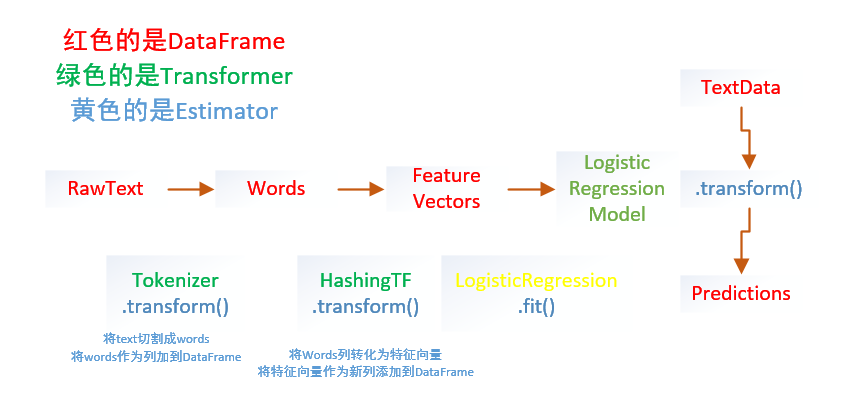
from pyspark.ml importPipelinefrom pyspark.ml.classification importLogisticRegressionfrom pyspark.ml.feature importHashingTF,Tokenizer#准备测试数据# Prepare training documents from a list of (id, text, label) tuples.training = spark.createDataFrame([(0L,"a b c d e spark",1.0),(1L,"b d",0.0),(2L,"spark f g h",1.0),(3L,"hadoop mapreduce",0.0)],["id","text","label"])#构建机器学习流水线# Configure an ML pipeline, which consists of three stages: tokenizer, hashingTF, and lr.tokenizer =Tokenizer(inputCol="text", outputCol="words")hashingTF =HashingTF(inputCol=tokenizer.getOutputCol(), outputCol="features")lr =LogisticRegression(maxIter=10, regParam=0.01)pipeline =Pipeline(stages=[tokenizer, hashingTF, lr])#训练出model# Fit the pipeline to training documents.model = pipeline.fit(training)#测试数据# Prepare test documents, which are unlabeled (id, text) tuples.test = spark.createDataFrame([(4L,"spark i j k"),(5L,"l m n"),(6L,"mapreduce spark"),(7L,"apache hadoop")],["id","text"])#预测,打印出想要的结果# Make predictions on test documents and print columns of interest.prediction = model.transform(test)selected = prediction.select("id","text","prediction")for row in selected.collect():print(row)
Spark.ML之PipeLine学习笔记的更多相关文章
- ML机器学习导论学习笔记
机器学习的定义: 机器学习(Machine Learning, ML)是一门多领域交叉学科,涉及概率论.统计学.逼近论.凸分析.算法复杂度理论等多门学科.专门研究计算机怎样模拟或实现人类的学习行为,以 ...
- Spark ML下实现的多分类adaboost+naivebayes算法在文本分类上的应用
1. Naive Bayes算法 朴素贝叶斯算法算是生成模型中一个最经典的分类算法之一了,常用的有Bernoulli和Multinomial两种.在文本分类上经常会用到这两种方法.在词袋模型中,对于一 ...
- spark ML pipeline 学习
一.pipeline 一个典型的机器学习过程从数据收集开始,要经历多个步骤,才能得到需要的输出.这非常类似于流水线式工作,即通常会包含源数据ETL(抽取.转化.加载),数据预处理,指标提取,模型训练与 ...
- 【原】Learning Spark (Python版) 学习笔记(三)----工作原理、调优与Spark SQL
周末的任务是更新Learning Spark系列第三篇,以为自己写不完了,但为了改正拖延症,还是得完成给自己定的任务啊 = =.这三章主要讲Spark的运行过程(本地+集群),性能调优以及Spark ...
- spark学习笔记总结-spark入门资料精化
Spark学习笔记 Spark简介 spark 可以很容易和yarn结合,直接调用HDFS.Hbase上面的数据,和hadoop结合.配置很容易. spark发展迅猛,框架比hadoop更加灵活实用. ...
- 使用spark ml pipeline进行机器学习
一.关于spark ml pipeline与机器学习 一个典型的机器学习构建包含若干个过程 1.源数据ETL 2.数据预处理 3.特征选取 4.模型训练与验证 以上四个步骤可以抽象为一个包括多个步骤的 ...
- Spark ML Pipeline简介
Spark ML Pipeline基于DataFrame构建了一套High-level API,我们可以使用MLPipeline构建机器学习应用,它能够将一个机器学习应用的多个处理过程组织起来,通过在 ...
- 机器学习框架ML.NET学习笔记【6】TensorFlow图片分类
一.概述 通过之前两篇文章的学习,我们应该已经了解了多元分类的工作原理,图片的分类其流程和之前完全一致,其中最核心的问题就是特征的提取,只要完成特征提取,分类算法就很好处理了,具体流程如下: 之前介绍 ...
- 机器学习框架ML.NET学习笔记【7】人物图片颜值判断
一.概述 这次要解决的问题是输入一张照片,输出人物的颜值数据. 学习样本来源于华南理工大学发布的SCUT-FBP5500数据集,数据集包括 5500 人,每人按颜值魅力打分,分值在 1 到 5 分之间 ...
随机推荐
- 161010、在大型项目中组织CSS
编写CSS容易. 编写可维护的CSS难. 这句话你之前可能听过100次了. 原因是CSS中的一切都默认为全局的.如果你是一个C程序员你就知道全局变量不好.如果你是任何一种程序员,你都知道隔离和可组合的 ...
- jsp数据库连接出现乱码
只要涉及中文的地方全部是乱码,解决办法:在数据库的数据库URL中加上 useUnicode=true&characterEncoding=GBK 就OK了. 之前所写,迁移至此 原文链接:ht ...
- JVM 指令集
指令码 助记符 说明 0x00 nop 什么都不做 0x01 aconst_null 将null推送至栈顶 0x02 iconst_m1 将int型-1推送至栈顶 0x03 iconst_0 将int ...
- javascript 金额格式化
金额格式化 example: <!DOCTYPE html> <html> <head> <script src="http://code.jque ...
- mysql之使用xtrabackup进行物理备份、恢复、在线克隆从库、在线重做主从
注:图片来自<深入浅出MySQL 数据库开发 优化与管理维护 第2版> 物理备份和恢复 1.冷备份:停掉mysql再备份,一般很少用,因为很多应用不允许长时间停机,停机备份的可以直接CP数 ...
- String类方法
1.charAt(int index) 返回指定索引处的 char 值. 2. length() 返回此字符串的长度. 3.String replace(char oldChar, char new ...
- YTU 3022: 完全二叉树(1)
原文链接:https://www.dreamwings.cn/ytu3022/2595.html 3022: 完全二叉树(1) 时间限制: 1 Sec 内存限制: 128 MB 提交: 26 解决 ...
- 过滤器(Filter)案例:检测用户是否登陆的过滤器
*****检测用户是否登陆的过滤器:不需要用户跳转到每个页面都需要登陆,访问一群页面时,只在某个页面上登陆一次,就可以访问其他页面: 1.自定义抽象的 HttpFilter类, 实现自 Filter ...
- Uva 10118 免费糖果
题目链接:https://uva.onlinejudge.org/external/101/10118.pdf 参考:http://www.cnblogs.com/kedebug/archive/20 ...
- malloc与kmalloc
在设备驱动程序中动态开辟内存,不是用malloc,而是kmalloc,或者用get_free_pages直接申请页.释放内存用的是kfree,或free_pages. 对于提供了MMU(存储管理器,辅 ...