
spring自定义schema学习
【转载请注明作者和原文链接,欢迎讨论,相互学习。】
一、前言
1. 最近在学习dubbo,里边很多如provider、consumer、registry的配置都是通过spring自定义Schema来实现的,为此,我也学习下如何自定义Schema。
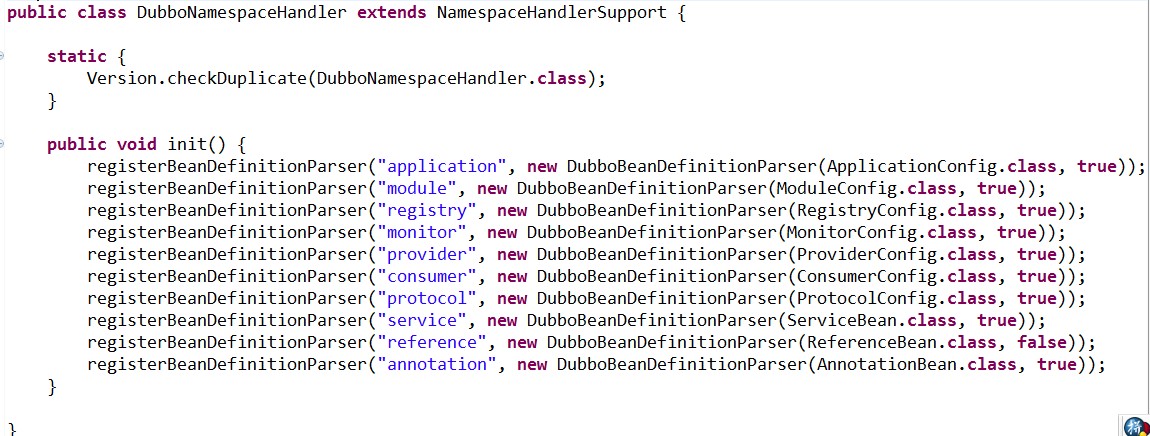
2.学习目标
完成自定义一个shema名称为test,节点名为user的例子。
二、准备内容
1.编写java bean
2.编写xsd配置文件
3.编写spring.handlers和spring.schmas
4.编写applicationContext.xml
5.编写NamespaceHandler和BeanDefinitionParser
三、晒代码
1.工程目录结构

2.java bean
 package com.cnblogs.ericlin.spring;

 public class User {

     private String id;

     private String name;

     private String sex;

     private int age;

     public String getId() {

         return id;

     }

     public void setId(String id) {

         this.id = id;

     }

     public String getName() {

         return name;

     }

     public void setName(String name) {

         this.name = name;

     }

     public String getSex() {

         return sex;

     }

     public void setSex(String sex) {

         this.sex = sex;

     }

     public int getAge() {

         return age;

     }

     public void setAge(int age) {

         this.age = age;

     }

 }
3.xsd文件
 <?xml version="1.0" encoding="UTF-8" standalone="no" ?>

 <xsd:schema xmlns="http://www.cnblogs.com/eric-lin/schema/user"

     xmlns:xsd="http://www.w3.org/2001/XMLSchema"

     xmlns:beans="http://www.springframework.org/schema/beans"

     xmlns:tool="http://www.springframework.org/schema/tool"

     targetNamespace="http://www.cnblogs.com/eric-lin/schema/user"

     elementFormDefault="qualified" attributeFormDefault="unqualified">

     <xsd:import namespace="http://www.springframework.org/schema/beans" />

     <xsd:import namespace="http://www.springframework.org/schema/tool" />

     <xsd:element name="user">

         <xsd:complexType>

             <xsd:complexContent>

                 <xsd:extension base="beans:identifiedType">

                     <xsd:attribute name="name" type="xsd:string">

                         <xsd:annotation>

                             <xsd:documentation>姓名</xsd:documentation>

                         </xsd:annotation>

                     </xsd:attribute>

                     <xsd:attribute name="sex" type="xsd:string">

                         <xsd:annotation>

                             <xsd:documentation>性别</xsd:documentation>

                         </xsd:annotation>

                     </xsd:attribute>

                     <xsd:attribute name="age" type="xsd:int">

                         <xsd:annotation>

                             <xsd:documentation>年龄</xsd:documentation>

                         </xsd:annotation>

                     </xsd:attribute>

                 </xsd:extension>

             </xsd:complexContent>

         </xsd:complexType>

     </xsd:element>

 </xsd:schema>
4.spring.handlers文件内容
http\://www.cnblogs.com/eric-lin/schema/user=com.cnblogs.ericlin.spring.schema.UserNamespaceHandler
5.spring.schemas文件内容
http\://www.cnblogs.com/eric-lin/schema/user/user.xsd=META-INF/user.xsd
6.applicationContext.xml
<?xml version="1.0" encoding="UTF-8"?>

<beans xmlns="http://www.springframework.org/schema/beans"

    xmlns:xsi="http://www.w3.org/2001/XMLSchema-instance" xmlns:test="http://www.cnblogs.com/eric-lin/schema/user"

    xsi:schemaLocation="http://www.springframework.org/schema/beans

    http://www.springframework.org/schema/beans/spring-beans-3.1.xsd

    http://www.cnblogs.com/eric-lin/schema/user

    http://www.cnblogs.com/eric-lin/schema/user/user.xsd">

    <test:user id="eric" name="123" sex="male" age="28" />

</beans>
7.NamespaceHandler
package com.cnblogs.ericlin.spring.schema;

import org.springframework.beans.factory.xml.NamespaceHandlerSupport;

public class UserNamespaceHandler extends NamespaceHandlerSupport {

    public void init() {

        registerBeanDefinitionParser("user", new UserBeanDefinitionParser());

    }

}
8.BeanDefinitionParser
package com.cnblogs.ericlin.spring.schema;

import org.springframework.beans.factory.support.BeanDefinitionBuilder;

import org.springframework.beans.factory.xml.AbstractSingleBeanDefinitionParser;

import org.w3c.dom.Element;

import com.cnblogs.ericlin.spring.User;

public class UserBeanDefinitionParser extends AbstractSingleBeanDefinitionParser {

    @Override

    protected Class<?> getBeanClass(Element element) {

        return User.class;

    }

    @Override

    protected void doParse(Element element, BeanDefinitionBuilder bean) {

        String id = element.getAttribute("id");

        String name = element.getAttribute("name");

        String sex = element.getAttribute("sex");

        int age = Integer.parseInt(element.getAttribute("age"));

        bean.addPropertyValue("id", id);

        bean.addPropertyValue("name", name);

        bean.addPropertyValue("sex", sex);

        bean.addPropertyValue("age", age);

    }

}
9测试类
package com.cnglogs.ericlin.spring;

import org.junit.Test;

import org.springframework.context.support.ClassPathXmlApplicationContext;

import com.cnblogs.ericlin.spring.User;

public class TestSpringSchema {

    @SuppressWarnings("resource")

    @Test

    public void test() {

        ClassPathXmlApplicationContext context = new ClassPathXmlApplicationContext("classpath:applicationContext.xml");

        User user = (User) context.getBean("eric");

        System.out.println(user.getId());

        System.out.println(user.getName());

        System.out.println(user.getSex());

        System.out.println(user.getAge());

    }

}
自此,自定义spring shema例子完成。
spring自定义schema学习的更多相关文章
- spring自定义标签学习
看到几篇很全的自定义标签,从定义到使用,写的很好. 这里我也是在那里学习的,对学习spring源码也很有帮助. 贴出来与大家共享. http://sammor.iteye.com/blog/11009 ...
- spring 自定义schema
扩展schema,定义自己的bean属性..不错! 主要: 1,定义META-INF下.xsd文件,这里是people.xsd;定义spring.handlers;定义spring.schemas 2 ...
- spring 自定义schema 加载异常 White spaces are required between publicId and systemId.
spring 项目启动报错 报错日志如下: Caused by: org.springframework.beans.factory.xml.XmlBeanDefinitionStoreExcepti ...
- 实战spring自定义属性(schema)
关于spring自定义属性(schema) 在开发Dubbo应用的时候,我们会在xml中做以下类似的配置: <dubbo:application name="dubbo_service ...
- Spring源码学习-容器BeanFactory(四) BeanDefinition的创建-自定义标签的解析.md
写在前面 上文Spring源码学习-容器BeanFactory(三) BeanDefinition的创建-解析Spring的默认标签对Spring默认标签的解析做了详解,在xml元素的解析中,Spri ...
- [spring源码学习]三、IOC源码——自定义配置文件读取
一.环境准备 在文件读取的时候,第9步我们发现spring会根据标签的namespace来选择读取方式,联想spring里提供的各种标签,比如<aop:xxx>等应该会有不同的读取和解析方 ...
- Spring 源码学习(1) —— 自定义标签
Spring 工作流程是先加载解析xml配置文件:配置文件中存在默认的标签,也可以自定义标签.解析默认标签调用: private void parseDefaultElement(Element el ...
- Spring中自定义Schema扩展机制
一.前言 Spring 为基于 XML 构建的应用提供了一种扩展机制,用于定义和配置 Bean. 它允许使用者编写自定义的 XML bean 解析器,并将解析器本身以及最终定义的 Bean 集成到 S ...
- Spring源码学习-容器BeanFactory(三) BeanDefinition的创建-解析Spring的默认标签
写在前面 上文Spring源码学习-容器BeanFactory(二) BeanDefinition的创建-解析前BeanDefinition的前置操作中Spring对XML解析后创建了对应的Docum ...
随机推荐
- nginx正则表达式
1.^:匹配字符串的开始位置: 2..*: .匹配任意字符,*匹配数量0到正无穷: 3.\. 斜杠用来转义,\.匹配.: 4.(jpg|gif|png|bmp)匹配jpg或gif或png或bmp 5. ...
- 简单的方向传感器SimpleOrientationSensor
SimpleOrientationSensor是一个简单的方向传感器.能够识别手机如下表的6种方向信息: SimpleOrientation枚举变量 方向 NotRotated 设备未旋转 Rotat ...
- 【Go入门教程7】并发(goroutine,channels,Buffered Channels,Range和Close,Select,超时,runtime goroutine)
有人把Go比作21世纪的C语言,第一是因为Go语言设计简单,第二,21世纪最重要的就是并行程序设计,而Go从语言层面就支持了并行. goroutine goroutine是Go并行设计的核心.goro ...
- Put-Me-Down项目Postmortem2
一.设想和目标 二.计划 三.资源 四.变更管理 五.设计/实现 六.测试/发布 总结 一.设想和目标 1. 我们的软件要解决什么问题?是否定义得很清楚?是否对典型用户和典型场景有清晰的描述? 我们的 ...
- Linux ftp访问控制配置,包括访问ftp权限和访问ftp目录权限
在Linux 上建立用户为website1 home目录是/data/home/website1 但是用ftp登录以后,路径可以随便切换,并且可以进入别的站点下 进行增.删.改 本篇的目的是:在lin ...
- C# 文件/文件夹重命名
C# 重命名的方法是MoveTo() 官方文档地址 (https://msdn.microsoft.com/zh-cn/library/system.io.fileinfo.moveto%28VS.8 ...
- [转]hql 语法与详细解释
HQL查询:Criteria查询对查询条件进行了面向对象封装,符合编程人员的思维方式,不过HQL(Hibernate Query Lanaguage)查询提供了更加丰富的和灵活的查询特性,因此 Hib ...
- css3美化复选框checkbox
两种美化效果如下图: 代码(html) <div id="main"> <h2 class="top_title">使用CSS3美化复 ...
- Servlet 之 HttpServlet
package cn.jiemoxiaodi.http; import java.io.IOException; import javax.servlet.GenericServlet; import ...
- Ubuntu 16.04 64位 搭建 node.js NodeJS 环境
我的系统环境: Ubuntu 16.04 64位 本文内容亲测可用, 请放心食用 使用淘宝镜像 淘宝镜像官网是https://npm.taobao.org/ 使用淘宝镜像前请自行安装好 npm 和 n ...