
libGDX游戏开发之弹窗(五)
libGDX游戏开发之弹窗(五)
libGDX系列,游戏开发有unity3D巴拉巴拉的,为啥还用java开发?因为我是Java程序员emm…国内用libgdx比较少,多数情况需要去官网和google找资料,相互学习的可以加我联系方式。
弹窗简单的代码如下:
import com.badlogic.gdx.ApplicationAdapter;

import com.badlogic.gdx.Gdx;

import com.badlogic.gdx.Input;

import com.badlogic.gdx.scenes.scene2d.Actor;

import com.badlogic.gdx.scenes.scene2d.Stage;

import com.badlogic.gdx.scenes.scene2d.ui.Dialog;

import com.badlogic.gdx.scenes.scene2d.ui.Skin;

import com.badlogic.gdx.scenes.scene2d.utils.ChangeListener;

import com.badlogic.gdx.utils.ScreenUtils;

/**

 * @author lingkang

 * @date 2021/10/7 0:01

 * @description

 */

public class MyWindow extends ApplicationAdapter {

    // 定义一个对话框

    private Dialog dialog;

    private Stage stage;// 对话框需要一个舞台

    @Override

    public void create() {

        stage=new Stage();

        // http://github.com/libgdx/libgdx/tree/master/tests/gdx-tests-android/assets/data 这里是官方的开发专用

        // 这皮肤也是比较尴尬的,框架没有内置样式,还得自己找。

        Skin skin = new Skin(Gdx.files.internal("sk/uiskin.json"));

        dialog = new Dialog("Info", skin); // 老规矩默认不支持中文

        dialog.text("hello ?");

        dialog.button("Yes", true); //sends "true" as the result

        dialog.button("No", false); //sends "false" as the result

        dialog.addListener(new ChangeListener() {

            @Override

            public void changed(ChangeEvent event, Actor actor) {

                System.out.println(event);

                dialog.hide();

            }

        });

        // 必须给舞台添加输入,否则无法触发舞台上的按钮事件等

        Gdx.input.setInputProcessor(stage);

    }

    @Override

    public void render() {

        // 清除相机内容

        ScreenUtils.clear(225f, 225f, 225f, 0.4f);

        // 按上键触发对话框

        if (Gdx.input.isKeyPressed(Input.Keys.UP) || Gdx.input.isKeyPressed(Input.Keys.W)) {

            dialog.show(stage);

        }

        // 绘制舞台

        stage.draw();

        // 舞台的行为,一定要添加,否则无法触发对话框的UI更新

        stage.act();

    }

}
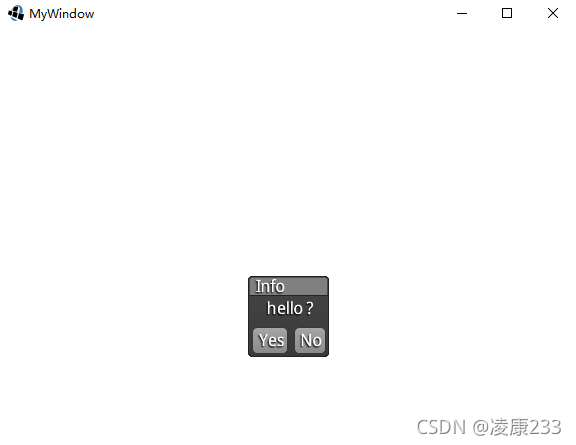
效果如下
也可以在这里找到所有的皮肤字体等等:
https://github.com/rafaskb/awesome-libgdx#readme
那么我们也可以自定一个窗口
import com.badlogic.gdx.ApplicationAdapter;

import com.badlogic.gdx.Gdx;

import com.badlogic.gdx.Input;

import com.badlogic.gdx.scenes.scene2d.InputEvent;

import com.badlogic.gdx.scenes.scene2d.InputListener;

import com.badlogic.gdx.scenes.scene2d.Stage;

import com.badlogic.gdx.scenes.scene2d.ui.Button;

import com.badlogic.gdx.scenes.scene2d.ui.Label;

import com.badlogic.gdx.scenes.scene2d.ui.Skin;

import com.badlogic.gdx.scenes.scene2d.ui.Window;

import com.badlogic.gdx.utils.ScreenUtils;

/**

 * @author lingkang

 * @date 2021/10/7 0:05

 * @description

 */

public class MyWindow extends ApplicationAdapter {

    // 自定义一个窗口

    class MessageWindow extends Window {

        public MessageWindow(String title, Skin skin) {

            super(title, skin.get(WindowStyle.class));

            setSkin(skin);

        }

    }

    private Stage stage;// 对话框需要一个舞台

    private MessageWindow messageWindow;

    @Override

    public void create() {

        stage = new Stage();

        // http://github.com/libgdx/libgdx/tree/master/tests/gdx-tests-android/assets/data 这里是官方的开发专用

        // 这皮肤也是比较尴尬的,框架没有内置样式,还得自己找。

        Skin skin = new Skin(Gdx.files.internal("sk/uiskin.json"));

        messageWindow = new MessageWindow("custom window", skin);

        messageWindow.add("custom window");

        Button button = new Button(skin);

        button.add(new Label("OK", skin));

        button.setSize(40, 20);

        messageWindow.add(button);

        messageWindow.setPosition(Gdx.graphics.getWidth() / 2, Gdx.graphics.getHeight() / 2);

        messageWindow.setWidth(100);

        messageWindow.setHeight(100);

        messageWindow.setSize(200, 200);

        // 添加按钮事件

        button.addListener(new InputListener() {

            @Override

            public boolean touchDown(InputEvent event, float x, float y, int pointer, int button) {

                // 不可见

                messageWindow.setVisible(false);

                return super.touchDown(event, x, y, pointer, button);

            }

        });

        // 不可见

        messageWindow.setVisible(false);

        stage.addActor(messageWindow);

        Gdx.input.setInputProcessor(stage);

    }

    @Override

    public void render() {

        // 清除相机内容

        ScreenUtils.clear(225f, 225f, 225f, 0.4f);

        // 按上键触发对话框

        if (Gdx.input.isKeyPressed(Input.Keys.UP) || Gdx.input.isKeyPressed(Input.Keys.W)) {

            messageWindow.setVisible(false);

        }

        if (Gdx.input.isKeyPressed(Input.Keys.DOWN) || Gdx.input.isKeyPressed(Input.Keys.S)) {

            messageWindow.setPosition(Gdx.graphics.getWidth() / 2, Gdx.graphics.getHeight() / 2);

            messageWindow.setVisible(true);

        }

        // 绘制舞台

        stage.draw();

        // 舞台的行为,一定要添加,否则无法触发事件

        stage.act();

    }

}
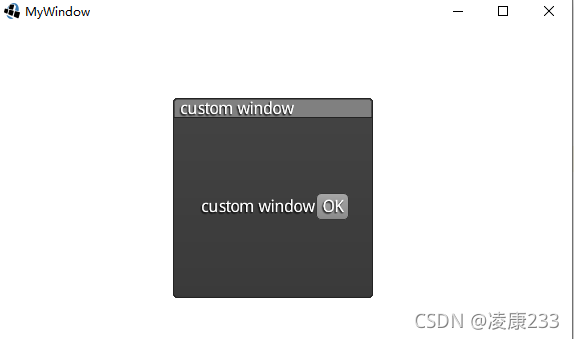
按上下键显示关闭
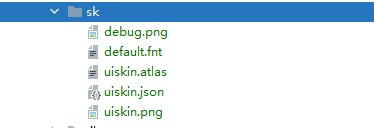
其中sk所需的文件如下:
libGDX游戏开发之弹窗(五)的更多相关文章
- 《MFC游戏开发》笔记五 定时器和简单动画
本系列文章由七十一雾央编写,转载请注明出处. http://blog.csdn.net/u011371356/article/details/9332377 作者:七十一雾央 新浪微博:http:// ...
- Libgdx游戏开发(2)——接水滴游戏实现
原文:Libgdx游戏开发(2)--接水滴游戏实现 - Stars-One的杂货小窝 本文使用Kotlin语言开发 通过本文的学习可以初步了解以下基础知识的使用: Basic file access ...
- [libGDX游戏开发教程]使用libGDX进行游戏开发(12)-Action动画
前文章节列表: 使用libGDX进行游戏开发(11)-高级编程技巧 使用libGDX进行游戏开发(10)-音乐音效不求人,程序员也可以DIY 使用libGDX进行游戏开发(9)-场景过渡 ...
- [libGDX游戏开发教程]使用libGDX进行游戏开发(1)-游戏设计
声明:<使用Libgdx进行游戏开发>是一个系列,文章的原文是<Learning Libgdx Game Development>,大家请周知.后续的文章连接在这里 使用Lib ...
- Unity3D ——强大的跨平台3D游戏开发工具(五)
第九章 图形用户界面类G.U.I 您在玩很多3D游戏的时候,不知是否注意到在游戏界面中,总有一些图形和文字信息是不随着3D视角的改变而改变的.这也是由于游戏本身的要求而决定的.比如说英雄的生命值,聊天 ...
- 精通libGDX游戏开发-RPG实战-开发游戏的基本前提
说起RPG,大概国人是不会陌生的. 这不得不从中国单机游戏市场说起,由于早期软件市场被盗版杀死,顺带的,单机游戏软件作为软件市场的分支,也没赚什么钱,养不活公司纷纷倒闭,只到RPG游戏<仙剑奇侠 ...
- [libgdx游戏开发教程]使用Libgdx进行游戏开发(11)-高级编程技巧 Box2d和Shader
高级编程技巧只是相对的,其实主要是讲物理模拟和着色器程序的使用. 本章主要讲解利用Box2D并用它来实现萝卜雨,然后是使用单色着色器shader让画面呈现单色状态:http://files.cnblo ...
- [libgdx游戏开发教程]使用Libgdx进行游戏开发(10)-音乐和音效
本章音效文件都来自于公共许可: http://files.cnblogs.com/mignet/sounds.zip 在游戏中,播放背景音乐和音效是基本的功能. Libgdx提供了跨平台的声音播放功能 ...
- [libgdx游戏开发教程]使用Libgdx进行游戏开发(2)-游戏框架搭建
让我们抛开理论开始code吧. 入口类CanyonBunnyMain的代码: package com.packtpub.libgdx.canyonbunny; import com.badlogic. ...
- 精通libGDX游戏开发-RPG实战-欢迎来到RPG的世界
欢迎来到RPG的世界 本章我会快速的使用tiled这样的瓷砖地图工具,来带领大家创造所设想的世界. 创建并编辑瓷砖地图 瓷砖地图(tile-based map)是广泛应用于各种游戏类型的地图格式,li ...
随机推荐
- RCU的简单认识
RCU RUC是什么? RCU(Read-Copy-Update)是一种用于并发编程的技术,旨在提供高效且无锁(lock-free)的读操作,同时保证数据一致性和并发性. 也就是说他并不需要锁的机制来 ...
- Python比较字符串格式类型时间大小
已知的格式是 06/24/2021 15:47:01.491 时间比较的思路是,把数据转换成时间戳比较: 第一步是把 06/24/2021 15:47:01.491 格式转换称 2021-06-24 ...
- CMP临时文件清理
■■ CMP临时文件 CMP - 指 Compression Advisor ,是 Oracle 数据库的压缩建议特性,在生成建议时产生的中间过程表,一般会自行删除.这个特性自 11.2.0.4 引入 ...
- 【IOC,AOP】spring的基础概念
IOC 控制反转 对象的创建控制权转交给外部实体,就是控制反转.外部实体便是IOC容器.其实就是以前创建java对象都是我们new一下,现在我们可以把这个new交给IOC容器来做,new出来的对象也会 ...
- oracle命令7 -rman命令
$ rman targer /RMAN> show all; #查看rman中所有的配置RMAN configuration parameters for database with db_un ...
- 轻巧的批量图片压缩工具imgfast
现在的手机拍照动辄2M3M,还有7M8m的,如果要把这些文件上传到网上应用,浪费网络,占用资源 所以2022年中秋写了这个小工具,可以批量进行图片文件压缩,支持jpg和png. 文件下载链接https ...
- c# 光学三原色混合,颜色叠加-dong
东的备注: 光的三原色:红.绿.蓝 红+绿=黄 红+蓝=品红 蓝+绿=青 红+绿+蓝=白 无颜色为黑 下看代码 Bitmap image1 = new Bitmap(500, 500);//红 Bit ...
- 前后端都用得上的 Nginx 日常使用经验
前言 nginx 是一个高性能的开源反向代理服务器和 web 服务器,一般用来搭建静态资源服务器.负载均衡器.反向代理,本文将分享其在 Windows/docker 中的使用,使用 nssm 部署成服 ...
- 用友U8与MES系统API接口对接案例分析
企业数字化转型:轻易云数据集成平台助力 U8 ERP+MES 系统集成 为什么选择数字化转型? 领导层对企业资源规划(ERP)的深刻理解促使了数字化转型的启动. 采用精确的"N+5" ...
- Fast ORM 读写分离功能使用方式
Fast Framework 作者 Mr-zhong 代码改变世界.... 一.前言 Fast Framework 基于NET6.0 封装的轻量级 ORM 框架 支持多种数据库 SqlServer O ...