
Digest Auth 摘要认证
1、该代码展示了使用Apache HttpClient库进行HTTP请求,并处理基于MD5的HTTP Digest认证的过程。 Digests类实现了MD5加密算法,HttpUtils类处理了GET、POST、PUT和DELETE方法的请求,包括设置请求头、生成授权信息和处理响应。
2、请求流程
2.1.发送一个请求
2.2.服务器返回401响应头,要求输入用户凭据(建立通信,发起请求。如果返回401,继续下一次请求。重新设置响应,并获取随机数,通过md5加密返回)
2.3.输入凭据后再发送请求
2.4.服务端验证通过后返回数据
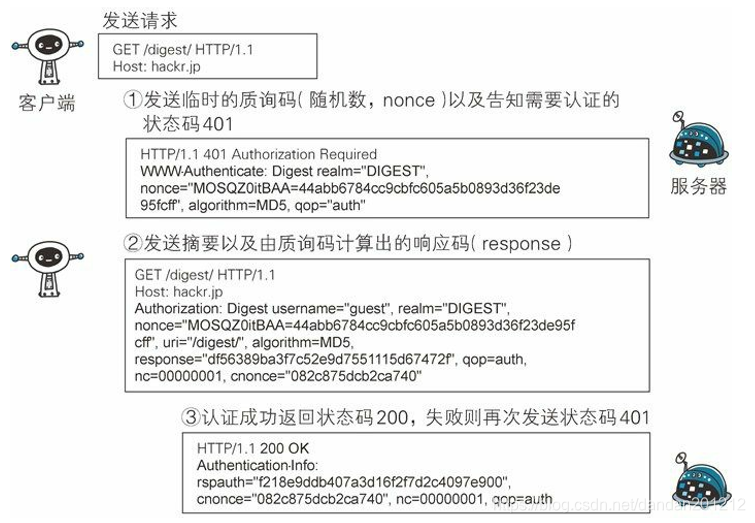
2.4代码示例:本案例使用xml请求并返回xml数据响应,json请求同理
        <dependency>

            <groupId>org.apache.httpcomponents</groupId>

            <artifactId>httpclient</artifactId>

            <version>4.5</version>

        </dependency>

        <dependency>

            <groupId>org.apache.httpcomponents</groupId>

            <artifactId>httpmime</artifactId>

            <version>4.5</version>

        </dependency>

        <dependency>

            <groupId>org.apache.httpcomponents</groupId>

            <artifactId>httpcore</artifactId>

            <version>4.4.1</version>

        </dependency>

        <dependency>

            <groupId>org.apache.commons</groupId>

            <artifactId>commons-lang3</artifactId>

            <version>3.8.1</version>

        </dependency>
package com.ywb.common.utils.http;

import com.ywb.common.constant.Constants;

import org.junit.Test;

import org.slf4j.Logger;

import org.slf4j.LoggerFactory;

import javax.net.ssl.*;

import java.io.*;

import java.net.ConnectException;

import java.net.SocketTimeoutException;

import java.net.URL;

import java.net.URLConnection;

import java.security.cert.X509Certificate;

import org.apache.commons.codec.digest.DigestUtils;

import org.apache.commons.lang3.StringUtils;

import org.apache.http.Header;

import org.apache.http.HeaderElement;

import org.apache.http.HttpEntity;

import org.apache.http.HttpStatus;

import org.apache.http.client.config.RequestConfig;

import org.apache.http.client.methods.CloseableHttpResponse;

import org.apache.http.client.methods.HttpPost;

import org.apache.http.entity.StringEntity;

import org.apache.http.impl.client.CloseableHttpClient;

import org.apache.http.impl.client.HttpClients;

import org.apache.http.util.EntityUtils;

import java.io.*;

import java.nio.charset.StandardCharsets;

import java.util.HashMap;

/**

 * 通用http发送方法

 *

 * @author ywb

 */

public class HttpUtils {

    private static final Logger log = LoggerFactory.getLogger(HttpUtils.class);

    /**

     * 向指定 URL 发送GET方法的请求

     *

     * @param url   发送请求的 URL

     * @param param 请求参数,请求参数应该是 name1=value1&name2=value2 的形式。

     * @return 所代表远程资源的响应结果

     */

    public static String sendGet(String url, String param) {

        return sendGet(url, param, Constants.UTF8);

    }

    /**

     * 向指定 URL 发送GET方法的请求

     *

     * @param url         发送请求的 URL

     * @param param       请求参数,请求参数应该是 name1=value1&name2=value2 的形式。

     * @param contentType 编码类型

     * @return 所代表远程资源的响应结果

     */

    public static String sendGet(String url, String param, String contentType) {

        StringBuilder result = new StringBuilder();

        BufferedReader in = null;

        try {

            String urlNameString = url + "?" + param;

            log.info("sendGet - {}", urlNameString);

            URL realUrl = new URL(urlNameString);

            URLConnection connection = realUrl.openConnection();

            connection.setRequestProperty("accept", "*/*");

            connection.setRequestProperty("connection", "Keep-Alive");

            connection.setRequestProperty("user-agent", "Mozilla/4.0 (compatible; MSIE 6.0; Windows NT 5.1;SV1)");

            connection.connect();

            in = new BufferedReader(new InputStreamReader(connection.getInputStream(), contentType));

            String line;

            while ((line = in.readLine()) != null) {

                result.append(line);

            }

            log.info("recv - {}", result);

        } catch (ConnectException e) {

            log.error("调用HttpUtils.sendGet ConnectException, url=" + url + ",param=" + param, e);

        } catch (SocketTimeoutException e) {

            log.error("调用HttpUtils.sendGet SocketTimeoutException, url=" + url + ",param=" + param, e);

        } catch (IOException e) {

            log.error("调用HttpUtils.sendGet IOException, url=" + url + ",param=" + param, e);

        } catch (Exception e) {

            log.error("调用HttpsUtil.sendGet Exception, url=" + url + ",param=" + param, e);

        } finally {

            try {

                if (in != null) {

                    in.close();

                }

            } catch (Exception ex) {

                log.error("调用in.close Exception, url=" + url + ",param=" + param, ex);

            }

        }

        return result.toString();

    }

    /**

     * 向指定 URL 发送POST方法的请求

     *

     * @param url   发送请求的 URL

     * @param param 请求参数,请求参数应该是 name1=value1&name2=value2 的形式。

     * @return 所代表远程资源的响应结果

     */

    public static String sendPost(String url, String param) {

        PrintWriter out = null;

        BufferedReader in = null;

        StringBuilder result = new StringBuilder();

        try {

            String urlNameString = url;

            log.info("sendPost - {}", urlNameString);

            URL realUrl = new URL(urlNameString);

            URLConnection conn = realUrl.openConnection();

            conn.setRequestProperty("accept", "*/*");

            conn.setRequestProperty("connection", "Keep-Alive");

            conn.setRequestProperty("user-agent", "Mozilla/4.0 (compatible; MSIE 6.0; Windows NT 5.1;SV1)");

            conn.setRequestProperty("Accept-Charset", "utf-8");

            conn.setRequestProperty("contentType", "utf-8");

            conn.setDoOutput(true);

            conn.setDoInput(true);

            out = new PrintWriter(conn.getOutputStream());

            out.print(param);

            out.flush();

            in = new BufferedReader(new InputStreamReader(conn.getInputStream(), "utf-8"));

            String line;

            while ((line = in.readLine()) != null) {

                result.append(line);

            }

            log.info("recv - {}", result);

        } catch (ConnectException e) {

            log.error("调用HttpUtils.sendPost ConnectException, url=" + url + ",param=" + param, e);

        } catch (SocketTimeoutException e) {

            log.error("调用HttpUtils.sendPost SocketTimeoutException, url=" + url + ",param=" + param, e);

        } catch (IOException e) {

            log.error("调用HttpUtils.sendPost IOException, url=" + url + ",param=" + param, e);

        } catch (Exception e) {

            log.error("调用HttpsUtil.sendPost Exception, url=" + url + ",param=" + param, e);

        } finally {

            try {

                if (out != null) {

                    out.close();

                }

                if (in != null) {

                    in.close();

                }

            } catch (IOException ex) {

                log.error("调用in.close Exception, url=" + url + ",param=" + param, ex);

            }

        }

        return result.toString();

    }

    public static String sendSSLPost(String url, String param) {

        StringBuilder result = new StringBuilder();

        String urlNameString = url + "?" + param;

        try {

            log.info("sendSSLPost - {}", urlNameString);

            SSLContext sc = SSLContext.getInstance("SSL");

            sc.init(null, new TrustManager[]{new TrustAnyTrustManager()}, new java.security.SecureRandom());

            URL console = new URL(urlNameString);

            HttpsURLConnection conn = (HttpsURLConnection) console.openConnection();

            conn.setRequestProperty("accept", "*/*");

            conn.setRequestProperty("connection", "Keep-Alive");

            conn.setRequestProperty("user-agent", "Mozilla/4.0 (compatible; MSIE 6.0; Windows NT 5.1;SV1)");

            conn.setRequestProperty("Accept-Charset", "utf-8");

            conn.setRequestProperty("contentType", "utf-8");

            conn.setDoOutput(true);

            conn.setDoInput(true);

            conn.setSSLSocketFactory(sc.getSocketFactory());

            conn.setHostnameVerifier(new TrustAnyHostnameVerifier());

            conn.connect();

            InputStream is = conn.getInputStream();

            BufferedReader br = new BufferedReader(new InputStreamReader(is));

            String ret = "";

            while ((ret = br.readLine()) != null) {

                if (ret != null && !"".equals(ret.trim())) {

                    result.append(new String(ret.getBytes("ISO-8859-1"), "utf-8"));

                }

            }

            log.info("recv - {}", result);

            conn.disconnect();

            br.close();

        } catch (ConnectException e) {

            log.error("调用HttpUtils.sendSSLPost ConnectException, url=" + url + ",param=" + param, e);

        } catch (SocketTimeoutException e) {

            log.error("调用HttpUtils.sendSSLPost SocketTimeoutException, url=" + url + ",param=" + param, e);

        } catch (IOException e) {

            log.error("调用HttpUtils.sendSSLPost IOException, url=" + url + ",param=" + param, e);

        } catch (Exception e) {

            log.error("调用HttpsUtil.sendSSLPost Exception, url=" + url + ",param=" + param, e);

        }

        return result.toString();

    }

    /**

     * 摘要认证 两次请求

     *

     * @param url

     * @return 返回结果

     */

    public static String doPostDigest(String url, String uri, String username, String password, String requestXml) {

        CloseableHttpClient httpClient = null;

        CloseableHttpResponse response = null;

        HttpPost httpPost = null;

        String strResponse = null;

        try {

            httpClient = HttpClients.createDefault();

//            httpClient = new SSLClient();

            httpPost = new HttpPost(url);

            // 构造请求头

            httpPost.setHeader("Content-Type", "application/xml");

            httpPost.setHeader("X-Requested-With", "XMLHttpRequest");

            httpPost.addHeader("Cache-Control", "no-cache"); //设置缓存

            httpPost.setHeader("Connection", "Close");

            RequestConfig.Builder builder = RequestConfig.custom();

            builder.setSocketTimeout(5000); //设置请求时间

            builder.setConnectTimeout(8000); //设置超时时间

            builder.setRedirectsEnabled(false);//设置是否跳转链接(反向代理)

            // 设置 连接 属性

            httpPost.setConfig(builder.build());

            StringEntity entityss = new StringEntity(requestXml, "utf-8");

            httpPost.setEntity(entityss);

            // 执行请求

            response = httpClient.execute(httpPost);

            HttpEntity responseEntity = response.getEntity();

            // 检验返回码

            int statusCode = response.getStatusLine().getStatusCode();

            log.debug("第一次发送摘要认证 Post请求 返回码:{}" + statusCode);

            if (401 == statusCode) {

                strResponse = EntityUtils.toString(responseEntity, "utf-8");

                log.debug("Post请求401返回结果:{}" + strResponse);

                // 组织参数,发起第二次请求

                Header[] headers = response.getHeaders("WWW-Authenticate");

                HeaderElement[] elements = headers[0].getElements();

                String realm = null;

                String qop = null;

                String nonce = null;

                String opaque = null;

                String method = "POST";

                for (HeaderElement element : elements) {

                    if (element.getName().equals("Digest realm")) {

                        realm = element.getValue();

                    } else if (element.getName().equals("qop")) {

                        qop = element.getValue();

                    } else if (element.getName().equals("nonce")) {

                        nonce = element.getValue();

                    } else if (element.getName().equals("opaque")) {

                        opaque = element.getValue();

                    }

                }

                // 以上为 获取第一次请求后返回的 数据

                String nc = "00000001";

                String cnonce = "uniview";

                // 后期变成可配置

                String a1 = username + ":" + realm + ":" + password;

                String a2 = method + ":" + uri;

                String response1 = null;

                // 获取 Digest 这个字符串

                String backString = response.getFirstHeader("WWW-Authenticate").getValue();

                try {

                    response1 = DigestUtils.md5Hex((DigestUtils.md5Hex(a1.getBytes("UTF-8")) + ":" + nonce + ":" + nc

                            + ":" + "uniview" + ":" + qop + ":" + DigestUtils.md5Hex(a2.getBytes("UTF-8"))).getBytes("UTF-8"));

                } catch (UnsupportedEncodingException e) {

                    log.error("MD5异常:{}" + e.getLocalizedMessage(), e);

                }

                httpPost.addHeader("Authorization", backString + ",username=\"" + username + "\"" + ",realm=\"" + realm + "\""

                        + ",nonce=\"" + nonce + "\"" + ",uri=\"" + uri + "\"" + ",qop=\"" + qop + "\"" + ",nc=\"" + nc + "\""

                        + ",cnonce=\"" + cnonce + "\"" + ",response=\"" + response1 + "\"" + ",opaque=\"" + opaque);

                // 发送第二次请求

                response = httpClient.execute(httpPost);

                HttpEntity entity = response.getEntity();

                int statusCode1 = response.getStatusLine().getStatusCode();

                log.debug("第二次发送摘要认证 Post请求 返回码:{}" + statusCode1);

                if (HttpStatus.SC_OK == statusCode1) {

                    strResponse = EntityUtils.toString(entity, StandardCharsets.UTF_8);

                    log.debug("第二次发送strResponse" + strResponse);

                    return strResponse;

                } else {

                    strResponse = EntityUtils.toString(entity, StandardCharsets.UTF_8);

                    log.debug("第二次鉴权认证请求非 200 返回结果:{}" + strResponse);

                    return strResponse;

                }

            } else {

                strResponse = EntityUtils.toString(responseEntity, StandardCharsets.UTF_8);

                log.error("第一次鉴权认证请求非401 返回结果:{}" + strResponse);

            }

        } catch (Exception e) {

            log.error("摘要认证 发送请求失败" + e.getLocalizedMessage(), e);

        } finally {

            if (null != httpPost) {

                httpPost.releaseConnection();

            }

            if (null != response) {

                try {

                    response.close();

                } catch (IOException e) {

                    log.error("httpResponse流关闭异常:", e);

                }

            }

            if (null != httpClient) {

                try {

                    httpClient.close();

                } catch (IOException e) {

                    log.error("httpClient 流关闭异常:", e);

                }

            }

        }

        return strResponse;

    }

    private static class TrustAnyTrustManager implements X509TrustManager {

        @Override

        public void checkClientTrusted(X509Certificate[] chain, String authType) {

        }

        @Override

        public void checkServerTrusted(X509Certificate[] chain, String authType) {

        }

        @Override

        public X509Certificate[] getAcceptedIssuers() {

            return new X509Certificate[]{};

        }

    }

    private static class TrustAnyHostnameVerifier implements HostnameVerifier {

        @Override

        public boolean verify(String hostname, SSLSession session) {

            return true;

        }

    }

    @Test

    public void testHttpPostRaw() {

        final String url = "http://18.18.167.120/ISAPI/Traffic/ContentMgmt/Statistic/operator";

        final String uri = "/ISAPI/Traffic/ContentMgmt/Statistic/operator";

        final String encode = "utf-8";

        String requestXml = "<?xml version='1.0' encoding='utf-8'?>" +

                "<StatisticOperator>" +

                "<operationType>search</operationType>" +

                "<searchCond>" +

                "<searchID>CAD8E0D6-1480-0001-C0B7-1E50E290140D</searchID>" +

                "<timeSpanList><timeSpan>" +

                "<startTime>2024-06-21T15:25:10Z</startTime>" +

                "<endTime>2024-06-21T15:27:59Z</endTime>" +

                "</timeSpan></timeSpanList>" +

                "<maxResults>20</maxResults>" +

                "<searchResultPosition>0</searchResultPosition>" +

                "</searchCond>" +

                "</StatisticOperator>";

        final HashMap<String, String> headers = new HashMap<String, String>();

        headers.put("Content-Type", "application/x-www-form-urlencoded");

        headers.put("X-Requested-With", "XMLHttpRequest");

        System.out.println(doPostDigest(url, uri, "admin", "123456", requestXml));

   响应结果:
<?xml version="1.0" encoding="UTF-8"?>

-<StatisticOperatorResult xmlns="http://www.isapi.org/ver20/XMLSchema" version="2.0">

<statusCode>1</statusCode>

<description>OK</description>

<searchID>CAD8E0D6-1480-0001-C0B7-1E50E290140D</searchID>

<numOfMatches>2</numOfMatches>

<totalMatches>2</totalMatches>

-<StatisticList>

-<Statistic>

<ID max="65535" min="1">1</ID>

<direction>0</direction>

<laneNo>18</laneNo>

<vehicleType>0</vehicleType>

<startTime>2024-06-21T15:26:03</startTime>

<endTime>2024-06-21T15:27:03</endTime>

<timePoint>2024-06-21T15:26:03</timePoint>

<channel>1</channel>

<carFlux>2</carFlux>

<smallCarFlux>0</smallCarFlux>

<bigCarFlux>1</bigCarFlux>

<passerbyFlux>0</passerbyFlux>

<averOccpancy>26.2</averOccpancy>

<averSpeed>0</averSpeed>

<averCarDis>0</averCarDis>

<midCarFlux>0</midCarFlux>

<averTimeOccupancy>50</averTimeOccupancy>

<averQueueLength>35</averQueueLength>

<averTimeHeadway>102</averTimeHeadway>

<nonmotorFlux>1</nonmotorFlux>

</Statistic>

-<Statistic>

<ID max="65535" min="1">2</ID>

<direction>0</direction>

<laneNo>19</laneNo>

<vehicleType>0</vehicleType>

<startTime>2024-06-21T15:26:03</startTime>

<endTime>2024-06-21T15:27:03</endTime>

<timePoint>2024-06-21T15:26:03</timePoint>

<channel>1</channel>

<carFlux>0</carFlux>

<smallCarFlux>0</smallCarFlux>

<bigCarFlux>0</bigCarFlux>

<passerbyFlux>0</passerbyFlux>

<averOccpancy>0.0</averOccpancy>

<averSpeed>0</averSpeed>

<averCarDis>0</averCarDis>

<midCarFlux>0</midCarFlux>

<averTimeOccupancy>0</averTimeOccupancy>

<averQueueLength>0</averQueueLength>

<averTimeHeadway>0</averTimeHeadway>

<nonmotorFlux>0</nonmotorFlux>

</Statistic>

-<Statistic>

<ID max="65535" min="1">3</ID>

<direction>0</direction>

<laneNo>3</laneNo>

<vehicleType>0</vehicleType>

<startTime>2024-06-21T15:26:03</startTime>

<endTime>2024-06-21T15:27:03</endTime>

<timePoint>2024-06-21T15:26:03</timePoint>

<channel>1</channel>

<carFlux>0</carFlux>

<smallCarFlux>0</smallCarFlux>

<bigCarFlux>0</bigCarFlux>

<passerbyFlux>0</passerbyFlux>

<averOccpancy>0.0</averOccpancy>

<averSpeed>0</averSpeed>

<averCarDis>0</averCarDis>

<midCarFlux>0</midCarFlux>

<averTimeOccupancy>0</averTimeOccupancy>

<averQueueLength>0</averQueueLength>

<averTimeHeadway>0</averTimeHeadway>

<nonmotorFlux>0</nonmotorFlux>

</Statistic>

-<Statistic>

<ID max="65535" min="1">4</ID>

<direction>0</direction>

<laneNo>18</laneNo>

<vehicleType>0</vehicleType>

<startTime>2024-06-21T15:27:03</startTime>

<endTime>2024-06-21T15:28:03</endTime>

<timePoint>2024-06-21T15:27:03</timePoint>

<channel>1</channel>

<carFlux>1</carFlux>

<smallCarFlux>0</smallCarFlux>

<bigCarFlux>1</bigCarFlux>

<passerbyFlux>0</passerbyFlux>

<averOccpancy>27.0</averOccpancy>

<averSpeed>0</averSpeed>

<averCarDis>0</averCarDis>

<midCarFlux>0</midCarFlux>

<averTimeOccupancy>98</averTimeOccupancy>

<averQueueLength>35</averQueueLength>

<averTimeHeadway>54</averTimeHeadway>

<nonmotorFlux>0</nonmotorFlux>

</Statistic>

-<Statistic>

<ID max="65535" min="1">5</ID>

<direction>0</direction>

<laneNo>19</laneNo>

<vehicleType>0</vehicleType>

<startTime>2024-06-21T15:27:03</startTime>

<endTime>2024-06-21T15:28:03</endTime>

<timePoint>2024-06-21T15:27:03</timePoint>

<channel>1</channel>

<carFlux>0</carFlux>

<smallCarFlux>0</smallCarFlux>

<bigCarFlux>0</bigCarFlux>

<passerbyFlux>0</passerbyFlux>

<averOccpancy>0.0</averOccpancy>

<averSpeed>0</averSpeed>

<averCarDis>0</averCarDis>

<midCarFlux>0</midCarFlux>

<averTimeOccupancy>0</averTimeOccupancy>

<averQueueLength>0</averQueueLength>

<averTimeHeadway>0</averTimeHeadway>

<nonmotorFlux>0</nonmotorFlux>

</Statistic>

-<Statistic>

<ID max="65535" min="1">6</ID>

<direction>0</direction>

<laneNo>3</laneNo>

<vehicleType>0</vehicleType>

<startTime>2024-06-21T15:27:03</startTime>

<endTime>2024-06-21T15:28:03</endTime>

<timePoint>2024-06-21T15:27:03</timePoint>

<channel>1</channel>

<carFlux>0</carFlux>

<smallCarFlux>0</smallCarFlux>

<bigCarFlux>0</bigCarFlux>

<passerbyFlux>0</passerbyFlux>

<averOccpancy>0.0</averOccpancy>

<averSpeed>0</averSpeed>

<averCarDis>0</averCarDis>

<midCarFlux>0</midCarFlux>

<averTimeOccupancy>0</averTimeOccupancy>

<averQueueLength>0</averQueueLength>

<averTimeHeadway>0</averTimeHeadway>

<nonmotorFlux>0</nonmotorFlux>

</Statistic>

</StatisticList>

</StatisticOperatorResult>
Digest Auth 摘要认证的更多相关文章
- Digest Authentication 摘要认证
“摘要”式认证( Digest authentication)是一个简单的认证机制,最初是为HTTP协议开发的,因而也常叫做HTTP摘要,在RFC2671中描述.其身份验证机制很简单,它采用杂凑式(h ...
- [转]ASP.NET Web API(三):安全验证之使用摘要认证(digest authentication)
本文转自:http://www.cnblogs.com/parry/p/ASPNET_MVC_Web_API_digest_authentication.html 在前一篇文章中,主要讨论了使用HTT ...
- ASP.NET Web API(三):安全验证之使用摘要认证(digest authentication)
在前一篇文章中,主要讨论了使用HTTP基本认证的方法,因为HTTP基本认证的方式决定了它在安全性方面存在很大的问题,所以接下来看看另一种验证的方式:digest authentication,即摘要认 ...
- 安全验证之使用摘要认证(digest authentication)
安全验证之使用摘要认证(digest authentication) 在前一篇文章中,主要讨论了使用HTTP基本认证的方法,因为HTTP基本认证的方式决定了它在安全性方面存在很大的问题,所以接下来看看 ...
- PHP 模拟 HTTP 摘要认证(Digest )
<?php header("Content-type: text/html; charset=utf-8"); /*php摘要认证*/ $users = ['dee'=> ...
- asp.net权限认证:摘要认证(digest authentication)
asp.net权限认证系列 asp.net权限认证:Forms认证 asp.net权限认证:HTTP基本认证(http basic) asp.net权限认证:Windows认证 asp.net权限认证 ...
- [转]asp.net权限认证:摘要认证(digest authentication)
本文转自:http://www.cnblogs.com/lanxiaoke/p/6357501.html 摘要认证简单介绍 摘要认证是对基本认证的改进,即是用摘要代替账户密码,从而防止明文传输中账户密 ...
- HTTP认证之摘要认证——Digest(一)
导航 HTTP认证之基本认证--Basic(一) HTTP认证之基本认证--Basic(二) HTTP认证之摘要认证--Digest(一) HTTP认证之摘要认证--Digest(二) 一.概述 Di ...
- HTTP认证之摘要认证——Digest(二)
导航 HTTP认证之基本认证--Basic(一) HTTP认证之基本认证--Basic(二) HTTP认证之摘要认证--Digest(一) HTTP认证之摘要认证--Digest(二) 在HTTP认证 ...
- EasyDarwin开源流媒体服务器支持basic基本认证和digest摘要认证解析
本文转自EasyDarwin开源团队成员ss的博客:http://blog.csdn.net/ss00_2012/article/details/52262621 RTSP认证作为RTSP标准协议的一 ...
随机推荐
- 如何在 VSCode 中配置和编写 LINGO
目录 如何在 VSCode 中配置和编写 LINGO 安装 VSCode 扩展 LINGO 脚本文件与 runlingo 命令 LINGO 命令行交互和脚本文件 配置 Visual Stdio Cod ...
- fastadmin的导出到excel功能
正常的excel导出没什么问题,最近一直头疼的是怎么导出数据中包含图片,并且图片还是数组?????by user 悦悦 https://www.cnblogs.com/nuanai 1.导出的exce ...
- Android系统启动:2-Init篇
Android系统启动:Init篇 原文:http://gityuan.com/2016/02/05/android-init/ 概述 init进程是Linux系统中用户空间的第一个进程,进程号固定为 ...
- Linux 中 uid、gid、euid、egid、groups 之间的关系
导航 1 权限匹配流程 2 五种身份变化 3 有效用户/组 4 特权对 Shell 脚本无效 5 Sudo 与 SUID/SGID 的优先级 6 SUID.SGID.Sticky 各自的功能 Linu ...
- django.db.utils.InternalError: (1050, "Table 'app01_book_author' already exists")
Django项目在执行 python manage.py migrate进行表迁移时报错 错误截图: 解决方法执行: 问题解决!!!
- [oeasy]python0072_自定义小动物变色_cowsay_color_boxes_asciiart
修改颜色 回忆上次内容 上次搞的是 颜色 前景颜色 总共有 7 种基本色 还有什么 好玩的 么? 可以 给小动物 上色 吗? 配合 先将cowsay结果 输出重定向 sudo apt install ...
- oeasy教您玩转vim - 88 - # 自动命令autocmd
自动命令 autocommand 回忆 上次我们研究的是外部命令grep 可以在vim中使用grep 搜索的结果进入了列表 可以打开.遍历.跳转.关闭这个列表 也可以给列表中的匹配行或者每个文件执 ...
- oeasy教您玩转vim - 78 - # 操作系统文件格式 fileformat
文件系统换行格式 fileformat 回忆保留环境的细节 上次我们了解了viminfo 他能够保存 命令行历史 标记 寄存器 把他和 :mksession 一起使用就可以完美复原环境了 还有什么 ...
- Figma 替代品 Excalidraw 安装和使用教程
如今远程办公盛行,一个好用的在线白板工具对于团队协作至关重要.然而,市面上的大多数白板应用要么功能单一,要么操作复杂,难以满足用户的多样化需求.尤其是在进行头脑风暴.流程设计或产品原型绘制时,我们常常 ...
- 在MySQL中 Truncate Delect Drop 的区别
在MySQL中 Truncate Delect Drop 的区别 面试问题: -- -- 请详细描述MySQL中TRUNCATE TABLE.DELETE FROM和DROP TABLE三个命令的区别 ...