
Docker 学习8 Dockerfile详解2
一、继续上章节Docker学习7 CMD命令后。
11、ENTRYPOINT
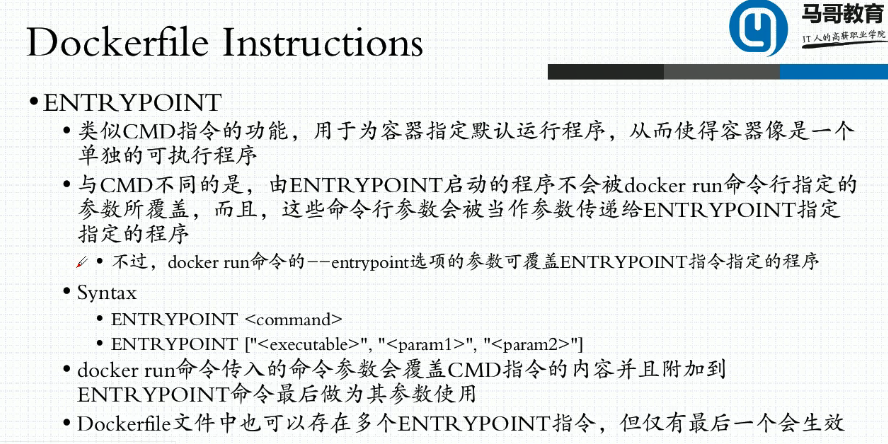
a、容器启动后相当于会启动ENTRYPOINT + CMD 命令,CMD相当于参数传给entrypoint的
[root@localhost images2]# cat Dockerfile

FROM  busybox

LABEL maintainer="wohaoshuai <wohaoshuai@qq.com>" app="httpd"

ENV WEB_DOC_ROOT="/data/web/html"

RUN mkdir -p ${WEB_DOC_ROOT} && \

    echo "<h1>Busybox httpd server.</h1>" > ${WEB_DOC_ROOT}/index.html

#CMD /bin/httpd -f -h ${WEB_DOC_ROOT}

#CMD ["/bin/sh","-c","/bin/httpd -f -h ${WEB_DOC_ROOT}"]

ENTRYPOINT /bin/httpd -f -h ${WEB_DOC_ROOT}

[root@localhost images2]# docker build -t wohaoshuaihttpd:v0.- ./

Sending build context to Docker daemon  .048kB

Step / : FROM  busybox

 ---> af2f74c517aa

Step / : LABEL maintainer="wohaoshuai <wohaoshuai@qq.com>" app="httpd"

 ---> Using cache

 ---> b94158ebd25b

Step / : ENV WEB_DOC_ROOT="/data/web/html"

 ---> Using cache

 ---> 128dc125c148

Step / : RUN mkdir -p ${WEB_DOC_ROOT} &&     echo "<h1>Busybox httpd server.</h1>" > ${WEB_DOC_ROOT}/index.html

 ---> Using cache

 ---> 79e6d697305f

Step / : ENTRYPOINT /bin/httpd -f -h ${WEB_DOC_ROOT}

 ---> Running in 322af685179f

Removing intermediate container 322af685179f

 ---> 26837ef4211b

Successfully built 26837ef4211b

Successfully tagged wohaoshuaihttpd:v0.-

[root@localhost images2]# docker run -it --rm -P --name wohaoshuai1 wohaoshuaihttpd:v0.- ls /data/web/html

[root@localhost images2]# docker inspect -f {{.Args}} wohaoshuai1   #此时可以看到我们覆盖的CMD命令自动追加到了ENTRYPOINT提供的命令后面,相当于容器一启动的时候就会启动 ENTRYPOINT + CMD命令

[-c /bin/httpd -f -h ${WEB_DOC_ROOT} ls /data/web/html]
b、ENTRYPOINT + CMD组合
[root@localhost images2]# cat Dockerfile

FROM  busybox

LABEL maintainer="wohaoshuai <wohaoshuai@qq.com>" app="httpd"

ENV WEB_DOC_ROOT="/data/web/html"

RUN mkdir -p ${WEB_DOC_ROOT} && \

    echo "<h1>Busybox httpd server.</h1>" > ${WEB_DOC_ROOT}/index.html

#CMD /bin/httpd -f -h ${WEB_DOC_ROOT}

CMD ["/bin/httpd -f -h ${WEB_DOC_ROOT}"]

ENTRYPOINT ["/bin/sh","-c"]

[root@localhost images2]# docker build -t wohaoshuaihttpd:v0.- ./

Sending build context to Docker daemon  .048kB

Step / : FROM  busybox

 ---> af2f74c517aa

Step / : LABEL maintainer="wohaoshuai <wohaoshuai@qq.com>" app="httpd"

 ---> Using cache

 ---> b94158ebd25b

Step / : ENV WEB_DOC_ROOT="/data/web/html"

 ---> Using cache

 ---> 128dc125c148

Step / : RUN mkdir -p ${WEB_DOC_ROOT} &&     echo "<h1>Busybox httpd server.</h1>" > ${WEB_DOC_ROOT}/index.html

 ---> Using cache

 ---> 79e6d697305f

Step / : CMD ["/bin/httpd -f -h ${WEB_DOC_ROOT}"]

 ---> Running in 633c17c96e88

Removing intermediate container 633c17c96e88

 ---> 997c922b10f0

Step / : ENTRYPOINT ["/bin/sh","-c"]

 ---> Running in 3838dded3dfe

Removing intermediate container 3838dded3dfe

 ---> 9df599309f9a

Successfully built 9df599309f9a

Successfully tagged wohaoshuaihttpd:v0.-

[root@localhost images2]# docker run -it --rm -P --name wohaoshuai1 wohaoshuaihttpd:v0.-

[root@localhost ~]# docker inspect -f {{.Config.Cmd}}  wohaoshuai1

[/bin/httpd -f -h ${WEB_DOC_ROOT}]

[root@localhost ~]# docker inspect -f {{.Config.Entrypoint}} wohaoshuai1

[/bin/sh -c]
[root@localhost images2]# docker run -it --rm -P --name wohaoshuai1 wohaoshuaihttpd:v0.2-7 ls /data
bin data dev etc home proc root sys tmp usr var
[root@localhost images2]#
c、启动nginx案例
[root@localhost images3]# cat Dockerfile

FROM nginx:1.14-alpine

LABEL maintainer="wohaoshuai <wohaoshuai@qq.com>"

ENV NGX_DOC_ROOT="/data/web/html/"

ADD index.html ${NGX_DOC_ROOT}

ADD entrypoint.sh /bin/

CMD ["/usr/sbin/nginx","-g","daemon off;"]

ENTRYPOINT ["/bin/entrypoint.sh"]

[root@localhost images3]#

[root@localhost images3]#

[root@localhost images3]# cat entrypoint.sh

#!/bin/sh

#

cat > /etc/nginx/conf.d/www.conf <<EOF

server {

    server_name $HOSTNAME;

    listen ${IP:-0.0.0.0}:${PORT:-};

    root    ${NGX_DOC_ROOT:-/usr/share/nginx/html};

}

EOF

#执行所有参数

exec "$@"

[root@localhost images3]# docker build -t wohaoshuaihttpd:v0.- ./

Sending build context to Docker daemon  .096kB

Step / : FROM nginx:1.14-alpine

 ---> 8a2fb25a19f5

Step / : LABEL maintainer="wohaoshuai <wohaoshuai@qq.com>"

 ---> Using cache

 ---> d073a723c02f

Step / : ENV NGX_DOC_ROOT="/data/web/html/"

 ---> Using cache

 ---> e1f5eb1ad38b

Step / : ADD index.html ${NGX_DOC_ROOT}

 ---> e070ca432d81

Step / : ADD entrypoint.sh /bin/

 ---> f45f6cba97b6

Step / : CMD ["/usr/sbin/nginx","-g","daemon off;"]

 ---> Running in c4e622170dc8

Removing intermediate container c4e622170dc8

 ---> 0bfde2a829f4

Step / : ENTRYPOINT ["/bin/entrypoint.sh"]

 ---> Running in bb3787180bc6

Removing intermediate container bb3787180bc6

 ---> 0ae588a1c9ff

Successfully built 0ae588a1c9ff

Successfully tagged wohaoshuaihttpd:v0.-

[root@localhost images3]# docker run --name wohaoshuai1 --rm -P  wohaoshuaihttpd:v0.-

172.17.0.1 - - [/Apr/::: +] "GET / HTTP/1.1"   "-" "curl/7.29.0" "-"

172.17.0.2 - - [/Apr/::: +] "GET / HTTP/1.1"   "-" "Wget" "-"

[root@localhost ~]# docker exec -it wohaoshuai1 /bin/sh

/ # cat /etc/nginx/conf.d/

default.conf  www.conf

/ # cat /etc/nginx/conf.d/www.conf

server {

    server_name 9243f356a5b7;

    listen 0.0.0.0:;

    root    /data/web/html/;

}

/ # wget -O - -q 9243f356a5b7

<h1>NEW DOC ROOT for NGINX</h1>

/ # ps
PID USER TIME COMMAND
1 root 0:00 nginx: master process /usr/sbin/nginx -g daemon off; #因为脚本中使用了exec 因此确保了主进程ID号为 1
9 nginx 0:00 nginx: worker process
18 root 0:00 /bin/sh
24 root 0:00 ps
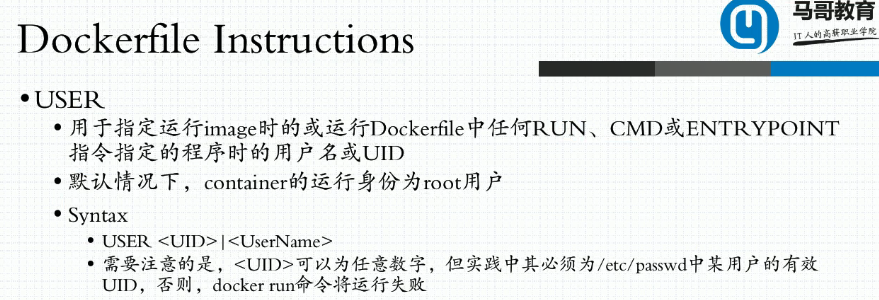
12、USER
13、HEALTHCHECK
a、如图,每隔5分钟检测一次,超时时间为3秒,使用命令 curl ,如果失败则状态1退出。

[root@localhost images3]# cat Dockerfile

FROM nginx:1.14-alpine

LABEL maintainer="wohaoshuai <wohaoshuai@qq.com>"

ENV NGX_DOC_ROOT="/data/web/html/"

ADD index.html ${NGX_DOC_ROOT}

ADD entrypoint.sh /bin/

EXPOSE /tcp

#3s后再做检测

HEALTHCHECK --start-period=3s CMD wget -O - -q http://${IP:-0.0.0.0}:${PORT:-80}/

CMD ["/usr/sbin/nginx","-g","daemon off;"]

ENTRYPOINT ["/bin/entrypoint.sh"]

[root@localhost images3]# docker build -t wohaoshuaihttpd:v0.- ./

Sending build context to Docker daemon  .096kB

Step / : FROM nginx:1.14-alpine

 ---> 8a2fb25a19f5

Step / : LABEL maintainer="wohaoshuai <wohaoshuai@qq.com>"

 ---> Using cache

 ---> d073a723c02f

Step / : ENV NGX_DOC_ROOT="/data/web/html/"

 ---> Using cache

 ---> e1f5eb1ad38b

Step / : ADD index.html ${NGX_DOC_ROOT}

 ---> Using cache

 ---> e070ca432d81

Step / : ADD entrypoint.sh /bin/

 ---> Using cache

 ---> f45f6cba97b6

Step / : EXPOSE /tcp

 ---> Running in b9bf91ef24fa

Removing intermediate container b9bf91ef24fa

 ---> fdea2cc4ac14

Step / : HEALTHCHECK --start-period=3s CMD wget -O - -q http://${IP:-0.0.0.0}:${PORT:-80}/

 ---> Running in 68abb31eacf2

Removing intermediate container 68abb31eacf2

 ---> a5d76a9959fa

Step / : CMD ["/usr/sbin/nginx","-g","daemon off;"]

 ---> Running in 7085a3cb2ebf

Removing intermediate container 7085a3cb2ebf

 ---> 3932fc91e4bf

Step / : ENTRYPOINT ["/bin/entrypoint.sh"]

 ---> Running in 55a5f50907fc

Removing intermediate container 55a5f50907fc

 ---> dfe7de99a64d

Successfully built dfe7de99a64d

Successfully tagged wohaoshuaihttpd:v0.-

[root@localhost images3]# docker run --name wohaoshuai1 --rm -P  -e "PORT=8080"  wohaoshuaihttpd:v0.-

127.0.0.1 - - [/Apr/::: +] "GET / HTTP/1.1"   "-" "Wget" "-"

127.0.0.1 - - [/Apr/::: +] "GET / HTTP/1.1"   "-" "Wget" "-"

127.0.0.1 - - [/Apr/::: +] "GET / HTTP/1.1"   "-" "Wget" "-"

127.0.0.1 - - [/Apr/::: +] "GET / HTTP/1.1"   "-" "Wget" "-"

[root@localhost ~]# docker ps

CONTAINER ID        IMAGE                    COMMAND                  CREATED              STATUS                        PORTS                   NAMES

a1b6d0ddff14        wohaoshuaihttpd:v0.-   "/bin/entrypoint.sh …"   About a minute ago   Up About a minute (healthy)   0.0.0.0:->/tcp   wohaoshuai1
14、SHELL
15、STOPSIGNAL 修改指令信号
16、ARG
[root@localhost images3]# cat Dockerfile

FROM nginx:1.14-alpine

ARG author="wohaoshuai <wohaoshuai@qq.com>"

LABEL maintainer="${author}"

ENV NGX_DOC_ROOT="/data/web/html/"

ADD index.html ${NGX_DOC_ROOT}

ADD entrypoint.sh /bin/

EXPOSE /tcp

#3s后再做检测

HEALTHCHECK --start-period=3s CMD wget -O - -q http://${IP:-0.0.0.0}:10080/

CMD ["/usr/sbin/nginx","-g","daemon off;"]

ENTRYPOINT ["/bin/entrypoint.sh"]

[root@localhost images3]# docker build -t wohaoshuaihttpd:v0.- ./

Sending build context to Docker daemon  .096kB

Step / : FROM nginx:1.14-alpine

 ---> 8a2fb25a19f5

Step / : ARG author="wohaoshuai <wohaoshuai@qq.com>"

 ---> Running in d51a611199ab

Removing intermediate container d51a611199ab

 ---> f682ee70b312

Step / : LABEL maintainer="${author}"

 ---> Running in 461d279b754d

Removing intermediate container 461d279b754d

 ---> ca0c78ef37ae

Step / : ENV NGX_DOC_ROOT="/data/web/html/"

 ---> Running in ceb69b94032a

Removing intermediate container ceb69b94032a

 ---> f7e500f33f56

Step / : ADD index.html ${NGX_DOC_ROOT}

 ---> 52e9500d83ba

Step / : ADD entrypoint.sh /bin/

 ---> cd773aca3f27

Step / : EXPOSE /tcp

 ---> Running in 396a1631a659

Removing intermediate container 396a1631a659

 ---> 064b4c952023

Step / : HEALTHCHECK --start-period=3s CMD wget -O - -q http://${IP:-0.0.0.0}:10080/

 ---> Running in c2f2b809f64b

Removing intermediate container c2f2b809f64b

 ---> e9b24a5f543d

Step / : CMD ["/usr/sbin/nginx","-g","daemon off;"]

 ---> Running in 7f848401bdd3

Removing intermediate container 7f848401bdd3

 ---> 1b2caf95eddc

Step / : ENTRYPOINT ["/bin/entrypoint.sh"]

 ---> Running in 14b2ef23a35f

Removing intermediate container 14b2ef23a35f

 ---> 65fe43f7d081

Successfully built 65fe43f7d081

Successfully tagged wohaoshuaihttpd:v0.-

[root@localhost ~]# docker inspect -f {{.Config.Labels}} wohaoshuaihttpd:v0.-

map[maintainer:wohaoshuai <wohaoshuai@qq.com>]
构建时修改参数
[root@localhost images3]# docker build --build-arg author="Presley <Presley@qq.com>" -t wohaoshuaihttpd:v0.- ./

Sending build context to Docker daemon  .096kB

Step / : FROM nginx:1.14-alpine

 ---> 8a2fb25a19f5

Step / : ARG author="wohaoshuai <wohaoshuai@qq.com>"

 ---> Using cache

 ---> f682ee70b312

Step / : LABEL maintainer="${author}"

 ---> Running in c6ae8d2e646b

Removing intermediate container c6ae8d2e646b

 ---> 5c3eb8688fff

Step / : ENV NGX_DOC_ROOT="/data/web/html/"

 ---> Running in 700d76775398

Removing intermediate container 700d76775398

 ---> 1427d0079175

Step / : ADD index.html ${NGX_DOC_ROOT}

 ---> 987d3187f31f

Step / : ADD entrypoint.sh /bin/

 ---> 7bc12ca11c64

Step / : EXPOSE /tcp

 ---> Running in be86f52a488f

Removing intermediate container be86f52a488f

 ---> 16c8520ae136

Step / : HEALTHCHECK --start-period=3s CMD wget -O - -q http://${IP:-0.0.0.0}:10080/

 ---> Running in 133ee12ebd7c

Removing intermediate container 133ee12ebd7c

 ---> 0eac1d50b199

Step / : CMD ["/usr/sbin/nginx","-g","daemon off;"]

 ---> Running in 798fee85709b

Removing intermediate container 798fee85709b

 ---> 07ca978c450f

Step / : ENTRYPOINT ["/bin/entrypoint.sh"]

 ---> Running in b3d13eb6e049

Removing intermediate container b3d13eb6e049

 ---> 06e6e8b0b448

Successfully built 06e6e8b0b448

Successfully tagged wohaoshuaihttpd:v0.-

[root@localhost ~]# docker inspect -f {{.Config.Labels}} wohaoshuaihttpd:v0.-

map[maintainer:Presley <Presley@qq.com>]
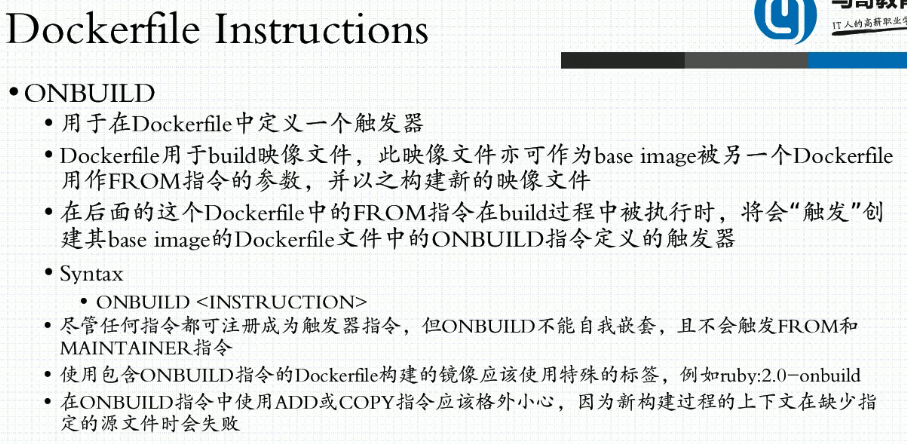
17、ONBUILD
[root@localhost images3]# cat Dockerfile

FROM nginx:1.14-alpine

ARG author="wohaoshuai <wohaoshuai@qq.com>"

LABEL maintainer="${author}"

ENV NGX_DOC_ROOT="/data/web/html/"

ADD index.html ${NGX_DOC_ROOT}

ADD entrypoint.sh /bin/

EXPOSE /tcp

#3s后再做检测

HEALTHCHECK --start-period=3s CMD wget -O - -q http://${IP:-0.0.0.0}:10080/

#如果谁要基于我的镜像做那么需要先下载

ONBUILD ADD http://nginx.org/download/nginx-1.15.12.tar.gz /usr/local/src/

CMD ["/usr/sbin/nginx","-g","daemon off;"]

ENTRYPOINT ["/bin/entrypoint.sh"]

[root@localhost images3]# docker build --build-arg author="Presley <Presley@qq.com>" -t wohaoshuaihttpd:v0.- ./

Sending build context to Docker daemon  .096kB

Step / : FROM nginx:1.14-alpine

 ---> 8a2fb25a19f5

Step / : ARG author="wohaoshuai <wohaoshuai@qq.com>"

 ---> Using cache

 ---> f682ee70b312

Step / : LABEL maintainer="${author}"

 ---> Using cache

 ---> 5c3eb8688fff

Step / : ENV NGX_DOC_ROOT="/data/web/html/"

 ---> Using cache

 ---> 1427d0079175

Step / : ADD index.html ${NGX_DOC_ROOT}

 ---> Using cache

 ---> 987d3187f31f

Step / : ADD entrypoint.sh /bin/

 ---> Using cache

 ---> 7bc12ca11c64

Step / : EXPOSE /tcp

 ---> Using cache

 ---> 16c8520ae136

Step / : HEALTHCHECK --start-period=3s CMD wget -O - -q http://${IP:-0.0.0.0}:10080/

 ---> Using cache

 ---> 0eac1d50b199

Step / : ONBUILD ADD http://nginx.org/download/nginx-1.15.12.tar.gz /usr/local/src/

 ---> Running in e694a816039c

Removing intermediate container e694a816039c

 ---> 8ad18558dc97

Step / : CMD ["/usr/sbin/nginx","-g","daemon off;"]

 ---> Running in aabdddec1860

Removing intermediate container aabdddec1860

 ---> a9d1f912f8c9

Step / : ENTRYPOINT ["/bin/entrypoint.sh"]

 ---> Running in f7af8d4d2ef7

Removing intermediate container f7af8d4d2ef7

 ---> 41521f27c609

Successfully built 41521f27c609

Successfully tagged wohaoshuaihttpd:v0.-

[root@localhost images4]# cat Dockerfile

FROM wohaoshuaihttpd:v0.-

RUN mkdir /tmp/test

[root@localhost images4]# docker build -t test:v0.- ./

Sending build context to Docker daemon  .048kB

Step / : FROM wohaoshuaihttpd:v0.-

# Executing  build trigger

Downloading [==================================================>]  .032MB/.032MB

 ---> 5401af3f58d1

Step / : RUN mkdir /tmp/test

 ---> Running in 9fec094f32d3

Removing intermediate container 9fec094f32d3

 ---> 107f495f566e

Successfully built 107f495f566e

Successfully tagged test:v0.-

[root@localhost images4]# docker run --name test1 --rm test:v0.- ls /usr/local/src

nginx-1.15..tar.gz
Docker 学习8 Dockerfile详解2的更多相关文章
- Docker 学习7 Dockerfile详解
一.镜像的生成途径 1.使用当前进程替换上一个进程 exec 2.生成方式 3.dockerfile制作镜像要求 a.要有专有的工作目录. b.要有专门的制作文件,文件名首字母大写 c.如果要打包很多 ...
- Docker系列07—Dockerfile 详解
本文收录在容器技术学习系列文章总目录 1.认识Dockerfile 1.1 镜像的生成途径 基于容器制作 dockerfile,docker build 基于容器制作镜像,已经在上篇Docker系列 ...
- docker学习(3)--Dockfile详解
转载请注明出处:http://www.cnblogs.com/lighten/p/6900556.html 1.基本说明 Dockfile是一个用于编写docker镜像生成过程的文件,其有特定的语法. ...
- Docker 学习之命令详解
1. docker version docker version 显示 Docker 版本信息. 2. docker info docker info 显示 Docker 系统信息,包括镜像和容器数. ...
- Docker入门02——Dockerfile详解
基本示例 FROM MAINTAINER LABEL RUN ADD COPY CMD ENTRYPOINT ENV EXPOSE VOLUME WORKDIR USER ARG 基本示例 # Thi ...
- [转帖]Docker学习之Dockerfile命令详解
Docker学习之Dockerfile命令详解 https://it.baiked.com/system/docker/2436.html 图挺好的 前言 之前,制作镜像的伪姿势搭建已经见过了,今天介 ...
- Dockerfile详解
Dockerfile详解 利用Dockerfile文件,可以构建docker的image镜像 命令使用 通过-f参数指定Dockerfile路径,进行构建image docker build -f / ...
- Dockerfile详解及优化
Dockerfile详解 0. Dockerfile的作用 docker可以根据Dockerfile中的指令来构建docker镜像.Dockerfile是一个文本文件,其应当包含用户想要构建一个镜像的 ...
- 最佳实战Docker持续集成图文详解
最佳实战Docker持续集成图文详解 这是一种真正的容器级的实现,这个带来的好处,不仅仅是效率的提升,更是一种变革:开发人员第一次真正为自己的代码负责——终于可以跳过运维和测试部门,自主维护运行环境( ...
随机推荐
- python 向量化
study from : https://www.jianshu.com/p/ad8933dd6407
- 你值得拥有的Mac PS滤镜插件和特效处理软件合集,不要错过!
以下几款是Mac上强大的Photoshop滤镜插件和特效,可以让我们更加高效率的使用PS,设计和处理出精美的图片. 1. Alien Skin Eye Candy Eye Candy是一款强大酷炫的P ...
- Angular记录(3)
文档资料 箭头函数--MDN:https://developer.mozilla.org/zh-CN/docs/Web/JavaScript/Reference/Functions/Arrow_fun ...
- DataTable某一列转换为分隔字符串
//把DataTable的某一列转化为逗号分隔字符串 private static string DataTableColumnSplit(DataTable dataTable,string str ...
- JGUI源码:Tab组件实现(9)
程序界面效果如下 Tab组件由多个TabItem组成,超出部分隐藏,可以通过左右按钮滑动显示出来 1.封装 // 初始化内容 $(function () { J.JTab($(".jgui- ...
- Java SE之快速失败(Fast-Fail)与快速安全(Fast-Safe)的区别[集合与多线程/增强For](彻底详解)
声明 特点:基于JDK源码进行分析. 研究费时费力,如需转载或摘要,请显著处注明出处,以尊重劳动研究成果:博客园 - https://www.cnblogs.com/johnnyzen/p/10547 ...
- 【5】学习C++之类的概念
C++ 中的类(Class)可以看做C语言中结构体(Struct)的升级版.结构体是一种构造类型,可以包含若干成员变量,每个成员变量的类型可以不同:可以通过结构体来定义结构体变量,每个变量拥有相同的性 ...
- http 状态码大全
状态码大全 1**(信息类):表示接收到请求并且继续处理 100——客户必须继续发出请求 101——客户要求服务器根据请求转换HTTP协议版本 2**(响应成功):表示动作被成功接收.理 ...
- Java 多线程 - 生产者消费者问题
https://www.cnblogs.com/hckblogs/p/7858545.html
- Uncaught DOMException: Failed to construct 'WebSocket': The URL
生成socket对象地址有误