
freemarker导出带图片的word文档
最近做一个关于文档导出功能, 顺便学习了下freemarker,做了个关于导出带图片的word文档,模板并没有写全,只是验证代码的正确性
这只是做一个小功能,故只做了后台代码关于导出的代码,并未与前台关联,可酌情处理
首先将需要导出的word文档做处理,关于word文档最好是后缀为.doc,应为有些软件可能无法打开导出的文档,将需要修改的数据修改成${xxx}
类型的内容,例如下面的文档

修改后则变为如下类型:

后将文档另存为.xml文档,将需要修改的然后再打开xml文档,找到图片的位置,是一大段base64编码后的
代码,形如<w:binData w:name="wordml://自定义.png" xml:space="preserve">UUUA......FFFFA</w:binData>
将中间编码后的代码修改为${xxx}的类型,关于xxx的内容可以根据自己的需求修改,而后将文件关闭。将其后
缀转为 .ftl 的格式。而后上后台代码:
 final static String separator = File.separator; // 系统路径分割符

     public void exportSellPlan(HttpServletRequest request, HttpServletResponse response){

         String evaluation = "四年的大学生涯是我人生的一大转折点。"

                 + "我深深地懂得“责任,荣誉,国家”这六个字的含义。作为大学生我最基本的责任是学习。"

                 + "在大学期间我认真学习,发挥自己的特长,挖掘自身的潜力,从而提高了"

                 + "自身的学习能力和分析处理问题的能力,也获得了大家的认同。";

         //获得数据

         Map<String, Object> map = new HashMap<String, Object>();

         map.put("profession", "xxx");

         map.put("name", "xxx");

         map.put("address","山西省xx县");

         map.put("email", "xxx@163.com");

         map.put("tel", "173xxx9927");

         map.put("skill1", "面对不同客人,用不同的语气、不同的态度,与客户要谈得来,处处为客户着想");

         map.put("skill2", "面对不同客人,用不同的语气、不同的态度,与客户要谈得来,处处为客户着想");

         map.put("skill3", "面对不同客人,用不同的语气、不同的态度,与客户要谈得来,处处为客户着想");

         map.put("skill4", "面对不同客人,用不同的语气、不同的态度,与客户要谈得来,处处为客户着想");

         map.put("hobby", "运动,看书,上网聊天,看电影。");

         map.put("evaluation", evaluation);

         map.put("graduateInstitutions", "南昌航空大学");

         map.put("degree", "本科");

         //map.put("image", getImageBase("E:"+ separator +"photo.jpg"));

         try {

             WordUtils.exportMillCertificateWord(request,response,map,"简历","jianli.ftl");

         } catch (IOException e) {

             e.printStackTrace();

         }

     }

   //获得图片的base64码

     public static String getImageBase(String src) {

         if(src==null||src==""){

             return "";

         }

         File file = new File(src);

         //File file = new File(getRequest().getRealPath("/")+src.replace(getRequest().getContextPath(), ""));

         if(!file.exists()) {

             return "";

         }

         InputStream in = null;

         byte[] data = null;

         try {

             in = new FileInputStream(file);

         } catch (FileNotFoundException e1) {

             e1.printStackTrace();

         }

         try {

             data = new byte[in.available()];

             in.read(data);

             in.close();

         } catch (IOException e) {

           e.printStackTrace();

         }

         BASE64Encoder encoder = new BASE64Encoder();

         return encoder.encode(data);

     }
关于excel导出:
 package com.haiyisoft.iecp.crm.web.struts;

 import java.io.BufferedWriter;

 import java.io.File;

 import java.io.FileNotFoundException;

 import java.io.FileOutputStream;

 import java.io.IOException;

 import java.io.OutputStreamWriter;

 import java.io.PrintWriter;

 import java.io.UnsupportedEncodingException;

 import java.io.Writer;

 import java.text.SimpleDateFormat;

 import java.util.Date;

 import java.util.Map;

 import javax.servlet.http.HttpServletRequest;

 import javax.servlet.http.HttpServletResponse;

 import javax.swing.filechooser.FileSystemView;

 import freemarker.template.Configuration;

 import freemarker.template.Template;

 import freemarker.template.TemplateException;

 public class WordUtils extends BaseAction{

      //配置信息,代码本身写的还是很可读的,就不过多注解了

     private static Configuration configuration = null;

     //这里注意的是利用WordUtils的类加载器动态获得模板文件的位置

    // private static final String templateFolder = WordUtils.class.getClassLoader().getResource("../../").getPath() + "WEB-INF/templetes/";

     private static final String templateFolder = "D:/uepstudio_uep/workspace/iecp/src/com/haiyisoft/iecp/crm/web/struts";

     static {

         configuration = new Configuration();

         configuration.setDefaultEncoding("utf-8");

         try {

             configuration.setDirectoryForTemplateLoading(new File(templateFolder));

         } catch (IOException e) {

             e.printStackTrace();

         }

    }

     private WordUtils() {

         throw new AssertionError();

     }

     @SuppressWarnings("rawtypes")

     public static void exportMillCertificateWord(HttpServletRequest request, HttpServletResponse response, Map map,String title,String ftlFile) throws IOException {

         //Template freemarkerTemplate = configuration.getTemplate(ftlFile);

         Template t = null;

         try {

             // temp.ftl为要装载的模板

             t = configuration.getTemplate(ftlFile);

         } catch (IOException e) {

             e.printStackTrace();

         }

         // 获取桌面路径

         File desktopDir = FileSystemView.getFileSystemView().getHomeDirectory();

         String desktopPath = desktopDir.getAbsolutePath();

         desktopPath = desktopPath.replace("\\", "/");

         // 输出文档路径及名称

         java.text.SimpleDateFormat sdf = new SimpleDateFormat("yyyyMMddHHmmss");

         File outFile = new File(desktopPath + "/" + sdf.format(new Date()) + title);

         Writer out = null;

         FileOutputStream fos = null;

         try {

             fos = new FileOutputStream(outFile);

             OutputStreamWriter oWriter = new OutputStreamWriter(fos, "UTF-8");

             out = new BufferedWriter(oWriter);

         } catch (FileNotFoundException e1) {

             e1.printStackTrace();

         } catch (UnsupportedEncodingException e) {

             e.printStackTrace();

         }

         try {

             t.process(map, out);

             out.close();

             fos.close();

         } catch (TemplateException e) {

             e.printStackTrace();

         } catch (IOException e) {

             e.printStackTrace();

         }

         response.setContentType("text/html;charset=UTF-8");

         response.setCharacterEncoding("UTF-8");

         PrintWriter outW = response.getWriter();

         outW.write("导出成功!</br>" + outFile.getPath());

         outW.close();

     }

 }
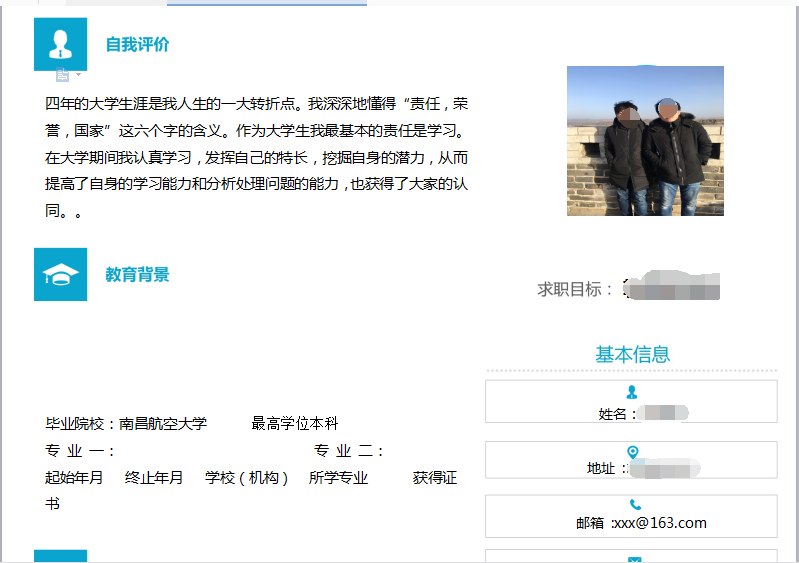
导出后的文件为20180322135608简历.doc桌面文件:
freemarker导出带图片的word文档的更多相关文章
- Java Web用Freemarker生成带图片的Word文档
步骤一:模板制作 用world2003做一个导出模板,如果有图片则加入一张图片占位,将world另存为xml,将xml中需要导出的内容用Freemarker标签表示,最后另存为.ftl结尾的模板: 步 ...
- Freemarker导出带图片的word
1.新建一doc文档
- 基于springboot的freemarker创建指定格式的word文档
在web或其他应用中,经常我们需要导出或者预览word文档,比较实际的例子有招聘网站上预览或者导出个人简历,使用POI导出excel会非常的方便,但是如果想导出word,由于其格式控制非常复杂,故而使 ...
- C#导出文本内容到word文档源码
将做工程过程中较好的代码片段珍藏起来,下面的代码内容是关于C#导出文本内容到word文档的代码,希望能对小伙伴们也有好处.<%@ Page Language="C#" Aut ...
- java 在MySQL中存储文件,读取文件(包括图片,word文档,excel表格,ppt,zip文件等)
转自:https://blog.csdn.net/u014475796/article/details/49893261 在设计到数据库的开发中,难免要将图片或文档文件(如word)插入到数据库中的情 ...
- 关于PowerDesigner导出数据库表到word文档
关于PowerDesigner导出数据库表到word文档 一.查看全部模板: powerdesigner默觉得我们提供了非常多的模版,在工具栏中选择[Report(报告)--->Report T ...
- 解决图片插入word文档后清晰度降低的问题
解决图片插入word文档后清晰度降低的问题 在默认情况下,word程序会自动压缩插入word文档中的图片以减小整个word文档的.当我们需要插入word文档中的图片保持原始清晰度时,可以通过设置wor ...
- PowerDesigner导出pdm设计为Word文档
点击Report->Reports 点击New Report 选择Standard Physical Report,语言选择简体中文,如下图 此时目录下就会多一个Report 右窗口: 根据自己 ...
- java通过freemarker导出包含富文本图片的word文档
废话不多说,进入正题! 本文重点在于:对富文本图片的导出(基础的freemarker+word模板导出这里不做详细解说哈) 参考文章:http://www.cnblogs.com/liaofeifig ...
随机推荐
- Python爬虫基础之requests
一.随时随地爬取一个网页下来 怎么爬取网页?对网站开发了解的都知道,浏览器访问Url向服务器发送请求,服务器响应浏览器请求并返回一堆HTML信息,其中包括html标签,css样式,js脚本等.我们之前 ...
- virtualenv安装及使用
环境 Windows 10 python 3.6.7 安装 virtualenv用于创建虚拟环境,用于隔离不同的python版本的运行,是容器类软件.这里在Windows下通过pip安装: pip i ...
- Laravel-google-authenticator--Google验证码
开发前的准备 安装Laravel 安装二维码生成器QrCode,没有安装也可以,接下来会安装 安装拓展 1.运行如下代码安装拓展包: composer require "earnp/lara ...
- echarts-饼状图默认选中高亮
1.首页需要设置legend legend: { data: ["积极", "负面"], selectedMode: false, show: false } ...
- webpack 学习小结
webpack 是一个模块打包工具(前提要安装 node使用npm来安装webpack) 1.安装webpack,webpack-cli , webpack-dev-server //全局安装 npm ...
- jQuery配合html2canvas 使用时 报错 Uncaught (in promise) Provided element is not within a Document
报错代码: 这个函数运行时 function download(){ var element = $("#demo"); //jquery 获取元素 //这里将会报错 html2c ...
- 论文阅读笔记五十二:CornerNet-Lite: Efficient Keypoint Based Object Detection(CVPR2019)
论文原址:https://arxiv.org/pdf/1904.08900.pdf github:https://github.com/princeton-vl/CornerNet-Lite 摘要 基 ...
- java写word转pdf
https://blog.csdn.net/csdnFlyFun/article/details/79523262
- Java基础知识总结(超级经典)
Java基础知识总结(超级经典) 写代码: 1,明确需求.我要做什么? 2,分析思路.我要怎么做?1,2,3. 3,确定步骤.每一个思路部分用到哪些语句,方法,和对象. 4,代码实现.用具体的java ...
- window mysql安装
1.选择下载版本 接着上几篇文章再来看下windows下安装mysql. 我这里是windows7 64位, 安装过程中还是遇到一些坑,这里记录下. 一.下载安装包 打开mysql官网下载页面:htt ...