
LAB1 partII
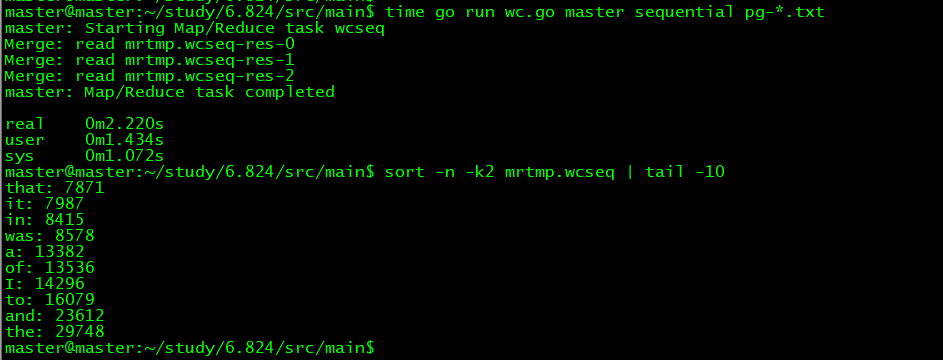
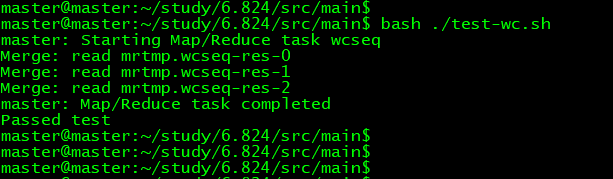
wc.go
package main

import (

    "fmt"

    "mapreduce"

    "os"

    "strings"

    "unicode"

    "strconv"

)

//

// The map function is called once for each file of input. The first

// argument is the name of the input file, and the second is the

// file's complete contents. You should ignore the input file name,

// and look only at the contents argument. The return value is a slice

// of key/value pairs.

//

func mapF(filename string, contents string) []mapreduce.KeyValue {

    // Your code here (Part II).

    f := func(c rune) bool {

    return !unicode.IsLetter(c)

  }

  rst := make([]mapreduce.KeyValue, )

      keys := strings.FieldsFunc(contents, f)

      for _, key := range keys {

          kv := mapreduce.KeyValue{ Key: key, Value:""}

          rst = append(rst, kv)

      }

    return rst

}

//

// The reduce function is called once for each key generated by the

// map tasks, with a list of all the values created for that key by

// any map task.

//

func reduceF(key string, values []string) string {

    // Your code here (Part II).

    cnt :=

    for _ , val := range values {

       i , err := strconv.Atoi(val);

         if  err != nil {

             panic(err)

         }

         cnt += i

    }

    rst := strconv.Itoa(cnt)

    return rst

}

// Can be run in 3 ways:

// 1) Sequential (e.g., go run wc.go master sequential x1.txt .. xN.txt)

// 2) Master (e.g., go run wc.go master localhost:7777 x1.txt .. xN.txt)

// 3) Worker (e.g., go run wc.go worker localhost:7777 localhost:7778 &)

func main() {

    if len(os.Args) <  {

        fmt.Printf("%s: see usage comments in file\n", os.Args[])

    } else if os.Args[] == "master" {

        var mr *mapreduce.Master

        if os.Args[] == "sequential" {

            mr = mapreduce.Sequential("wcseq", os.Args[:], , mapF, reduceF)

        } else {

            mr = mapreduce.Distributed("wcseq", os.Args[:], , os.Args[])

        }

        mr.Wait()

    } else {

        mapreduce.RunWorker(os.Args[], os.Args[], mapF, reduceF, , nil)

    }

}
LAB1 partII的更多相关文章
- MIT 6.824学习笔记4 Lab1
现在我们准备做第一个作业Lab1啦 wjk大神也在做6.824,可以参考大神的笔记https://github.com/zzzyyyxxxmmm/MIT6824_Distribute_System P ...
- 6.828 lab1 bootload
MIT6.828 lab1地址:http://pdos.csail.mit.edu/6.828/2014/labs/lab1/ 第一个练习,主要是让我们熟悉汇编,嗯,没什么好说的. Part 1: P ...
- Machine Learning #Lab1# Linear Regression
Machine Learning Lab1 打算把Andrew Ng教授的#Machine Learning#相关的6个实验一一实现了贴出来- 预计时间长度战线会拉的比較长(毕竟JOS的7级浮屠还没搞 ...
- ucore lab1 bootloader学习笔记
---恢复内容开始--- 开机流程回忆 以Intel 80386为例,计算机加电后,CPU从物理地址0xFFFFFFF0(由初始化的CS:EIP确定,此时CS和IP的值分别是0xF000和0xFFF0 ...
- LAB1 partV
partV 创建文档反向索引.word -> document 与 前面做的 单词统计类似,这个是单词与文档位置的映射关系. mapF 文档解析相同,返回信息不同而已. reduceF 返回归约 ...
- 6.824 LAB1 环境搭建
MIT 6.824 LAB1 环境搭建 vmware 虚拟机 linux ubuntu server 安装 go 官方安装步骤: 下载此压缩包并提取到 /usr/local 目录,在 /usr/l ...
- 软件测试:lab1.Junit and Eclemma
软件测试:lab1.Junit and Eclemma Task: Install Junit(4.12), Hamcrest(1.3) with Eclipse Install Eclemma wi ...
- MIT 6.824 lab1:mapreduce
这是 MIT 6.824 课程 lab1 的学习总结,记录我在学习过程中的收获和踩的坑. 我的实验环境是 windows 10,所以对lab的code 做了一些环境上的修改,如果你仅仅对code 感兴 ...
- 清华大学OS操作系统实验lab1练习知识点汇总
lab1知识点汇总 还是有很多问题,但是我觉得我需要在查看更多资料后回来再理解,学这个也学了一周了,看了大量的资料...还是它们自己的80386手册和lab的指导手册觉得最准确,现在我就把这部分知识做 ...
随机推荐
- SQA计划与系统测试
(一)目的 本计划的目的是定义我们该小组所做的“爱上长大”项目的SQA任务和职责,在项目过程中应遵循的流程.规范和约定等,以确保软件质量得到维持. (二)范围 本计划应用于“爱上长大”项目开发的整个生 ...
- python vtk 通过回调函数监测键盘”Up”键动作,每按一次方向上键,actor变换一种颜色
import vtk class KeyPressInteractorStyle(vtk.vtkInteractorStyleTrackballCamera): def __init__(self,p ...
- python爬虫,使用BeautifulSoup解析爬出来的HTML代码时报错
UserWarning: No parser was explicitly specified, so I'm using the best available HTML parser for thi ...
- Deepest left leaf node in a binary tree
Recursion selfcontained recursion global variables outside of recursion Recursion Design Whenever r ...
- Feign get接口传输对象引发一场追寻
一个报错引发的追寻之路: Feign get接口传输对象,调用方接口代码: @FeignClient(name = "manage") public interface Acces ...
- AI之旅(2):初识线性回归
前置知识 矩阵.求导 知识地图 学习一个新事物之前,先问两个问题,我在哪里?我要去哪里?这两个问题可以避免我们迷失在知识的海洋里,所以在开始之前先看看地图. 此前我们已经为了解线性回归做了 ...
- ODI Scenario 场景
ODI中,场景的作用类似发布版本,当映射最终修改版完成时,可以生成场景.无论是映射(Mapping)还是包(Package)都可以生成场景. 包调用映射和调用场景的区别: 1,包直接调用映射,当映射修 ...
- windows 查看端口是否被占用
查看本机端口是否被占用:netstat -ano | findstr "端口号" 用此端口的pid查看是哪个程序在占用:tasklist|findstr "1896&qu ...
- 04bootstrap_表单
03bootstrap_表单 表单的基本实例 1.默认表单:form 表单域 fieldset legend label 提示span class="help-block" 2.基 ...
- Linux查询日志内容
1.查询日志中含有某个关键字的信息 cat app.log |grep 'error' 2.查询日志尾部最后10行的日志 tail -n 10 app.log 3.查询10行之后的所有日志 tail ...