
IdentityServer4(一)使用客户端凭证方式
这个篇文章主要是记录自己参考官方文档搭建身份认证的过程
使用的.NET Core2.2
参考地址:https://identityserver4.readthedocs.io/en/latest/quickstarts/1_client_credentials.html
1.第一步,创建一个webapi的工程,要使用IDS4(IdentityServer4)做身份认证首先得在程序管理控制台导入IDS4的NuGet包:Install-Package IdentityServer4
2.因为客户端凭证的方式会在api根目录下生成一个tempkey.rsa文件,所以需要在在Starut.cs构造函数中注入IHostingEnvironment
         public IHostingEnvironment Environment { get; }

         public Startup(IConfiguration configuration, IHostingEnvironment environment)

         {

             Configuration = configuration;

             Environment = environment;

         }
3.导入IDS4的包之后我们需要在ConfigureServices中添加如下内容:
 var builder = services.AddIdentityServer()

                 .AddInMemoryIdentityResources(Config.GetIdentityResources())

                 .AddInMemoryApiResources(Config.GetApis())

                 .AddInMemoryClients(Config.GetClients())

                 //.AddTestUsers(Config.GetUsers());

             services.AddMvcCore()

                         .AddAuthorization()

                         .AddJsonFormatters();

             #region 客户端凭证的方式需要添加此处代码生成证书

             if (Environment.IsDevelopment())

             {

                 builder.AddDeveloperSigningCredential();

             }

             else

             {

                 throw new Exception("need to configure key material");

             }

             #endregion

             services.AddAuthentication("Bearer")

                 .AddJwtBearer("Bearer", options =>

                 {

                     options.Authority = "http://localhost:5000";

                     //开发环境禁用了https,默认为开开启

                     options.RequireHttpsMetadata = false;

                     options.Audience = "api1";

                 });
4.在Configure中添加identityServer中间件:
//在UseMvc之前即可

app.UseIdentityServer();
然后我们在VaulesController中修改下代码,在后面客户端的时候用来测试
    [Route("api/[controller]")]

    [Authorize]

    [ApiController]

    public class ValuesController : ControllerBase

    {

        // GET api/values

        [HttpGet]

        public ActionResult Get()

        {

            return new JsonResult(from c in User.Claims select new { c.Type, c.Value });

        }

    }
客户端需要导入IdentityModel Nuget包
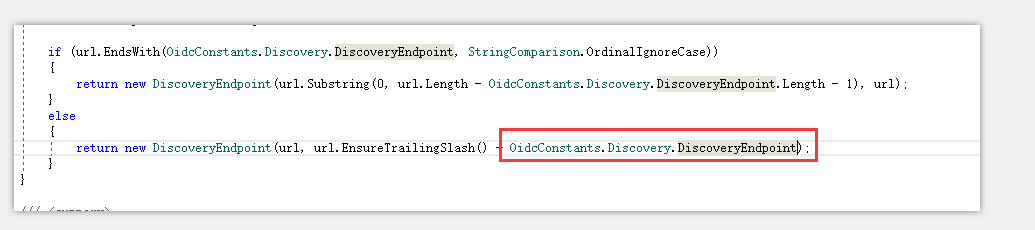
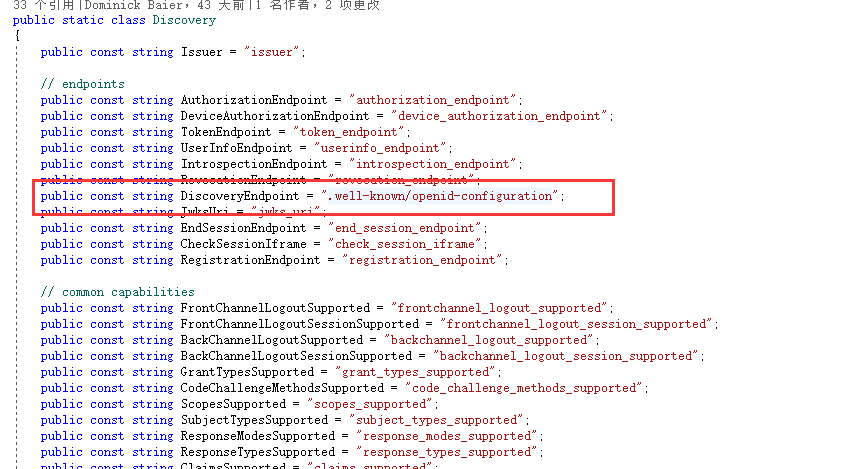
下面代码中GetDiscoveryDocumentAsync()方法主要是从API服务的http://localhost:5000/.well-known/openid-configuration获取访问token的接口,即TokenEndpoint,debug可看到TokenEndpoint=http://localhost:5000/connect/token,经过验证直接将Addres赋值为http://localhost:5000/connect/token也是可以正常获取token的,查看IdentityModel源码也是在url中追加了/.well-known/openid-configuration
  var  _client = new HttpClient();

  var disco = _client.GetDiscoveryDocumentAsync("http://localhost:5000").Result;

  if (disco.IsError)

    {

      Console.WriteLine(disco.Error);

    }
 var tokenResponse = _client.RequestClientCredentialsTokenAsync(new ClientCredentialsTokenRequest

         {

           Address = disco.TokenEndpoint,
             //Address="http://localhost:5000/connect/token",//直接使用获取token的地址

           ClientId = "client",

           ClientSecret = "secret",

           Scope = "api1"

         }).Result;

  if (tokenResponse.IsError)

        {

          Console.WriteLine(tokenResponse.Error);

          Console.ReadKey();

          return;

        }

  Console.WriteLine("============================客户端获取token================================================");

  Console.WriteLine(tokenResponse.Json);

  _client.SetBearerToken(tokenResponse.AccessToken);

   var response = _client.GetAsync("http://localhost:5000/api/Values").Result;

   if (!response.IsSuccessStatusCode)

      {

        Console.WriteLine(response.StatusCode);

      }

      else

      {

        var content = response.Content.ReadAsStringAsync().Result;

        Console.WriteLine(JArray.Parse(content));

      }
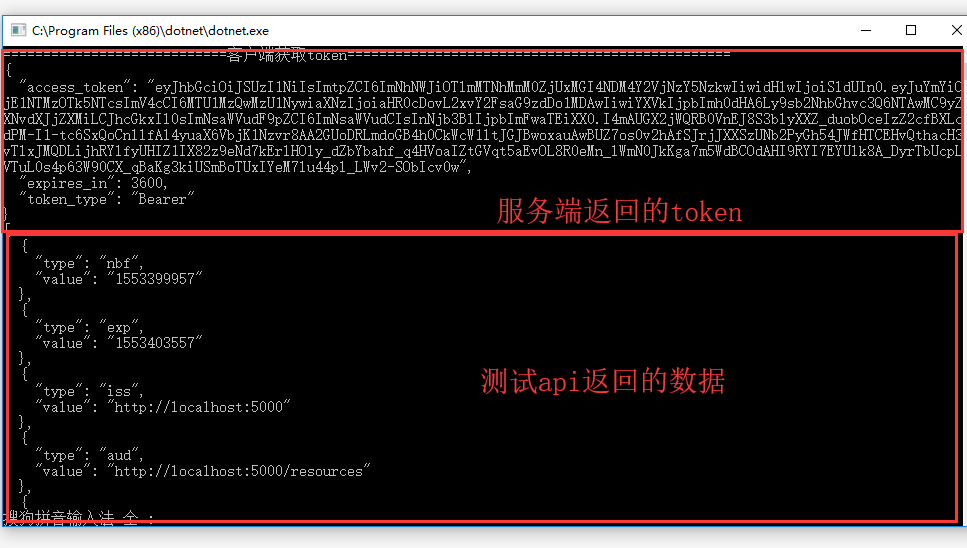
以下是运行之后的结果
IdentityServer4(一)使用客户端凭证方式的更多相关文章
- IdentityServer4系列 | 客户端凭证模式
一.前言 从上一篇关于 快速搭建简易项目中,通过手动或者官方模板的方式简易的实现了我们的IdentityServer授权服务器搭建,并做了相应的配置和UI配置,实现了获取Token方式. 而其中我们也 ...
- IdentityServer4 中文文档 -9- (快速入门)使用客户端凭证保护API
IdentityServer4 中文文档 -9- (快速入门)使用客户端凭证保护API 原文:http://docs.identityserver.io/en/release/quickstarts/ ...
- ASP.NET Core3.1使用IdentityServer4中间件系列随笔(三):创建使用[ClientCredentials客户端凭证]授权模式的客户端
配套源码:https://gitee.com/jardeng/IdentitySolution 上一篇<ASP.NET Core3.1使用IdentityServer4中间件系列随笔(二):创建 ...
- IdentityServer4系列 | 资源密码凭证模式
一.前言 从上一篇关于客户端凭证模式中,我们通过创建一个认证授权访问服务,定义一个API和要访问它的客户端,客户端通过IdentityServer上请求访问令牌,并使用它来控制访问API.其中,我们也 ...
- Atitit 动态调用webservice与客户端代理方式调用
Atitit 动态调用webservice与客户端代理方式调用 方式1: 使用call.invoke 直接调用WSDL,缺点:麻烦,不推荐--特别是JAVA调用.NET的WS时,会有不少的问题需要解 ...
- Web Service基础——四种客户端调用方式
通过访问公网服务地址 http://www.webxml.com.cn/zh_cn/index.aspx 来演示四种不同的客户端调用方式 1. 生成客户端调用方式 1.1 Wsimport命令介绍 首 ...
- 因为 Java 和 Php 在获取客户端 cookie 方式不同引发的 bug
遇到个 Java 和 Php 在获取客户端 cookie 方式不同导致跨系统的问题.所以写了这篇博客梳理下相关知识. 实验 下面通过两个简单的实验,来看Java和Php在获取web请求中的cookie ...
- asp.net core IdentityServer4 实现 Client credentials(客户端凭证)
前言 OAuth 2.0默认四种授权模式(GrantType) 授权码模式(authorization_code) 简化模式(implicit) 密码模式(resource owner passwor ...
- IdentityServer4关于多客户端和API的最佳实践【含多类型客户端和API资源,以及客户端分组实践】【下】
经过前两篇文章你已经知道了关于服务器搭建和客户端接入相关的基本资料,本文主要讲述整个授权系统所服务的对象,以ProtectApi资源为演示 目标: 1)实现多资源服务器针对请求的token校验,接入I ...
随机推荐
- Window10下RabbitMQ安装图文教程
版权声明:本文为博主原创文章,未经博主允许欢迎转载,请注明原文链接.一起交流,共同进步. https://blog.csdn.net/newbie_907486852/article/details/ ...
- HBase原理和设计
转载 2016年1月10日:http://www.sysdb.cn/index.php/2016/01/10/hbase_principle/ 简介 架构 数据组织 原理 RS定位 region写入 ...
- [转]如何正确学习JavaScript
原文:How to Learn JavaScript Properly(2014-2-7) 学习时长:6-8周 学习前提:中学水平,无需编程经验 更新(2014-1-7) 在Reddit上创建了一个学 ...
- EOS wallet API 报HTTP 400错误
服务器:192.168.8.144 按照官方的docker方式运行的,因为keosd(钱包)开出来的API只容许本地访问,即: url --request POST --header 'Host: 0 ...
- js中数组常用方法总结
操作数组 印象中数组有很多方法,系统的整理一下,放在自己家里方便回头查~ Array.map() 此方法是将数组中的每个元素调用一个提供的函数,结果作为一个新的数组返回,并没有改变原来的数组 1 2 ...
- java标志性接口
标识接口是没有任何方法和属性的接口.它仅仅表明它的类属于一个特定的类型,供其他代码来测试允许做一些事情.使用标记接口的唯一目的是使得可以用instanceof进行类型查询,例如:if(obj inst ...
- 作业一 :关于C语言
C语言是计算机专业的基础课,同时也是计算机专业的第一个入门语言,学好C语言母庸质疑.就目前来看,在C语言中已经学习的内容有:基本运算符及表达式.输入输出函数.选择 结构程序设计.循环结构程序设计.数组 ...
- spring 动态代理
突然想到AOP,就简单回忆一下动态代理.1.什么是动态代理? 假如有个用户有增删该查4个方法,如果要对用户操作后进行日志记录,可能会有人说直接在增删改查后做日志记录就行. 一旦我想在用户操作之前加一个 ...
- Hbase常用操作记录
Hbase常用操作记录 Hbase 创建表 查看表结构 修改表结构 删除表 创建表 语法:create <table>, {NAME => <family>, VERSI ...
- MySQL下载与安装
百度云网盘: https://pan.baidu.com/s/11ZIuXcNowp4_bVH4FLhyYA 提取码:ocuh MySQL是一个关系型数据库管理系统,由瑞典MySQL AB 公司开发, ...