
delphi 按键测试
unit Unit1;

interface

uses

  Winapi.Windows, Winapi.Messages, System.SysUtils, System.Variants, System.Classes, Vcl.Graphics,

  Vcl.Controls, Vcl.Forms, Vcl.Dialogs, Vcl.Imaging.pngimage, Vcl.ExtCtrls,

  Vcl.StdCtrls, Vcl.Buttons, Vcl.ComCtrls, Vcl.DBCtrls, System.StrUtils;

type

  TForm1 = class(TForm)

    Button1: TButton;

    Label1: TLabel;

    Label2: TLabel;

    Label3: TLabel;

    Label4: TLabel;

    Button2: TButton;

    Button3: TButton;

    Button4: TButton;

    procedure FormCreate(Sender: TObject);

    procedure FormDblClick(Sender: TObject);

    procedure Button1Click(Sender: TObject);

    procedure Button2Click(Sender: TObject);

    procedure Button3Click(Sender: TObject);

    procedure Button4Click(Sender: TObject);

  private

    { Private declarations }

    procedure Remote(key: Integer);

  public

    { Public declarations }

    procedure WndProc(var Message: TMessage); override;

    procedure MyCopyData(var message: TWMCopyData); message WM_COPYDATA;

  end;

var

  Form1: TForm1;

implementation

{$R *.dfm}

procedure SendMyKeyDown(key: Integer);

var

  data: TCopyDataStruct;

  str: string;

begin

  str:= '下'+ IntToStr(key);

  data.dwData := ;

  data.cbData := Length(str) + ;

  data.lpData := PChar(str);

  SendMessage(Application.MainForm.Handle, WM_COPYDATA, , LongWord(@data));

end;

procedure SendMyKeyUp(key: Integer);

var

  data: TCopyDataStruct;

  str: string;

begin

  str:= '上'+ IntToStr(key);

  data.dwData := ;

  data.cbData := Length(str) + ;

  data.lpData := PChar(str);

  SendMessage(Application.MainForm.Handle, WM_COPYDATA, , LongWord(@data));

end;

procedure TForm1.Button1Click(Sender: TObject);

begin

  Button1.Visible := False;

  Button2.Visible := False;

  Button3.Visible := False;

  Button4.Visible := False;

  SendMyKeyDown(Ord('A'));

  SendMyKeyUp(Ord('A'));

end;

procedure TForm1.Button2Click(Sender: TObject);

begin

  Button1.Visible := False;

  Button2.Visible := False;

  Button3.Visible := False;

  Button4.Visible := False;

  SendMyKeyDown(VK_CONTROL);

  SendMyKeyUp(VK_CONTROL);

end;

procedure TForm1.Button3Click(Sender: TObject);

begin

  Button1.Visible := False;

  Button2.Visible := False;

  Button3.Visible := False;

  Button4.Visible := False;

  SendMyKeyDown(VK_SHIFT);

  SendMyKeyUp(VK_SHIFT);

end;

procedure TForm1.Button4Click(Sender: TObject);

begin

  Button1.Visible := False;

  Button2.Visible := False;

  Button3.Visible := False;

  Button4.Visible := False;

  SendMyKeyDown(VK_MENU);

  SendMyKeyUp(VK_MENU);

end;

procedure TForm1.FormCreate(Sender: TObject);

begin

  self.KeyPreview := True;

end;

procedure TForm1.FormDblClick(Sender: TObject);

begin

  Label1.Caption := '';

  Label2.Caption := '';

  Label3.Caption := '';

  Label4.Caption := '';

  Button1.Visible := not Button1.Visible;

  Button2.Visible := not Button2.Visible;

  Button3.Visible := not Button3.Visible;

  Button4.Visible := not Button4.Visible;

end;

procedure TForm1.MyCopyData(var message: TWMCopyData);

var

  data: PCopyDataStruct;

  str: string;

  key: Integer;

begin

  data := message.CopyDataStruct;

  str := string(PChar(data.lpData));

  if StartsText('下', str) then

  begin

    key := StrToInt(StringReplace(str, '下', '', []));

    keybd_event(key, MapVirtualKey(key, ), , );

  end

  else

  begin

    key := StrToInt(StringReplace(str, '上', '', []));

    keybd_event(key, MapVirtualKey(key, ), KEYEVENTF_KEYUP, );

  end;

end;

procedure TForm1.Remote(key: Integer);

begin

  //这里就是接收到的按键

end;

procedure TForm1.WndProc(var Message: TMessage);

begin

  inherited;

  case Message.Msg of

    WM_KEYDOWN:

      begin

        Label1.Caption := Format('KeyDown: %d - %d', [message.WParam, message.LParam]);

        Remote(message.WParam);

      end;

    WM_KEYUP:

      begin

        Label2.Caption := Format('KeyUp: %d - %d', [message.WParam, message.LParam]);

        Remote(message.WParam);

      end;

    WM_SYSKEYDOWN:

      begin

        Label3.Caption := Format('SysKeyDown: %d - %d', [message.WParam, message.LParam]);

        Remote(message.WParam);

      end;

    WM_SYSKEYUP:

      begin

        Label4.Caption := Format('SysKeyUp: %d - %d', [message.WParam, message.LParam]);

        Remote(message.WParam);

      end;

  end;

end;

end.
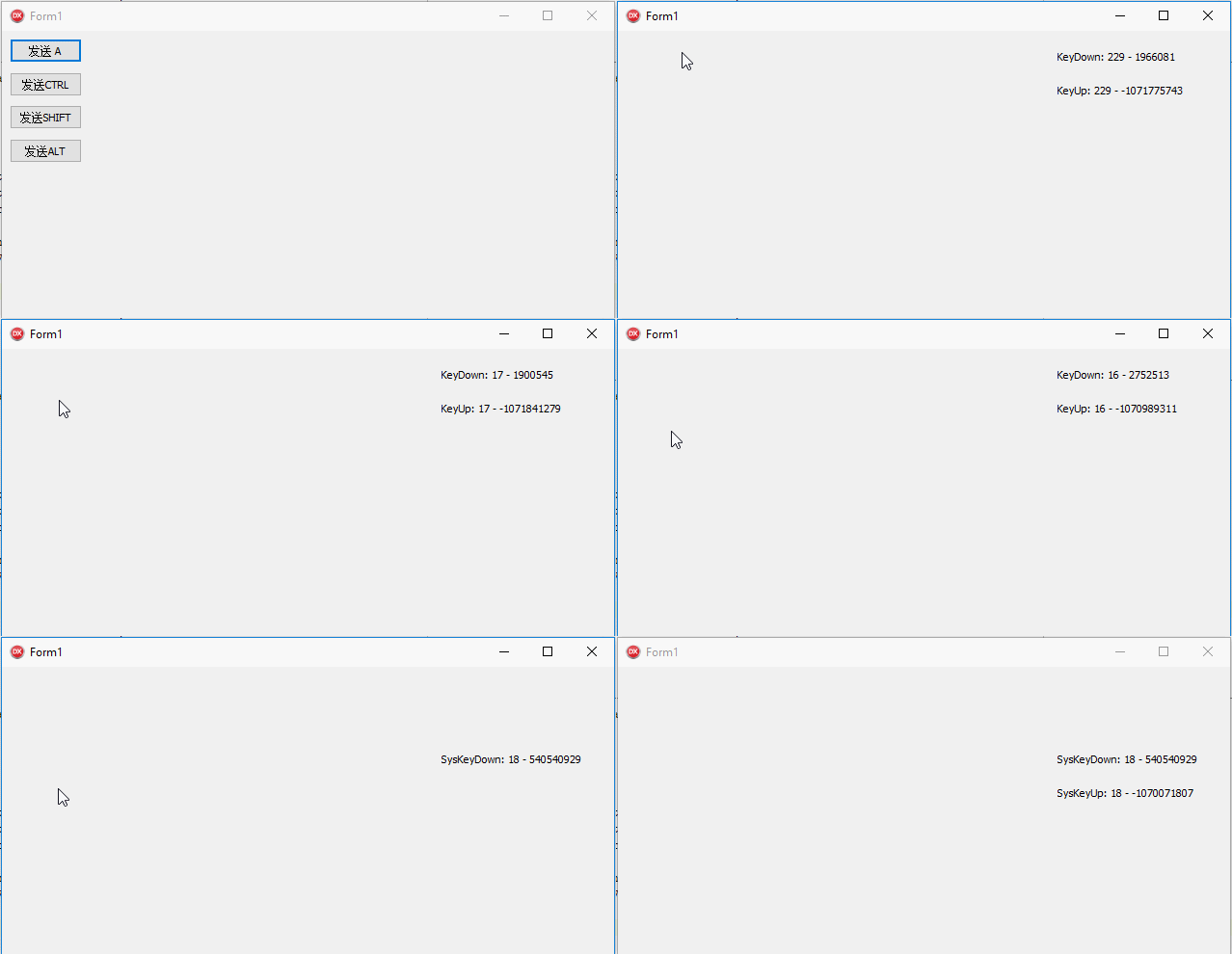
delphi 按键测试的更多相关文章
- ADSL_自动拨号源码(Delphi),已经测试通过
下载地址: http://files.cnblogs.com/lwm8246/ADSL_%E8%87%AA%E5%8A%A8%E6%8B%A8%E5%8F%B7.rar
- [转]Delphi 控件属性和事件
常用[属性] Action:该属性是与组件关联的行为,允许应用程序集中响应用户命令 Anchors:与组件连接的窗体的位置点 Align:确定组件的对齐方式 AutoSize:确定组件是否自动调整其大 ...
- Delphi经验总结(1)
先人的DELPHI基础开发技巧 ◇[DELPHI]网络邻居复制文件 uses shellapi; copyfile(pchar('newfile.txt'),pchar('//computername ...
- 【小技巧】9针USB转串口简易连通性测试,附25针转9针
Part 1 前言 最近用SecureCRT连接串口,因为是笔记本用的USB转串口,好多次出现安装驱动OK,连接上了,但是没有串口打印.无法进行控制的问题:所以不清楚是USB串口的驱动问题,还是转接用 ...
- delphi 调用QQ邮箱发送邮件
procedure TForm1.FormCreate(Sender: TObject); begin try IdSMTP1.AuthenticationType := atLogin; IdSMT ...
- delphi 各版本的特性
delphi 各新版本特性收集 Delphi XE6新增了一些特性并增强了原有的功能,主要有以下几个方面: IDE(整合开发环境) Internet XML(扩展标记语言) Compiler( ...
- 《FPGA全程进阶---实战演练》第七章 让按键恢复平静
1基础理论部分 A:“怎么按键按下去之后,结果不正常?”,B:“按键你消抖了吗?”A:“消什么抖,还要消抖?”, B:“先检测按键变化,然后消抖过滤波动信号,最后输出稳定信号”,A:“我好像漏掉了什 ...
- Python3 tkinter基础 event keysym 查看按键的按键名
Python : 3.7.0 OS : Ubuntu 18.04.1 LTS IDE : PyCharm 2018.2.4 Conda ...
- 【嵌入式】FS2410非操作系统外围资源测试
在刚接触FS2410时,其实这个测试也没有多大意义,但是对于以后来说,当一个产品做成功时,产品测试还是一个必须经过的一个阶段,所以这个流程还是有必要走一下! 在非操作系统下,主要进行RTC测试,按键测 ...
随机推荐
- mysql建表时
问题:Incorrect column specifier for column 'id' 答案:原来自动增长列用int数据类型,不用varchar
- 最近在学习Flask框架,那么就说下jinja2吧~~~
jinja是组成Flask的模板引擎,先写一个demo吧 {% block body %} <ul> {% for user in users %} <li><a hre ...
- 前端开发【第三篇: JavaScript基础】
JavaScript是一门编程语言,浏览器内置了JavaScript语言的解释器,所以在浏览器上按照JavaScript语言的规则编写相应代码之,浏览器可以解释并做出相应的处理. 一.如何编写 1.J ...
- JS中的加减乘除和比较赋值
隐式类型转换 使用Boolean(), Number(), String()去转换数据类型的方法叫显示类型转换,而与它相对的就是隐式类型转换,隐式类型转换并没有明显的标志,而是JS解释器觉得做这样一个 ...
- Linux中彻底删除Google-Chrome浏览器
sudo apt-get autoremove --purge google-chrome-stable 卸载chrome后, 删除-/.config/google-chrome,重新安装.
- for循环:用turtle画一颗五角星2
import turtle turtle.setup(600,400,0,0) turtle.bgcolor('red') turtle.pencolor('yellow') turtle.fillc ...
- java多态——基础
多态 定义: 一个接口,多种实现,就是多种状态 价值: 特点:多态存在的特点,就是必须要有继承.覆盖.父类变量调用子类对象 场景: 首先检查父类中是否有该方法,如果没有,则编译错误:如果有,则 ...
- Verilog中的reg一定会被综合成寄存器么
对应于实际的数字电路中,如果该程序块描述的是时序逻辑,则该寄存器变量对应为寄存器:如果该程序块描述的是组合逻辑,该寄存器变量对应为硬件逻辑:如果该程序块描述的是不完全组合逻辑,那么该寄存器变量也可以对 ...
- WEB学习笔记14-HTML5新特性的使用
(1)定义文档类型声明 <!DOCTYPE html> (2)定义页面编码 <!—HTML 4.01中定义的设置页面编码的方式--> <meta http-equiv=& ...
- tomcat配置去掉项目名称
在web项目中,把代码部署到服务器上访问时都不带项目名,可以配置tomcat 在tomcat安装目录下,找到conf/server.xml打开 <Host name="localhos ...