
【代码笔记】Web-CSS-CSS Positioning
一,效果图。
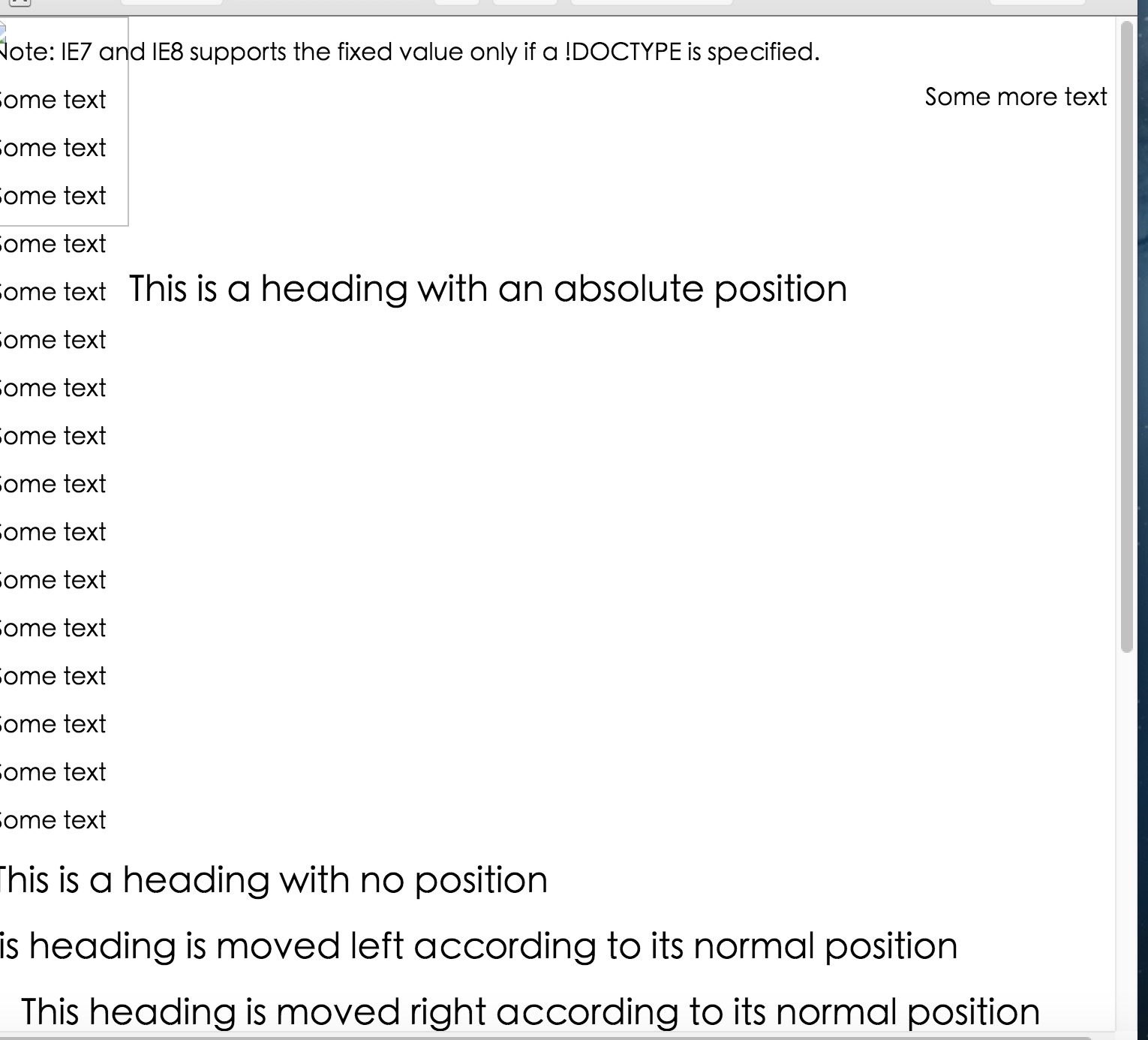

二,代码。

<!DOCTYPE html>

<html>

<head>

    <meta charset="utf-8">

    <title>CSS Positioning</title>

    <style>

    p.pos_fixed {

        position: fixed;

        top: 30px;

        right: 5px;

    }

    h2.pos_left {

        position: relative;

        left: -20px;

    }

    h2.pos_right {

        position: relative;

        left: 20px;

    }

    h2.pos_top {

        position: relative;

        top: -50px;

    }

    h2.absolute {

        position: absolute;

        left: 100px;

        top: 150px;

    }

    img {

        position: absolute;

        left: 0px;

        top: 0px;

        z-index: -1;

    }

    </style>

</head>

<body>

    <p class="pos_fixed">Some more text</p>

    <p><b>Note:</b> IE7 and IE8 supports the fixed value only if a !DOCTYPE is specified.</p>

    <p>Some text</p>

    <p>Some text</p>

    <p>Some text</p>

    <p>Some text</p>

    <p>Some text</p>

    <p>Some text</p>

    <p>Some text</p>

    <p>Some text</p>

    <p>Some text</p>

    <p>Some text</p>

    <p>Some text</p>

    <p>Some text</p>

    <p>Some text</p>

    <p>Some text</p>

    <p>Some text</p>

    <p>Some text</p>

    <h2>This is a heading with no position</h2>

    <h2 class="pos_left">This heading is moved left according to its normal position</h2>

    <h2 class="pos_right">This heading is moved right according to its normal position</h2>

    <p>Relative positioning moves an element RELATIVE to its original position.</p>

    <p>The style "left:-20px" subtracts 20 pixels from the element's original left position.</p>

    <p>The style "left:20px" adds 20 pixels to the element's original left position.</p>

    <h2>This is a heading with no position</h2>

    <h2 class="pos_top">This heading is moved upwards according to its normal position</h2>

    <p><b>Note:</b> Even if the content of the relatively positioned element is moved, the reserved space for the element is still preserved in the normal flow.</p>

    <h2 class="absolute">This is a heading with an absolute position</h2>

    <p>With absolute positioning, an element can be placed anywhere on a page. The heading below is placed 100px from the left of the page and 150px from the top of the page.</p>

    <h1>This is a heading</h1>

    <img src="w3css.gif" width="100" height="140" />

    <p>因为图像元素设置了 z-index 属性值为 -1, 所以它会显示在文字之后。</p>

</body>

</html>
参考资料:《菜鸟教程》
【代码笔记】Web-CSS-CSS Positioning的更多相关文章
- Python学习笔记整理总结【web基础】【web/HTML/CSS/JavaScript/DOM/jQuery】
一.HTML HTML是英文Hyper Text Mark-up Language(超文本标记语言)的缩写,他是一种制作万维网页面标准语言(标记).相当于定义统一的一套规则,大家都来遵守他,这样就可以 ...
- WEB前端 CSS(非布局)
目录 WEB前端 CSS CSS引入方式 CSS结构 CSS选择器 直接选择器 组合选择器 分组选择器 也叫并集选择器 属性选择器 伪类选择器 伪元素选择器 CSS选择器是一个查找的过程,高效的查找影 ...
- 《编写高质量代码:Web 前端开发修炼之道》 笔记与读后感
编写高质量代码:Web 前端开发修炼之道/曹刘阳著. —北京:机械工业出版社,2010.5 第一版 涉及到的知识点: 1. CSS Sprites 在国内很多人叫css精灵,是一种网页图片应用处理方式 ...
- CSS3基础——笔记+实战案例(CSS基本用法、CSS层叠性、CSS继承性)
CSS3基础——笔记 CSS是Cascading Style Sheet的缩写,翻译为"层叠样式表" 或 "级联样式表".CSS定义如何显示HTML的标签央视, ...
- CSS 定位 (Positioning)
CSS 定位 (Positioning) 属性允许你对元素进行定位. CSS 定位和浮动 CSS 为定位和浮动提供了一些属性,利用这些属性,可以建立列式布局,将布局的一部分与另一部分重叠,还可以完成多 ...
- python 学习笔记十二 CSS基础(进阶篇)
1.CSS 简介 CSS 指层叠样式表 (Cascading Style Sheets) 样式定义如何显示 HTML 元素 样式通常存储在样式表中 把样式添加到 HTML 4.0 中,是为了解决内容与 ...
- Tridiv:基于 Web 的 CSS 编辑器,创建炫丽 3D 图形
Tridiv 是一个基于 Web 的编辑器,使用 CSS 创建 3D 形状.它提供了一个传统的四个面板的操作界面,给出了从每个平面的视图,以及一个预览窗格中示出的最终的效果.使用 Tridiv 可以创 ...
- @import————————css代码内部链接另外css
在css代码里这样可以链接另外的css @import url("style.css"); @import语法结构 @import + 空格+ url(CSS文件路径地址); ...
- Web云笔记--CSS
CSS CSS CSS Web自学第二阶段之CSS 参考资料:<Head First HTML&CSS>(中文第二版)(美国)弗里昂ISBN:9787508356464 中国电力出 ...
- 写给自己的web总结——css篇(1)
上一篇写了关于html的知识,算是小试牛刀,这次来尝试写一下css. 初步了解css css的全称为cascading style sheet-- 层叠样式表,通过编入代码来对html里的标签做出各种 ...
随机推荐
- Unity进阶----AssetBundle_03(2018/11/07)
1. 为啥有AB包? 因为资源需要更新, 避免更新一次打包一次 动态修改. 2. AB包注意啥? 依赖关系 找依赖关系应该找到对应的平台!!! 3. 打包策略是分场景打包 若文件被文件夹包含打包出来的 ...
- 与JMeter的第一次亲密接触
postman和JMeters是外部接口测试的两个工具,通过界面化的方法,来实现操作http报文携带的请求字段.VK值.json.cookie.header值及文件.本篇主要介绍JMeter. 测 ...
- DCOS实践分享(1):基于图形化模型设计的应用容器化实践
2015年11月29日,Mesos Meetup 第三期 - 北京技术沙龙成功举行.本次活动由数人科技CTO 肖德时 和 Linker Networks 的 Sam Chen 一起组织发起. 在这次m ...
- macOS 10.14虚拟机安装教程
windows10下安装vmware14.0以及macOS 10.14图文详解 工具/原料 windows10 vmware 14.0 macOS 10.14懒人版 mac补丁unlocker工具 ...
- [Swift]LeetCode81. 搜索旋转排序数组 II | Search in Rotated Sorted Array II
Suppose an array sorted in ascending order is rotated at some pivot unknown to you beforehand. (i.e. ...
- Java集合类常见的问题
本篇文章将尝试回答一些Java集合类常见的问题,以作知识梳理之用. ArrayList和LinkList以及Vector的区别 就实现方式而言: ArrayList是以数组的方式实现的列表. Link ...
- 分布式_zookeeper
分布式协调服务-zookeeper 分布式环境的特点 1.分布性 2.并发性 程序运行过程中,并发性操作是很常见的.比如同一个分布式系统中的多个节点,同时访问一个共享资源.数据库.分布式存储 3.无序 ...
- linux配置jdk环境变量
首先在Linux解压后缀为.tar.gz的jdk压缩文件 解压到当前的文件夹 tar -zcvf /root/java/jdk版本编号 指令: cd 目录路径 -> 是进入该目录路径 c ...
- Java的内部类真的那么难以理解?
01 前言 昨天晚上,我把车停好以后就回家了.回家后才发现手机落在车里面了,但外面太冷,冷到骨头都能感受到寒意——实在是不想返回一趟去取了(小区的安保还不错,不用担心被砸车玻璃),于是打定主意过几个小 ...
- .NET Core实战项目之CMS 第十七章 CMS网站系统的部署
目前我们的.NET Core实战项目之CMS系列教程基本走到尾声了,通过这一系列的学习你应该能够轻松应对.NET Core的日常开发了!当然这个CMS系统的一些逻辑处理还需要优化,如没有引入日志组件以 ...