
【代码笔记】Web-CSS-CSS Positioning
一,效果图。
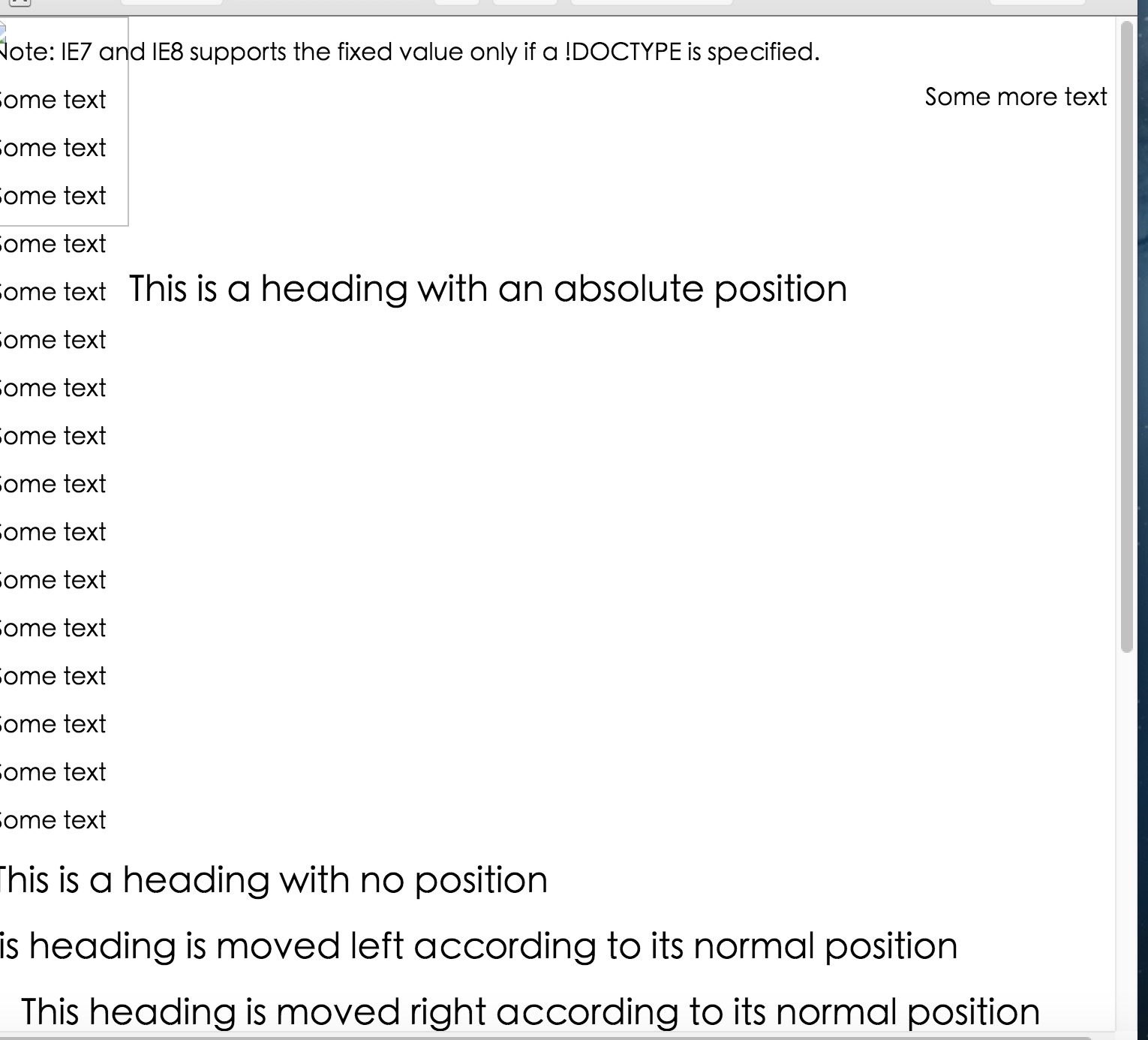

二,代码。

<!DOCTYPE html>

<html>

<head>

    <meta charset="utf-8">

    <title>CSS Positioning</title>

    <style>

    p.pos_fixed {

        position: fixed;

        top: 30px;

        right: 5px;

    }

    h2.pos_left {

        position: relative;

        left: -20px;

    }

    h2.pos_right {

        position: relative;

        left: 20px;

    }

    h2.pos_top {

        position: relative;

        top: -50px;

    }

    h2.absolute {

        position: absolute;

        left: 100px;

        top: 150px;

    }

    img {

        position: absolute;

        left: 0px;

        top: 0px;

        z-index: -1;

    }

    </style>

</head>

<body>

    <p class="pos_fixed">Some more text</p>

    <p><b>Note:</b> IE7 and IE8 supports the fixed value only if a !DOCTYPE is specified.</p>

    <p>Some text</p>

    <p>Some text</p>

    <p>Some text</p>

    <p>Some text</p>

    <p>Some text</p>

    <p>Some text</p>

    <p>Some text</p>

    <p>Some text</p>

    <p>Some text</p>

    <p>Some text</p>

    <p>Some text</p>

    <p>Some text</p>

    <p>Some text</p>

    <p>Some text</p>

    <p>Some text</p>

    <p>Some text</p>

    <h2>This is a heading with no position</h2>

    <h2 class="pos_left">This heading is moved left according to its normal position</h2>

    <h2 class="pos_right">This heading is moved right according to its normal position</h2>

    <p>Relative positioning moves an element RELATIVE to its original position.</p>

    <p>The style "left:-20px" subtracts 20 pixels from the element's original left position.</p>

    <p>The style "left:20px" adds 20 pixels to the element's original left position.</p>

    <h2>This is a heading with no position</h2>

    <h2 class="pos_top">This heading is moved upwards according to its normal position</h2>

    <p><b>Note:</b> Even if the content of the relatively positioned element is moved, the reserved space for the element is still preserved in the normal flow.</p>

    <h2 class="absolute">This is a heading with an absolute position</h2>

    <p>With absolute positioning, an element can be placed anywhere on a page. The heading below is placed 100px from the left of the page and 150px from the top of the page.</p>

    <h1>This is a heading</h1>

    <img src="w3css.gif" width="100" height="140" />

    <p>因为图像元素设置了 z-index 属性值为 -1, 所以它会显示在文字之后。</p>

</body>

</html>
参考资料:《菜鸟教程》
【代码笔记】Web-CSS-CSS Positioning的更多相关文章
- Python学习笔记整理总结【web基础】【web/HTML/CSS/JavaScript/DOM/jQuery】
一.HTML HTML是英文Hyper Text Mark-up Language(超文本标记语言)的缩写,他是一种制作万维网页面标准语言(标记).相当于定义统一的一套规则,大家都来遵守他,这样就可以 ...
- WEB前端 CSS(非布局)
目录 WEB前端 CSS CSS引入方式 CSS结构 CSS选择器 直接选择器 组合选择器 分组选择器 也叫并集选择器 属性选择器 伪类选择器 伪元素选择器 CSS选择器是一个查找的过程,高效的查找影 ...
- 《编写高质量代码:Web 前端开发修炼之道》 笔记与读后感
编写高质量代码:Web 前端开发修炼之道/曹刘阳著. —北京:机械工业出版社,2010.5 第一版 涉及到的知识点: 1. CSS Sprites 在国内很多人叫css精灵,是一种网页图片应用处理方式 ...
- CSS3基础——笔记+实战案例(CSS基本用法、CSS层叠性、CSS继承性)
CSS3基础——笔记 CSS是Cascading Style Sheet的缩写,翻译为"层叠样式表" 或 "级联样式表".CSS定义如何显示HTML的标签央视, ...
- CSS 定位 (Positioning)
CSS 定位 (Positioning) 属性允许你对元素进行定位. CSS 定位和浮动 CSS 为定位和浮动提供了一些属性,利用这些属性,可以建立列式布局,将布局的一部分与另一部分重叠,还可以完成多 ...
- python 学习笔记十二 CSS基础(进阶篇)
1.CSS 简介 CSS 指层叠样式表 (Cascading Style Sheets) 样式定义如何显示 HTML 元素 样式通常存储在样式表中 把样式添加到 HTML 4.0 中,是为了解决内容与 ...
- Tridiv:基于 Web 的 CSS 编辑器,创建炫丽 3D 图形
Tridiv 是一个基于 Web 的编辑器,使用 CSS 创建 3D 形状.它提供了一个传统的四个面板的操作界面,给出了从每个平面的视图,以及一个预览窗格中示出的最终的效果.使用 Tridiv 可以创 ...
- @import————————css代码内部链接另外css
在css代码里这样可以链接另外的css @import url("style.css"); @import语法结构 @import + 空格+ url(CSS文件路径地址); ...
- Web云笔记--CSS
CSS CSS CSS Web自学第二阶段之CSS 参考资料:<Head First HTML&CSS>(中文第二版)(美国)弗里昂ISBN:9787508356464 中国电力出 ...
- 写给自己的web总结——css篇(1)
上一篇写了关于html的知识,算是小试牛刀,这次来尝试写一下css. 初步了解css css的全称为cascading style sheet-- 层叠样式表,通过编入代码来对html里的标签做出各种 ...
随机推荐
- High Availability手册(1): 环境
三台KVM虚拟机 首先我们得有一个pacemaker的环境,需要三台机器,如果没有那么多物理机器,可以用kvm虚拟机 创建一个bridge ovs-vsctl add-br ubuntu_br ifc ...
- MongoDB 复制机制
一.复制原理 MongoDB的复制功能是使用操作日志oplog实现的,oplog包含主节点(Master)的每一次写操作,oplog是local本地数据库中的一个数据集合,其它非主节点(Seconda ...
- 贪心算法----区间选点问题(POJ1201)
题目: 题目的大致意思是,给定n个闭区间,并且这个闭区间上的点都是整数,现在要求你使用最少的点来覆盖这些区间并且每个区间的覆盖的点的数量满足输入的要求点覆盖区间的数量. 输入: 第一行输入n,代表n个 ...
- [Swift]LeetCode93. 复原IP地址 | Restore IP Addresses
Given a string containing only digits, restore it by returning all possible valid IP address combina ...
- [Swift]LeetCode771. 宝石与石头 | Jewels and Stones
You're given strings J representing the types of stones that are jewels, and S representing the ston ...
- [Swift]LeetCode936. 戳印序列 | Stamping The Sequence
You want to form a target string of lowercase letters. At the beginning, your sequence is target.len ...
- 安装部署jumpserver3.0
1.安装依赖包yum -y install git readline-devel automake autoconf2.下载 jumpservergit clone https://github.co ...
- MySql和Oracle数据库区别
Oracle与mysql区别: 1.Oracle有表空间,mysql没有表空间. 2.mysql的char类型取值范围0-255字节,varchar为0-65535字节 3.oracle的char类型 ...
- redux-thunk 源码学习记录
redux触发store更新,使用的dispatch(action),在关于createStore的源码解读中可以看到,store.dispatch限制了action必须是一个纯对象.是为了保持red ...
- 【spring】ApplicationListener传递参数到页面(解决静态+动态资源路径+静态文件的缓存控制)
一.相对路径还是绝对路径的问题 前端页面加载资源或者请求的时候到底是使用相对路径还是绝对路径,想必大家都很清楚,用的是当然是相对路径,因为这样增加了项目的灵活性,不需要经常的改动.那既然是相对路径就需 ...