
Broadcast发送广播
一、知识介绍
1、【广播分类】
①有序广播:接收者A收到广播传递给B,B传给C,有序传递。任何一个环节都可以终止广播,也可以修改广播中携带的数据。
发送的方式:sendOrderedBroadcast(intent,receiverPermission);
【提示】①第二个参数是设置发送的权限,这里可以设为null
②接收有序广播是需要在intent-flter中设置priority,值越大则先执行,相同则按照注册顺序
②无序广播:一个广播发送者,向所有接收者同时发送广播,也就是ABC接收者都同时响应。
发送方式:sendBroadcast(intent)
2、【广播接收者】按是否常驻分类
①常驻型广播接收者:在androidManifest.xml中注册,只要应用程序没有被卸载就持续存在。
②非常驻型广播接收者:在java代码中注册,一般随Activity或者Service组件产生而产生,随他们销毁而销毁。生命周期比较短。使用的方法是registerReceiver(参数1:广播接收者实例,参数2:频道(意图过滤器));unregisterReceiver(广播接收者实例)
二、项目一【发送广播】
【步骤】
①定义一个广播接收者,自定义添加intent-fliter中的action name
②添加按钮,点击事件
③定义intent,设置action,发送广播
【项目结构】

【MyReceiver】
 import android.content.BroadcastReceiver;

 import android.content.Context;

 import android.content.Intent;

 import android.widget.Toast;

 public class MyReceiver extends BroadcastReceiver {

     @Override

     public void onReceive(Context context, Intent intent) {

         // TODO: This method is called when the BroadcastReceiver is receiving

         Toast.makeText(context, "收到广播", Toast.LENGTH_SHORT).show();

     }

 }
【AndroidManifest.xml】
 <receiver

             android:name=".receiver.MyReceiver"

             android:enabled="true"

             android:exported="true">

             <intent-filter>

                 <action android:name="com.example.MyApplication2.myreceiver" />

             </intent-filter>

         </receiver>
【activity_main.xml】
     <Button

        android:id="@+id/btn"

        android:text="发送广播"

        android:layout_width="match_parent"

        android:layout_height="wrap_content" />
【MainActivity】
 import android.content.Intent;

 import android.support.v7.app.AppCompatActivity;

 import android.os.Bundle;

 import android.view.View;

 import android.widget.Button;

 public class MainActivity extends AppCompatActivity {

     Button btn;

     @Override

     protected void onCreate(Bundle savedInstanceState) {

         super.onCreate(savedInstanceState);

         setContentView(R.layout.activity_main);

         btn = findViewById(R.id.btn);

         btn.setOnClickListener(new View.OnClickListener() {

             @Override

             public void onClick(View view) {

                 Intent intent = new Intent("com.example.MyApplication2.myreceiver");

                 sendBroadcast(intent);

             }

         });

     }

 }
【提示】发送广播intent设置的action要和广播接受者设置的action相同,这样广播接收者才能收到发送的广播
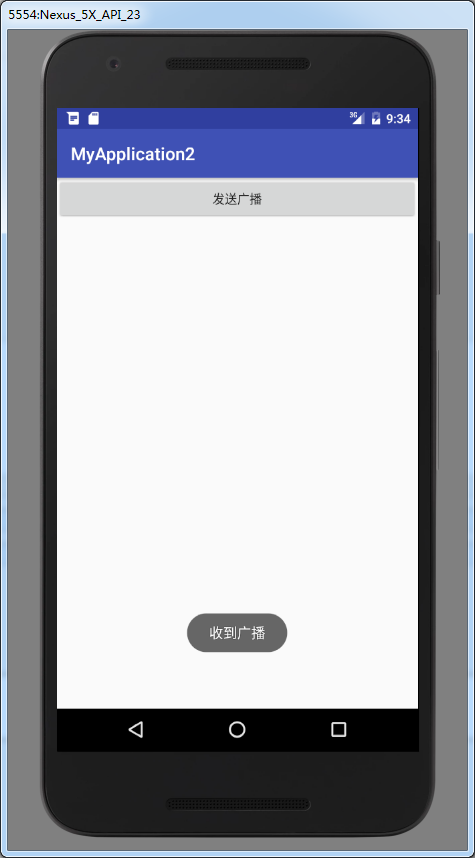
【效果】点击
二、项目二【发送有序广播】
【步骤】
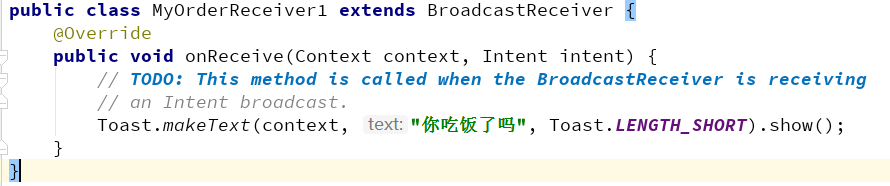
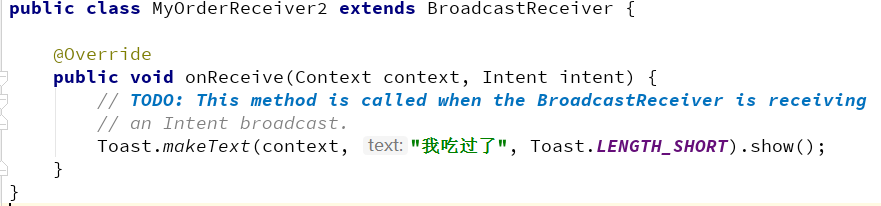
①定义三个广播接收者,观察顺序
②添加按钮点击
③设置intent,发送有序广播
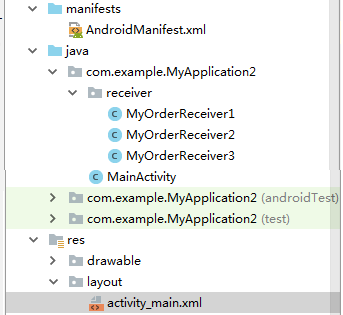
【项目结构】
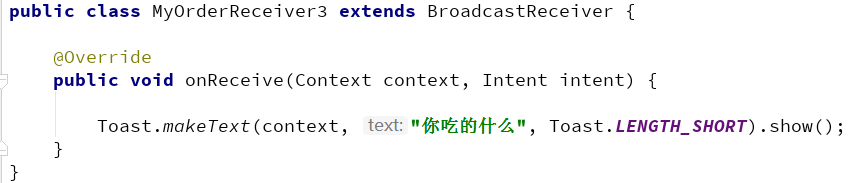
【定义三个广播接收者并注册】
 <receiver

             android:name=".receiver.MyOrderReceiver1"

             android:enabled="true"

             android:exported="true">

             <intent-filter android:priority="1000">

                 <action android:name="com.example.MyApplication2.myreceiver" />

             </intent-filter>

         </receiver>

         <receiver

             android:name=".receiver.MyOrderReceiver2"

             android:enabled="true"

             android:exported="true">

             <intent-filter android:priority="100">

                 <action android:name="com.example.MyApplication2.myreceiver" />

             </intent-filter>

         </receiver>

         <receiver

             android:name=".receiver.MyOrderReceiver3"

             android:enabled="true"

             android:exported="true">

             <intent-filter android:priority="10">

                 <action android:name="com.example.MyApplication2.myreceiver" />

             </intent-filter>

         </receiver>
【提示】设置priority为不同的值,action name为相同的,接收同一个广播
【MainActivity】
         btn2 = findViewById(R.id.btn2);

         btn2.setOnClickListener(new View.OnClickListener() {

             @Override

             public void onClick(View view) {

                 Intent intent = new Intent("com.example.MyApplication2.myreceiver");

                 sendOrderedBroadcast(intent,null);

             }

         });
【效果】
点击按钮执行顺序


Broadcast发送广播的更多相关文章
- 在命令行中通过adb shell am broadcast发送广播通知
通过命令行执行adb shell am broadcast发送广播通知. adb shell am broadcast 后面的参数有:[-a <ACTION>][-d <DATA_U ...
- Android通过adb shell am broadcast发送广播 参数说明
通过命令行执行adb shell am broadcast发送广播通知. adb shell am broadcast 后面的参数有: <INTENT> specifications in ...
- [AX2012]发送广播邮件
AX 2012可以使用MAPI或者SMTP发送邮件,MAPI是客户端方法,需要outlook的协作,而SMTP则是服务器端方法,要求SMTP允许AOS服务器通过它中继.这里要讲的就是如何通过SMTP发 ...
- 通过 adb命令发送广播
我们经常用到模块设备发送广播,此处记录一下: 首先进入adb 使用命令: adb shell 发送广播 例: am broadcast -a action.com.custom.broadcast.q ...
- Android应用程序发送广播(sendBroadcast)的过程分析
文章转载至CSDN社区罗升阳的安卓之旅,原文地址:http://blog.csdn.net/luoshengyang/article/details/6744448 前面我们分析了Android应用程 ...
- linux中C语言发送广播报文
2. 指令的解决方法: oute add -net 255.255.255.255 netmask 255.255.255.255 dev eth0 metric 1 或者 route add -ho ...
- Android 两种注册、发送广播的区别
前言:前面文章记录了Service的使用,这次来记录另一个四个组件之一的BroadcastReceiver.主要介绍两种发送和注册广播的区别. BroadcastReceiver广播接收者用于接收系统 ...
- Ordered Broadcast有序广播
sendBroadcast()发生无序广播 sendOrderedBroadcast()发送有序广播 activity_main.xml <LinearLayout xmlns:android= ...
- Angular发送广播和接收广播
home.module.ts import {BroadcastService} from "../broadcast.service"; @NgModule({ imports: ...
随机推荐
- [Swift]LeetCode129. 求根到叶子节点数字之和 | Sum Root to Leaf Numbers
Given a binary tree containing digits from 0-9 only, each root-to-leaf path could represent a number ...
- Linux 下源码编译FFMEG
目录 1. 安装依赖关系 2. 源码安装 yasm 3. 源码安装 NASM 4. 源码安装libx264 5. 源码安装x265 6. 源码安装 libmp3lame 7. 源码安装 libopus ...
- 『sumdiv 数学推导 分治』
sumdiv(POJ 1845) Description 给定两个自然数A和B,S为A^B的所有正整数约数和,编程输出S mod 9901的结果. Input Format 只有一行,两个用空格隔开的 ...
- Android Studio升级到3.1.4后打开旧项目警告:The `android.dexOptions.incremental` property is deprecated and it has no effect on the build process.
现象截图 问题原因&解决方案 在build.gralde中,对Android开发过程中突破的方法数的限制,做了如下解决配置: dexOptions { incremental true jav ...
- .NET代码树执行时间计时器
有很多时候我们需要对代码不同段计算一个执行时间,并希望通过节点树的方式表达现每段代码的执行时长.在.Net下似乎找不到这样一个功能类,所以花了一些时间实现这样一个代码运行计时器.首先看一下简单的需求. ...
- 封装cookie设置和获取的简易方法
(function() { var tool = { expires: "expires", // 过期时间expires path: "path", // 路 ...
- 【漫画】以后在有面试官问你平衡(AVL)树,你就把这篇文章扔给他。
西天取经的路上,一样上演着编程的乐趣..... 1.若它的左子树不为空,则左子树上所有的节点值都小于它的根节点值. 2.若它的右子树不为空,则右子树上所有的节点值均大于它的根节点值. 3.它的左右子树 ...
- IDEA搭建Spring Boot项目
所需工具 新建项目 创建一个login控制器 写入两个注释 import导入项会自动添加@RestController@RequestMapping(value = "/login" ...
- leetcode — populating-next-right-pointers-in-each-node
/** * * Source : https://oj.leetcode.com/problems/populating-next-right-pointers-in-each-node/ * Sou ...
- 补习系列(2)-springboot mime类型处理
目标 了解http常见的mime类型定义: 如何使用springboot 处理json请求及响应: 如何使用springboot 处理 xml请求及响应: http参数的获取及文件上传下载: 如何获得 ...