
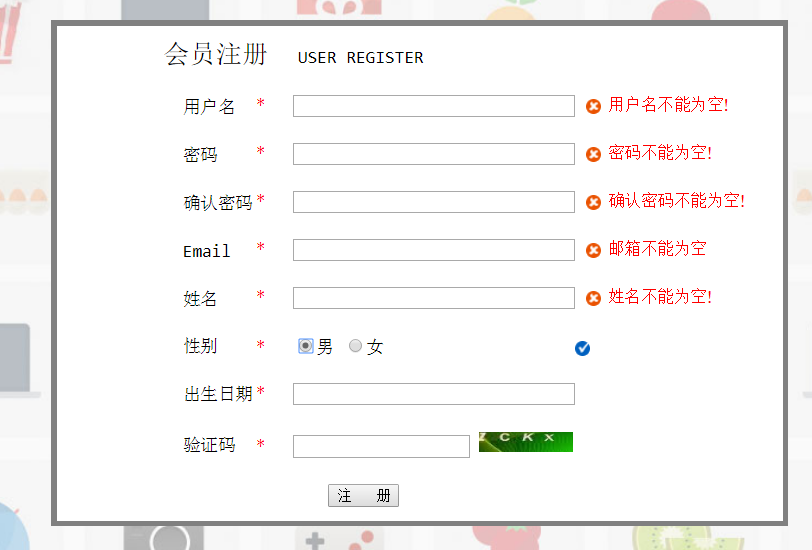
JQuery之validate入门
<!DOCTYPE html>
<html>
<head>
<meta charset="UTF-8">
<title>网站注册页面</title>
<style>
#contanier{
border: 0px solid white;
width: 1300px;
margin: auto;
} #top{
border: 0px solid white;
width: 100%;
height: 50px;
}
#menu{
border: 0px solid white;
height: 40px;
background-color: black;
padding-top: 10px;
margin-bottom: 15px;
margin-top: 10px;
}
.top{
border: 0px solid white;
width: 405px;
height: 100%;
float: left;
padding-left: 25px;
}
#top1{
padding-top: 15px;
}
#bottom{
margin-top: 13px;
text-align: center;
} #form{
height: 500px;
padding-top: 70px;
background-image: url(../img/regist_bg.jpg);
margin-bottom: 10px;
}
a{
text-decoration: none;
} label.error{
background:url(../img/unchecked.gif) no-repeat 10px 3px;
padding-left: 30px;
font-family:georgia;
font-size: 15px;
font-style: normal;
color: red;
} label.success{
background:url(../img/checked.gif) no-repeat 10px 3px;
padding-left: 30px;
} #father{
border: 0px solid white;
padding-left: 307px;
} #form2{
border: 5px solid gray;
width: 660px;
height: 450px;
} </style>
<script type="text/javascript" src="../js/jquery-1.11.0.min.js" charset="UTF-8"></script>
<script type="text/javascript" src="../js/jquery.validate.min.js" charset="UTF-8"></script>
<script type="text/javascript" src="../js/messages_zh.js" charset="UTF-8"></script>
<script>
$(function() {
$("#registForm").validate({
rules:{
user:{
required:true,
minlength:3
},
password:{
required:true,
digits: true,
minlength:6
},
repassword:{
required:true,
equalTo: "[name='password']"
},
email:{
required:true,
email: true
},
username:{
required:true,
minlength:3,
maxlength:5
},
sex: {
required: true
}
},
messages:{
user:{
required:"用户名不能为空!",
minlength:"用户名不得少于3位!"
},
password:{
required:"密码不能为空!",
digits: "密码必须是数字",
minlength:"密码不能少于6位"
},
repassword:{
required:"确认密码不能为空!",
equalTo: "两次输入密码不一致!"
},
email:{
required:"邮箱不能为空",
email: "邮箱格式不支持"
},
username:{
required:"姓名不能为空!",
minlength:"姓名不得少于3位!",
maxlength:"姓名不超过5位!"
},
sex: {
required: "性别必须勾选!"
}
},
errorElement: "label", //用来创建错误提示信息标签
success: function(label) { //验证成功后的执行的回调函数
//label指向上面那个错误提示信息
label.text(" ") //清空错误提示信息
.addClass("success"); //加上自定义success类
}
});
});
</script>
</head>
<body>
<div id="contanier">
<div id="top">
<div class="top">
<img src="../img/logo2.png" height="47px"/>
</div>
<div class="top">
<img src="../img/header.png" height="45px" />
</div>
<div class="top" id="top1">
<a href="#">登录</a>
<a href="#">注册</a>
<a href="#">购物车</a>
</div>
</div>
<div id="menu">
<a href="#"><font size="5" color="white">首页</font></a>
<a href="#"><font color="white">电脑办公</font></a>
<a href="#"><font color="white">手机数码</font></a>
<a href="#"><font color="white">鞋靴箱包</font></a>
</div>
<div id="form">
<form action="#" method="get" id="registForm">
<div id="father">
<div id="form2">
<table border="0px" width="100%" height="100%" align="center" cellpadding="0px" cellspacing="0px" bgcolor="white">
<tr>
<td colspan="2" >
<font size="5">会员注册</font> USER REGISTER
</td>
</tr>
<tr>
<td width="180px">
<label for="user" >用户名</label>
</td>
<td>
<em style="color: red;">*</em> <input type="text" name="user" size="35px" id="user"/>
</td>
</tr>
<tr>
<td>
密码
</td>
<td>
<em style="color: red;">*</em> <input type="password" name="password" size="35px" id="password" />
</td>
</tr>
<tr>
<td>
确认密码
</td>
<td>
<em style="color: red;">*</em> <input type="password" name="repassword" size="35px"/>
</td>
</tr>
<tr>
<td>
</td>
<td>
<em style="color: red;">*</em> <input type="text" name="email" size="35px" id="email"/>
</td>
</tr>
<tr>
<td>
姓名
</td>
<td>
<em style="color: red;">*</em> <input type="text" name="username" size="35px"/>
</td>
</tr>
<tr>
<td>
性别
</td>
<td>
<span style="margin-right: 155px;">
<em style="color: red;">*</em> <input type="radio" name="sex" value="男"/>男
<input type="radio" name="sex" value="女"/>女<em></em>
</span>
<label for="sex" class="error" style="display: none;"></label>
</td>
</tr>
<tr>
<td>
出生日期
</td>
<td>
<em style="color: red;">*</em> <input type="text" name="birthday" size="35px"/>
</td>
</tr>
<tr>
<td>
验证码
</td>
<td>
<em style="color: red;">*</em> <input type="text" name="yanzhengma" />
<img src="../img/yanzhengma.png" style="height: 18px;width: 85px;"/>
</td>
</tr>
<tr>
<td colspan="2">
<input type="submit" value="注 册" height="50px"/>
</td>
</tr>
</table>
</div>
</div>
</form>
</div>
</div>
</body>
</html>
JQuery之validate入门的更多相关文章
- 基于jQuery的Validate表单验证
表单验证可以说在前端开发工作中是无处不在的~ 有数据,有登录,有表单, 都需要前端验证~~ 而我工作中用到最多的就是基于基于jQuery的Validate表单验证~ 就向下面这样~ 因为今天有个朋 ...
- jquery插件开发基础入门
jquery插件开发基础入门 入门 编写一个jquery插件开始于给jquery.fn加入新的功能属性,此处添加的对象属性的名称就是你的插件名称 jQuery.fn,myPlugin = functi ...
- 简单地使用jquery的validate
简单地使用jquery的validate ——@梁WP 摘要:本文通过一个很简单的例子,讲解了jquery validate的最基础使用方式. 一.源代码 注意事项都写在代码的注释里了,哈哈. < ...
- jquery插件-validate
1.引入js,css 下载地址:http://plugins.jquery.com/validate/ 2.设置验证规则:input的class添加以下验证属性 3.设置不符合规则的提示信息:添加da ...
- 使用jquery插件validate制作的表单验证案例
<!DOCTYPE html> <html lang="en"> <head> <meta charset="UTF-8&quo ...
- jQuery validate入门
<html> <head> <meta charset="utf8"></meta> </head> <body& ...
- jQuery校验validate详解(转)
jQuery校验 官网地址:http://bassistance.de/jquery-plugins/jquery-plugin-validation 一导入js库 <script src=&q ...
- jquery的validate.js 和 form.js 的使用方法
在使用 Jquery 的方法的验证并且修改 原Form 表单的提交方式的时候,需要引用的文件有 <script type="text/javascript" src=&quo ...
- JQuery插件validate的Remote使用
JQuery.validate.js 在表单验证中经常使用,初学,对于其中Remote的使用说明一下. 1. 基本解释 JQuery主要用于DOM树和CSS树的检索和后面的操作的一套方法,JQuery ...
随机推荐
- HDU 5642 King's Order dp
题目链接: http://acm.hdu.edu.cn/showproblem.php?pid=5642 King's Order Accepts: 381 Submissions: 1361 ...
- Spring学习(七)——增强类
Spring 切点 什么是切点?切点(Pointcut),每个程序类都拥有多个连接点,如一个拥有两个方法的类,这两个方法都是连接点,即连接点是程序类中客观存在的事物.但在这为数从多的连接点中,如何定位 ...
- C#高级编程 (第六版) 学习 第三章:对象和类型
第三章 对象和类型 1,类和结构 类存储在托管堆上 结构存储在堆栈上 2,类成员 类中的数据和函数称为类成员 数据成员 数据成员包括了字段.常量和事件 函数成员 方法:与某个类相关的函数,可以 ...
- 复利计算C语言转java的相关代码
static void principal()// 计算本金 { int N, m; double i, F, P; System.out.printf("复利终值:"); F = ...
- eclipse中jsp页面Invalid location of tag 解决办法分析小结
在jsp页面使用标签过程中有时候不注意规则的话,eclipse会提示一些错误,下面针对这些错误提出相应的解决办法: <form></form>标签 1. Invalid loc ...
- HttpHandler与HttpModule的理解与应用
问题1:什么是HttpHandler? 问题2:什么是HttpModule? 问题3:什么时候应该使用HttpHandler什么时候使用HttpModule? 答案1:HttpHandler,Http ...
- 动态Lambda表达式打印HelloWorld
最近在用C#与数据库打交道.开发过程中采用了ORM模型(以前是纯sql玩法,复杂的逻辑用存储过程做). 为了能通过配置文件动态地查询字段,也就是说需要能这样写: db.AsQuery<T> ...
- Catalan数,括号序列和栈
全是入门的一些东西.基本全是从别处抄的. 栈: 支持单端插入删除的线性容器. 也就是说,仅允许在其一端加入一个新元素或删除一个元素. 允许操作的一端也叫栈顶,不允许操作的一端也叫栈底. 数个箱子相叠就 ...
- Now or later UVALive - 3211(2-SAT 最小值最大化)
emmm...去吃早饭了... rujia讲的很好.. 最小值最大化问题,,,二分枚举答案 设x1.x2为同一个集合中的元素,y1.y2为另一个集合中的元素,如果x1与y1之差小于mid,那么如果 ...
- Java操作excel(POI)
由于在项目中使用了将excel数据导入到数据库.在这里分享一下. 这里使用的POI方式,支持两种格式(xls,xlsx) package com.entity; import java.io.File ...