
[Vue]组件——插槽:slot(匿名插槽,具名插槽)与slot-scope(作用域插槽)
v-slot 指令自 Vue 2.6.0 起被引入,提供更好的支持 slot 和 slot-scope 特性的 API 替代方案:https://cn.vuejs.org/v2/guide/components-slots.html
1.单个插槽 | 匿名插槽
1.1<navigation-link> 子组件定义为:
<a v-bind:href="url" class="nav-link">

  <slot></slot>

</a>
1.2父组件像以下这样使用<navigation-link>子组件:
<navigation-link url="/profile">

  Your Profile

</navigation-link>
1.3渲染出来的 HTML 将会是:
<a v-bind:href="url" class="nav-link">

  Your Profile

</a>
2.具名插槽
需要多个插槽时,可以利用<slot> 元素的一个特殊的特性:name来定义具名插槽
2.1<base-layout>子组件模板定义:
<div class="container">

  <header>

    <slot name="header"></slot>

  </header>

  <main>

    <slot></slot>

  </main>

  <footer>

    <slot name="footer"></slot>

  </footer>

</div>
2.2.1父组件使用子组件<base-layout>,节点上使用slot特性:
<base-layout>

  <h1 slot="header">Here might be a page title</h1>

  <p>A paragraph for the main content.</p>

  <p>And another one.</p>

  <p slot="footer">Here's some contact info</p>

</base-layout>
2.2.2也可在内容外层套一个节点,并在外层节点上使用slot特性:
<base-layout>

  <template slot="header">

    <h1>Here might be a page title</h1>

  </template>

  <p>A paragraph for the main content.</p>

  <p>And another one.</p>

  <template slot="footer">

    <p>Here's some contact info</p>

  </template>

</base-layout>
2.3渲染出来的 HTML 都将会是:
<div class="container">

  <header>

    <h1>Here might be a page title</h1>

  </header>

  <main>

    <p>A paragraph for the main content.</p>

    <p>And another one.</p>

  </main>

  <footer>

    <p>Here's some contact info</p>

  </footer>

</div>
3.作用域插槽——带数据的插槽
单个插槽和具名插槽中插槽上不绑定数据,所以父组件提供的模板既要包括样式又要包括数据,而作用域插槽是子组件提供数据,父组件只需要提供一套样式
3.1子组件:
<template>

  <div class="child">

    <h3>这里是子组件</h3>

    // 作用域插槽

    <slot  :data="data"></slot>

  </div>

</template>

 export default {

    data: function(){

      return {

        data: ['zhangsan','lisi','wanwu','zhaoliu','tianqi','xiaoba']

      }

    }

}
3.2父组件:
<template>

  <div class="father">

    <h3>这里是父组件</h3>

    <!--第一次使用:用flex展示数据-->

    <child>

      <template slot-scope="user">

        <div class="tmpl">

          <span v-for="item in user.data">{{item}}</span>

        </div>

      </template>

    </child>

    <!--第二次使用:用列表展示数据-->

    <child>

      <template slot-scope="user">

        <ul>

          <li v-for="item in user.data">{{item}}</li>

        </ul>

      </template>

    </child>

    <!--第三次使用:直接显示数据-->

    <child>

      <template slot-scope="user">

       {{user.data}}

      </template>

    </child>

    <!--第四次使用:不使用其提供的数据, 作用域插槽退变成匿名插槽-->

    <child>

      我就是模板

    </child>

  </div>

</template>
3.3结果如图:
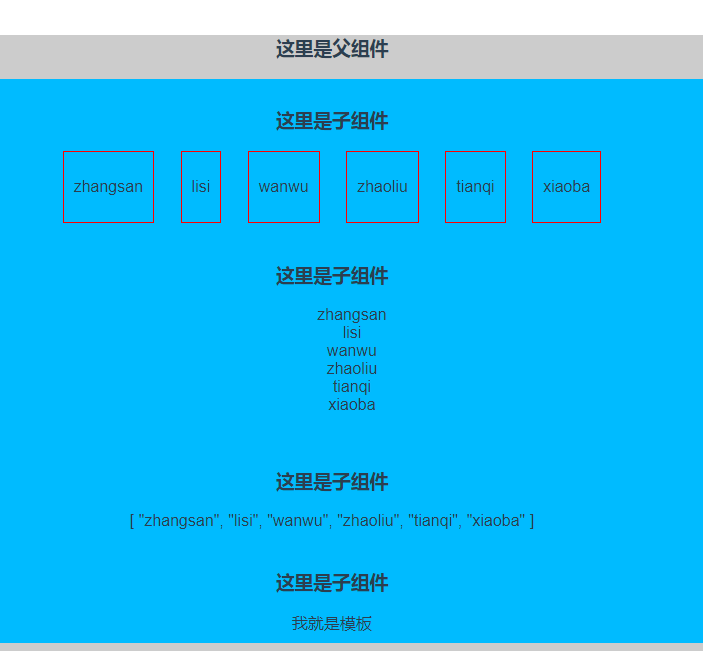
匿名插槽和具名插槽详情见:https://cn.vuejs.org/v2/guide/components-slots.html#作用域插槽
作用域插槽详情见:https://segmentfault.com/a/1190000013277423
[Vue]组件——插槽:slot(匿名插槽,具名插槽)与slot-scope(作用域插槽)的更多相关文章
- Vue组件-使用插槽分发内容
在使用组件时,我们常常要像这样组合它们: <app> <app-header></app-header> <app-footer></app-fo ...
- Vue基础-作用域插槽-列表组件
Vue 测试版本:Vue.js v2.5.13 Vue 官网介绍作用域插槽时, 在 2.5.0+,slot-scope 能被用在任意元素或组件中而不再局限于 <template>. 作用域 ...
- Vue 组件3 作用域插槽
作用域插槽是一种特殊类型的插槽,用作使用一个(能够传递数据到)可重用模板替换已渲染元素. 在子组件中,只需将数据传递到插槽,就像你将props传递给组件一样: <div class=" ...
- Vue.js 源码分析(二十六) 高级应用 作用域插槽 详解
普通的插槽里面的数据是在父组件里定义的,而作用域插槽里的数据是在子组件定义的. 有时候作用域插槽很有用,比如使用Element-ui表格自定义模板时就用到了作用域插槽,Element-ui定义了每个单 ...
- 新版vue作用域插槽的使用
2.6开始,作用域插槽的使用有了不同的地方: 作用域插槽的个人理解就是让子组件的数据可以在父组件中使用: 也是一个数据传递的方式了: 不多说,上代码 子组件定义一个插槽,并且定义一个需要传递到父组件 ...
- vue组件-使用插槽分发内容(slot)
slot--使用插槽分发内容(位置.槽口:作用: 占个位置) 官网API: https://cn.vuejs.org/v2/guide/components.html#使用插槽分发内容 使用组件时,有 ...
- 三、深入Vue组件——Vue插槽slot、动态组件
一.插槽slot() 1.1简单插槽slot [功能]用于从父组件中,通过子组件写成双标签,向子组件中放入自定的内容 parent.vue [1]首先把child写成双标签样式,把要插入的内容放双标签 ...
- 8.Vue组件三---slot插槽
主要内容: 1. 什么是插槽 2. 组件的插槽 3. 插槽的使用方法 4. 插槽的具名 5. 变量的作用域 6. slot的作用域 一. 什么是插槽呢? 1. 生活中的插槽有哪些呢? usb插槽, ...
- vue组件---插槽
(1)插槽内容 Vue 实现了一套内容分发的 API,这套 API 的设计灵感源自 Web Components 规范草案,将 <slot> 元素作为承载分发内容的出口. 在父级组件里可以 ...
随机推荐
- Linux下修改.bash_profile 文件改变PATH变量的值
Linux中含有两个重要的文件 /etc/profile和$HOME/.bash_profile 每当系统登陆时都要读取这两个文件,用来初始化系统所用到的变量,其中/etc/profile是超级用户所 ...
- django xadmin的全局配置
在adminx.py中增加 class BaseSetting(object): enable_themes = True use_bootswatch = True class GlobalSett ...
- 工作笔记-javascript-网络层封装
/** * @Author Mona * @Date 2016-12-08 * @description 网络层封装 */ /** * 封装基本请求方式 */ window.BaseRequest = ...
- Java并发编程实战4章
第4章主要介绍如何构造线程安全类. 在设计线程安全类的过程中,需要包含以下三个基本要素: 找出构成对象状态的所有变量. 找出约束状态变量的不变性条件. 建立对象状态的并发访问管理策略. 构造线程安全类 ...
- 【android】使用RecyclerView和CardView,实现知乎日报精致布局
完整代码,请参考我的博客园客户端,git地址:http://git.oschina.net/yso/CNBlogs 在写博客园客户端的时候,突然想到,弄个知乎日报风格的简单清爽多好!不需要那么多繁杂的 ...
- cocos2d: fullPathForFilename: No file found at /cc_2x2_white_image. Possible missing file.
程序运行的时候输出这条信息cocos2d: fullPathForFilename: No file found at /cc_2x2_white_image. Possible missing fi ...
- 什么是Socket?简单点,通俗易懂的?
网络上的两个程序通过一个双向的通信连接实现数据的交换,这个连接的一端称为一个socket. 建立网络通信连接至少要一对端口号(socket).socket本质是编程接口(API),对TCP/IP的封装 ...
- RabbitMQ学习之(三)_Centos6下RabbitMQ PHP扩展的安装
安装rabbitmq-c依赖包 yum install libtool autoconf 下载安装rabbitmq-c wget https://github.com/alanxz/rabbitmq- ...
- MVC中 关于退出按钮的写法
public ActionResult Logoff() { Session.Abandon(); Session.Clear(); FormsAuthentication.SignOut(); re ...
- spring数据源、数据库连接池
什么是数据源.数据库连接池? DataSource通常被称为数据源,它包含连接池和连接池管理两个部分,习惯上也经常把DataSource称为连接池. 数据库连接池的基本思想:为数据库连接建立一个“缓冲 ...