
vue组件---插槽
(1)插槽内容
Vue 实现了一套内容分发的 API,这套 API 的设计灵感源自 Web Components 规范草案,将 <slot> 元素作为承载分发内容的出口。
在父级组件里可以这样写
    <div class="slot_area">

        <navigation-link v-bind:url="url">

            Your Profile你的个人简介资料

        </navigation-link>

    </div>
然后在 <navigation-link> 组件模板中:
        Vue.component('navigation-link',{

            props:['url'],

            template:`<a v-bind:href="url" class="nav-link">

                        <span class="slot_span"></span>

                        <slot></slot>

                    </a>`

        });
new Vue({
el:'.slot_area',
data:{
url:'http://www.baidu.com'
}
})
当组件渲染的时候,<slot></slot> 将会被替换为“Your Profile你的个人简介资料”。

插槽内可以包含任何模板代码,包括 HTML:
        Vue.component('navigation-link',{

            props:['url'],

            template:`<a v-bind:href="url" class="nav-link">
                        <!-- 添加一个 Font Awesome 图标 -->

                        <span class="fa fa-user"></span>

                        <slot></slot>

                    </a>`

        });

插槽也可以是其他组件
    <div class="slot_area">

        <navigation-link v-bind:url="url">

            Your Profile你的个人资料简介

            <slot-component></slot-component>

        </navigation-link>

    </div>

    <script type="text/javascript">

        Vue.component('navigation-link',{

            props:['url'],

            template:`<a v-bind:href="url" class="nav-link">

                        <!-- 添加一个 Font Awesome 图标 -->

                        <span class="slot_span"></span>

                        <slot></slot>

                    </a>`

        });

        Vue.component('slot-component',{

            template:'<h4>插槽可以是其他模板</h4>'

        })

        new Vue({

            el:'.slot_area',

            data:{

                url:'http://www.baidu.com'

            }

        })

    </script>
结果:

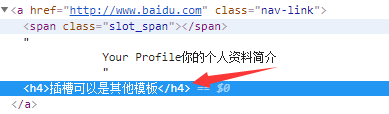
注意:如果 <navigation-link> 没有包含一个 <slot> 元素,则该组件起始标签和结束标签之间的任何内容都会被抛弃。即如果模板中没有slot插槽元素,则在父级组件里加的内容都会被抛弃。
(2)编译作用域
父组件模板内容是在父组件作用域中编译的,子组件模板内容是在子组件里编译的。
先来个简单的案例:
<parent-scrop>
    {{message}}
</parent-scrop>
Vue.component('parent-scrop',{

    template:`<div>

                子组件模板内容

                <slot></slot>

            </div>`

});

new Vue({

    el:".parent_scrop",

    data:{

        message:"父组件模板内容"

    }

});
这里的message就是一个slot,但是其绑定的是父组件的数据,而不是子组件模板的数据。
再来看个案例:
    <div class="parent_scrop">

        <parent-scrop v-show="showStatus"></parent-scrop>

    </div>

    Vue.component('parent-scrop',{

        template:`<div>

                    子组件模板内容

                </div>`

    });

    new Vue({

        el:".parent_scrop",

        data:{

            showStatus:true

        }

    })
这里的showStatus绑定的是父级组件的数据,如果想在子级组件上绑定,应该是
    <div class="parent_scrop">

        <parent-scrop></parent-scrop>

    </div>

    Vue.component('parent-scrop',{

        template:`<div v-show="showStatus">

                    子组件模板内容

                </div>`,

        data:function(){

            return {

                showStatus:false

            }

        }

    });

    new Vue({

        el:".parent_scrop"

    })
结果:
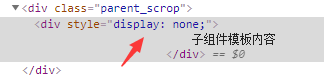
因此,slot分发的内容,作用域是在父组件上的。
(3)slot用法
①单个slot
在子组件内使用特殊的<slot>元素就可以为这个子组件开启一个slot(插槽),在父组件模板里,插入在父组件标签内的所有内容都将替代子组件的<slot>标签及它的内容。
demo1:
    <div class="single_slot">

        <single-slot></single-slot>

    </div>

        Vue.component('single-slot',{

            template:`

                    <div>

                        <slot>

                            <p>如果父组件没有插入内容,将会作为默认值出现</p>

                        </slot>

                    </div>

            `

        });

        new Vue({

            el:".single_slot"

        })
结果:

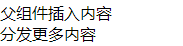
demo2:父组件插入内容
    <div class="single_slot">

        <single-slot>

            <p>父组件插入内容</p>

            <p>分发更多内容</p>

        </single-slot>

    </div>

        Vue.component('single-slot',{

            template:`

                    <div>

                        <slot>

                            <p>如果父组件没有插入内容,将会作为默认值出现</p>

                        </slot>

                    </div>

            `

        });

        new Vue({

            el:".single_slot"

        })
结果:

(4)后备内容/备用内容
结合上例,<single-slot>模板里定义了<slot>元素,并用了<p>作为默认内容。在父组件没有使用slot即未插入内容时,会渲染这段默认文本;如果写入了slot,那么就会替换整个<slot>。
注意:子组件<slot>中的后备内容,其作用域是子组件本身。
(5)具名插槽
给<slot>元素指定一个name后,可以分发多个内容,具名插槽可以与单个插槽共存。
用法简单demo1:
父级组件里:

<solt-area>

    <h2 slot="header">标题</h2>

    <p slot="footer">底部</p>

</slot-area>

子级模板里:

Vue.component('slot-area',{

    template:`

            <div class="main_area">

                    <div class="header"><slot name="header"></slot></div>

                    <div class="footer"><slot name="footer"></slot></div>

            </div>

          `

})
demo2:
    <!-- 具名slot -->

    <div class="slot_name">

        <slot-name>

            <h2 slot="header">文章标题</h2>

            <p>内容展示区域1,文章具体内容1... ...</p>

            <p>内容展示区域2,文章具体内容2... ...</p>

            <p slot="footer">作者:Tony 发布日期:2020.6.</p>

        </slot-name>

    </div>

    <style type="text/css">

        .main_area{

            padding: 20px;

            background-color: rgba(,,,0.1);

        }

        .main_area h2{

            margin: 10px ;

            text-align: center;

        }

        .main_area .footer{

            text-align: right;

            font-weight: ;

            margin: 10px ;

        }

        .main_area .main{

            padding: 10px;

            background-color: rgba(,,,.);

        }

    </style>

        /* 3、具名slot */

        Vue.component('slot-name',{

            template:`

                <div class="main_area">

                    <div class="header"><slot name="header"></slot></div>

                    <div class="main"><slot></slot></div>

                    <div class="footer"><slot name="footer"></slot></div>

                </div>

            `

        })

        new Vue({

            el:".slot_name"

        })
结果:
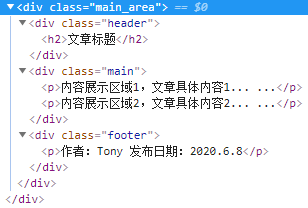

子组件里声明了3个<slot>元素,其中在<div class="main"></div>内的slot没有使用name特性,所以他将作为默认slot出现,父组件里没有使用slot特性的元素与内容都将出现在这里。
如果没有指定默认的匿名slot,父组件里多余的内容片段都将会被抛弃。在组合使用组件时,内容分发API至关重要。
注意:自2.6.0开始有所跟新,将原先的slot方法更新为v-slot 指令即
    <div class="slot_name">

        <slot-name>

            <template v-slot:header>

                <h2>文章标题</h2>

            </template>

            <template v-slot:default>

                <p>内容展示区域1,文章具体内容1... ...</p>

                <p>内容展示区域2,文章具体内容2... ...</p>

            </template>

            <template v-slot:footer>

                <p>作者:Tony 发布日期:2020.6.8</p>

            </template>

        </slot-name>

    </div>
现在 <template> 元素中的所有内容都将会被传入相应的插槽。任何没有被包裹在带有 v-slot 的 <template> 中的内容都会被视为默认插槽的内容。然而,如果你希望更明确一些,仍然可以在一个 <template> 中包裹默认插槽的内容,如上所示v-slot:default。
(6)作用域插槽
正常情况下,父级组件的插槽内容无法访问子级模板中的数据,例如
    <div class="scrop_slot">

        <scrop-slot>

            姓:{{user.firstName}},名:{{user.lastName}}

        </scrop-slot>

    </div>

        /* 4、作用域插槽 */

        Vue.component('scrop-slot',{

            template:`

                    <div class="show_area">

                        <slot>

                            <p>姓:{{user.firstName}},名:{{user.lastName}}</p>

                        </slot>

                    </div>

                    `,

            data:function(){

                return {

                    user:{firstName:"邓",lastName:"超"}

                };

            }

        })

        new Vue({

            el:".scrop_slot"

        })

        /* 4、作用域插槽 */
此时,控制台会出现报错提示

为了让 user 在父级的插槽内容可用,我们可以将 user 作为一个 <slot> 元素的特性绑定上去:
<slot v-bind:user="user">

        <p>姓:{{user.firstName}},名:{{user.lastName}}</p>

</slot>
绑定在 <slot> 元素上的特性被称为插槽 prop。现在在父级作用域中,我们可以给 v-slot 带一个值来定义我们提供的插槽 prop 的名字:
    <div class="scrop_slot">

        <scrop-slot v-slot:default="slotDefault">

            <template>

                姓:{{slotDefault.user.firstName}},名:{{slotDefault.user.lastName}}

            </template>

        </scrop-slot>

    </div>
在这个例子中,选择将包含所有插槽 prop 的对象命名为 slotProps,也可以使用任意你喜欢的名字。
(7)独占默认插槽的缩写语法
    <div class="scrop_slot">

        <scrop-slot v-slot:default="slotDefault">

            <template>

                姓:{{slotDefault.user.firstName}},名:{{slotDefault.user.lastName}}

            </template>

        </scrop-slot>

    </div>
在上述情况下,当被提供的内容只有默认插槽时,组件的标签才可以被当作插槽的模板来使用。这样我们就可以把 v-slot 直接用在组件上:
    <div class="scrop_slot">

        <scrop-slot v-slot:default="slotDefault">

            姓:{{slotDefault.user.firstName}},名:{{slotDefault.user.lastName}}

        </scrop-slot>

    </div>
这种写法还可以更简单。就像假定未指明的内容对应默认插槽一样,不带参数但 v-slot 被假定对应默认插槽:
    <div class="scrop_slot">

        <scrop-slot v-slot="slotDefault">

            姓:{{slotDefault.user.firstName}},名:{{slotDefault.user.lastName}}

        </scrop-slot>

    </div>
注意:注意默认插槽的缩写语法不能和具名插槽混用,因为它会导致作用域不明确。如下所示
<scrop-slot v-slot="slotDefault">

     姓:{{slotDefault.user.firstName}}

     <template v-slot:other="otherSlot">

          名:{{slotDefault.user.lastName}}

     </template>

</scrop-slot>
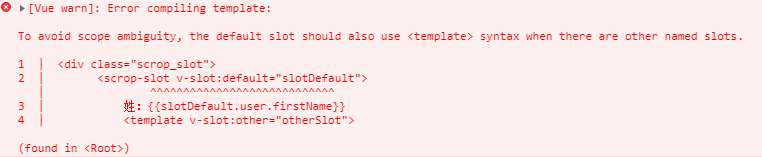
此时,控制台出现报错:译为---为避免范围模糊,当存在其他命名槽时,默认槽也应使用<template>语法。
<scrop-slot>

    <template v-slot:datault="slotDefault">

        姓:{{slotDefault.user.firstName}}

    </template>

    <template v-slot:other="otherSlot">

        名:{{otherSlot.user.lastName}}

    </template>

</scrop-slot>
只要出现多个插槽,请始终为所有的插槽使用完整的基于 <template> 的语法。
(8)解构插槽Prop
可以使用 ES2015 解构来传入具体的插槽 prop,如下:
    <div class="scrop_slot">

        <scrop-slot v-slot="{user}">

            {{user.firstName}}

        </scrop-slot>

    </div>

        Vue.component('scrop-slot',{

            template:`

                    <div class="show_area">

                        <slot v-bind:user="user">

                            <p>姓:{{user.firstName}},名:{{user.lastName}}</p>

                        </slot>

                    </div>

                    `,

            data:function(){

                return {

                    user:{firstName:"邓",lastName:"超"}

                };

            }

        })

        new Vue({

            el:".scrop_slot"

        })
这样可以使模板更简洁,尤其是在该插槽提供了多个 prop 的时候。它同样开启了 prop 重命名等其它可能,例如将 user 重命名为 person:
<scrop-slot v-slot="{user:person}">

    {{person.firstName}}

</scrop-slot>
(9)动态插槽名(待验证)
(10)具名插槽缩写
跟 v-on 和 v-bind 一样,v-slot 也有缩写,即把参数之前的所有内容 (v-slot:) 替换为字符 #。例如 v-slot:header 可以被重写为 #header:
    <div class="slot_name">

        <slot-name>

            <template #header>

                <h2>文章标题</h2>

            </template>

            <template #default>

                <p>内容展示区域1,文章具体内容1... ...</p>

                <p>内容展示区域2,文章具体内容2... ...</p>

            </template>

            <template #footer>

                <p>作者:Tony 发布日期:2020.6.</p>

            </template>

        </slot-name>

    </div>
.
vue组件---插槽的更多相关文章
- vue组件插槽
vue中子组件内容如何定义为可扩展的呢,就是用slot插槽来实现.如下图 如果<slot></slot>标签有内容,那就默认显示里面的内容,父组件传了就会覆盖此默认的内容.
- [Vue]组件——插槽:slot(匿名插槽,具名插槽)与slot-scope(作用域插槽)
1.单个插槽 | 匿名插槽 1.1<navigation-link> 子组件定义为: <a v-bind:href="url" class="nav-l ...
- vue组件插槽与编译作用域
<!DOCTYPE html> <html> <head> <title></title> </head> <script ...
- 极客时间_Vue开发实战_07.Vue组件的核心概念(3):插槽
07.Vue组件的核心概念(3):插槽 严格来的说在2.0之后已经不分区这两种插槽的概念了. 因为它底层的实现已经趋向于相同了. 2.6为了兼容2.5的版本,现在依然可以用这两种写法 作用域插槽就是多 ...
- Vue组件之作用域插槽
写作用域插槽之前,先介绍一下Vue中的slot内容分发: 如果<child-component></child-component>标签之间没有插入那两个p标签的话,页面会显示 ...
- 三、深入Vue组件——Vue插槽slot、动态组件
一.插槽slot() 1.1简单插槽slot [功能]用于从父组件中,通过子组件写成双标签,向子组件中放入自定的内容 parent.vue [1]首先把child写成双标签样式,把要插入的内容放双标签 ...
- 04 . Vue组件注册,数据交互,调试工具及组件插槽介绍及使用
vue组件 组件(Component)是 Vue.js 最强大的功能之一. 组件可以扩展 HTML 元素,封装可重用的代码. 组件系统让我们可以用独立可复用的小组件来构建大型应用,几乎任意类型的应用的 ...
- 04 . Vue组件注册,组件间数据交互,调试工具及组件插槽介绍及使用
vue组件 组件(Component)是 Vue.js 最强大的功能之一. 组件可以扩展 HTML 元素,封装可重用的代码. 组件系统让我们可以用独立可复用的小组件来构建大型应用,几乎任意类型的应用的 ...
- Vue 组件化开发之插槽
插槽的作用 相信看过前一篇组件化开发后,你对组件化开发有了新的认识. 插槽是干什么的呢?它其实是配合组件一起使用的,让一个组件能够更加的灵活多变,如下图所示,你可以将组件当作一块电脑主板,将插槽当作主 ...
随机推荐
- 1062. Talent and Virtue (25)【排序】——PAT (Advanced Level) Practise
题目信息 1062. Talent and Virtue (25) 时间限制200 ms 内存限制65536 kB 代码长度限制16000 B About 900 years ago, a Chine ...
- 【智能家居篇】wifi网络结构(下)
转载请注明出处:http://blog.csdn.net/Righthek 谢谢. 因为WIFI网络具有移动性,同一时候WIFI以无线电波作为传输媒介,这样的媒介本质上是开放的,且easy被拦截,不论 ...
- 通过uri呼起本地app
1.在Android本地app清单文件里配置 <activity android:name="com.mdj.ui.WelcomeActivity" android:scre ...
- 操作系统学习笔记:CPU调度
CPU调度的目的在于提高CPU利用率,不让CPU闲着.CPU是宝贵的资源,如果有一个进程,本来在CPU中运行,忽然因为要使用IO资源,于是转而请求IO,这边CPU挂起,造成就绪队列中的其他进程等待,这 ...
- 在ARM-linux上实现4G模块PPP拨号上网【转】
本文转载自:http://blog.csdn.net/zqixiao_09/article/details/52540887 在ARM平台上实现4G模块的PPP拨号上网,参考网上的资料和自己的理解,从 ...
- CSU 1807: 最长上升子序列~ 分类讨论
1807: 最长上升子序列~ Time Limit: 5 Sec Memory Limit: 128 MBSubmit: 138 Solved: 17[Submit][Status][Web Bo ...
- 并不对劲的[noi2006]网络收费
题目略长,就从大视野上复制了. 听上去好像费用流,然而…… ***************************表示略长的题目的分界线************************ 1495: [ ...
- 洛谷 P2312 & bzoj 3751 解方程 —— 取模
题目:https://www.luogu.org/problemnew/show/P2312 https://www.lydsy.com/JudgeOnline/problem.php?id=3751 ...
- 移动端html touch事件
诸如智能手机和平板电脑一类的移动设备通常会有一(capacitive touch-sensitivescreen),以捕捉用户的手指所做的交互.随着移动网络的发展,其能够支持越来越复杂的应用,web开 ...
- 2-4 原生小程序 - 自带组件及API
获取用户的信息有两种,一种是不需要登录的,我们只需要获取用户的头像,还有微信的名.还有一种是登录的,就是登录后台校验的,就是获取用户的openid. webview,可以内嵌一个网页,类似于原生的开发 ...