
[Vue]组件——插槽:slot(匿名插槽,具名插槽)与slot-scope(作用域插槽)
v-slot 指令自 Vue 2.6.0 起被引入,提供更好的支持 slot 和 slot-scope 特性的 API 替代方案:https://cn.vuejs.org/v2/guide/components-slots.html
1.单个插槽 | 匿名插槽
1.1<navigation-link> 子组件定义为:
<a v-bind:href="url" class="nav-link">

  <slot></slot>

</a>
1.2父组件像以下这样使用<navigation-link>子组件:
<navigation-link url="/profile">

  Your Profile

</navigation-link>
1.3渲染出来的 HTML 将会是:
<a v-bind:href="url" class="nav-link">

  Your Profile

</a>
2.具名插槽
需要多个插槽时,可以利用<slot> 元素的一个特殊的特性:name来定义具名插槽
2.1<base-layout>子组件模板定义:
<div class="container">

  <header>

    <slot name="header"></slot>

  </header>

  <main>

    <slot></slot>

  </main>

  <footer>

    <slot name="footer"></slot>

  </footer>

</div>
2.2.1父组件使用子组件<base-layout>,节点上使用slot特性:
<base-layout>

  <h1 slot="header">Here might be a page title</h1>

  <p>A paragraph for the main content.</p>

  <p>And another one.</p>

  <p slot="footer">Here's some contact info</p>

</base-layout>
2.2.2也可在内容外层套一个节点,并在外层节点上使用slot特性:
<base-layout>

  <template slot="header">

    <h1>Here might be a page title</h1>

  </template>

  <p>A paragraph for the main content.</p>

  <p>And another one.</p>

  <template slot="footer">

    <p>Here's some contact info</p>

  </template>

</base-layout>
2.3渲染出来的 HTML 都将会是:
<div class="container">

  <header>

    <h1>Here might be a page title</h1>

  </header>

  <main>

    <p>A paragraph for the main content.</p>

    <p>And another one.</p>

  </main>

  <footer>

    <p>Here's some contact info</p>

  </footer>

</div>
3.作用域插槽——带数据的插槽
单个插槽和具名插槽中插槽上不绑定数据,所以父组件提供的模板既要包括样式又要包括数据,而作用域插槽是子组件提供数据,父组件只需要提供一套样式
3.1子组件:
<template>

  <div class="child">

    <h3>这里是子组件</h3>

    // 作用域插槽

    <slot  :data="data"></slot>

  </div>

</template>

 export default {

    data: function(){

      return {

        data: ['zhangsan','lisi','wanwu','zhaoliu','tianqi','xiaoba']

      }

    }

}
3.2父组件:
<template>

  <div class="father">

    <h3>这里是父组件</h3>

    <!--第一次使用:用flex展示数据-->

    <child>

      <template slot-scope="user">

        <div class="tmpl">

          <span v-for="item in user.data">{{item}}</span>

        </div>

      </template>

    </child>

    <!--第二次使用:用列表展示数据-->

    <child>

      <template slot-scope="user">

        <ul>

          <li v-for="item in user.data">{{item}}</li>

        </ul>

      </template>

    </child>

    <!--第三次使用:直接显示数据-->

    <child>

      <template slot-scope="user">

       {{user.data}}

      </template>

    </child>

    <!--第四次使用:不使用其提供的数据, 作用域插槽退变成匿名插槽-->

    <child>

      我就是模板

    </child>

  </div>

</template>
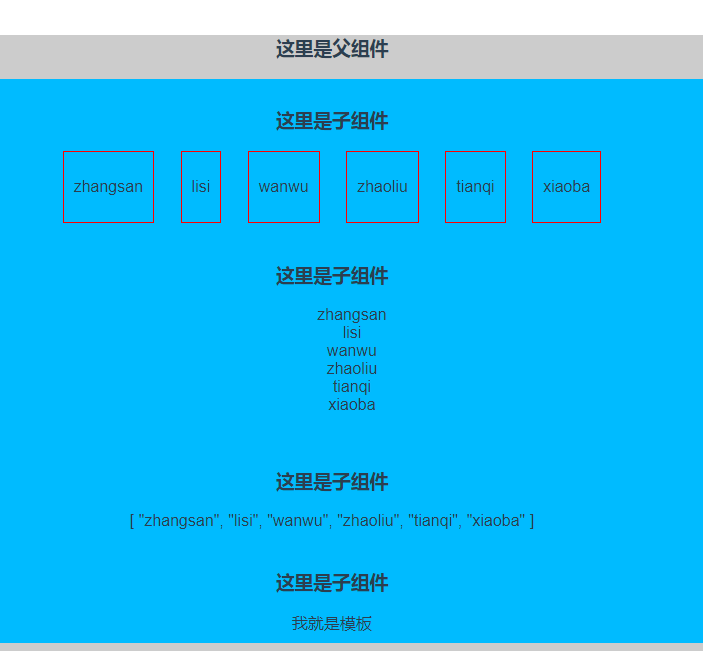
3.3结果如图:
匿名插槽和具名插槽详情见:https://cn.vuejs.org/v2/guide/components-slots.html#作用域插槽
作用域插槽详情见:https://segmentfault.com/a/1190000013277423
[Vue]组件——插槽:slot(匿名插槽,具名插槽)与slot-scope(作用域插槽)的更多相关文章
- Vue组件-使用插槽分发内容
在使用组件时,我们常常要像这样组合它们: <app> <app-header></app-header> <app-footer></app-fo ...
- Vue基础-作用域插槽-列表组件
Vue 测试版本:Vue.js v2.5.13 Vue 官网介绍作用域插槽时, 在 2.5.0+,slot-scope 能被用在任意元素或组件中而不再局限于 <template>. 作用域 ...
- Vue 组件3 作用域插槽
作用域插槽是一种特殊类型的插槽,用作使用一个(能够传递数据到)可重用模板替换已渲染元素. 在子组件中,只需将数据传递到插槽,就像你将props传递给组件一样: <div class=" ...
- Vue.js 源码分析(二十六) 高级应用 作用域插槽 详解
普通的插槽里面的数据是在父组件里定义的,而作用域插槽里的数据是在子组件定义的. 有时候作用域插槽很有用,比如使用Element-ui表格自定义模板时就用到了作用域插槽,Element-ui定义了每个单 ...
- 新版vue作用域插槽的使用
2.6开始,作用域插槽的使用有了不同的地方: 作用域插槽的个人理解就是让子组件的数据可以在父组件中使用: 也是一个数据传递的方式了: 不多说,上代码 子组件定义一个插槽,并且定义一个需要传递到父组件 ...
- vue组件-使用插槽分发内容(slot)
slot--使用插槽分发内容(位置.槽口:作用: 占个位置) 官网API: https://cn.vuejs.org/v2/guide/components.html#使用插槽分发内容 使用组件时,有 ...
- 三、深入Vue组件——Vue插槽slot、动态组件
一.插槽slot() 1.1简单插槽slot [功能]用于从父组件中,通过子组件写成双标签,向子组件中放入自定的内容 parent.vue [1]首先把child写成双标签样式,把要插入的内容放双标签 ...
- 8.Vue组件三---slot插槽
主要内容: 1. 什么是插槽 2. 组件的插槽 3. 插槽的使用方法 4. 插槽的具名 5. 变量的作用域 6. slot的作用域 一. 什么是插槽呢? 1. 生活中的插槽有哪些呢? usb插槽, ...
- vue组件---插槽
(1)插槽内容 Vue 实现了一套内容分发的 API,这套 API 的设计灵感源自 Web Components 规范草案,将 <slot> 元素作为承载分发内容的出口. 在父级组件里可以 ...
随机推荐
- 基于rman的坏块恢复
转载请注明出处 http://blog.csdn.net/guoyjoe/article/details/30965303 实验过程例如以下: 1.使用rman备份全库 Recovery Mana ...
- C的指针疑惑:C和指针13(高级指针话题)
传递命令行参数 C程序的main函数具有两个形参.第一个通常称为argc,代表命令行参数的数目. 第二个通常称为argv,它指向一组参数值.由于参数的数目并没有内在的限制,所以argv指向这组参数值( ...
- 模块讲解----shutil模块(copy、压缩、解压)
作用与功能 主要用于文件的copy,压缩,解压 导入shuitl模块: import shutil copy方法 1.shutil.copyfileobj() 打开file1,并copy写入file ...
- python - 常用模块 os, sys
常用模块: os(处理文件和目录), sys(sys 模块包含了与 Python 解释器和它的环境有关的函数.) sys.argv 变量是一个字符串的 列表.特别地,sys.argv 包含了 命令行参 ...
- idea的junit测试出现Class not found: "com.chinaums.szm.test.RouteTransProxyClientTest" Empty test suite.
- C++命名规则(转)
如果想要有效的管理一个稍微复杂一点的体系,针对其中事物的一套统一.带层次结构.清晰明了的命名准则就是必不可少而且非常好用的工具. 活跃在生物学.化学.军队.监狱.黑社会.恐怖组织等各个领域内的大量有识 ...
- Spring AOP 的实现方式(以日志管理为例)
一.AOP的概念 AOP(Aspect Oriented Programming),是面向切面编程的技术.AOP基于IoC基础,是对OOP的有益补充,流行的AOP框架有Sping AOP.Aspect ...
- Java最佳实战
1. 针对日志记录的优化:logback , 预编译形式记录日志,开发debug,生产info,访问日志和错误日志分开,异常日志输出到单独文件 2. 针对数据库连接的优化 :单例模式或数据库连接池 3 ...
- linux下多线程之pthread_detach(pthread_self())
写个碰到的问题,记录下自己的技术之路点滴pthread_detach(pthread_self())linux线程执行和windows不同,pthread有两种状态joinable状态和unjoina ...
- webservice使用方法
1,右击项目选择-->添加服务引用: 填写一个 命名空间名称; 2, 实例化 命名空间名称 ; 选择 带client的服务名称进行初始化 3,开始调用方法 // 带参数的webservice ...