
具有SSM框架的CRUD与多条件查询
概述
详细
一、功能展示
部门CRUD:
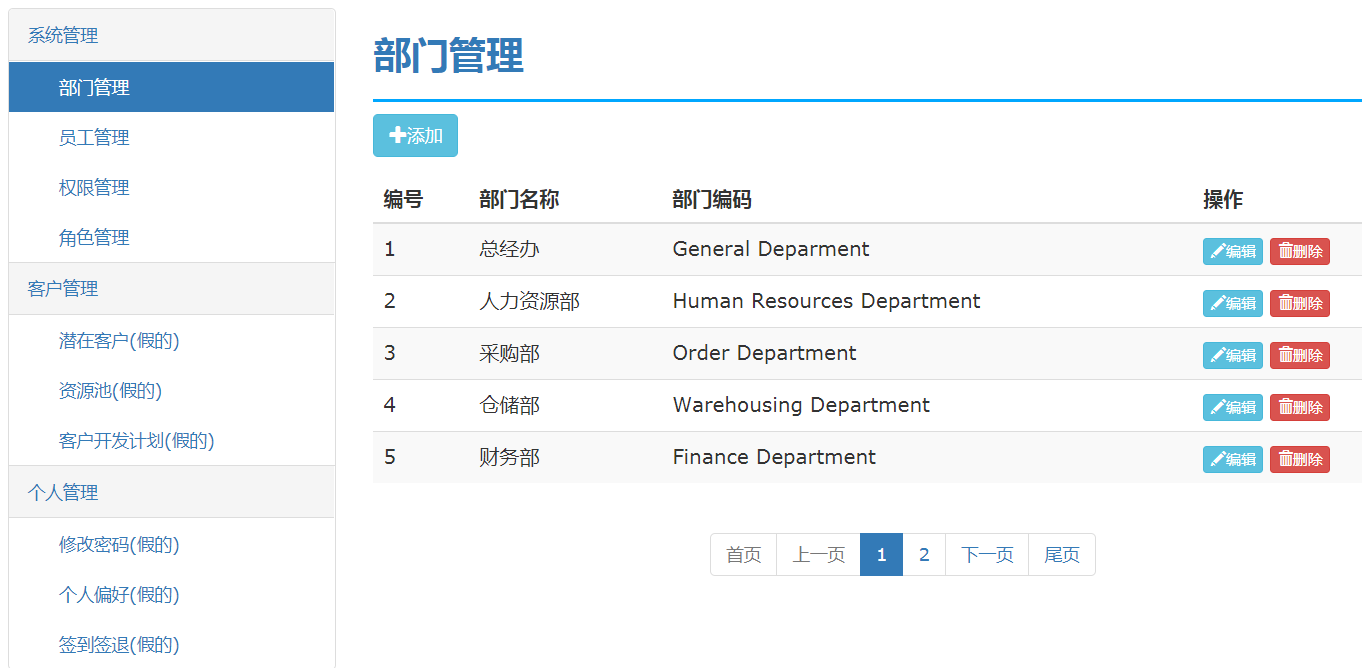
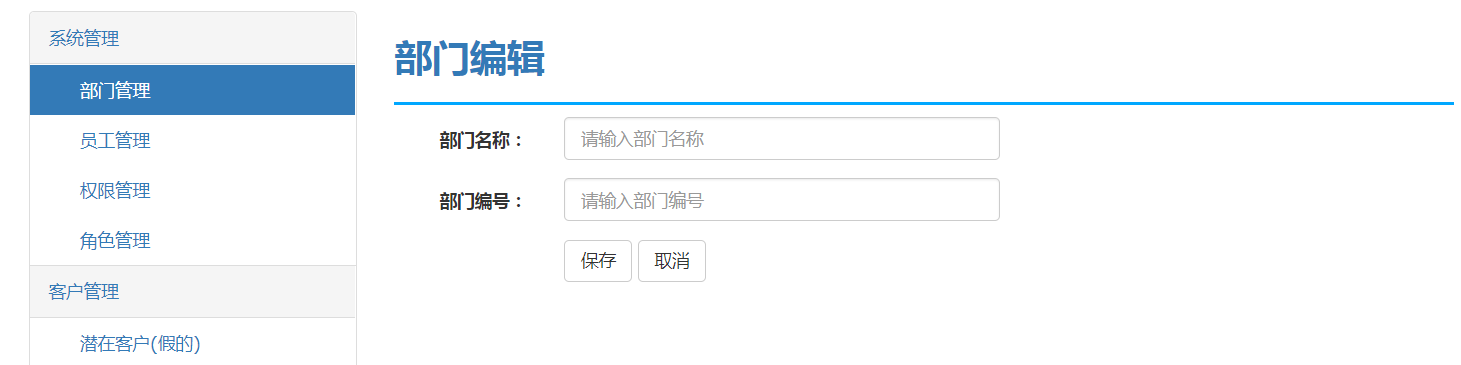
员工CRUD:
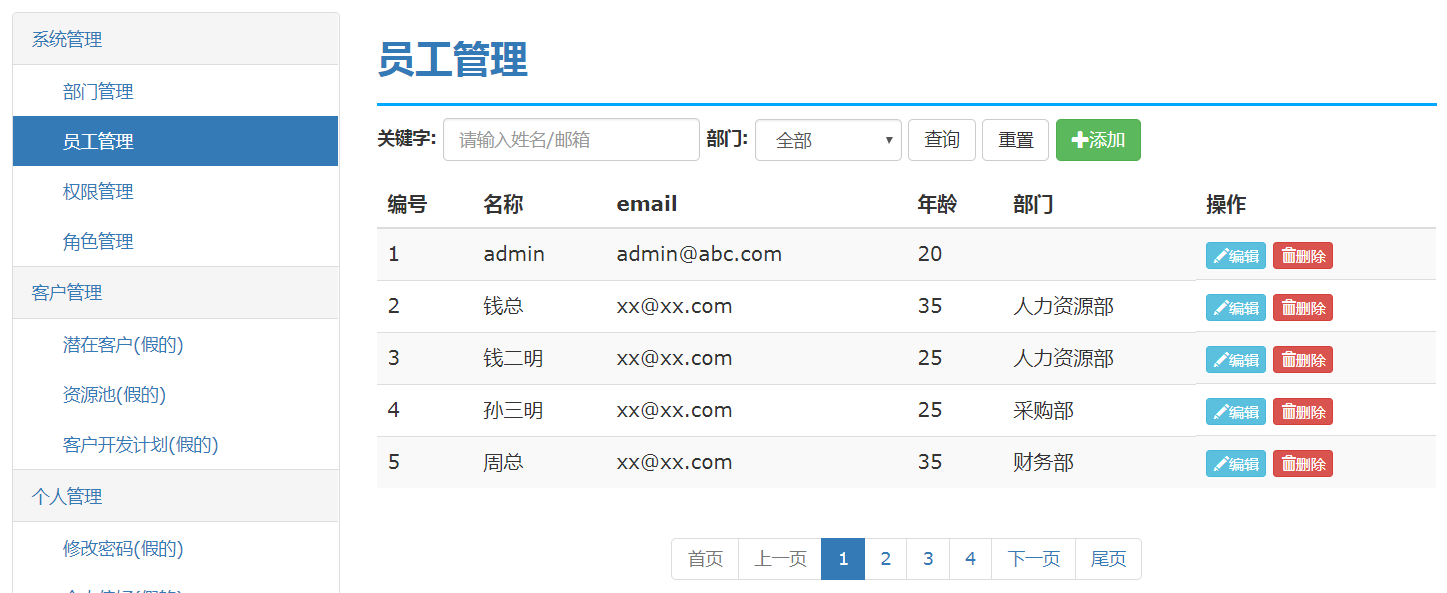
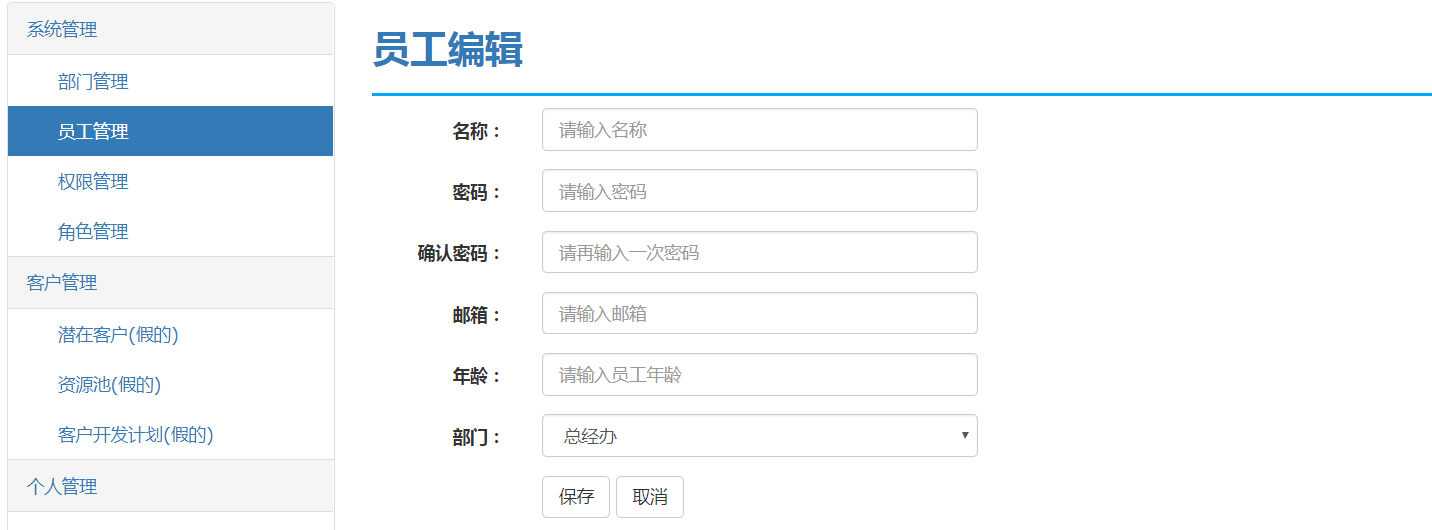
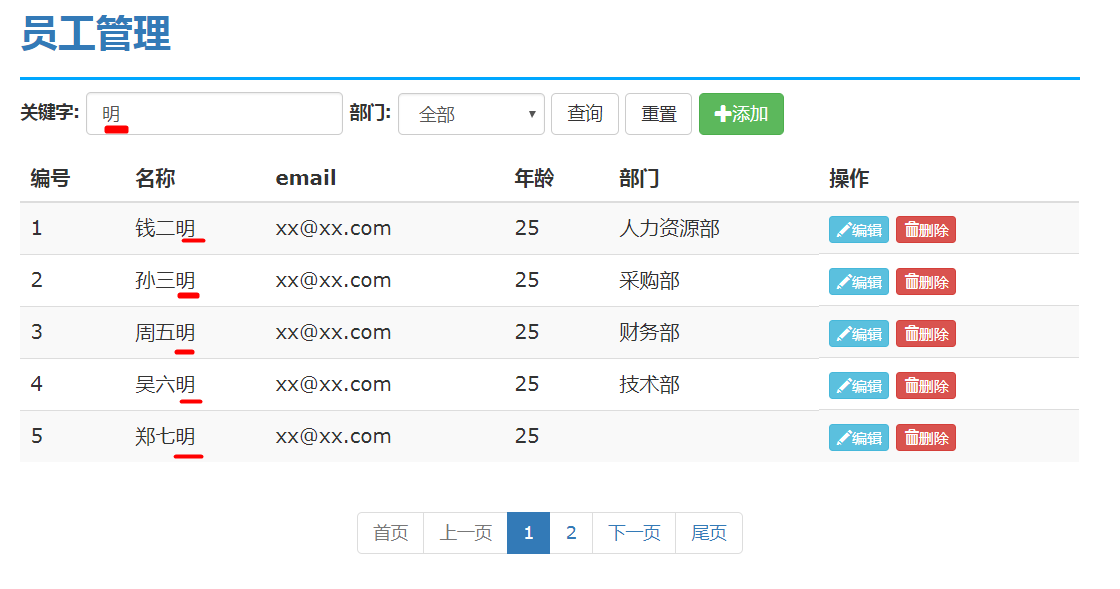
多条件查询与分页:
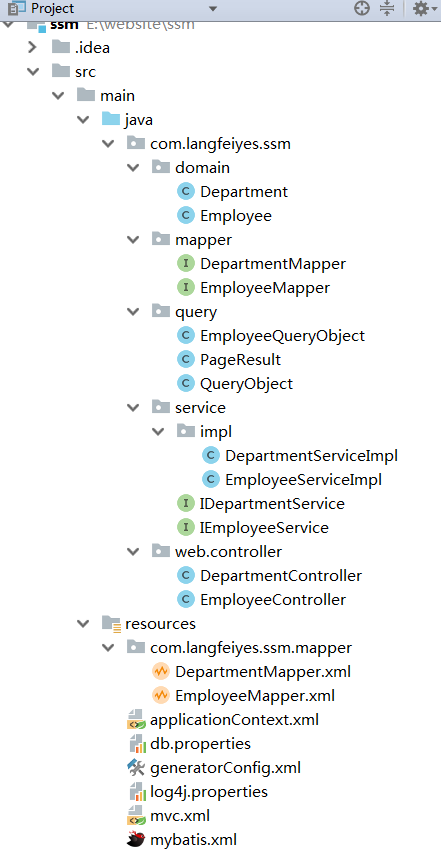
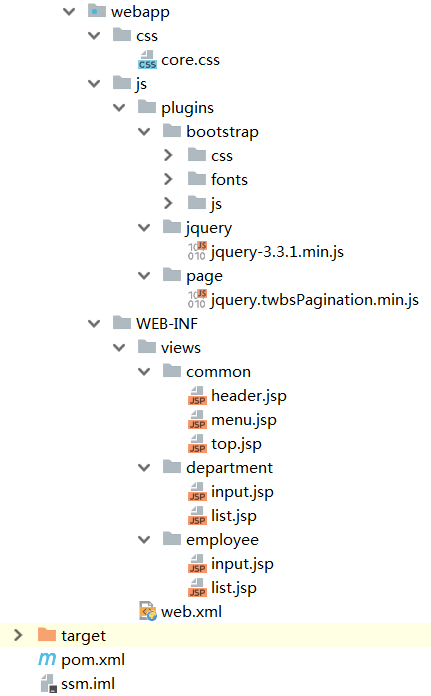
二、代码结构
三、操作过程
1>下载源码, 使用idea导入
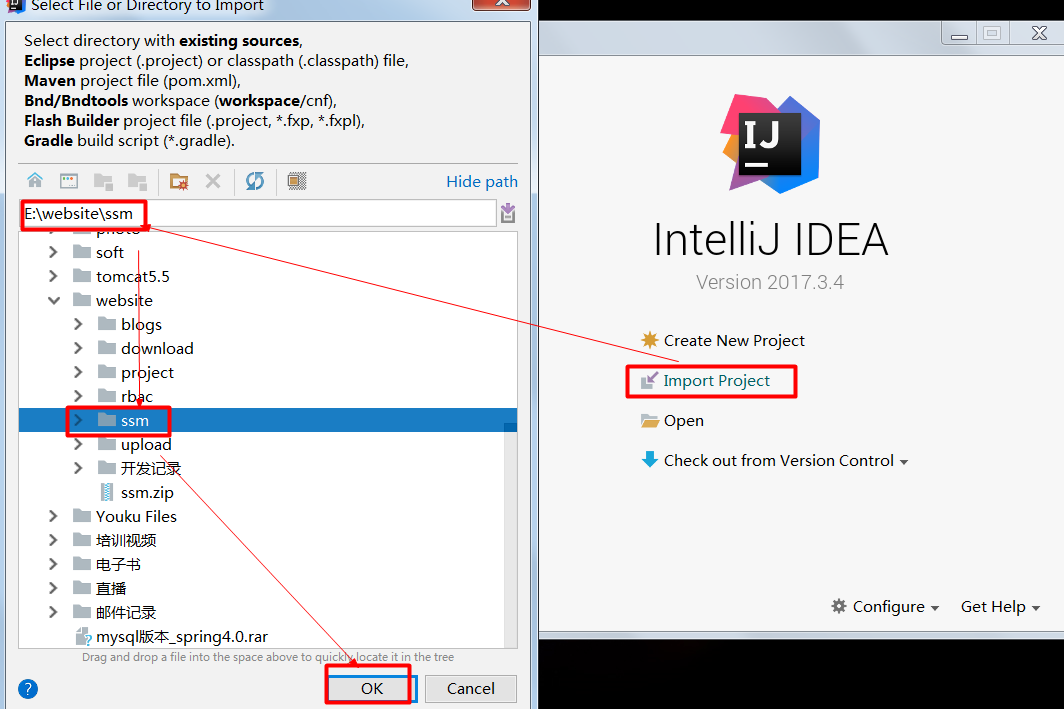
2:>启动tomcat服务器
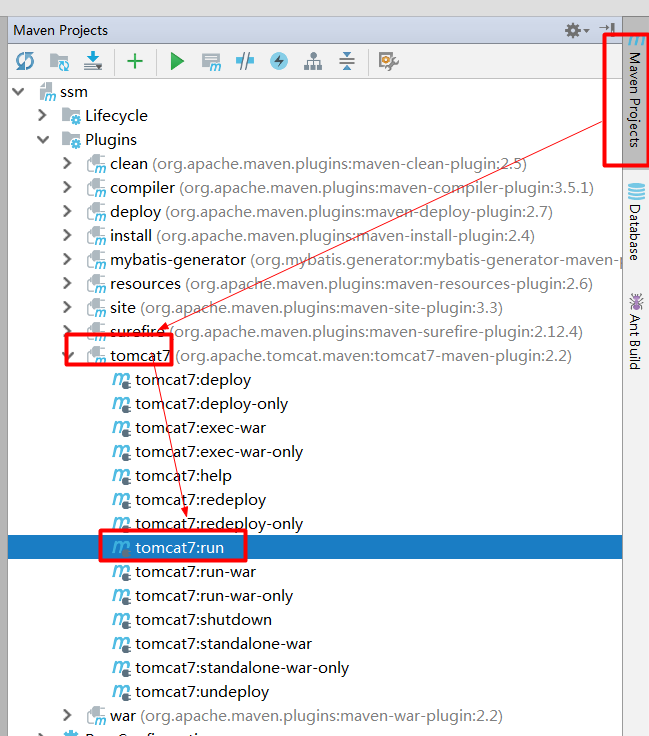
3>打开浏览器访问
http://localhost:8888/employee/list.do
四、关键代码
员工的表现层
package com.langfeiyes.ssm.web.controller;

import com.langfeiyes.ssm.domain.Employee;

import com.langfeiyes.ssm.query.EmployeeQueryObject;

import com.langfeiyes.ssm.query.QueryObject;

import com.langfeiyes.ssm.service.IDepartmentService;

import com.langfeiyes.ssm.service.IEmployeeService;

import org.springframework.beans.factory.annotation.Autowired;

import org.springframework.stereotype.Controller;

import org.springframework.ui.Model;

import org.springframework.web.bind.annotation.ModelAttribute;

import org.springframework.web.bind.annotation.RequestMapping;

@Controller

@RequestMapping("employee")

public class EmployeeController {

    @Autowired

    private IEmployeeService employeeService;

    @Autowired

    private IDepartmentService departmentService;

    @RequestMapping("list")

    public String list(Model model, @ModelAttribute("qo") EmployeeQueryObject qo) throws  Exception{

        model.addAttribute("result", employeeService.query(qo));

        model.addAttribute("currentMenu", "employee");

        model.addAttribute("depts", departmentService.list());

        return "employee/list";

    }

    @RequestMapping("input")

    public String input(Long id, Model model) throws  Exception{

        if(id != null){

            model.addAttribute("entity", employeeService.get(id));

        }

        model.addAttribute("depts", departmentService.list());

        model.addAttribute("currentMenu", "employee");

        return "employee/input";

    }

    @RequestMapping("saveOrUpdate")

    public String saveOrUpdate(Employee entity) throws  Exception{

        if(entity.getId() != null){

            employeeService.update(entity);

        }else{

            employeeService.save(entity);

        }

        return "redirect:/employee/list.do";

    }

    @RequestMapping("delete")

    public String input(Long id) throws  Exception{

        if(id != null){

            employeeService.delete(id);

        }

        return "redirect:/employee/list.do";

    }

}
员工列表页面
<%@ page contentType="text/html;charset=UTF-8" language="java" %>

<%@taglib prefix="c" uri="http://java.sun.com/jsp/jstl/core" %>

<html lang="en">

<head>

    <meta charset="UTF-8">

    <title>Title</title>

    <meta name="viewport" content="width=device-width, initial-scale=1">

    <%@include file="/WEB-INF/views/common/header.jsp"%>

    <style>

        .page-head-line {

            font-size: 30px;

            text-transform: uppercase;

            color: #337ab7;

            font-weight: 800;

            padding-bottom: 20px;

            border-bottom: 2px solid #00a7ff;

            margin-bottom: 10px;

        }

    </style>

    <script type="text/javascript">

        $(function(){

            $("#pagination").twbsPagination({

                totalPages:${result.totalPage},

                visiblePages:${result.pageSize},

                startPage:${qo.currentPage},

                first:"首页",

                prev:"上一页",

                next:"下一页",

                last:"尾页",

                onPageClick:function(event,page){

                    $("#currentPage").val(page);

                    $("#searchForm").submit();

                }

            });

            $("#query").click(function(){

                $("#currentPage").val(1);

                $("#searchForm").submit();

            });

            $("#cancel").click(function () {

                $("#dept").val("-1");

                $("#keyword").val("");

                $("#currentPage").val(1);

                $("#searchForm").submit();

            });

        });

    </script>

</head>

<body>

<div class="container " style="margin-top: 20px">

    <div class="row">

        <div class="col-sm-3">

            <%@include file="/WEB-INF/views/common/menu.jsp"%>

        </div>

        <div class="col-sm-9">

            <div class="row">

                <div class="col-sm-12">

                    <h1 class="page-head-line">员工管理</h1>

                </div>

            </div>

            <!--高级查询--->

 <form class="form-inline" id="searchForm" action="/employee/list.do" method="post">

                <input type="hidden" name="currentPage" id="currentPage" value="${qo.currentPage}">

                <input type="hidden" name="pageSize" id="pageSize" value="${qo.pageSize}">

                <div class="form-group">

                    <label for="keyword">关键字:</label>

                    <input type="text" class="form-control" id="keyword" name="keyword"  placeholder="请输入姓名/邮箱" value="${qo.keyword}">

                </div>

                <div class="form-group">

                    <label for="dept">部门:</label>

                    <select class="form-control" id="dept" name="deptId">

                        <option value="-1">全部</option>

                        <c:forEach items="${depts}" var="d">

                            <option value="${d.id}" ${qo.deptId == d.id? 'selected':''}>${d.name}</option>

                        </c:forEach>

                    </select>

                </div>

                <button type="button" id="query" class="btn btn-default">查询</button>

                <button type="button" id="cancel" class="btn btn-default" >重置</button>

                <a class="btn btn-success" href="/employee/input.do">

                    <span class="glyphicon glyphicon-plus"></span>添加

 </a>

            </form>

            <table class="table table-striped table-hover" >

                <thead>

                    <tr>

                        <th>编号</th>

                        <th>名称</th>

                        <%--<th>密码</th>--%>

 <th>email</th>

                        <th>年龄</th>

                        <th>部门</th>

                        <th>操作</th>

                    </tr>

                </thead>

               <c:forEach items="${result.list}" var="e" varStatus="vs">

                   <tr>

                       <td>${vs.count}</td>

                       <td>${e.name}</td>

                       <%--<td>${e.password}</td>--%>

 <td>${e.email}</td>

                       <td>${e.age}</td>

                       <td>${e.dept.name}</td>

                       <td>

                           <a class="btn btn-info btn-xs" href="/employee/input.do?id=${e.id}">

                               <span class="glyphicon glyphicon-pencil"></span>编辑

 </a>

                           <a href="/employee/delete.do?id=${e.id}" class="btn btn-danger btn-xs" >

                               <span class="glyphicon glyphicon-trash"></span>删除

 </a>

                       </td>

                   </tr>

               </c:forEach>

            </table>

            <div style="text-align: center;">

                <ul id="pagination" class="pagination"></ul>

            </div>

        </div>

    </div>

</div>

</body>

</html>
总配置文件
<?xml version="1.0" encoding="UTF-8"?>

<beans xmlns="http://www.springframework.org/schema/beans"

   xmlns:context="http://www.springframework.org/schema/context"

   xmlns:aop="http://www.springframework.org/schema/aop" xmlns:tx="http://www.springframework.org/schema/tx"

   xmlns:xsi="http://www.w3.org/2001/XMLSchema-instance"

   xsi:schemaLocation="

        http://www.springframework.org/schema/beans

        http://www.springframework.org/schema/beans/spring-beans.xsd

        http://www.springframework.org/schema/context

        http://www.springframework.org/schema/context/spring-context.xsd

        http://www.springframework.org/schema/aop

        http://www.springframework.org/schema/aop/spring-aop.xsd

        http://www.springframework.org/schema/tx

        http://www.springframework.org/schema/tx/spring-tx.xsd">

   <!-- -1: 配置扫描包 -->

   <context:component-scan base-package="com.langfeiyes.ssm"/>

   <!--0:配置数据源-->

   <context:property-placeholder location="classpath:db.properties" system-properties-mode="NEVER"/>

   <bean id="dataSource" class="com.alibaba.druid.pool.DruidDataSource"

      init-method="init" destroy-method="close">

      <property name="driverClassName" value="${jdbc.driverClassName}"/>

      <property name="url" value="${jdbc.url}"/>

      <property name="username" value="${jdbc.username}"/>

      <property name="password" value="${jdbc.password}"/>

   </bean>

   <!--1:配置SqlSessionFactory-->

   <bean id="sqlSessionFactory" class="org.mybatis.spring.SqlSessionFactoryBean">

      <!--1.1:配置数据源-->

      <property name="dataSource" ref="dataSource"/>

      <!--1.2:配置mybatis.xml配置文件-->

      <property name="configLocation" value="classpath:mybatis.xml"/>

      <!--1.3:配置mapper配置文件-->

      <property name="mapperLocations" value="classpath:com/langfeiyes/ssm/mapper/*Mapper.xml"/>

      <!--1.4:配置别名-->

      <property name="typeAliasesPackage" value="com.langfeiyes.ssm.domain"/>

   </bean>

   <!---2:配置mapper接口实现类-->

   <bean class="org.mybatis.spring.mapper.MapperScannerConfigurer">

      <property name="basePackage" value="com.langfeiyes.ssm.mapper"/>

   </bean>

   <!--3:配置事务-->

   <!--3w: who what when : I has dinner last night -->

   <!--3.1:what 什么增强-->

   <bean id="txManger" class="org.springframework.jdbc.datasource.DataSourceTransactionManager">

      <property name="dataSource" ref="dataSource"/>

   </bean>

   <!--3.2:when-->

   <tx:advice id="txAdivce" transaction-manager="txManger">

      <tx:attributes>

         <tx:method name="get*" read-only="true"/>

         <tx:method name="select*" read-only="true"/>

         <tx:method name="list*" read-only="true"/>

         <tx:method name="check*" read-only="true"/>

         <tx:method name="*" propagation="REQUIRED"/>

      </tx:attributes>

   </tx:advice>

   <!--3.3:who-->

   <aop:config>

      <aop:pointcut id="pc" expression="execution( * com.langfeiyes.ssm.service.*Service.*(..))"/>

      <aop:advisor advice-ref="txAdivce" pointcut-ref="pc"/>

   </aop:config>

</beans>
五、其他补充
暂时没有
注:本文著作权归作者,由demo大师发表,拒绝转载,转载需要作者授权
具有SSM框架的CRUD与多条件查询的更多相关文章
- mybatis+maven+父子多模块进行crud以及动态条件查询
使用IDEA创建maven项目,File→New→Project→maven→Next→填写GroupId(例:com.zyl)和ArtifactId(mybatis-demo-parent)→Nex ...
- java实现ssm框架的crud
上一篇博客写了通过表名获取数据库表结构的demo,现在我以此为基础实现了一个简单的通过数据库表结构生成对应的实体,通过读取mapper接口文件.mapping映射文件. service映射文件模板,替 ...
- 【前端VUE】【后端SSM】 记录一次多条件查询状态下加载极慢的解决思路和解决方案
最近在开发一个Online Judge系统,其中有一个“挑战模式”模块,如图所示 由于是第一次使用ECharts做开发,所以完成整个模块的过程也是边写边学了,记录一下问题: 遇到的问题:在最开始进行测 ...
- SSM框架三分钟搞定分页查询
使用的国产第三方jar pagehelper 里面的基本属性值 //当前页 private int pageNum; //每页的数量 private int pageSize; //当前页的数量 ...
- ssm框架的搭建实现CRUD的操作
最近在开发公司的一个系统,系统的框架是用ssm的框架搭建的,当然和这次写博客的不一样,它拥有很多的配置文件,企业级的开发所需要的配置文件是非常繁琐的,今天记录一下一个简单的SSM框架的搭建和实现一个C ...
- ssm 框架实现增删改查CRUD操作(Spring + SpringMVC + Mybatis 实现增删改查)
ssm 框架实现增删改查 SpringBoot 项目整合 一.项目准备 1.1 ssm 框架环境搭建 1.2 项目结构图如下 1.3 数据表结构图如下 1.4 运行结果 二.项目实现 1. Emplo ...
- Spring SSM 框架
IDEA 整合 SSM 框架学习 http://www.cnblogs.com/wmyskxz/p/8916365.html 认识 Spring 框架 更多详情请点击这里:这里 Spring 框架是 ...
- java web后台开发SSM框架(Spring+SpringMVC+MyBaitis)搭建与优化
一.ssm框架搭建 1.1创建项目 新建项目后规划好各层的包. 1.2导入包 搭建SSM框架所需包百度云链接:http://pan.baidu.com/s/1cvKjL0 1.3整合spring与my ...
- SSM框架Web程序的流程(Spring SpringMVC Mybatis)
SSM框架的Web程序主要用到了三个技术: Spring:用到了注解和自动装配,就是Spring的两个精髓IOC(反向控制)和 AOP(面向切面编程). SpringMVC:用到了MVC模型,将逻辑代 ...
随机推荐
- CROC 2016 - Elimination Round (Rated Unofficial Edition) B. Mischievous Mess Makers 贪心
B. Mischievous Mess Makers 题目连接: http://www.codeforces.com/contest/655/problem/B Description It is a ...
- Dart格式化输出
类似于保留几位小数,直接 n.toStringAsFixed() 例如: 1.toStringAsFixed(3); // 1.000 (4321.12345678).toStringAsFixed( ...
- mybatis源码分析(6)-----核心调度对象StatmentHandler
写在前面 通过上一偏文章,我们知道:mybatis 的插件开发,主要是集中在Executor(执行器),ParameterHandler(参数处理器),ResultSetHandler(结果集处理器) ...
- MatLab角点检測(harris经典程序)
http://blog.csdn.net/makenothing/article/details/12884331 这是源博客的出处,鄙人转过来是为了更好的保存!供大家一起学习!已将原始的博客的文章的 ...
- VirtualBox 4.3.18 启动虚拟机时显示不能加载 R3模块并退出故障解决一例
VirtualBox 升级到 4.3.1x后一直问题不断.搜了些资料,发现这货从最近的某个版本开始,为了安全,要校验进程完整性,那些在运行时要注入Virtualbox进程的模块都要进行校验.于是乎出现 ...
- sed替换换行符“\n”
linux sed命令,如何替换换行符“\n” 在一次sed使用中,执行命令: sed "s/\n//g" file 1 发现,没起到任何效果. 后来,经查sed官方用户手册,才得 ...
- [转]awk使用手册
awk 手册 简体中文版由bones7456 (bones7456@gmail.com)整理. 原文:应该是 http://phi.sinica.edu.tw/aspac/reports/94/940 ...
- 屏幕实时显示键盘鼠标操作软件keycastow,适合做视频教程
屏幕实时显示键盘鼠标操作软件keycastow,适合做视频教程 学习了:https://www.52pojie.cn/thread-535154-1-1.html 进行键盘按键的屏幕实时显示:
- (C++)函数参数传递中的一级指针和二级指针
主要内容: 1.一级指针和二级指针 2.函数指针传递的例子 3.什么时候需要传递二级指针? 4.二级指针在链表中的使用 1.一级指针和二级指针 一级指针:即我们一般说的指针,就是内存地址: 二级指针: ...
- 机器学习实战之PCA
1. 向量及其基变换 1.1 向量内积 (1)两个维数同样的向量的内积定义例如以下: 内积运算将两个向量映射为一个实数. (2) 内积的几何意义 如果A\B是两个n维向量, n维向量能够等价表示为n ...