
TRF7970A IC Communication Interface


General Introduction
The communication interface to the reader can be configured in two ways:
with a eight line parallel interface (D0:D7) plus DATA_CLK, or
with a three or four wire Serial Peripheral Interface (SPI).
The SPI interface uses traditional Master Out/Slave In (MOSI), Master In/Slave Out (MISO), IRQ, and DATA_CLK lines.
The SPI can be operated with or without using the Slave Select line.
These communication modes are mutually exclusive; that is, only one mode can be used at a time in the application.
When the SPI interface is selected, the unused I/O_2, I/O_1, and I/O_0 pins must be hard-wired as shown in Table 5-9.
At power up, the TRF7970A samples the status of these three pins and then enters one of the possible SPI modes.
The TRF7970A always behaves as the slave device, and the microcontroller (MCU) behaves as the master device.
The MCU initiates all communications with the TRF7970A, and the TRF7970A makes use of the Interrupt Request (IRQ) pin
in both parallel and SPI modes to prompt the MCU for servicing attention.
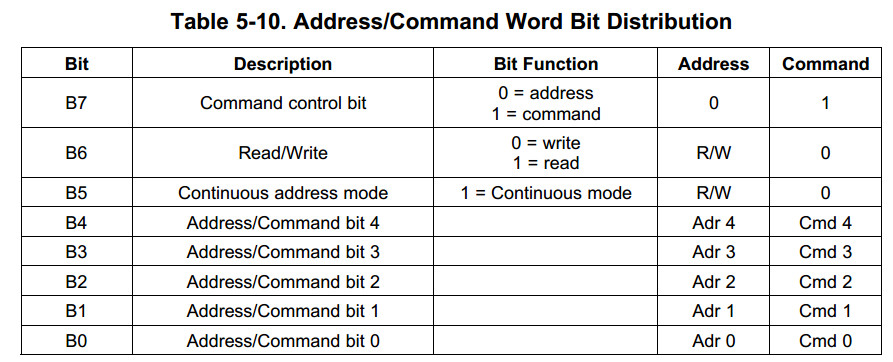
Communication is initialized by a start condition, which is expected to be followed by an Address/Command word (Adr/Cmd).
The Adr/Cmd word is 8 bits long, and its format is shown in Table 5-10.
The MSB (bit 7) determines if the word is to be used as a command or as an address.
The last two columns of Table 5-10 show the function of the separate bits if either address or command is written.
Data is expected once the address word is sent.
In continuous-address mode (Cont. mode = 1), the first data that follows the address is written (or read) to (from) the given address.
For each additional data, the address is incremented by one.
Continuous mode can be used to write to a block of control registers in a single stream without changing the address;
for example, setup of the predefined standard control registers from the MCU non-volatile memory to the reader.
In non-continuous address mode (simple addressed mode), only one data word is expected after the address.
Address Mode is used to write or read the configuration registers or the FIFO. When writing more than 12 bytes to the FIFO,
the Continuous Address Mode should be set to 1.
The Command Mode is used to enter a command resulting in reader action
(for example, initialize transmission, enable reader, and turn reader on or off).
Examples of expected communications between an MCU and the TRF7970A are shown in the following sections.
The IRQ line is indeed the interrupt back to the MCU to indicate something has occurred. The reading of the IRQ status register is then the pointer to the logic of what to do next. For example, after transmitting out a command sequence to a tag, you will get an IRQ which needs to be serviced by reading the IRQ status register (which clears the IRQ), then most likely you would have an 0x80, telling you that the transmission was successful (we call EOTX (end of transmit) IRQ)...then you would next get an IRQ, which would for example be 0x40, indicating an EORX (end of recieve) has occured, then you would read the FIFO status for # of bytes to clock out, then read the FIFO for the data...you can see in the data sheet the descriptions of the IRQ register and and some examples, too. (see the TRF7970A DS, section 5.9.xx)
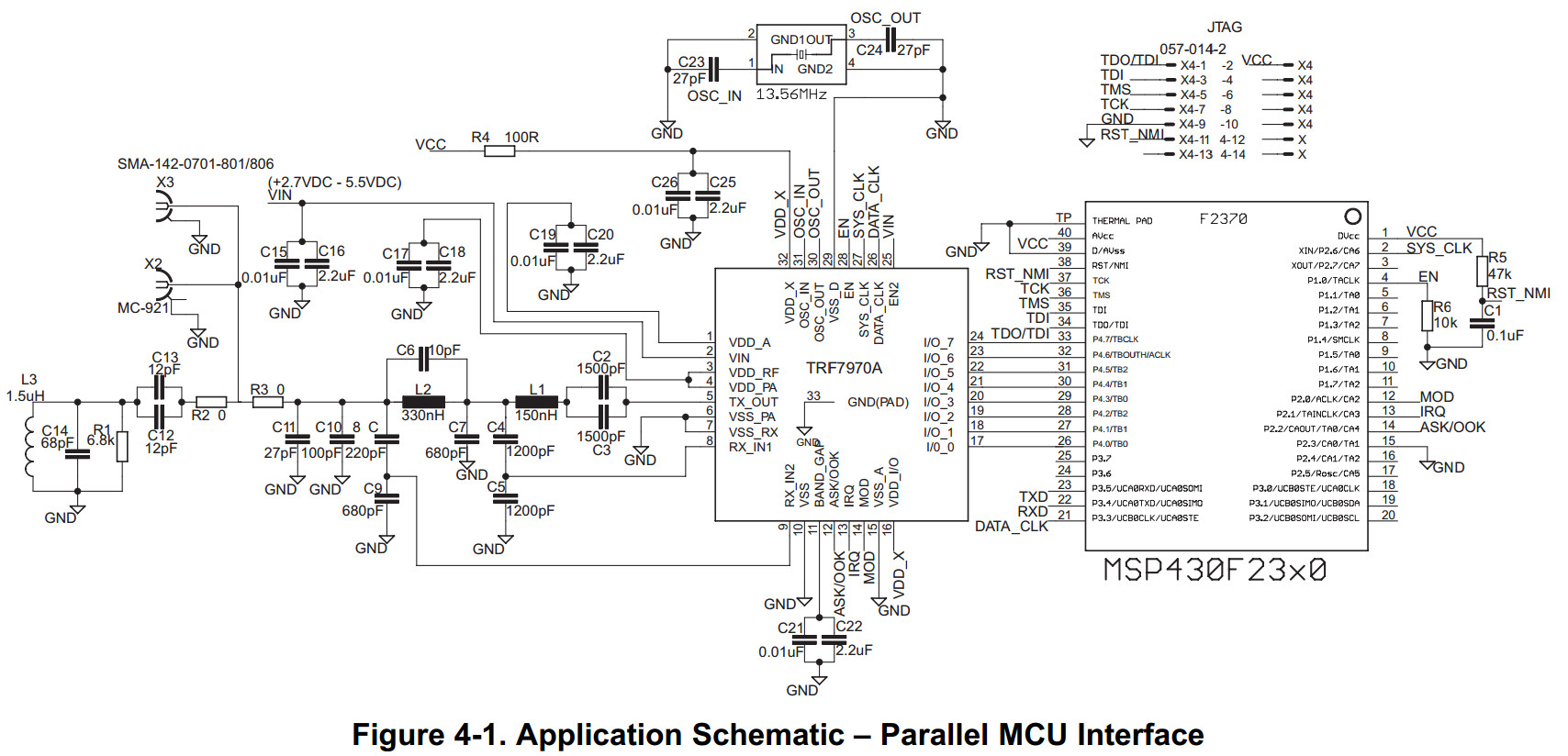
The ASK/OOK line in your case most likely can just be pulled to GND or you can connect it to a GPIO on your MCU like we have it shown in the reference schematics. MOD same thing, unless you are using any Mifare Classic tags, then you would need control of the MOD pin for Direct Mode 0, so then it would need to be connected to a GPIO.
Usually we are recommending connecting EN line to a GPIO, with a pulldown (needs to see low to high transition) so you can have control of some of the power modes...EN2 can also be connected to a GPIO or pulled high or low, depending on your need for even lower power consumption.
Correct about I/O_0, I/O_1 and I/O_2 being at GND potential for SPI w/o SS.
If it helps here is a schematic of SPI with SS, which you can modify for your own usage, since you say you want to do without SS. (I/O_3 and I/O_5 are connected in this drawing as well, and this is for Special Direct Mode, which you may or may not need, depending on which tags you are trying to use here - normally not needed, just FYI)
7183.TRF7970A_SPI_MSP430F2370_dongle_sch.pdf

TRF7970A IC Communication Interface的更多相关文章
- USB组合设备 Interface Association Descriptor (IAD)
Communication Device Class,简称CDCUSB Compound Device,USB复合设备USB Composite Device,USB组合设备 摘要USB复合设备 Co ...
- (转)什么是CDC类(Communication Device Class)
全文地址:http://justmei.blog.163.com/blog/static/1160998532010321112522467/ 什么是CDC类 (Communication Devic ...
- Chrysler -- CCD (Chrysler Collision Detection) Data Bus
http://articles.mopar1973man.com/general-cummins/34-engine-system/81-ccd-data-bus CCD (Chrysler Coll ...
- 实验室项目.md
1 嵌入式操作系统 为什么要用嵌入式操作系统 普通的单片机编程:程序(软件)--单片机硬件: 嵌入式操作系统开发:程序(软件)--操作系统--嵌入式硬件(包括单片机等); 我们平时普通所学的单片机编程 ...
- Linux内核配置选项
http://blog.csdn.net/wdsfup/article/details/52302142 http://www.manew.com/blog-166674-12962.html Gen ...
- Smart internet of things services
A method and apparatus enable Internet of Things (IoT) services based on a SMART IoT architecture by ...
- Indexing Sensor Data
In particular embodiments, a method includes, from an indexer in a sensor network, accessing a set o ...
- 深入linux kernel内核配置选项
============================================================================== 深入linux kernel内核配置选项 ...
- Fedora 24中的日志管理
Introduction Log files are files that contain messages about the system, including the kernel, servi ...
随机推荐
- 2017 CERC
2017 CERC Problem A:Assignment Algorithm 题目描述:按照规则安排在飞机上的座位. solution 模拟. 时间复杂度:\(O(nm)\) Problem B: ...
- 安装 Xamarin for Visual Studio
总得来说,Xamarin 有“联网自动安装”和“手动安装”两种方式. 说明:本文涉及得资源链接都是官网的,同时,在 我的网盘 也有相关备份. 现在,我就以 Windows 为例来大概说明……(-=-我 ...
- WPF之模拟打开或关闭Windows功能
用WPF模拟打开或关闭Windows功能的实现方法其实很简单,主要用递归判断当前节点的子节点和父节点的选中状态就行了. 一.效果演示 先看看效果图: 二.部分代码 xaml代码: <TreeVi ...
- WPF之换肤
WPF之换肤 设计原理 WPF换肤的设计原理,利用资源字典为每种皮肤资源添加不同的样式,在后台切换皮肤资源文件. 截图 上图中,第一张图采用规则样式,第二张图采用不规则样式,截图的时候略有瑕疵. 资源 ...
- Ubuntu 下查看已安装的软件
Ubuntu 下如何查看已安装的软件 1.查看安装的所有软件 dpkg -l 例如: dpkg -l | grep ftp 2.查看软件安装的路径 dpkg -L | grep ftp 也可以用 wh ...
- Mathtype公式位置偏上
Mathtype公式位置偏上 部分Mathtype公式与文档文字没有很好的对齐,而是浮起来了,也就是说Mathtype公式的位置比正常文字稍高,这是我写论文时碰到的一个很麻烦的问题.然后就是行距稍微大 ...
- php琐碎
1.类中的常量,可以用类来引用: class MyClass() { const SUCCESS ="success"; const FAIL ="fail"; ...
- 窗口生效函数UpdateData
Invalidate()使整个窗口客户区无效.窗口的客户区无效意味着需要重绘,例如,如果一个被其它窗口遮住的窗口变成了前台窗口,那么原来被遮住的部分就是无效的,需要重绘.这时Windows会在应用程序 ...
- 三、ansible简要使用
1.ansible服务器生成公钥与私钥 ssh-keygen -t rsa 2.拷贝ansible公钥到客户机上 ssh-copy-id -i root@192.168.1.1 3.添加主机到ansi ...
- hive学习(五) 应用案例
1.实现struct数据结构例子 1.1创建student表 create table student( id int, info struct<name:string,age:int> ...