
15.Update Documents-官方文档摘录
1.插入数据
db.inventory.insertMany( [

   { item: "canvas", qty: 100, size: { h: 28, w: 35.5, uom: "cm" }, status: "A" },

   { item: "journal", qty: 25, size: { h: 14, w: 21, uom: "cm" }, status: "A" },

   { item: "mat", qty: 85, size: { h: 27.9, w: 35.5, uom: "cm" }, status: "A" },

   { item: "mousepad", qty: 25, size: { h: 19, w: 22.85, uom: "cm" }, status: "P" },

   { item: "notebook", qty: 50, size: { h: 8.5, w: 11, uom: "in" }, status: "P" },

   { item: "paper", qty: 100, size: { h: 8.5, w: 11, uom: "in" }, status: "D" },

   { item: "planner", qty: 75, size: { h: 22.85, w: 30, uom: "cm" }, status: "D" },

   { item: "postcard", qty: 45, size: { h: 10, w: 15.25, uom: "cm" }, status: "A" },

   { item: "sketchbook", qty: 80, size: { h: 14, w: 21, uom: "cm" }, status: "A" },

   { item: "sketch pad", qty: 95, size: { h: 22.85, w: 30.5, uom: "cm" }, status: "A" }

]);
2 更新语句$set
db.inventory.updateOne(

{item:"paper"},

{

    $set:{"size.uom":"cm",status:"P"},

    $currentDate:{lastModified:true}

    }

)
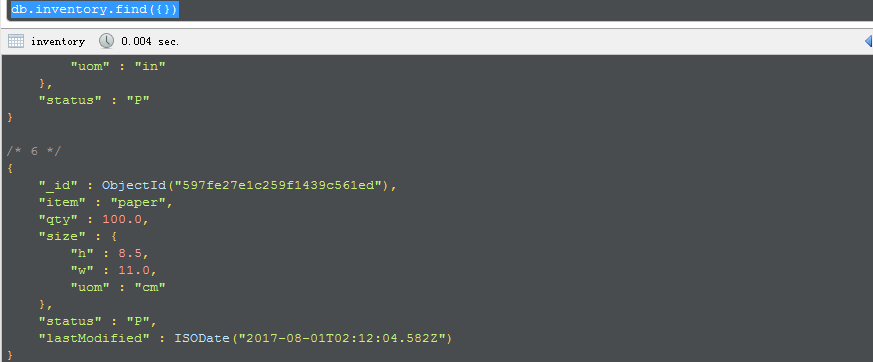
可以看到,如果没有的字段,则新增进去,同时修改了对应修改的内容
3 更新多条
db.inventory.updateMany(

   { "qty": { $lt: 50 } },

   {

     $set: { "size.uom": "in", status: "P" },

     $currentDate: { lastModified: true }

   }

)
4 替换
db.inventory.replaceOne(

   { item: "paper" },

   { item: "paper", instock: [ { warehouse: "A", qty: 60 }, { warehouse: "B", qty: 40 } ] }

)
This page provides examples of how to update documents in using the following methods in the mongo shell:
db.collection.updateOne(<filter>, <update>, <options>)db.collection.updateMany(<filter>, <update>, <options>)db.collection.replaceOne(<filter>, <replacement>, <options>)
The examples on this page use the inventory collection. To create and/or populate the inventorycollection, run the following:
db.inventory.insertMany( [

   { item: "canvas", qty: 100, size: { h: 28, w: 35.5, uom: "cm" }, status: "A" },

   { item: "journal", qty: 25, size: { h: 14, w: 21, uom: "cm" }, status: "A" },

   { item: "mat", qty: 85, size: { h: 27.9, w: 35.5, uom: "cm" }, status: "A" },

   { item: "mousepad", qty: 25, size: { h: 19, w: 22.85, uom: "cm" }, status: "P" },

   { item: "notebook", qty: 50, size: { h: 8.5, w: 11, uom: "in" }, status: "P" },

   { item: "paper", qty: 100, size: { h: 8.5, w: 11, uom: "in" }, status: "D" },

   { item: "planner", qty: 75, size: { h: 22.85, w: 30, uom: "cm" }, status: "D" },

   { item: "postcard", qty: 45, size: { h: 10, w: 15.25, uom: "cm" }, status: "A" },

   { item: "sketchbook", qty: 80, size: { h: 14, w: 21, uom: "cm" }, status: "A" },

   { item: "sketch pad", qty: 95, size: { h: 22.85, w: 30.5, uom: "cm" }, status: "A" }

]);
You can run the operation in the web shell below:
Update Documents in a Collection
To update a document, MongoDB provides update operators, such as $set, to modify field values.
To use the update operators, pass to the update methods an update document of the form:
{

  <update operator>: { <field1>: <value1>, ... },

  <update operator>: { <field2>: <value2>, ... },

  ...

}
Some update operators, such as $set, will create the field if the field does not exist. See the individual update operator reference for details.
Update a Single Document
The following example uses the db.collection.updateOne() method on the inventory collection to update the first document where item equals "paper":
db.inventory.updateOne(

   { item: "paper" },

   {

     $set: { "size.uom": "cm", status: "P" },

     $currentDate: { lastModified: true }

   }

)
The update operation:
- uses the
$setoperator to update the value of thesize.uomfield to"cm"and the value of thestatusfield to"P", - uses the
$currentDateoperator to update the value of thelastModifiedfield to the current date. IflastModifiedfield does not exist,$currentDatewill create the field. See$currentDatefor details.
Update Multiple Documents
New in version 3.2.
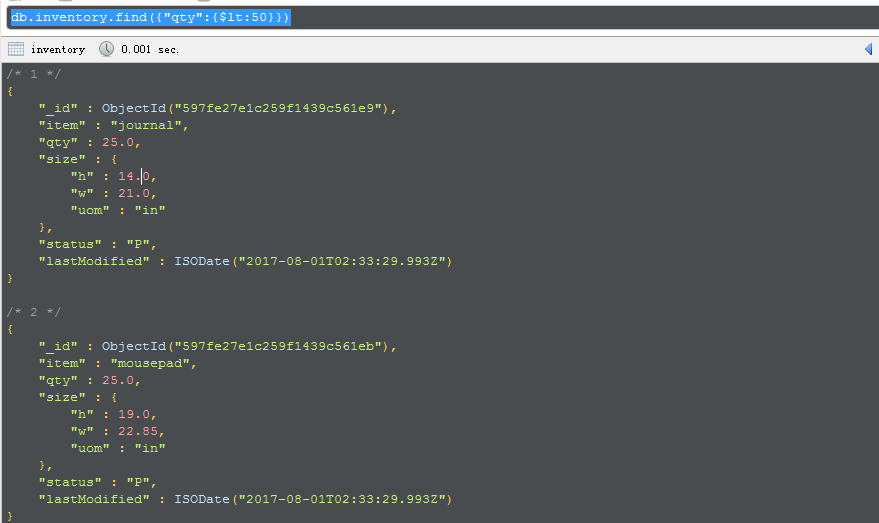
The following example uses the db.collection.updateMany() method on the inventory collection to update all documents where qty is less than 50:
db.inventory.updateMany(

   { "qty": { $lt: 50 } },

   {

     $set: { "size.uom": "in", status: "P" },

     $currentDate: { lastModified: true }

   }

)
The update operation:
- uses the
$setoperator to update the value of thesize.uomfield to"in"and the value of thestatusfield to"P", - uses the
$currentDateoperator to update the value of thelastModifiedfield to the current date. IflastModifiedfield does not exist,$currentDatewill create the field. See$currentDatefor details.
Replace a Document
To replace the entire content of a document except for the _id field, pass an entirely new document as the second argument to db.collection.replaceOne().
When replacing a document, the replacement document must consist of only field/value pairs; i.e. do not include update operators expressions.
The replacement document can have different fields from the original document. In the replacement document, you can omit the _id field since the _id field is immutable; however, if you do include the _id field, it must have the same value as the current value.
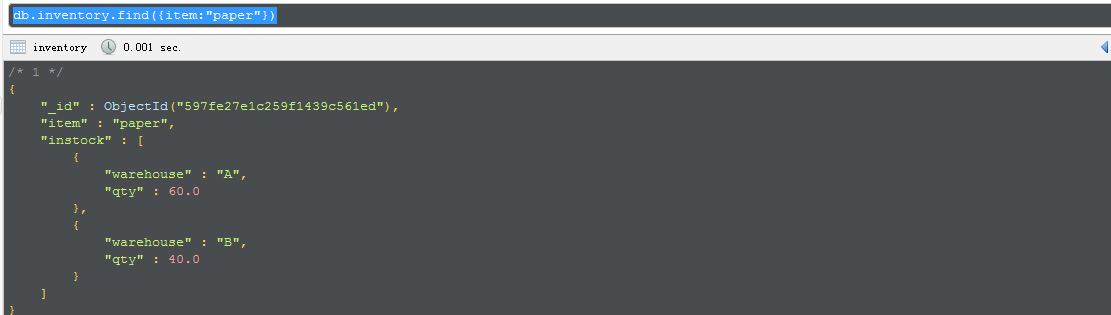
The following example replaces the first document from the inventory collection that matches the filteritem equals "paper":
db.inventory.replaceOne(

   { item: "paper" },

   { item: "paper", instock: [ { warehouse: "A", qty: 60 }, { warehouse: "B", qty: 40 } ] }

)
Behavior
Atomicity
All write operations in MongoDB are atomic on the level of a single document. For more information on MongoDB and atomicity, see Atomicity and Transactions.
_id Field
Once set, you cannot update the value of the _id field nor can you replace an existing document with a replacement document that has a different _id field value.
Document Size
When performing update operations that increase the document size beyond the allocated space for that document, the update operation relocates the document on disk.
Field Order
MongoDB preserves the order of the document fields following write operations except for the following cases:
- The
_idfield is always the first field in the document. - Updates that include
renamingof field names may result in the reordering of fields in the document.
Changed in version 2.6: Starting in version 2.6, MongoDB actively attempts to preserve the field order in a document. Before version 2.6, MongoDB did not actively preserve the order of the fields in a document.
Upsert Option
If updateOne(), updateMany(), or replaceOne() includes upsert : true and no documents match the specified filter, then the operation creates a new document and inserts it. If there are matching documents, then the operation modifies or replaces the matching document or documents.
For details on the new document created, see the individual reference pages for the methods.
Write Acknowledgement
With write concerns, you can specify the level of acknowledgement requested from MongoDB for write operations. For details, see Write Concern.
| [1] | You can use the DBQuery.shellBatchSize to change the number of iteration from the default value 20. SeeWorking with the mongo Shell for more information. |
15.Update Documents-官方文档摘录的更多相关文章
- Cocos Creator 加载和切换场景(官方文档摘录)
Cocos Creator 加载和切换场景(官方文档摘录) 在 Cocos Creator 中,我们使用场景文件名( 可以不包含扩展名)来索引指代场景.并通过以下接口进行加载和切换操作: cc.dir ...
- ng的概念层次(官方文档摘录)
官方文档是这么说的: You write Angular applications by: composing HTML templates with Angularized markup, writ ...
- Cocos Creator 使用计时器(官方文档摘录)
在 Cocos Creator 中,我们为组件提供了方便的计时器,这个计时器源自于 Cocos2d-x 中的 cc.Scheduler,我们将它保留在了 Cocos Creator 中并适配了基于组件 ...
- Cocos Creator 生命周期回调(官方文档摘录)
Cocos Creator 为组件脚本提供了生命周期的回调函数.用户通过定义特定的函数回调在特定的时期编写相关 脚本.目前提供给用户的声明周期回调函数有: onLoad start update la ...
- angular 模板语法(官方文档摘录)
https://angular.cn/guide/template-syntax {{}} 和"" 如果嵌套,{{}}里面求完值,""就是原意 <h3&g ...
- Qt元类型(MetaType)注册入门(附一些官方文档的关键摘录)
昨天调试项目时,突然发现如下消息: QObject::connect: Cannot queue arguments of type 'ERROR_LEVEL' (Make sure 'ERROR_L ...
- Sqoop 使用详解(内含对官方文档的解析)
Sqoop 是 Cloudera 公司创造的一个数据同步工具,现在已经完全开源了. 目前已经是 hadoop 生态环境中数据迁移的首选,另外还有 ali 开发的 DataX 属于同类型工具,由于社区的 ...
- Spring Data Commons 官方文档学习
Spring Data Commons 官方文档学习 -by LarryZeal Version 1.12.6.Release, 2017-07-27 为知笔记版本在这里,带格式. Table o ...
- Spring 4 官方文档学习(十一)Web MVC 框架
介绍Spring Web MVC 框架 Spring Web MVC的特性 其他MVC实现的可插拔性 DispatcherServlet 在WebApplicationContext中的特殊的bean ...
- [翻译]PyMongo官方文档
PyMongo官方文档翻译 周煦辰 2016-06-30 这是本人翻译的PyMongo官方文档.现在网上分(抄)享(袭)的PyMongo博客文章很多,一方面这些文章本就是抄袭的,谈不上什么格式美观,另 ...
随机推荐
- 纯css3实现的鼠标悬停动画按钮
今天给大家带来一款纯css3实现的鼠标悬停动画按钮.这款按钮鼠标经过前以正方形的形式,当鼠标经过的时候以动画的形式变成圆形.效果图如下: 在线预览 源码下载 实现的代码. html代码: < ...
- Xml解析之PULL解析 例1
<?xml version="1.0" encoding="UTF-8"?> <persons> <person id=" ...
- Unix系统编程()执行非局部跳转:setjmp和longjmp
使用库函数setjmp和longjmp可执行非局部跳转(local goto). 术语"非局部(nonlocal)"是指跳转目标为当前执行函数之外的某个位置. C语言里面有个&qu ...
- web automation 常用技术比较
selenium2支持通过各种driver(FirfoxDriver,IternetExplorerDriver,OperaDriver,ChromeDriver)驱动真实浏览器完成测试. 除此之外, ...
- 组合数学 - BZOJ 3997 - TJOI2015
TJOI2015 Problem's Link ---------------------------------------------------------------------------- ...
- WINDOWS中设置计划任务执行PHP文件
1.写一个PHP程序,命名为test.php,内容如下所示: <? $fp = fopen("test.txt", "a+"); fwrite($fp, ...
- grid-tooltip扩展方法
调用:$('#dg').datagrid('doCellTip', { 'max-width': '100px' }); /** * 扩展两个方法 */$.extend($.fn.datagrid.m ...
- MapReduce总体架构分析
转自:http://blog.csdn.net/Androidlushangderen/article/details/41051027 继前段时间分析Redis源码一段时间之后,我即将开始接下来的一 ...
- OGNL支持各种纷繁复杂的表达式
OGNL支持各种纷繁复杂的表达式.但是最最基本的表达式的原型,是将对象的引用值用点串联起来,从左到右,每一次表达式计算返回的结果成为当前对象,后面部分接着在当前对象上进行计算,一直到全部表达式计算完成 ...
- linux -- Ubuntu修改静态IP地址重启后无法上网的解决
ubuntu设置静态IP地址后,上不了网 文章中也提到,如果是在/etc/resolv.conf添加DNS,由于Ubuntu 有一个 resolvconf 服务,如果重启它,那么 /etc/resol ...