
[Polymer] Custom Elements: Styling
Code:
<dom-module id="business-card">

    <template>

        <div class="card">

            <h1>Joe Maddalone</h1>

            <h2>Instructor</h2>

            <h3>egghead.io</h3>

        </div>

        <style>

            .card{

                background-color: #e8e8e8;

                box-shadow: 0 0 1px #e8e8e8;

                position: relative;

                font-family: monospace;

                display: flex;

                width: 350px;

                height: 200px;

                flex-flow: column wrap;

                margin: 20px;

            }

            .card:before, .card:after {

                z-index: -1;

                position: absolute;

                content: "";

                bottom: 15px;

                left: 10px;

                width: 50%;

                top: 80%;

                max-width:300px;

                background: rgba(0, 0, 0, 0.7);

                box-shadow: 0 15px 10px rgba(0, 0, 0, 0.7);

                transform: rotate(-3deg);

            }

            .card:after {

                transform: rotate(3deg);

                right: 10px;

                left: auto;

            }

            .card h1,.card h2,.card h3 {

                font-weight: normal;

                color: var(--custom-text-color,--text-color)

            }

            .card h1 {

                flex:4;

                padding-top: 50px;

                font-size: 24px;

                align-self: center;

            }

            .card h2 {

                flex:3;

                margin-top: -30px;

                align-self: center;

                font-size: 12px;

            }

            .card h3 {

                flex:1;

                font-size: 14px;

                align-self: flex-end;

                margin-right: 20px;

            }

        </style>

    </template>

    <script>

        Polymer( {

            is: "business-card"

        } )

    </script>

</dom-module>
Using parent compoment in css :host
- remove the <div class="host"></div>
- change .card class to :host, which can be consider as <div class=":host"><h1>..</h1><h2>..</h2><h3>..</h3></div>
<dom-module id="business-card">

    <template>

        <h1>Joe Maddalone</h1>

        <h2>Instructor</h2>

        <h3>egghead.io</h3>

        <style>

            :host {

                background-color: #e8e8e8;

                box-shadow: 0 0 1px #e8e8e8;

                position: relative;

                font-family: monospace;

                display: flex;

                width: 350px;

                height: 200px;

                flex-flow: column wrap;

                margin: 20px;

            }

            :host:before, :host:after {

                z-index: -1;

                position: absolute;

                content: "";

                bottom: 15px;

                left: 10px;

                width: 50%;

                top: 80%;

                max-width: 300px;

                background: rgba(0, 0, 0, 0.7);

                box-shadow: 0 15px 10px rgba(0, 0, 0, 0.7);

                transform: rotate(-3deg);

            }

            :host:after {

                transform: rotate(3deg);

                right: 10px;

                left: auto;

            }

            h1, h2, h3 {

                font-weight: normal;

                color: var(--custom-text-color, --text-color)

            }

            h1 {

                flex: 4;

                padding-top: 50px;

                font-size: 24px;

                align-self: center;

            }

            h2 {

                flex: 3;

                margin-top: -30px;

                align-self: center;

                font-size: 12px;

            }

            h3 {

                flex: 1;

                font-size: 14px;

                align-self: flex-end;

                margin-right: 20px;

            }

        </style>

    </template>

    <script>

        Polymer( {

            is: "business-card"

        } )

    </script>

</dom-module>
Create variable in css:
:host{

                --card-color: #e8e8e8;

                --text-color: #222;

            }

            :host {

                background-color: var(--card-color);

                box-shadow: 0 0 1px var(--card-color);

                ...

            }
Default value:
                background-color: var(--custom-card-color, --card-color);

                box-shadow: 0 0 1px var(--custom-card-color, --card-color);
--card-color will be the default value if --custom-card-color not exists.
------------------------------
index.html:
<!DOCTYPE html>

<html lang="en">

<head>

    <meta charset="UTF-8">

    <title>Polymer</title>

    <script src="bower_components/webcomponentsjs/webcomponents-lite.js"></script>

    <link rel="import" href="bower_components/polymer/polymer.html">

    <link rel="import" href="my-card.html">

</head>

<body>

<my-card></my-card>

</body>

</html>
my-card.html:
<link rel="import" href="./business-card.html">

<dom-module id="my-card">

    <template>

        <business-card></business-card>

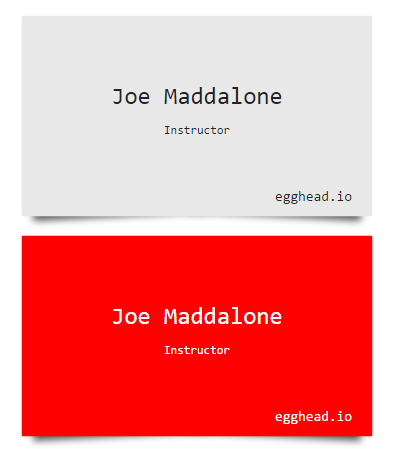
        <business-card class="red"></business-card>

        <style>

            .red{

                --custom-card-color: red;

                --custom-text-color: white;

            }

        </style>

    </template>

    <script>

        Polymer( {

            is: "my-card"

        } )

    </script>

</dom-module>
busniess-card.html:
<dom-module id="business-card">

    <template>

        <h1>Joe Maddalone</h1>

        <h2>Instructor</h2>

        <h3>egghead.io</h3>

        <style>

            :host{

                --card-color: #e8e8e8;

                --text-color: #222;

            }

            :host {

                background-color: var(--custom-card-color, --card-color);

                box-shadow: 0 0 1px var(--custom-card-color, --card-color);

                position: relative;

                font-family: monospace;

                display: flex;

                width: 350px;

                height: 200px;

                flex-flow: column wrap;

                margin: 20px;

            }

            :host:before, :host:after {

                z-index: -1;

                position: absolute;

                content: "";

                bottom: 15px;

                left: 10px;

                width: 50%;

                top: 80%;

                max-width: 300px;

                background: rgba(0, 0, 0, 0.7);

                box-shadow: 0 15px 10px rgba(0, 0, 0, 0.7);

                transform: rotate(-3deg);

            }

            :host:after {

                transform: rotate(3deg);

                right: 10px;

                left: auto;

            }

            h1, h2, h3 {

                font-weight: normal;

                color: var(--custom-text-color, --text-color)

            }

            h1 {

                flex: 4;

                padding-top: 50px;

                font-size: 24px;

                align-self: center;

            }

            h2 {

                flex: 3;

                margin-top: -30px;

                align-self: center;

                font-size: 12px;

            }

            h3 {

                flex: 1;

                font-size: 14px;

                align-self: flex-end;

                margin-right: 20px;

            }

        </style>

    </template>

    <script>

        Polymer( {

            is: "business-card"

        } )

    </script>

</dom-module>
[Polymer] Custom Elements: Styling的更多相关文章
- Web Components之Custom Elements
什么是Web Component? Web Components 包含了多种不同的技术.你可以把Web Components当做是用一系列的Web技术创建的.可重用的用户界面组件的统称.Web Com ...
- 自定义元素(custom elements)
记录下自定义html自定义元素的相关心得: 浏览器将自定义元素保留在 DOM 之中,但不会任何语义.除此之外,自定义元素与标准元素都一致 事实上,浏览器提供了一个HTMLUnknownElement, ...
- [HTML5] Render Hello World Text with Custom Elements
Custom elements are fun technology. In this video, you will learn how to set one up and running in l ...
- 使用custom elements和Shadow DOM自定义标签
具体的api我就不写 官网上面多 如果不知道这个的话也可以搜索一下 目前感觉这个还是相当好用的直接上码. <!DOCTYPE html> <html lang="en&q ...
- window 属性:自定义元素(custom elements)
概述 Web Components 标准非常重要的一个特性是,它使开发者能够将HTML页面的功能封装为 custom elements(自定义标签),而往常,开发者不得不写一大堆冗长.深层嵌套的标 ...
- HTML Custom Elements & valid name
HTML Custom Elements & valid name valid custom element name https://html.spec.whatwg.org/multipa ...
- HTML Custom Elements (v1)
HTML Custom Elements (v1) https://developers.google.com/web/fundamentals/web-components/customelemen ...
- Knockoutjs:Component and Custom Elements(翻译文章)
Knockoutjs 的Components 是一种自定义的组件,它以一种强大.简介的方式将你自己的ui代码组织成一种单独的.可重用的模块,自定义的组件(Component)有以下特点: 1.可以替代 ...
- webAssmebly实现js数组排序 使用custom elements和Shadow DOM自定义组件
直接上码了……………… .wat源码 (module (type $t0 (func (param i32 i32))) (type $t1 (func (result i32))) (type $t ...
随机推荐
- 如何缩减Try{}Catch{}Finally{}代码----定义一个公用的Try{}Catch{}Finally{}
public class Process { public Process() { } public static void Execute(Action action) { try { //ACTI ...
- JS判断图片是否加载完成三种方式
1.img的complete属性 轮询不断监测img的complete属性,如果为true则表明图片已经加载完毕,停止轮询.该属性所有浏览器都支持. <p id="p1"&g ...
- 《CSS网站布局实录》学习笔记(五)
第五章 CSS内容排版 5.1 文字排版 5.1.1 通栏排版 进行网页通栏排版时,只要直接将段落文字放置于p或者其他对象中,再对段落文字应用间距.行距.字号等样式控制,便形成了排版雏形. 5.1.2 ...
- swift 重载 泛式 inout的使用
swift 重载 泛式 inout的使用 函数 func 关键字 -> 表示返回值信息等等 那我们接下来利用函数做几件事情 -a 比较两个数字的大小 -b 比较两个字符串 -c 既能比较字符串, ...
- 【C#学习笔记】二、面向对象编程
2.1 抽象类与接口 1)概念 抽象类是特殊的类,只是不能被实例化:除此以外,具有类的其他特性:重要的是抽象类可以包括抽象方法,这是普通类所不能的.抽象方法只能声明于抽象类中,且不包含任何实现,派生类 ...
- 单点登录CAS使用记(四):为登录页面加上验证码
CAS默认的登录页面样式如下,只有用户名与密码两项验证项目. 现在需要为首页登录加上验证码功能. 第一步:首页对默认登录页面的样式进行了调整,使其看上去还算美观. 在页面上加上了验证码项目. 第二步: ...
- java学习——正则表达式
本文内容来源于 历经5年锤练--史上最适合初学者入门的Java基础视频 例:要求QQ号长度为5~15位,不能以0开头 String qq="123456"; String reg ...
- Java之简单的聊天工具
今天整理资料的时候,找出自己几年前刚学Java时做过的一个简易的聊天工具,有服务器也有客户端,能发送文字消息和文件,但是用户上线并未存入数据库,而只是简单的缓存在服务器的一个数组中,所以,只要服务器一 ...
- CodedDFS日志配置
本文根据Log4j的配置属性,编写了用于记录BMBR编码的日志 author: zyumeng Blog: [url] http://www.cnblogs.com/zyumeng/ [/url] 利 ...
- MySQL添加中文字符集问题 --- java.sql.SQLException: Incorrect string value
今天在做开关记录的时候,数据库表中description字段用于记录当前版本的描述(需要存储中文),在测试程序的时候发现如果用户输入中文,那么后台会报错.错误信息如下: java.sql.SQLExc ...