
SharePoint Online 使用 adal js 获取access token
最近在写一些SharePoint 的sample code, 有兴趣的小伙伴可以查看我的GitHub.
今天给大家介绍SharePoint Framework (SPFx )web part 当中怎么去使用adal js 去获取 使用Office 365 Graph API 的access token.
首先,在此感谢我的同事闫明明研究出来怎样获取adal js access token.
首先我们打开office 365 tenant 里面的Admin center. 然后打开 Azure AD Tab
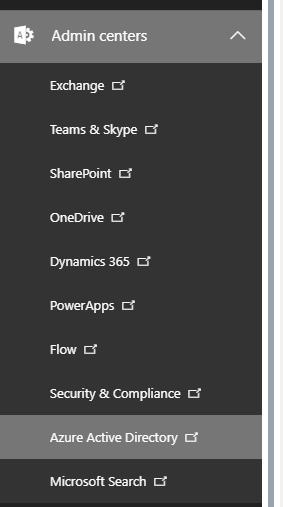
打开Azure 之后, 点 Azure Active Directory -> App registrations -> New application registration

我们创建之后, 会要求我们输入这些信息: Name & Sign-on URL
Name是项目的名称
Application type 选 Web app / API
Sign-on url 是 项目登录Azure AD 的URL.

我们创建好app 之后, 我们会在app 设置页面:
Application ID 是我们后面需要使用的GUID.

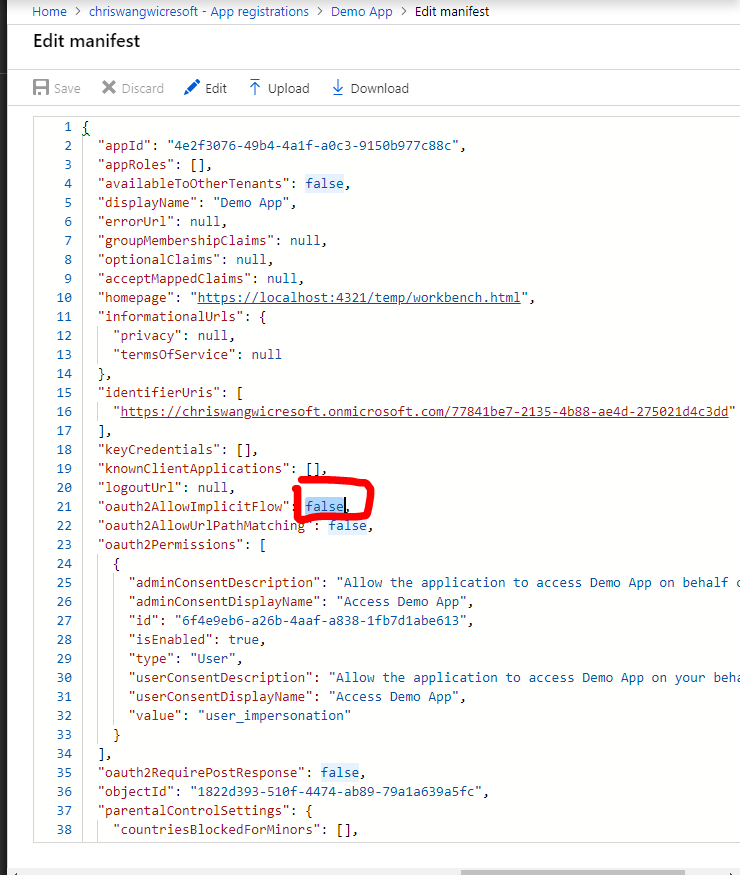
下面我们要改动一下 manifest 文档
我們需要把图中的oauth2AllowImplicitFlow 的value 改为true.
然后save 改动.
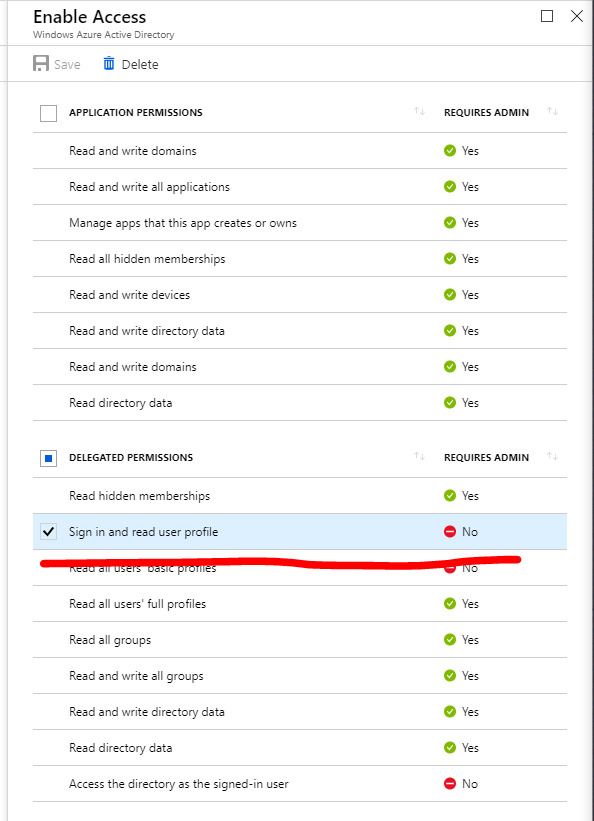
接下来,我们需要去Settings _> Required permissions 做一些改动
我们在delegated permissions里面选上 sign in and read user profile 然后 save changes
很多小伙伴有问题 为什么不使用application permissions 而使用 delegated permissions.
Application permissions:
Application permissions are used when the application calls the API as itself
App 本身call API
Delegated permissions:
Delegated permissions works when you want to call the Web API as the logged on user.
使用app的登录用户call api
区别其实很明显了. 在于app本身 call api 还是使用用户call api.
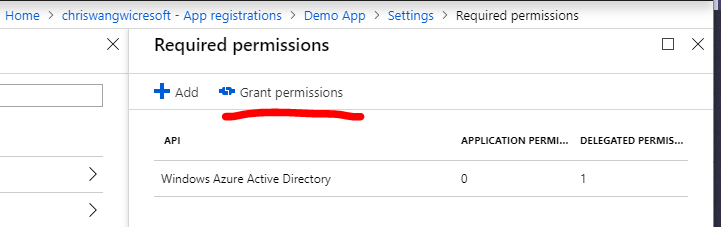
在我们save 之后, 需要再required permissions grant permissions, 不然系统不会改动配置
所有在Azure端设置的都结束了. 我们可以打开SPFx Web Part 啦
我们首先要添加这两个文件到helloWorld文件夹里面(注解: 没有使用仍和JavaScript的framework)
在IAdalConfig.ts 的interface当中添加以下TS代码:
export interface IAdalConfig extends adal.Config {

    popUp?: boolean;

    callback?: (error: any, token: string) => void;

    webPartId?: string;

  }
添加WebPartAuthenticationContext.js 代码:
const AuthenticationContext = require('adal-angular');

AuthenticationContext.prototype._getItemSuper = AuthenticationContext.prototype._getItem;

AuthenticationContext.prototype._saveItemSuper = AuthenticationContext.prototype._saveItem;

AuthenticationContext.prototype.handleWindowCallbackSuper = AuthenticationContext.prototype.handleWindowCallback;

AuthenticationContext.prototype._renewTokenSuper = AuthenticationContext.prototype._renewToken;

AuthenticationContext.prototype.getRequestInfoSuper = AuthenticationContext.prototype.getRequestInfo;

AuthenticationContext.prototype._addAdalFrameSuper = AuthenticationContext.prototype._addAdalFrame;

AuthenticationContext.prototype._getItem = function (key) {

  if (this.config.webPartId) {

    key = this.config.webPartId + '_' + key;

  }

  return this._getItemSuper(key);

};

AuthenticationContext.prototype._saveItem = function (key, object) {

  if (this.config.webPartId) {

    key = this.config.webPartId + '_' + key;

  }

  return this._saveItemSuper(key, object);

};

AuthenticationContext.prototype.handleWindowCallback = function (hash) {

  if (hash == null) {

    hash = window.location.hash;

  }

  if (!this.isCallback(hash)) {

    return;

  }

  var requestInfo = this.getRequestInfo(hash);

  if (requestInfo.requestType === this.REQUEST_TYPE.LOGIN) {

    return this.handleWindowCallbackSuper(hash);

  }

  var resource = this._getResourceFromState(requestInfo.stateResponse);

  if (!resource || resource.length === 0) {

    return;

  }

  if (this._getItem(this.CONSTANTS.STORAGE.RENEW_STATUS + resource) === this.CONSTANTS.TOKEN_RENEW_STATUS_IN_PROGRESS) {

    return this.handleWindowCallbackSuper(hash);

  }

}

AuthenticationContext.prototype._renewToken = function (resource, callback) {

  this._renewTokenSuper(resource, callback);

  var _renewStates = this._getItem('renewStates');

  if (_renewStates) {

    _renewStates = _renewStates.split(',');

  }

  else {

    _renewStates = [];

  }

  _renewStates.push(this.config.state);

  this._saveItem('renewStates', _renewStates);

}

AuthenticationContext.prototype.getRequestInfo = function (hash) {

  var requestInfo = this.getRequestInfoSuper(hash);

  var _renewStates = this._getItem('renewStates');

  if (!_renewStates) {

    return requestInfo;

  }

  _renewStates = _renewStates.split(';');

  for (var i = 0; i < _renewStates.length; i++) {

    if (_renewStates[i] === requestInfo.stateResponse) {

      requestInfo.requestType = this.REQUEST_TYPE.RENEW_TOKEN;

      requestInfo.stateMatch = true;

      break;

    }

  }

  return requestInfo;

}

AuthenticationContext.prototype._addAdalFrame = function (iframeId) {

  var adalFrame = this._addAdalFrameSuper(iframeId);

  adalFrame.style.width = adalFrame.style.height = '106px';

  return adalFrame;

}

window.AuthenticationContext = function() {

  return undefined;

}
打开XXXwebpart.ts
添加以下代码到render里面
ClientId是Azure AD 前面注册的ID
Tenant 为你office365 的tenant ID.
var authContext = new AuthenticationContext({

        clientId: 'your_content_id',

        instance: "https://login.microsoftonline.com/",

        tenant: "your_tenant.onmicrosoft.com",

        // postLogoutRedirectUri: 'https://localhost:4321/temp/workbench.html'

      });

      // Make an AJAX request to the Microsoft Graph API and print the response as JSON.

      var getToken;

      var getCurrentUser = function (access_token) {

        var xhr = new XMLHttpRequest();

        xhr.open('GET', 'https://graph.microsoft.com/v1.0/me', true);

        xhr.setRequestHeader('Authorization', 'Bearer ' + access_token);

        xhr.onreadystatechange = function () {

          if (xhr.readyState === 4 && xhr.status === 200) {

            // Do something with the response

            getToken=JSON.stringify(JSON.parse(xhr.responseText), null, '  ');

            console.log('get Graph APi information=='+getToken);

          } else {

            // TODO: Do something with the error (or non-200 responses)

          //  console.log(' error');

          }

        };

        xhr.send();

      }

      if (authContext.isCallback(window.location.hash)) {

        // Handle redirect after token requests

        authContext.handleWindowCallback();

        var err = authContext.getLoginError();

        if (err) {

          // TODO: Handle errors signing in and getting tokens

          console.log('login error');

        }

      } else {

        // If logged in, get access token and make an API request

        var user = authContext.getCachedUser();

        if (user) {

          // Get an access token to the Microsoft Graph API

          authContext.acquireToken(

            'https://graph.microsoft.com',

            function (error, token) {

              if (error || !token) {

                // TODO: Handle error obtaining access token

                console.log('Token error');

                return;

              }

              // Use the access token

              console.log('token=='+token);

              getCurrentUser(token);

            }

          );

        } else {

          authContext.login();

        }

      }
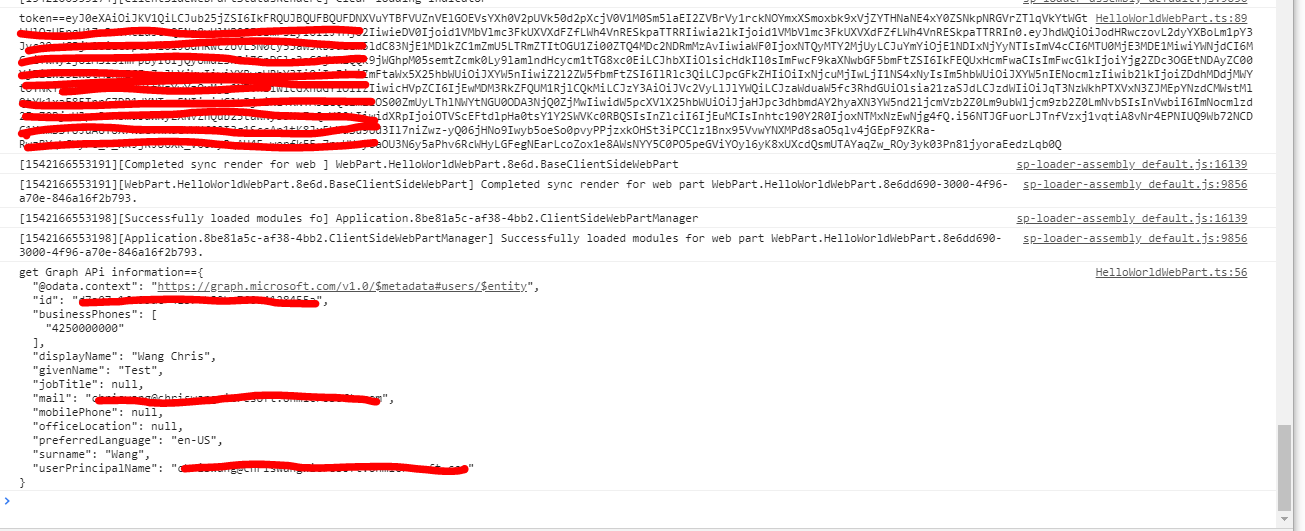
接下来我们就可以debug了
以下就是我们获取的信息
SharePoint Online 使用 adal js 获取access token的更多相关文章
- 基于DotNetOpenAuth的OAuth实现示例代码: 获取access token
1. 场景 根据OAuth 2.0规范,该场景发生于下面的流程图中的(D)(E)节点,根据已经得到的authorization code获取access token. 2. 实现环境 DotNetOp ...
- 工作笔记—新浪微博Oauth2.0授权 获取Access Token (java)
java发送新浪微博,一下博客从注册到发布第一条微博很详细 利用java语言在eclipse下实现在新浪微博开发平台发微博:http://blog.csdn.net/michellehsiao/art ...
- 新浪微博Oauth2.0授权 获取Access Token
新浪微博开放平台提供了丰富的API接口,利用这些接口,开发者能够开发出独具特色的微博应用.但是,大部分接口都需要用户授权给应用,应用利用授权得到的Access Token来调用相应的接口来获取内容. ...
- 通过重复运行的Microsoft Flow由OAuth认证后获取Access Token并将其更新到实体记录
我是微软Dynamcis 365 & Power Platform方面的工程师罗勇,也是2015年7月到2018年6月连续三年Dynamics CRM/Business Solutions方面 ...
- 自定义菜单和高级接口-获取Access Token
自定义菜单和高级接口都需要使用APPID和AppSecret来创建. 对应暂时没有这些权限的微信公众账号,开发者可以申请测试账号来体验和测试体验微信公众平台的所有高级接口的功能.链接 https:// ...
- 【Azure Developer】使用 Microsoft Authentication Libraries (MSAL) 如何来获取Token呢 (通过用户名和密码方式获取Access Token)
问题描述 在上一篇博文<[Azure Developer]使用 adal4j(Azure Active Directory authentication library for Java)如何来 ...
- Azure AD, Endpoint Manger(Intune), SharePoint access token 的获取
本章全是干货,干货,干货,重要的事情说三遍. 最近在研究Azure, Cloud相关的东西,项目中用的是Graph API(这个在下一章会相信介绍),可能是Graph API推出的时间比较晚,部分AP ...
- OAuth2.0 微博登陆网站功能的实现(一)获取用户授权及令牌 Access Token
在登陆一些网站的时候,可以选择登陆方式为第三方登陆,例如微博登陆,以爱奇艺为例,进入首页,点击 ”登陆“,会弹出登录框: 除了本站登陆外,还可以选择其他第三方登陆,比如微博登陆.QQ 登陆.微信登陆等 ...
- 微信公众平台开发视频教程-03-获取Access Token和获取微信服务器IP,添加微信菜单
1 获取access token 此token是以后每次调用微信接口都会带上的票据,token是公众号全局唯一票据,在调用其他接口之前都需要先得到token,taoken长度至少512个字符,通常用s ...
随机推荐
- SQL-25 获取员工其当前的薪水比其manager当前薪水还高的相关信息
题目描述 获取员工其当前的薪水比其manager当前薪水还高的相关信息,当前表示to_date='9999-01-01',结果第一列给出员工的emp_no,第二列给出其manager的manager_ ...
- CodeForces - 780C Andryusha and Colored Balloons(dfs染色)
Andryusha goes through a park each day. The squares and paths between them look boring to Andryusha, ...
- 『转』credential Provider 简易改写攻略
本次小学期的题目是windows下的凭证改编.本人负责的是Win7 下的credentials Provider 的编写以及其他杂七杂八的工作.当然给我印象最深的就是credentials provi ...
- centos安装python3虚拟环境和python3安装
1.本文的系统命令一般会在语句前加上#号,以区分系统命令及其他内容.输入命令时,无需输入#号. # yum install vim 2.本文系统输出的信息,会在前面加上>>号. # whi ...
- centos安装pip扩展包
1.安装 epel-release扩展yum源# yum install -y epel-release# yum clean all# yum makecache2.安装setuptools# yu ...
- Python 带有参数的装饰器
def wrapper_out(flag): # 装饰器本身的参数 def wrapper(fn): # 目标函数 def inner(*args, **kwargs): # 目标函数执行需要的参数 ...
- 大数据-03-Spark入门
Spark 简介 行业广泛使用Hadoop来分析他们的数据集.原因是Hadoop框架基于一个简单的编程模型(MapReduce).这里,主要关注的是在处理大型数据集时在查询之间的等待时间和运行程序的等 ...
- 2.7 多窗口、句柄(handle)
2.7 多窗口.句柄(handle) 前言 有些页面的链接打开后,会重新打开一个窗口,对于这种情况,想在新页面上操作,就得先切换窗口了.获取窗口的唯一标识用句柄表示,所以只需要切换句柄,我们就能在 ...
- VMware虚拟机与主机共享文件夹
VMware也可以像docker容器那样"挂载"主机上的目录给虚拟机,在虚拟机上访问共享目录就跟访问自己的目录一样方便. 1. 虚拟机(M) -> 设置(S)-> 选项 ...
- 项目实战利用Python来看美国大选
一.项目介绍 首先分析美国总统竞选这个项目是一个烂大街的项目,但是他的确是一个适合Python新手入门的数据处理项目. 本人在大二刚刚学习了Python数据处理,学习时间不超过5个小时,但是已经可以完 ...