
【Azure Developer】使用 Microsoft Authentication Libraries (MSAL) 如何来获取Token呢 (通过用户名和密码方式获取Access Token)
问题描述
在上一篇博文《【Azure Developer】使用 adal4j(Azure Active Directory authentication library for Java)如何来获取Token呢 (通过用户名和密码方式获取Access Token)》中,介绍了使用ADAL4J SDK获取Access Token。而ADAL4J是非常旧的SDK,最新的SDK名称为 MSAL4J (Microsoft Authentication Libraries),原来的AcquireToken的函数与现在的方式变动较大,不能直接修改POM.XML中依赖的方式来解决问题。
ADAL4J的acquireToken方法:
    /**

     * Acquires a security token from the authority using a Refresh Token

     * previously received.

     *

     * @param clientId

     *            Name or ID of the client requesting the token.

     * @param resource

     *            Identifier of the target resource that is the recipient of the

     *            requested token. If null, token is requested for the same

     *            resource refresh token was originally issued for. If passed,

     *            resource should match the original resource used to acquire

     *            refresh token unless token service supports refresh token for

     *            multiple resources.

     * @param username

     *            Username of the managed or federated user.

     * @param password

     *            Password of the managed or federated user.

     * @param callback

     *            optional callback object for non-blocking execution.

     * @return A {@link Future} object representing the

     *         {@link AuthenticationResult} of the call. It contains Access

     *         Token, Refresh Token and the Access Token's expiration time.

     */

    public Future<AuthenticationResult> acquireToken(final String resource,

            final String clientId, final String username,

            final String password, final AuthenticationCallback callback) {

        if (StringHelper.isBlank(resource)) {

            throw new IllegalArgumentException("resource is null or empty");

        }

        if (StringHelper.isBlank(clientId)) {

            throw new IllegalArgumentException("clientId is null or empty");

        }

        if (StringHelper.isBlank(username)) {

            throw new IllegalArgumentException("username is null or empty");

        }

        if (StringHelper.isBlank(password)) {

            throw new IllegalArgumentException("password is null or empty");

        }

        return this.acquireToken(new AdalAuthorizatonGrant(

                new ResourceOwnerPasswordCredentialsGrant(username, new Secret(

                        password)), resource), new ClientAuthenticationPost(

                ClientAuthenticationMethod.NONE, new ClientID(clientId)),

                callback);

    }
MSAL4J的acquireToken方法:
    public CompletableFuture<IAuthenticationResult> acquireToken(UserNamePasswordParameters parameters) {

        validateNotNull("parameters", parameters);

        UserNamePasswordRequest userNamePasswordRequest =

                new UserNamePasswordRequest(parameters,

                        this,

                        createRequestContext(PublicApi.ACQUIRE_TOKEN_BY_USERNAME_PASSWORD));

        return this.executeRequest(userNamePasswordRequest);

    }
    /**

     * Builder for UserNameParameters

     * @param scopes scopes application is requesting access to

     * @param username username of the account

     * @param password char array containing credentials for the username

     * @return builder object that can be used to construct UserNameParameters

     */

    public static UserNamePasswordParametersBuilder builder(Set<String> scopes, String username, char[] password) {

        validateNotEmpty("scopes", scopes);

        validateNotBlank("username", username);

        validateNotEmpty("password", password);

        return builder().scopes(scopes).username(username).password(password);

    }
那么,通过MSAL4J SDK,如何使用用户名,密码来获取到Access Token呢?
问题解答
和使用ADAL4J一样,都是需要使用Azure AD中的用户,以及一个Azure AD 注册应用(此应用需要开启“Allow public client flows”功能),开启步骤见博文《【Azure Developer】使用 adal4j(Azure Active Directory authentication library for Java)如何来获取Token呢 (通过用户名和密码方式获取Access Token)》中。
示例代码
package com.example;

import java.util.Collections;

import java.util.Set;

import com.microsoft.aad.msal4j.*;

/**

 * Hello world!

 *

 */

public class App {

    private static String authority  = "https://login.chinacloudapi.cn/<your tenant id>/";

    private static Set<String> scope  = Collections.singleton("https://ossrdbms-aad.database.chinacloudapi.cn/.default");

    private static String clientId ="Azure AD Application(Client) ID";

    private static String username ="AAD USER @XXXX.partner.onmschina.cn";

    private static String password = "USER PASSWORD";

    public static void main(String[] args) throws Exception {

        System.out.println("Hello World!");

        System.out.println("Hello App to get Token by Username & Password....");

        PublicClientApplication pca = PublicClientApplication.builder(clientId)

                .authority(authority)

                .build();

        //Get list of accounts from the application's token cache, and search them for the configured username

        //getAccounts() will be empty on this first call, as accounts are added to the cache when acquiring a token

        Set<IAccount> accountsInCache = pca.getAccounts().join();

        IAccount account = getAccountByUsername(accountsInCache, username);

        //Attempt to acquire token when user's account is not in the application's token cache

        IAuthenticationResult result = acquireTokenUsernamePassword(pca, scope, account, username, password);

        System.out.println("Account username: " + result.account().username());

        System.out.println("Access token:     " + result.accessToken());

        System.out.println("Id token:         " + result.idToken());

        System.out.println();

        accountsInCache = pca.getAccounts().join();

        account = getAccountByUsername(accountsInCache, username);

        //Attempt to acquire token again, now that the user's account and a token are in the application's token cache

        result = acquireTokenUsernamePassword(pca, scope, account, username, password);

        System.out.println("Account username: " + result.account().username());

        System.out.println("Access token:     " + result.accessToken());

        System.out.println("Id token:         " + result.idToken());

    }

    private static IAuthenticationResult acquireTokenUsernamePassword(PublicClientApplication pca,

                                                                      Set<String> scope,

                                                                      IAccount account,

                                                                      String username,

                                                                      String password) throws Exception {

        IAuthenticationResult result;

        try {

            SilentParameters silentParameters =

                    SilentParameters

                            .builder(scope)

                            .account(account)

                            .build();

            // Try to acquire token silently. This will fail on the first acquireTokenUsernamePassword() call

            // because the token cache does not have any data for the user you are trying to acquire a token for

            result = pca.acquireTokenSilently(silentParameters).join();

            System.out.println("==acquireTokenSilently call succeeded");

        } catch (Exception ex) {

            if (ex.getCause() instanceof MsalException) {

                System.out.println("==acquireTokenSilently call failed: " + ex.getCause());

                UserNamePasswordParameters parameters =

                        UserNamePasswordParameters

                                .builder(scope, username, password.toCharArray())

                                .build();

                // Try to acquire a token via username/password. If successful, you should see

                // the token and account information printed out to console

                result = pca.acquireToken(parameters).join();

                System.out.println("==username/password flow succeeded");

            } else {

                // Handle other exceptions accordingly

                throw ex;

            }

        }

        return result;

    }

        /**

     * Helper function to return an account from a given set of accounts based on the given username,

     * or return null if no accounts in the set match

     */

    private static IAccount getAccountByUsername(Set<IAccount> accounts, String username) {

        if (accounts.isEmpty()) {

            System.out.println("==No accounts in cache");

        } else {

            System.out.println("==Accounts in cache: " + accounts.size());

            for (IAccount account : accounts) {

                if (account.username().equals(username)) {

                    return account;

                }

            }

        }

        return null;

    }

}
在POM.XML文件中添加依赖Package:
    <dependency>

      <groupId>com.microsoft.azure</groupId>

      <artifactId>msal4j</artifactId>

      <version>1.0.0</version>

  </dependency>
注意:以上代码最关键的部分就是 UserNamePasswordParameters 的设置。scope 也是需要根据Token的资源而变动,如以上示例代码中使用的 https://ossrdbms-aad.database.chinacloudapi.cn/.default , 而在adal4j的示例中,resource的值为:https://microsoftgraph.chinacloudapi.cn/。
运行效果为
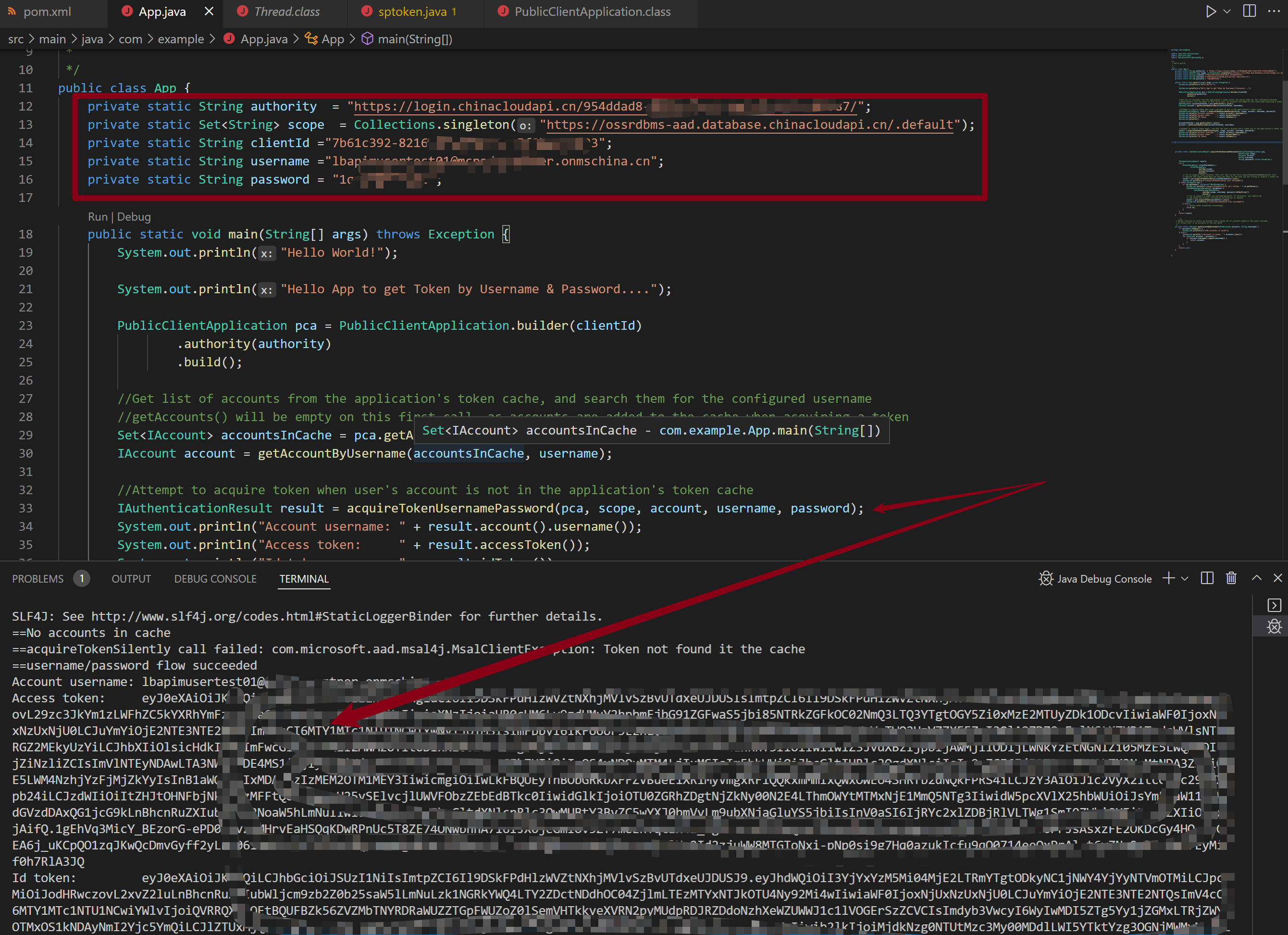
附录一:遇见 Administrator has not consented the application的问题
错误消息:
Caused by: com.microsoft.aad.adal4j.AuthenticationException:
{"error_description":
"AADSTS65001: The user or administrator has not consented to use the application with ID 'xxxxxxxx-xxxx-4fa8-xxxx-xxxxxxxxxxxx' named 'xxxxtest01'.
Send an interactive authorization request for this user and resource.\r\n
Trace ID:xxxxxx-xxx-xxx----xxxxxx\r\n
Correlation ID: xxxxxxxx-xxxx-xxxx-xxxx-xxxxxxxxxxxx\r\n
Timestamp: 2022-05-05 08:16:16Z",
"error":"invalid_grant"}
此类问题的解决方法为:
1)进入Azure AD页面,找到当前User的登录日志信息(Sign-in logs),查看失败的记录,在详细记录中,查看Status为 Interrupted的记录,找到 Resource 和Application 信息。在第二步中使用这两个信息。
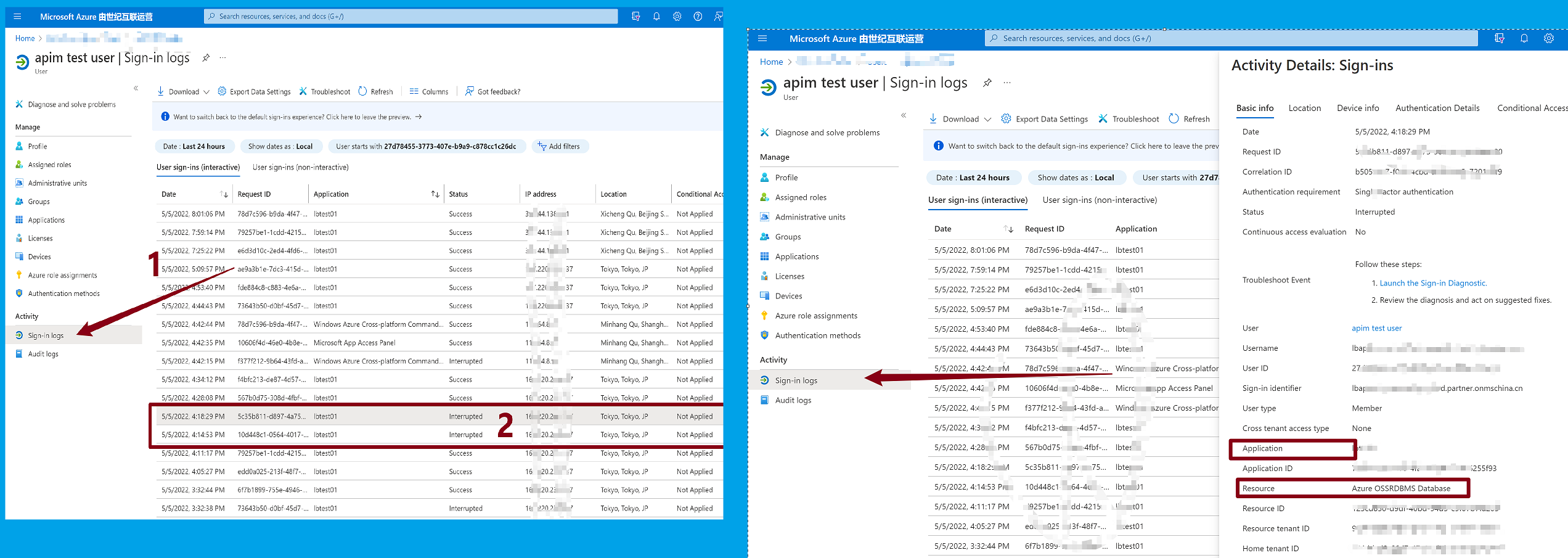
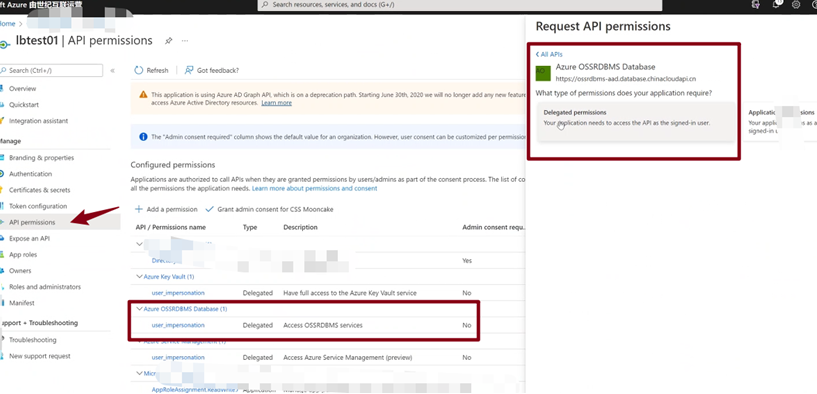
2)回到Azure AD的注册应用页面,找到第一步中的Applicaiton,然后进入API Permission页面。在API Permission页面中点击“Add a Permission”,然后再“APIs my Organization uses”的文本框中输入“Azure OSSRDBMS Database”进行搜索,然后选中它,并赋予“Delegated Permissions”权限。如下图:
参考资料
Java console application letting users sign-in with username/password and call Microsoft Graph API:https://github.com/Azure-Samples/ms-identity-java-desktop/tree/da27a1af6064d5e833e645e5040a5120a0c2698f/Username-Password-Flow
Microsoft identity platform and OAuth 2.0 Resource Owner Password Credentials:https://docs.microsoft.com/en-us/azure/active-directory/develop/v2-oauth-ropc
使用 adal4j(Azure Active Directory authentication library for Java)如何来获取Token呢 (通过用户名和密码方式获取Access Token) : https://www.cnblogs.com/lulight/p/16212275.html
【Azure Developer】使用 Microsoft Authentication Libraries (MSAL) 如何来获取Token呢 (通过用户名和密码方式获取Access Token)的更多相关文章
- Azure AD, Endpoint Manger(Intune), SharePoint access token 的获取
本章全是干货,干货,干货,重要的事情说三遍. 最近在研究Azure, Cloud相关的东西,项目中用的是Graph API(这个在下一章会相信介绍),可能是Graph API推出的时间比较晚,部分AP ...
- 【Azure Developer】使用 adal4j(Azure Active Directory authentication library for Java)如何来获取Token呢
问题描述 使用中国区的Azure,在获取Token时候,参考了 adal4j的代码,在官方文档中,发现了如下的片段代码: ExecutorService service = Executors.new ...
- 【Azure Developer】使用Microsoft Graph API 批量创建用户,先后遇见的三个错误及解决办法
问题描述 在先前的一篇博文中,介绍了如何使用Microsoft Graph API来创建Azure AD用户(博文参考:[Azure Developer]使用Microsoft Graph API 如 ...
- 【Azure Developer】Python 获取Micrisoft Graph API资源的Access Token, 并调用Microsoft Graph API servicePrincipals接口获取应用ID
问题描述 在Azure开发中,我们时常面临获取Authorization问题,需要使用代码获取到Access Token后,在调用对应的API,如servicePrincipals接口. 如果是直接调 ...
- 【Azure Developer】解决Azure Key Vault管理Storage的示例代码在中国区Azure遇见的各种认证/授权问题 - C# Example Code
问题描述 使用Azure密钥保管库(Key Vault)来托管存储账号(Storage Account)密钥的示例中,从Github中下载的示例代码在中国区Azure运行时候会遇见各种认证和授权问题, ...
- 【Azure Developer】【Python 】使用 azure.identity 和 azure.common.credentials 获取Azure AD的Access Token的两种方式
问题描述 使用Python代码,展示如何从Azure AD 中获取目标资源的 Access Token. 如要了解如何从AAD中获取 client id,client secret,tenant id ...
- 【Azure 环境】【Azure Developer】使用Python代码获取Azure 中的资源的Metrics定义及数据
问题描述 使用Python SDK来获取Azure上的各种资源的Metrics的名称以及Metrics Data的示例 问题解答 通过 azure-monitor-query ,可以创建一个 metr ...
- 【Azure Developer】使用Postman获取Azure AD中注册应用程序的授权Token,及为Azure REST API设置Authorization
Azure Active Directory (Azure AD) is Microsoft's cloud-based identity and access management service, ...
- 【Azure Developer】在Azure Resource Graph Explorer中查看当前订阅下的所有资源信息列表并导出(如VM的名称,IP地址内网/公网,OS,区域等)
问题描述 通过Azure的Resource Graph Explorer(https://portal.azure.cn/#blade/HubsExtension/ArgQueryBlade),可以查 ...
随机推荐
- spring-boot-关于配置文件
------------恢复内容开始------------ spring-boot 的配置文件有四个地方: 项目更目录下的config目you录下(自己建) 项目根目录下 resource 目录下的 ...
- 解释基于 XML Schema 方式的切面实现?
在这种情况下,切面由常规类以及基于 XML 的配置实现.
- nginx 负载均衡详解
配置文件 upstream abc { server 192.168.2.188:8080 weight=1 max_fails=3 fail_timeout=30; 定义集群,weight=权重轮询 ...
- ros工作空间中文件夹结构
ROS 编译系统 catkin 详解 ros系统学习之Catkin编译系统 ROS--catkin编译系统.package.xml和CMakeList.txt文件 1.build:编译空间 存放CMa ...
- ABP源码分析 - 约定注册(2)
比较随意,记录下过程,以便忘了以后重拾. 所谓约定注册是指不需要明确写代码注入,只需要按约定规则写服务类,框架自动完成服务注册. 例如,只要这样写,框架就会自动注册. public class Tax ...
- python---替换空格
""" 请实现一个函数,将一个字符串中的每个空格替换成"%20". 例如,当字符串为We Are Happy.则经过替换之后的字符串为We%20Are ...
- Mybatis-Dao层实现(通过代理方式)
1.代理方式开发是主流 2.Mapper接口开发方法只需要编写Mapper接口(相当于Dao接口),然后由Mybatis根据接口创建动态代理对象 Mapper接口开发需要遵循以下规范 一一对应 Use ...
- 使用SQL的FOR XML PATH('')将字段用逗号隔开
FOR XML PATH('') 将查询结果显示为XML 经常用来将查询结果按逗号分隔后显示至某一字段 select * from Area结果 添加FOR XML PATH('')后 select ...
- zabbix3.2 监控MongoDB
本文参考连接: https://www.jianshu.com/p/a6b36d5b74ba 一.实验环境: MongoDB/zabbix-agent:172.16.88.44 zabbix-serv ...
- os、sys、json、subprocess模块
今日内容概要 1.os模块 2.sys模块 3.json模块 4.subprocess模块 今日内容详细 os模块 """该模块主要是跟操作系统打交道"&quo ...