
Understanding Flash: Blocks, Pages and Program / Erases
https://flashdba.com/2014/06/20/understanding-flash-blocks-pages-and-program-erases/
In the last post on this subject I described the invention of NAND flash and the way in which erase operations affect larger areas than write operations. Let’s have a look at this in more detail and see what actually happens. First of all, we need to know our way around the different entities on a flash chip (or “package“), which are: the die, the plane, the block and the page:

NAND Flash Die Layout (image courtesy of AnandTech)
Note: What follows is a high-level description of the generic behaviour of flash. There are thousands of different NAND chips available, each potentially with slightly different instruction sets, block/page sizes, performance characteristics etc.
- The package is the memory chip, i.e. the black rectangle with little electrical connectors sticking out of it. If you look at an SSD, a flash card or the internals of a flash array you will see many flash packages, each of which is produced by one of the big flash manufacturers: Toshiba, Samsung, Micron, Intel, SanDisk, SK Hynix. These are the only companies with the multi-billion dollar fabrication plants necessary to make NAND flash.
- Each package contains one or more dies (for example one, two, or four). The die is the smallest unit that can independently execute commands or report status.
- Each die contains one or more planes (usually one or two). Identical, concurrent operations can take place on each plane, although with some restrictions.
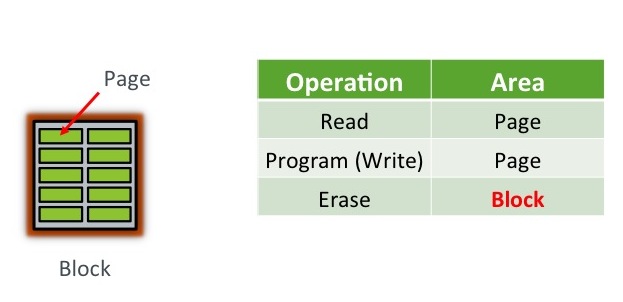
- Each plane contains a number of blocks, which are the smallest unit that can be erased. Remember that, it’s really important.
- Each block contains a number of pages, which are the smallest unit that can be programmed (i.e. written to).
The important bit here is that program operations (i.e. writes) take place to a page, which might typically be 8-16KB in size, while erase operations take place to a block, which might be 4-8MB in size. Since a block needs to be erased before it can be programmed again (*sort of, I’m generalising to make this easier), all of the pages in a block need to be candidates for erasure before this can happen.
Program / Erase Cycles
When your flash device arrives fresh from the vendor, all of the pages are “empty”. The first thing you will want to do, I’m sure, is write some data to them – which in the world of memory chips we call a program operation. As discussed, these program operations take place at the page level. You can then read your fresh data back out again with readoperations, which also take place at the page level. [Having said that, the instruction to read a page places the data from that page in a memory register, so your reading process can in fact then selectively access subsets of the page if it desires – but maybe that’s going into too much detail…]
 Where it gets interesting is if you want to update the data you just wrote. There is no update operation for flash, no undo or rewind mechanism for changing what is currently in place, just the erase operation. It’s a little bit like an etch-a-sketch, in that you can continue to turn the dials and make white sections of screen go black, but you cannot turn black sections of screen to white again without erasing the entire screen.
  An erase operation on a flash chip clears the data from all pages in the block, so if some of the other pages contain active data (stuff you want to keep) you either have to copy it elsewhere first or hold off from doing the erase.
In fact, that second option (don’t erase just yet) makes the most sense, because the blocks on a flash chip can only tolerate a limited number of program and erase options (known as the program erase cycle or PE cycle because for obvious reasons they follow each other in turn). If you were to erase the block every time you wanted to change the contents of a page, your flash would wear out very quickly.
So a far better alternative is to simply mark the old page (containing the unchanged data) as INVALID and then write the new, changed data to an empty page. All that is required now is a mechanism for pointing any subsequent access operations to the new page and a way of tracking invalid pages so that, at some point, they can be “recycled”.

Updating a page in NAND flash. Note that the new page location does not need to be within the same block, or even the same flash die. It is shown in the same block here purely for ease of drawing.
This “mechanism” is known as the flash translation layer and it has responsibility for these tasks as well as a number of others. We’ll come back to it in subsequent posts because it is a real differentiator between flash products. For now though, think about the way the device is filling up with data. Although we’ve delayed issuing erase operations by cleverly moving data to different pages, at some point clearly there will be no empty pages left and erases will become essential. This is where the bad news comes in: it takes many times longer to perform an erase than it does to perform a read or program. And that clearly has consequences for performance if not managed correctly.
In the next post we’ll look at the differences in time taken to perform reads, programs and erases – which first requires looking at the different types of flash available: SLC, MLC and TLC…
Understanding Flash: Blocks, Pages and Program / Erases的更多相关文章
- Understanding Objective-C Blocks
The aim of this tutorial is to give a gentle introduction to Objective-C blocks while paying special ...
- 一些有趣的B+树优化实验
作为目前数据库引擎的两种主要数据结构,LSM-tree和B+-tree在业界已经有非常广泛的研究.相比B+-tree,LSM-tree牺牲一定的读性能以换取更小的写放大以及更低的存储成本,但这必须建立 ...
- A New 3-bit Programming Algorithm using SLC-to-TLC Migration for 8MBs High Performance TLC NAND Flash Memory
背景 1.2012年左右的数据SLC.MLC.TLC闪存芯片的区别:SLC = Single-Level Cell ,即1bit/cell,速度快寿命长,价格超贵(约MLC 3倍以上的价格),约10万 ...
- UEFI Bootable USB Flash Drive - Create in Windows(WIN7 WIN8)
How to Create a Bootable UEFI USB Flash Drive for Installing Windows 7, Windows 8, or Windows 8.1 In ...
- [翻译]理解Ruby中的blocks,Procs和lambda
原文出处:Understanding Ruby Blocks, Procs and Lambdas blocks,Procs和lambda(在编程领域被称为闭包)是Ruby中很强大的特性,也是最容易引 ...
- [转]Flash Socket通信的安全策略
昨天做测试的时候遇到一个问题,做好的SWF在Flash AS3中调试通过,但是发布到html中之后就无法得到数据了.查了一些资料之后找到了解决办法.这里感谢 剑心 提供帮助,以及同事若水三千提供Jav ...
- Core Java Volume I — 3.1. A Simple Java Program
Let’s look more closely at one of the simplest Java programs you can have—one that simply prints a m ...
- Apache Flex + Adobe Flash Builder环境配置
在开始学习Flex之前,需要配置开发环境.Apache Flex SDK包含了你开发所需要的东西,当然除了集成开发环境(Integrated Development Environment,IDE). ...
- Flash Socket通信的安全策略问题 843端口
1.问题描述 将flash发布为html格式后,加载页面后,swf无法与服务器进行socket通信.Flash端显示的错误为:securityErrorHandler信息: [Securi ...
随机推荐
- 病毒木马查杀实战第020篇:Ring3层主动防御之基本原理
前言 假设说我们的计算机中安装有杀毒软件,那么当我们有意或无意地下载了一个恶意程序后.杀软一般都会弹出一个对话框提示我们,下载的程序非常可能是恶意程序,建议删除之类的.或者杀软就不提示.直接删除了:或 ...
- Spark机器学习(11):协同过滤算法
协同过滤(Collaborative Filtering,CF)算法是一种常用的推荐算法,它的思想就是找出相似的用户或产品,向用户推荐相似的物品,或者把物品推荐给相似的用户.怎样评价用户对商品的偏好? ...
- python3用BeautifulSoup抓取id='xiaodeng',且正则包含‘elsie’的标签
# -*- coding:utf-8 -*- #python 2.7 #XiaoDeng #http://tieba.baidu.com/p/2460150866 #使用多个指定名字的参数可以同时过滤 ...
- struts2:数据标签
目录 数据标签1. a标签2. set标签3. push标签4. bean/param标签5. date标签6. include标签7. url标签8. property标签9. debug标签10. ...
- 浅析Mysql的my.ini文件
转载:http://hunanpengdake.iteye.com/admin/blogs/1647725 今天闲的蛋疼,没事想了解mysql,大家都知道在配置Mysql的过程中,my.ini非常重要 ...
- [svc]证书各个字段的含义
证书生成工具 1,openssl 2,jdk自带的keystone 3,cfssl 证书中各个字段的含义 - 查看证书的内容 openssl x509 -in /etc/pki/CA/cacert.p ...
- 关于java线程、进程的一些问题
1.多核硬件上,java中同一个进程的多个线程可以运行在不同的CPU上么? 应该是可以的,在eclipse上面跑一个模拟程序,一个死循环的线程可以占用系统(4核,Win7)%的CPU,4个这样的线程刚 ...
- Socket网络编程--简单Web服务器(2)
上一小节通过阅读开源的Web服务器--tinyhttpd.大概知道了一次交互的请求信息和应答信息的具体过程.接下来我就自己简单的实现一个Web服务器. 下面这个程序只是实现一个简单的框架出来.这次先实 ...
- 【iCore4 双核心板】DEMO V1.0 测试程序发布
iCore4 Demo V1.0程序说明 一.概要 本资料包含5个文件夹: 1.“arm”里是iCore4上arm的程序包,开发环境为KEIL5.17: 2.“fpga”里是iCore4上FPGA的程 ...
- token令牌和jwt
用户登录,后端生成token返回给前端 前端拿到token,以后每次登录使用header里的token进行权限验证 后端接收到前端传来的token,如果是通过数据库或redis或session进行比对 ...