
Jupyter Notebook主题字体设置及自动代码补全
安装
Jupyter Notebook 用久了就离不开了,然而自带的主题真的不忍直视。为了视力着想,为了自己看起来舒服,于是折腾了一番。。在 github 上发现了一个 jupyter-themes 工具,可以通过 pip 安装,非常方便使用。
首先是主题下载,为了速度快点,使用豆瓣源,命令行如下所示:
pip install -i http://pypi.douban.com/simple --trusted-host pypi.douban.com --no-dependencies jupyterthemes==0.18.2
安装好了,有的电脑可能会提示缺少 lesscpy,继续 pip 安装
pip install -i http://pypi.douban.com/simple --trusted-host pypi.douban.com lesscpy
然后是对主题选择、字体大小进行设置,我总结了一个我最喜欢的
jt --lineh 140 -f consolamono -tf ptmono -t grade3 -ofs 14 -nfs 14 -tfs 14 -fs 14 -T -N
命令行的格式的解释如下表所示:
| cl options | arg | default |
|---|---|---|
| Usage help | -h | -- |
| List Themes | -l | -- |
| Theme Name to Install | -t | -- |
| Code Font | -f | -- |
| Code Font-Size | -fs | 11 |
| Notebook Font | -nf | -- |
| Notebook Font Size | -nfs | 13 |
| Text/MD Cell Font | -tf | -- |
| Text/MD Cell Fontsize | -tfs | 13 |
| Pandas DF Fontsize | -dfs | 9 |
| Output Area Fontsize | -ofs | 8.5 |
| Mathjax Fontsize (%) | -mathfs | 100 |
| Intro Page Margins | -m | auto |
| Cell Width | -cellw | 980 |
| Line Height | -lineh | 170 |
| Cursor Width | -cursw | 2 |
| Cursor Color | -cursc | -- |
| Alt Prompt Layout | -altp | -- |
| Alt Markdown BG Color | -altmd | -- |
| Alt Output BG Color | -altout | -- |
| Style Vim NBExt* | -vim | -- |
| Toolbar Visible | -T | -- |
| Name & Logo Visible | -N | -- |
| Kernel Logo Visible | -kl | -- |
| Reset Default Theme | -r | -- |
| Force Default Fonts | -dfonts | -- |
附上最终效果:


接着实现自动代码补全,首先安装 nbextensions
pip install -i http://pypi.douban.com/simple --trusted-host pypi.douban.com jupyter_contrib_nbextensions

jupyter contrib nbextension install --user
然后安装 nbextensions_configurator
pip install -i http://pypi.douban.com/simple --trusted-host pypi.douban.com  jupyter_nbextensions_configurator

jupyter nbextensions_configurator enable --user
如果提示缺少依赖,就安装对应依赖即可。
最后重启 jupyter,在弹出的主页面里,能看到增加了一个 Nbextensions 标签页,在这个页面里,勾选 Hinterland 即启用了代码自动补全,如图所示:


这时打开一个笔记,来感受一下吧。
更新
有几个给我留言说 Nbextensions 安装失败的问题,这里做一下统一回复。
其实大多都是缺少依赖,我在今天(2020/04/08)重新安装,按照上面的步骤,也没有 Nbextensions ,并且没有报错,后来卸载重装,提示我缺少 msgpack ,把它安装后,重新配置,Nbextensions 又出来了
如果已经安装了,先卸载:
pip uninstall jupyter_contrib_nbextensions

pip uninstall jupyter_nbextensions_configurator
打开 Anaconda Prompt 窗口,执行以下命令:
pip install -i http://pypi.douban.com/simple --trusted-host pypi.douban.com jupyter_contrib_nbextensions

jupyter contrib nbextension install --user

pip install -i http://pypi.douban.com/simple --trusted-host pypi.douban.com  jupyter_nbextensions_configurator

jupyter nbextensions_configurator enable --user
最后重新启动 Jupyter Notebook 后,就发现
Nbextensions标签又有了
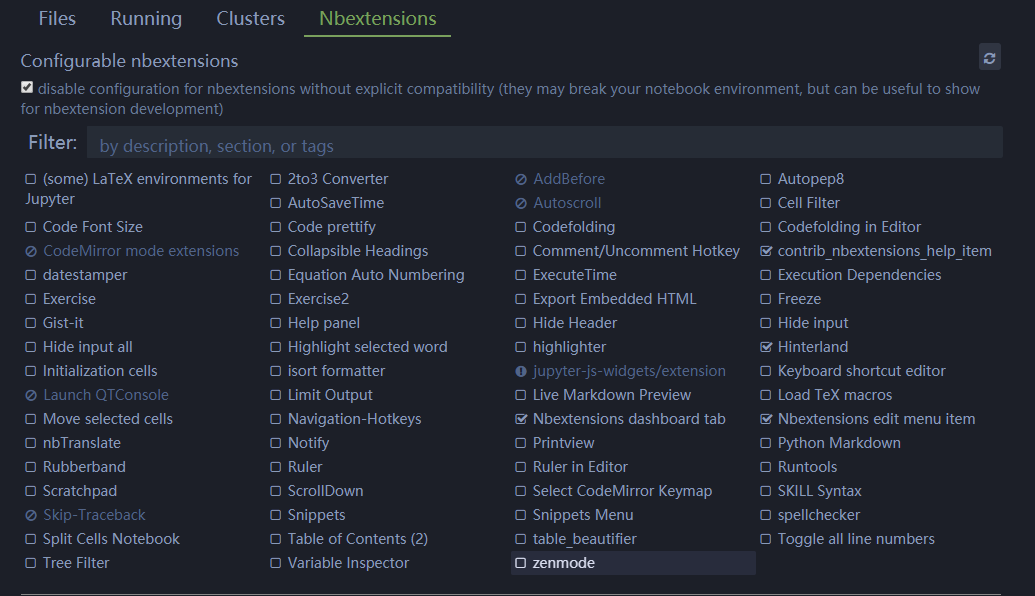
- 安装好插件是灰色的。把这里的勾取消即可

Jupyter Notebook主题字体设置及自动代码补全的更多相关文章
- 【转】Jupyter Notebook主题字体设置及自动代码补全
Jupyter Notebook用久了就离不开了,然而自带的主题真的不忍直视.为了视力着想,为了自己看起来舒服,于是折腾了一番..在github上发现了一个jupyter-themes工具,可以通过p ...
- Eclipse自动代码补全
Windows——>Preferences——>Java-->Editor-->Content Asist, 在Auto activation triggers for Jav ...
- 在windows中python安装sit-packages路径位置 在Pycharm中导入opencv不能自动代码补全问题
在Pycharm中导入opencv不能自动代码补全问题 近期学习到计算机视觉库的相关知识,经过几个小时的探讨,终于解决了opencv不能自动补全代码的困惑, 我们使用pycharm安装配置可能会添加多 ...
- 设置IDEA自动提示补全代码,关于idea自动补全的详细设置。
在IDEA中,默认的代码自动提示不够智能,现在配置成更加智能的方式. File-Settings-Editor-General-Code Completion中 把最上面的大小写敏感度改成none,下 ...
- sublime开启php自动代码补全
配置文件添加 "auto_complete_selector": "source, text", 配置文件打开方式:preferences->settin ...
- jupyter notebook安装/代码补全/支持golang 踩坑记
安装(不要用root) 安装anaconda3,然后ln -s bin目录下的jupyter命令到/usr/bin目录下 生成密码备用 敲ipython进入交互终端 In [1]: from note ...
- [jetbrains系列] 外链第三方库+代码补全设置
jetbrains系列的IDE真的是太好用了,有种相见恨晚的感觉. 在开发过程中第三方库是必不可少的,在开发的时候如果有一个可以补全的IDE可以节省查文档的时间. 举个例子:给pycharm配pysp ...
- ADT中的代码补全设置
设置自动补全代码 刚刚学Android,有很多变量和方法 都不熟悉.需要有提示,才更加方便. 快捷方式:Alt + / 可以出现代码提示. 默认的只有输入“ .” 以后才会有代码补全提示,可作如 ...
- jupyter lab最强代码补全插件
1 简介 提起kite相信不少朋友都有印象,它是一个功能非常强大的代码补全工具,目前可用于Python与javascript,为许多知名的编辑器譬如Vs Code.Pycharm提供对应的插件. 图1 ...
随机推荐
- MySql获取两个日期间的时间差
[1]MySql 语言获取两个日期间的时间差 DATEDIFF 函数可以获得两个日期之间的时间差.但是,这个函数得出的结果是天数. 需要直接获取秒数可使用TIMESTAMPDIFF函数.应用示例如下: ...
- 只打开一次浏览器,生成html测试报告<小紧张中......>
from selenium import webdriverimport unittestimport time class Blog(unittest.TestCase): "" ...
- gitlab提交内容关联到slack通知
gitlab提交内容关联到slack通知 https://docs.gitlab.com/ee/user/project/integrations/slack.html 首先去slack做相关的设置 ...
- httpclient get post
https://www.cnblogs.com/wutongin/p/7778996.html post请求方法和get请求方法 package com.xkeshi.paymentweb.contr ...
- JustOj 2009: P1016 (dp)
题目描述 有一个箱子容量为v(正整数,o≤v≤20000),同时有n个物品(o≤n≤30),每个物品有一个体积 (正整数).要求从 n 个物品中,任取若干个装入箱内,使箱子的剩余空间为最小. ...
- [转载]oracle函数listagg的使用说明
工作中经常遇到很多需求是这样的,根据条件汇总某些字段,比如我遇到的是,我们公司有三个投资平台,同一个客户拿手机号在三个平台都注册了,但注册过的用户名不一样,显示的时候需要根据手机号显示所有注册过的名称 ...
- vue 加载更多
<template> <div> <ul> <li v-for="item in articles"> ...
- ui-router .state参数配置
.state('页面被引用时的变量名',{ template: '<h1>My Contacts</h1>',//被应用时插入的模板,状态被激活时,它的模板会自动插入到父状态对 ...
- game to refactor for refactor
first step, only aim to work. it works, but i have not seen the necessaty to use class yet. my quest ...
- yii2 mysql根据多个字段的数据计算排序
mysql根据多个字段的数据计算排序 select *,num1+num2*10+num3*100 num from $tableName order by num desc yii2框架活动记录ac ...