
C#实现Windows服务
资源:Walkthrough: Creating a Windows Service Application in the Component Designer: https://msdn.microsoft.com/en-us/library/zt39148a(v=vs.110).aspx
注意事项
- 调试服务:先启动服务,然后Attach到服务进程。
- 需要添加安装模块,这样可以安装Windows服务。使用InstallUtil.exe安装。
- 服务运行在different window station,不是interactive的,如果服务弹出对话框,用户是看不见的,这时候可能中断服务,使服务失去响应。
安装服务。
- 命令。InstallUtil /i MyService.exe安装服务。InstallUtil /u MyService.exe卸载服务。
- 编程。ManagedInstallerClass
                if (args[] == "-i")

                {

                    ManagedInstallerClass.InstallHelper(new[] { Assembly.GetExecutingAssembly().Location });

                }

                else if (args[] == "-u")

                {

                    ManagedInstallerClass.InstallHelper(new[] { "/u", Assembly.GetExecutingAssembly().Location });

                }
控制服务状态:
- 命令。使用sc start ServiceName启动服务,sc stop ServiceName停止服务,sc query ServiceName查询服务状态。Sc delete ServiceName删除服务。
- 编程。System.ServiceProcess.ServiceController。 https://msdn.microsoft.com/en-us/library/system.serviceprocess.servicecontroller(v=vs.110).aspx
- 服务管理界面。

创建服务。
如果创建新项目,可以使用Windows服务模板。
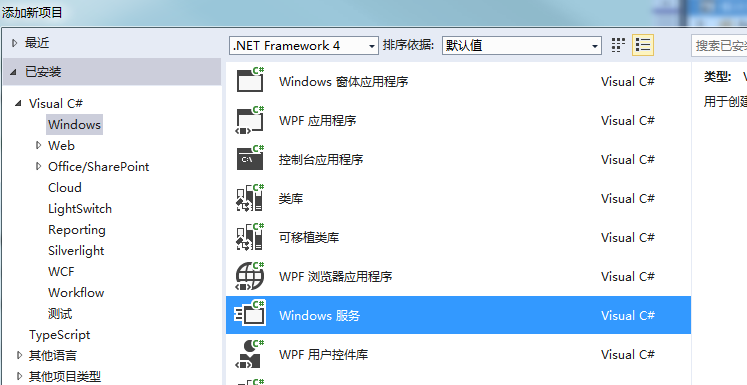
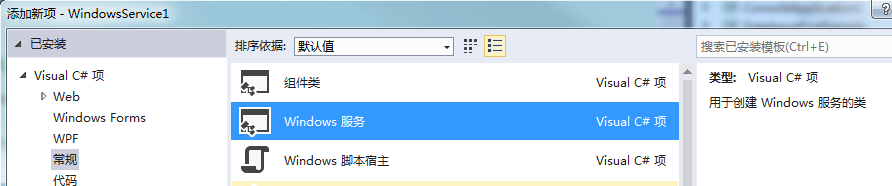
如果是现有项目,往项目中添加Windows服务模块。
在Main中调用ServiceBase.Run把服务跑起来。
ServiceBase[] ServicesToRun;

            ServicesToRun = new ServiceBase[]

            {

                new Service1()

            };

            ServiceBase.Run(ServicesToRun);
在OnStart和OnStop中启动和清理工作线程。注意不要在OnStart中提供服务(比如while循环),否则服务一直会是正在启动状态,后面也就没有办法停止服务了。
protected override void OnStart(string[] args)

        {

            //启动后台线程,提供服务

        }
在控制台测试。为了测试,我们可能在控制台跑服务。
private static void Main(string[] args)

        {

            if (Environment.UserInteractive)

            {

                var service = new Service1();

                service.TestService(args);

            }

            else

            {

                ServiceBase[] ServicesToRun;

                ServicesToRun = new ServiceBase[] { new Service1() };

                ServiceBase.Run(ServicesToRun);

            }

        }

///Service1

        public void TestService(string[] args)

        {

            this.OnStart(args);

            Console.ReadLine();

            this.OnStop();

        }
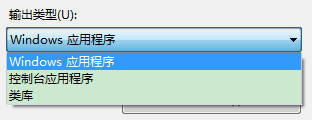
注意程序的编译输出类型应该为“控制台应用程序”。
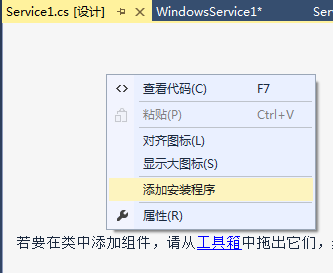
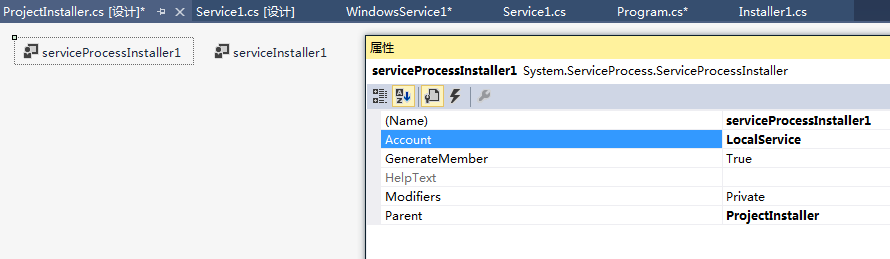
添加安装模块。在Service的设计界面上右键,选择添加安装程序。
设置添加的Installer中的控件属性,包括服务运行的账号,服务名等。

设置服务状态
如果服务启动时间很长,可以在代码里面设置服务显示的状态。
public enum ServiceState

    {

        SERVICE_STOPPED = 0x00000001,

        SERVICE_START_PENDING = 0x00000002,

        SERVICE_STOP_PENDING = 0x00000003,

        SERVICE_RUNNING = 0x00000004,

        SERVICE_CONTINUE_PENDING = 0x00000005,

        SERVICE_PAUSE_PENDING = 0x00000006,

        SERVICE_PAUSED = 0x00000007,

    }

    [StructLayout(LayoutKind.Sequential)]

    public struct ServiceStatus

    {

        public long dwServiceType;

        public ServiceState dwCurrentState;

        public long dwControlsAccepted;

        public long dwWin32ExitCode;

        public long dwServiceSpecificExitCode;

        public long dwCheckPoint;

        public long dwWaitHint;

    };

//在服务中导入方法

        [DllImport("advapi32.dll", SetLastError = true)]

        private static extern bool SetServiceStatus(IntPtr handle, ref ServiceStatus serviceStatus);

//使用方法。

            ServiceStatus status = new ServiceStatus();

            status.dwCurrentState = ServiceState.SERVICE_START_PENDING;

            SetServiceStatus(this.ServiceHandle, ref status);
C#实现Windows服务的更多相关文章
- 基于SignalR实现B/S系统对windows服务运行状态的监测
通常来讲一个BS项目肯定不止单独的一个BS应用,可能涉及到很多后台服务来支持BS的运行,特别是针对耗时较长的某些任务来说,Windows服务肯定是必不可少的,我们还需要利用B/S与windows服务进 ...
- C#创建、安装、卸载、调试Windows Service(Windows 服务)的简单教程
前言:Microsoft Windows 服务能够创建在它们自己的 Windows 会话中可长时间运行的可执行应用程序.这些服务可以在计算机启动时自动启动,可以暂停和重新启动而且不显示任何用户界面.这 ...
- 玩转Windows服务系列汇总
玩转Windows服务系列汇总 创建Windows服务 Debug.Release版本的注册和卸载及其原理 无COM接口Windows服务启动失败原因及解决方案 服务运行.停止流程浅析 Windows ...
- 玩转Windows服务系列——给Windows服务添加COM接口
当我们运行一个Windows服务的时候,一般情况下,我们会选择以非窗口或者非控制台的方式运行,这样,它就只是一个后台程序,没有界面供我们进行交互. 那么当我们想与Windows服务进行实时交互的时候, ...
- 玩转Windows服务系列——使用Boost.Application快速构建Windows服务
玩转Windows服务系列——创建Windows服务一文中,介绍了如何快速使用VS构建一个Windows服务.Debug.Release版本的注册和卸载,及其原理和服务运行.停止流程浅析分别介绍了Wi ...
- 玩转Windows服务系列——Debug、Release版本的注册和卸载,及其原理
Windows服务Debug版本 注册 Services.exe -regserver 卸载 Services.exe -unregserver Windows服务Release版本 注册 Servi ...
- C# 开发windows服务的一些心得
最近在做一个windows服务的项目,发现并解决了一些问题,拿出来和大家分享一下,以下windows服务简称“服务” 文章会在适合时间更新,因为朋友们在不断提出新的意见或思路,感谢-.- 1.服务如何 ...
- 使用topshelf包装redis为windows服务
Redis服务端目前用的是控制台程序运行,部署的时候能作为windows服务后台运行感觉更好.找到一篇文章Running Redis as a Windows Service,利用win ...
- 编写Windows服务疑问1:操作过程
Windows 服务开发平时不太受人关注,毕竟那是高大上的项目类型,平常需求也用不上,很多老掉牙的家伙也只知有WinForm,仍不知有WPF,更别说Windows 服务了,正如陶渊明所写的,“不知有汉 ...
- C# windows服务制作(包括安装及卸载)
开篇语 因工作内容需要做一个windows服务,此前并没有相关经验,所以做了一个demo来跑跑这个梗(高手跳过,需要的来踩)- 效果如下:打开服务,可以找到我们新增的一个windows服务,这个dem ...
随机推荐
- C#获得网络连接信息 IPGlobalProperties
IPGlobalProperties 提供有关本地计算机的网络连接的信息. 此类提供有关本地计算机的网络接口和网络连接的配置和统计信息 可以获取本机TCP UDP 丢包 发包等数据. 此类提供的信息与 ...
- nginx 之 grok 过滤
简介 前面我们的nginx日志编码使用的json,logstash直接输入预定义好的 JSON 数据,这样就可以省略掉 filter/grok 配置,但是在我们的生产环境中,日志格式往往使用的是普 ...
- iredmail安装脚本分析(二)---get_all.sh 文件所在目录为PKGS
经过上面的一系列分析后,进入到获取安装包的步骤,作者在此处单独写了一个脚本,get_all.sh,我们继续分析这个脚本 _ROOTDIR="$(pwd)" CONF_DIR=&qu ...
- Linux学习之路—Linux文件权限
内容来源于鸟哥私房菜 1.Linux文件属性 1)第一列为文件类型与权限 第一个字符表示文件的类型: [d]表示目录 [-]表示文件 [l]表示连接文件 [b]表示设备文件中可供存储的接口设备,例如硬 ...
- swf格式文件如何修改里面的动作路径或者动作脚本(没有源文件的情况)
一.UrlActionEditor汉化版,这个工具是非常的简单和使用,直接把你需要需要修改的swf格式的flash文件在这里面打开 二.如果需要更加详细的修改可以下载一个SWFDecompiler4. ...
- LPTHW 笨办法学python 40章 类
今天读了LPTHW的第40章以后豁然开朗,原来一直愚钝,不太理解类的定义和使用,还有就是不太理解关于self的定义. class MyStuff(object): def __init__(self) ...
- LPTHW 笨办法学python 37章 python关键字/关键词介绍
本章简要的介绍了各种关键词: and:[布尔运算]且 del: 删除变量(函数,类) from: 从某一个库或者文件读取 not:[布尔运算]非 while: while-loop 关键字,后跟循环条 ...
- folly::AtomicHashmap源码分析(二)
本文为原创,转载请注明:http://www.cnblogs.com/gistao/ 背景 上一篇只是细致的把源码分析了一遍,而源码背后的设计思想并没有写,设计思想往往是最重要的,没有它,基本无法做整 ...
- Entity Framework关联查询以及数据加载(延迟加载,预加载)
数据加载分为延迟加载和预加载 EF的关联实体加载有三种方式:Lazy Loading,Eager Loading,Explicit Loading,其中Lazy Loading和Explicit Lo ...
- iOS AppStore提交错误收集
ERROR ITMS-90535: "Unexpected CFBundleExecutable Key. The bundle at 'Payload/创可贴.app/TencentOpe ...