
虚拟化平台cloudstack(8)——从UI开始
UI
ucloudstack采用的是前后端分离的架构,就是说前端可以选择使用web、swing甚至其它的界面,都可以。
我们来看cloudstack的UI信息吧,所有的cloudstack的UI都在{cloudstack_home}/cloudstack/ui目录下。

用firefox打开工程,打开firebug,找到login.js,在100行加上断点。
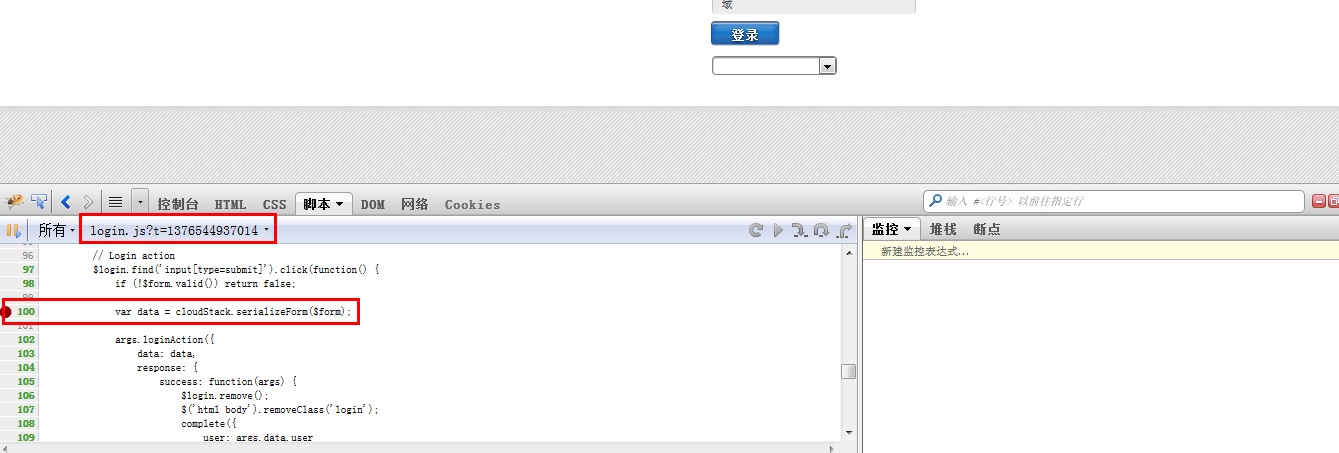
执行登录,这时就会触发断点,让我们看看发生了什么:
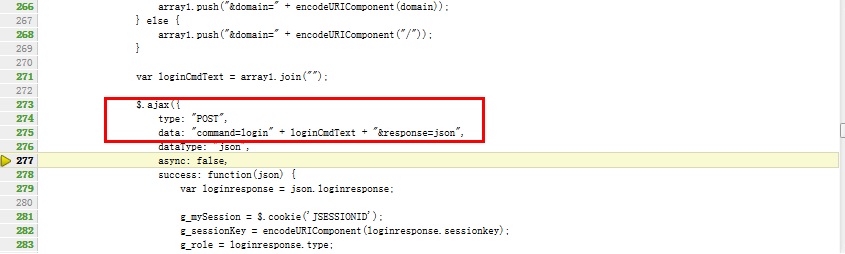
最终是使用jquery的ajax来提交post请求给服务器端,也就是说,manager server提供给我们的是一组API,我们可以通过http的请求方式提交请求。
处理http请求
看完了前端,我们继续看一下后端处理。
在web.xml中,我们看到所有的api/请求都会到ApiServlet中处理。
    <servlet>

        <servlet-name>apiServlet</servlet-name>

        <servlet-class>com.cloud.api.ApiServlet</servlet-class>

        <load-on-startup></load-on-startup>

    </servlet>

    <servlet-mapping>

         <servlet-name>apiServlet</servlet-name>

         <url-pattern>/api/*</url-pattern>

    </servlet-mapping>
在ApiServlet中,重点看下
    @Override

    public void init(ServletConfig config) throws ServletException {

        SpringBeanAutowiringSupport.processInjectionBasedOnServletContext(this, config.getServletContext());

    }
这样在web容器中就可以查看spring中使用注解的接口了。
说实话这块感觉设计的挺一般的,一个servlet里边承担了太多的任务,我打了个断点在
processRequest(req, resp);
这个方法中,但是一个登录的操作就走了四次断点,一个退出操作又走了两次,不清楚这块为什么这样设计。
而且很多业务代码都在这个类中操作,感觉很冗余。但这个不是我们重点关心的问题。
CloudStack API提供的三种角色
- 管理员。获得云的所有功能,包括虚拟和物理资源管理。
- 域管理员。进入到虚拟资源的云属于管理员的域。
- 用户。只访问允许用户管理的功能,虚拟实例,存储,和网络。
API文档的地址
http://cloudstack.apache.org/docs/api/
可以看到不同角色的API的地址,进去之后,可以看到每个API的详细描述。
处理简单列举一下4.1中API的新特性
在VM中重新配置物理网络
支持IPV6
扩展VMX设置
重新设置SSH密钥来访问虚拟机
在4.1中改变的API命令:
|
API Commands
|
Description
|
|---|---|
|
createNetworkOffering
|
The following request parameters have been added:
|
|
listNetworkOfferings
listNetworks
|
The following request parameters have been added:
|
|
createVlanIpRange
|
The following request parameters have been added:
|
|
deployVirtualMachine
|
The following parameter has been added: ip6Address.
The following parameter is updated to accept the IPv6 address: iptonetworklist.
|
|
CreateZoneCmd
|
The following parameter have been added: ip6dns1, ip6dns2.
|
|
listRouters
listVirtualMachines
|
For nic responses, the following fields have been added.
|
|
listVlanIpRanges
|
For nic responses, the following fields have been added.
|
|
listRouters
listZones
|
For DomainRouter and DataCenter response, the following fields have been added.
|
|
addF5LoadBalancer
configureNetscalerLoadBalancer
addNetscalerLoadBalancer
listF5LoadBalancers
configureF5LoadBalancer
listNetscalerLoadBalancers
|
The following response parameter is removed: inline.
|
|
listFirewallRules
createFirewallRule
|
The following request parameter is added: traffictype (optional).
|
|
listUsageRecords
|
The following response parameter is added: virtualsize.
|
|
deleteIso
|
The following request parameter is added: forced (optional).
|
|
createStoragePool
|
The following request parameters are made mandatory:
|
|
createAccount
|
The following new request parameters are added: accountid, userid
|
|
createUser
|
The following new request parameter is added: userid
|
|
createDomain
|
The following new request parameter is added: domainid
|
|
listZones
|
The following request parameters is added: securitygroupenabled
|
同时添加了一些新的API
- createEgressFirewallRules (creates an egress firewall rule on the guest network.)
- deleteEgressFirewallRules (deletes a egress firewall rule on the guest network.)
- listEgressFirewallRules (lists the egress firewall rules configured for a guest network.)
- resetSSHKeyForVirtualMachine (Resets the SSHkey for virtual machine.)
- addBaremetalHost (Adds a new host.)
- addNicToVirtualMachine (Adds a new NIC to the specified VM on a selected network.)
- removeNicFromVirtualMachine (Removes the specified NIC from a selected VM.)
- updateDefaultNicForVirtualMachine (Updates the specified NIC to be the default one for a selected VM.)
- addRegion (Registers a Region into another Region.)
- updateRegion (Updates Region details: ID, Name, Endpoint, User API Key, and User Secret Key.)
- removeRegion (Removes a Region from current Region.)
- listRegions (List all the Regions. Filter them by using the ID or Name.)
- getUser (This API can only be used by the Admin. Get user details by using the API Key.)
配置8096端口
8096端口, 不需要验证即可进行API调用. 在所有的3.0.1版本全新安装时, 这个端口都是默认被禁用的. 你可以通过下面的设置启用8096(或使用其它端口号):
- 确保第一个管理服务器安装并运行.
- 设置你期望的端口号到全局配置参数 integration.api.port.
- 重启管理服务器.
- 在管理服务器的节点上, 创建一个防火墙规则以便允许访问这个端口.

使用API请求
所有CloudStack API请求都是以HTTP GET/POST形式提交, 同时附上相关的命令和参数. 无论是HTTP或HTTPS, 一个请求都有以下内容组成:
- CloudStack API URL: 这是Web服务API入口(例如, http://www.cloud.com:8080/client/api)
- 命令: 你想要执行的Web服务命令, 比如开启一个虚拟机或创建一个磁盘卷
- 参数: 命令所需的任何必要或可选的参数
一个API GET请求的样例看起来像这样:
http://localhost:8080/client/api?command=deployVirtualMachine&serviceOfferingId=1&diskOfferingId=1&templateId=2&zoneId=4&apiKey=miVr6X7u6bN_sdahOBpjNejPgEsT35eXq-jB8CG20YI3yaxXcgpyuaIRmFI_EJTVwZ0nUkkJbPmY3y2bciKwFQ&signature=Lxx1DM40AjcXU%2FcaiK8RAP0O1hU%3D
更容易读的方式:
http://localhost:8080/client/api

?command=deployVirtualMachine

&serviceOfferingId=

&diskOfferingId=

&templateId=

&zoneId= &apiKey=miVr6X7u6bN_sdahOBpjNejPgEsT35eXqjB8CG20YI3yaxXcgpyuaIRmFI_EJTVwZ0nUkkJbPmY3y2bciKwFQ

&signature=Lxx1DM40AjcXU%2FcaiK8RAP0O1hU%3D
虚拟化平台cloudstack(8)——从UI开始的更多相关文章
- 虚拟化平台cloudstack新版本的调试
虚拟化平台cloudstack(7)——新版本的调试 调试环境 ubuntu 12.04 JDK1.7 apache-maven-3.10 eclipse 4.2 Juno mysql 5 源码下载及 ...
- 虚拟化平台cloudstack(5)——参考资料
虚拟化的几种方式 完全虚拟化: 半虚拟化: 硬件辅助虚拟化: 详细的内容可以看: http://pan.baidu.com/share/link?shareid=4134188256&uk=2 ...
- 虚拟化平台cloudstack(2)——安装(上)
vmware workstation安装ubuntu server12.04 这个其实没什么说的了,下软件,安装,一顿下一步,OK. 安装完成后,为ubuntu server 12.04安装桌面. 使 ...
- 虚拟化平台cloudstack(7)——新版本的调试
调试环境 ubuntu 12.04 JDK1.7 apache-maven-3.10 eclipse 4.2 Juno mysql 5 源码下载及调试 上面的几个软件在上一篇中已经介绍了. 在新的版本 ...
- 虚拟化平台cloudstack(6)——使用maven:jetty调试
调试环境 ubuntu 12.04 JDK1.7 apache-maven-3.10 eclipse 4.2 Juno mysql 5 apache ant JDK的配置和安装 安装可以参考: htt ...
- 虚拟化平台cloudstack(4)——几个异常
cloudstack主机添加不成功 CloudStack正常启动,添加区域.提供点和群集都正常,但是添加主机时提示添加不成功. 先添加主机: 然后出现提示: 在网上找了一圈,基本上没什么回复,没办法, ...
- 虚拟化平台cloudstack(3)——安装(下)
登录时用户名和密码错误 默认账号密码 admin/password 管理节点安装好后,初始化数据库,完了使用admin和password登陆提示用户名密码错误,查看日志: Fail to genera ...
- 从SDN鼻祖Nicira到VMware NSX 网络虚拟化平台的简单探讨
以前的大二层技术,一般是在物理网络底层使用IS-IS路由技术,再在此基础之上,实现数据中心网络的二层扩展,如公有的Trill.SPB技术和Cisco私有的OTV.Fabricpath技术:前沿一些的网 ...
- 【VMware虚拟化解决方案】 基于VMware虚拟化平台VDI整体性能分析与优化
一.说一说 本来打算将前期项目里面出现的问题的分析思路与解决方法写出来,第一.疏导一下自己的思路,第二.分析并找出自身在技术层面所存在欠缺.但由于每个人都有一根懒经所以迟迟未动.今天突然发现51CTO ...
随机推荐
- CodeSmith Generator 7.0.2激活步骤
地址是:http://www.cnblogs.com/dunitian/p/4096917.html
- Ajax Step By Step4
第四,[$.ajax()] $.ajax()是所有 ajax 方法中最底层的方法,所有其他方法都是基于$.ajax()方法的封装.这个方法只有一个参数,传递一个各个功能键值对的对象. $.ajax() ...
- 数据存储--沙盒sandBox
默认情况下,每个沙盒必含有3个文件夹:Documents, Library 和 tmp 一.沙盒(sandbox)出于安全的目的,应用程序只能将自己的数据和偏好设置写入到几个特定的位置上.当应用程序被 ...
- 14.Xcode8imageview图片圆角不显示的bug
第一种方法: 在imageView调用clipToBounds的之前,[super awakeFromNib]之后,加上[self.contentView layoutIfNeeded];就可以了,反 ...
- Centos 7下搭建WordPress
1,首先安装MySQL. http://www.cnblogs.com/zyh120/p/6066983.html 2,继续安装httpd,php,php-mysql这3个服务. [root@loca ...
- codeIgniter怎么实现对input type=text对话框blur事件的监听以及传值?
如题,这个问题怎么解决? 用JS和前端框架习惯了,现在学后端框架,感觉各种坑...
- Task set generation
Task set generation for uni- and multiprocessors: “Unifying Fixed- and Dynamic-Priority Scheduling b ...
- 关于display: box 和 box-flex
这两天做手机项目,使用到这个css3新属性.现在还不为所有浏览器支持,所以使用的时候要加上前缀.使用方法见下面: html代码: <div class="s-indLine" ...
- SAS提供的机器学习算法
SAS graphical user interfaces help you build machine-learning models and implement an iterative mach ...
- WInform关闭程序的几种方法以及区别。
1.this.Close(); 关闭窗体,如果关闭的是主窗体 程序结束.2.Application.Exit(); 退出所有的窗体但是如果有托管线程的话无法完全退出3.Application.Exit ...