
阿里云服务器 配置 tomcat 发布spring boot项目 的具体操作 【使用公网ip】
1.前言
spring boot 转成war包 后用tomcat发布的具体操作在我另一篇随笔有详细记载,不论是window系统还是Linux系统,tomcat的发布配置都是一样的,所以这里不具体讲这个了 。
配合使用的工具是 Xshell 和 Xftp [使用方式在我另一篇随笔有详细记载]
需要提前装 jdk [详细安装方法在我另一篇随笔有详细记载]
//
现在的任务是
(1)tomcat安装

(2)tomcat server.xml文件 服务节点 配置

(3)阿里云防火墙配置
2.tomcat安装
(1)在/usr/local/ 下创建tomcat文件夹
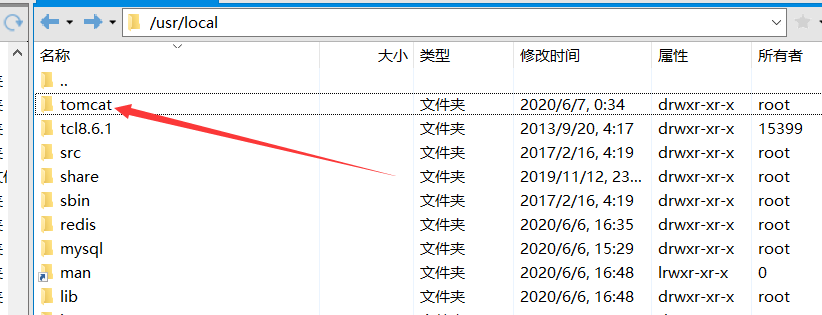
进入tomcat文件夹
指令 wget https://archive.apache.org/dist/tomcat/tomcat-9/v9.0.12/bin/apache-tomcat-9.0.12.tar.gz
下载tomcat压缩包到当前文件夹

(2)解压到指定位置
如果只想装这一个tomcat ,那么只需要街道到当前文件夹即可
指令 tar -zxvf apache-tomcat-9.0.12.tar.gz
如果想要做tomcat集群,
那就再建立下一级文件夹后解压到里面
指令 mkdir tomcat1 建立新的文件夹
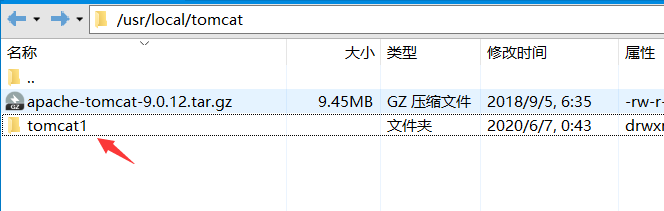
指令 tar zxvf apache-tomcat-9.0.12.tar.gz -C /usr/local/tomcat/tomcat1
解压到tomcat1文件夹里面
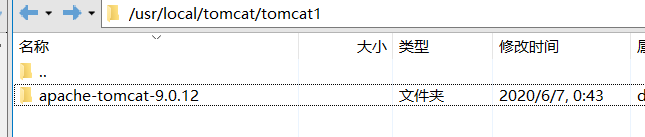
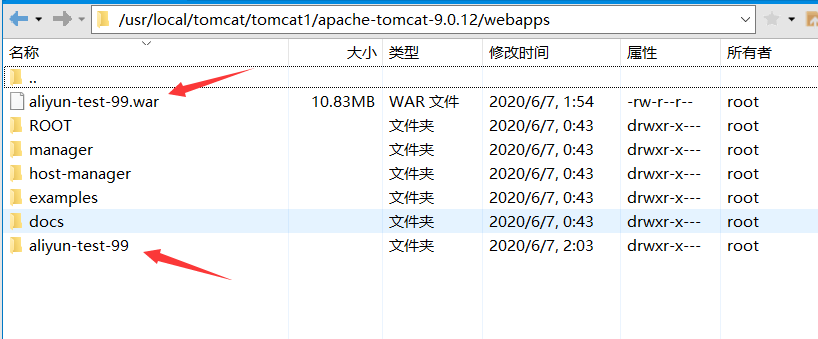
(2)tomcat根目录
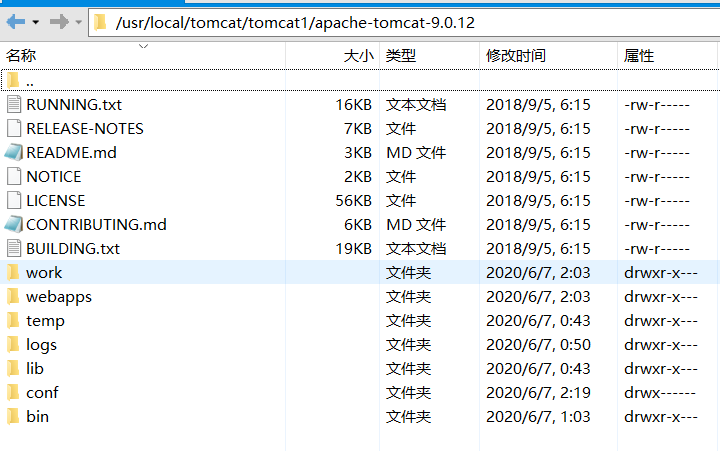
(3)spring boot war包放的位置
3.server.xml文件 服务节点 配置
找到server.xml文件
我的位置在 /usr/local/tomcat/tomcat1/apache-tomcat-9.0.12/conf/server.xml
指令编辑 vi /usr/local/tomcat/tomcat1/apache-tomcat-9.0.12/conf/server.xml
我是要做集群的,所以端口号都改了
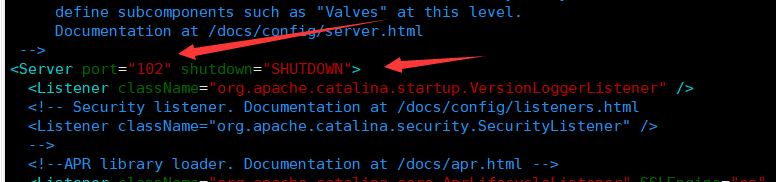
但是访问tomcat 工程的端口是在

这里设置的,改成自己需要的即可
源码


<?xml version="1.0" encoding="UTF-8"?>
<!--
Licensed to the Apache Software Foundation (ASF) under one or more
contributor license agreements. See the NOTICE file distributed with
this work for additional information regarding copyright ownership.
The ASF licenses this file to You under the Apache License, Version 2.0
(the "License"); you may not use this file except in compliance with
the License. You may obtain a copy of the License at http://www.apache.org/licenses/LICENSE-2.0 Unless required by applicable law or agreed to in writing, software
distributed under the License is distributed on an "AS IS" BASIS,
WITHOUT WARRANTIES OR CONDITIONS OF ANY KIND, either express or implied.
See the License for the specific language governing permissions and
limitations under the License.
-->
<!-- Note: A "Server" is not itself a "Container", so you may not
define subcomponents such as "Valves" at this level.
Documentation at /docs/config/server.html
-->
<Server port="102" shutdown="SHUTDOWN">
<Listener className="org.apache.catalina.startup.VersionLoggerListener" />
<!-- Security listener. Documentation at /docs/config/listeners.html
<Listener className="org.apache.catalina.security.SecurityListener" />
-->
<!--APR library loader. Documentation at /docs/apr.html -->
<Listener className="org.apache.catalina.core.AprLifecycleListener" SSLEngine="on" />
<!-- Prevent memory leaks due to use of particular java/javax APIs-->
<Listener className="org.apache.catalina.core.JreMemoryLeakPreventionListener" />
<Listener className="org.apache.catalina.mbeans.GlobalResourcesLifecycleListener" />
<Listener className="org.apache.catalina.core.ThreadLocalLeakPreventionListener" /> <!-- Global JNDI resources
Documentation at /docs/jndi-resources-howto.html
-->
<GlobalNamingResources>
<!-- Editable user database that can also be used by
UserDatabaseRealm to authenticate users
-->
<Resource name="UserDatabase" auth="Container"
type="org.apache.catalina.UserDatabase"
description="User database that can be updated and saved"
factory="org.apache.catalina.users.MemoryUserDatabaseFactory"
pathname="conf/tomcat-users.xml" />
</GlobalNamingResources> <!-- A "Service" is a collection of one or more "Connectors" that share
a single "Container" Note: A "Service" is not itself a "Container",
so you may not define subcomponents such as "Valves" at this level.
Documentation at /docs/config/service.html
-->
<Service name="Catalina"> <!--The connectors can use a shared executor, you can define one or more named thread pools-->
<!--
<Executor name="tomcatThreadPool" namePrefix="catalina-exec-"
maxThreads="150" minSpareThreads="4"/>
--> <!-- A "Connector" represents an endpoint by which requests are received
and responses are returned. Documentation at :
Java HTTP Connector: /docs/config/http.html
Java AJP Connector: /docs/config/ajp.html
APR (HTTP/AJP) Connector: /docs/apr.html
Define a non-SSL/TLS HTTP/1.1 Connector on port 8080
-->
<Connector port="99" protocol="HTTP/1.1"
connectionTimeout="20000"
redirectPort="101" />
<!-- A "Connector" using the shared thread pool-->
<!--
<Connector executor="tomcatThreadPool"
port="8080" protocol="HTTP/1.1"
connectionTimeout="20000"
redirectPort="8443" />
-->
<!-- Define a SSL/TLS HTTP/1.1 Connector on port 8443
This connector uses the NIO implementation. The default
SSLImplementation will depend on the presence of the APR/native
library and the useOpenSSL attribute of the
AprLifecycleListener.
Either JSSE or OpenSSL style configuration may be used regardless of
the SSLImplementation selected. JSSE style configuration is used below.
-->
<!--
<Connector port="8443" protocol="org.apache.coyote.http11.Http11NioProtocol"
maxThreads="150" SSLEnabled="true">
<SSLHostConfig>
<Certificate certificateKeystoreFile="conf/localhost-rsa.jks"
type="RSA" />
</SSLHostConfig>
</Connector>
This connector uses the APR/native implementation which always uses
OpenSSL for TLS.
Either JSSE or OpenSSL style configuration may be used. OpenSSL style
configuration is used below.
-->
<!--
<Connector port="8443" protocol="org.apache.coyote.http11.Http11AprProtocol"
maxThreads="150" SSLEnabled="true" >
<UpgradeProtocol className="org.apache.coyote.http2.Http2Protocol" />
<SSLHostConfig>
<Certificate certificateKeyFile="conf/localhost-rsa-key.pem"
certificateFile="conf/localhost-rsa-cert.pem"
certificateChainFile="conf/localhost-rsa-chain.pem"
type="RSA" />
</SSLHostConfig>
</Connector>
--> <!-- Define an AJP 1.3 Connector on port 8009 -->
<Connector port="100" protocol="AJP/1.3" redirectPort="101" /> <!-- An Engine represents the entry point (within Catalina) that processes
every request. The Engine implementation for Tomcat stand alone
analyzes the HTTP headers included with the request, and passes them
on to the appropriate Host (virtual host).
Documentation at /docs/config/engine.html --> <!-- You should set jvmRoute to support load-balancing via AJP ie :
<Engine name="Catalina" defaultHost="localhost" jvmRoute="jvm1">
-->
<Engine name="Catalina" defaultHost="localhost"> <!--For clustering, please take a look at documentation at:
/docs/cluster-howto.html (simple how to)
/docs/config/cluster.html (reference documentation) -->
<!--
<Cluster className="org.apache.catalina.ha.tcp.SimpleTcpCluster"/>
--> <!-- Use the LockOutRealm to prevent attempts to guess user passwords
via a brute-force attack -->
<Realm className="org.apache.catalina.realm.LockOutRealm">
<!-- This Realm uses the UserDatabase configured in the global JNDI
resources under the key "UserDatabase". Any edits
that are performed against this UserDatabase are immediately
available for use by the Realm. -->
<Realm className="org.apache.catalina.realm.UserDatabaseRealm"
resourceName="UserDatabase"/>
</Realm> <Host name="111.111.111.11" appBase="webapps"
unpackWARs="true" autoDeploy="true"> <!-- <Host name="111.111.111.11" appBase=""
unpackWARs="true" autoDeploy="true">
-->
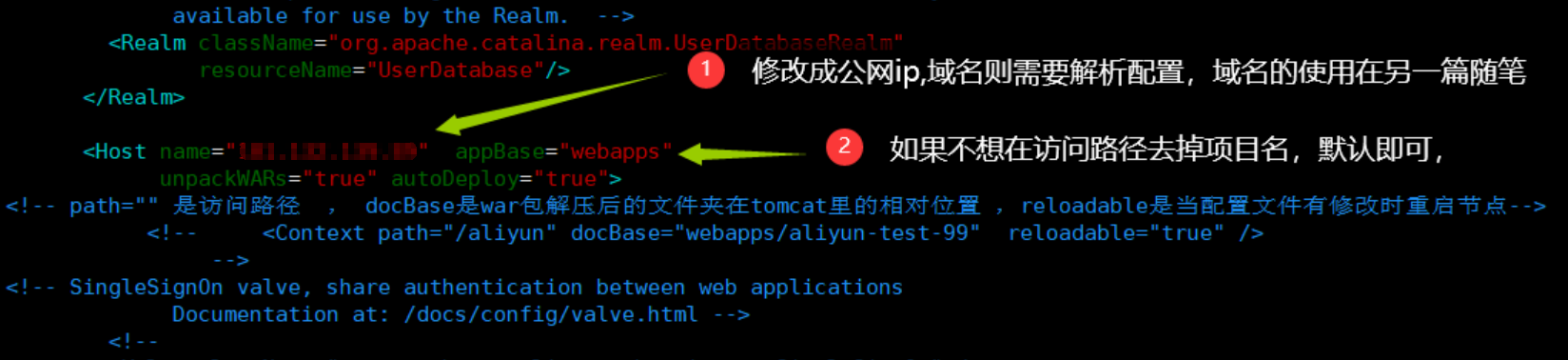
<!-- path="" 是访问路径 , docBase是war包解压后的文件夹在tomcat里的相对位置 ,reloadable是当配置文件有修改时重启节点-->
<!-- <Context path="" docBase="webapps/aliyun-test-99" reloadable="true" />
-->
<!-- SingleSignOn valve, share authentication between web applications
Documentation at: /docs/config/valve.html -->
<!--
<Valve className="org.apache.catalina.authenticator.SingleSignOn" />
--> <!-- Access log processes all example.
Documentation at: /docs/config/valve.html
Note: The pattern used is equivalent to using pattern="common" -->
<Valve className="org.apache.catalina.valves.AccessLogValve" directory="logs"
prefix="localhost_access_log" suffix=".txt"
pattern="%h %l %u %t "%r" %s %b" /> </Host>
</Engine>
</Service>
</Server>
如果想将访问路径的项目名字去掉,使用下图配置

源码
<?xml version="1.0" encoding="UTF-8"?>
<!--
Licensed to the Apache Software Foundation (ASF) under one or more
contributor license agreements. See the NOTICE file distributed with
this work for additional information regarding copyright ownership.
The ASF licenses this file to You under the Apache License, Version 2.0
(the "License"); you may not use this file except in compliance with
the License. You may obtain a copy of the License at http://www.apache.org/licenses/LICENSE-2.0 Unless required by applicable law or agreed to in writing, software
distributed under the License is distributed on an "AS IS" BASIS,
WITHOUT WARRANTIES OR CONDITIONS OF ANY KIND, either express or implied.
See the License for the specific language governing permissions and
limitations under the License.
-->
<!-- Note: A "Server" is not itself a "Container", so you may not
define subcomponents such as "Valves" at this level.
Documentation at /docs/config/server.html
-->
<Server port="102" shutdown="SHUTDOWN">
<Listener className="org.apache.catalina.startup.VersionLoggerListener" />
<!-- Security listener. Documentation at /docs/config/listeners.html
<Listener className="org.apache.catalina.security.SecurityListener" />
-->
<!--APR library loader. Documentation at /docs/apr.html -->
<Listener className="org.apache.catalina.core.AprLifecycleListener" SSLEngine="on" />
<!-- Prevent memory leaks due to use of particular java/javax APIs-->
<Listener className="org.apache.catalina.core.JreMemoryLeakPreventionListener" />
<Listener className="org.apache.catalina.mbeans.GlobalResourcesLifecycleListener" />
<Listener className="org.apache.catalina.core.ThreadLocalLeakPreventionListener" /> <!-- Global JNDI resources
Documentation at /docs/jndi-resources-howto.html
-->
<GlobalNamingResources>
<!-- Editable user database that can also be used by
UserDatabaseRealm to authenticate users
-->
<Resource name="UserDatabase" auth="Container"
type="org.apache.catalina.UserDatabase"
description="User database that can be updated and saved"
factory="org.apache.catalina.users.MemoryUserDatabaseFactory"
pathname="conf/tomcat-users.xml" />
</GlobalNamingResources> <!-- A "Service" is a collection of one or more "Connectors" that share
a single "Container" Note: A "Service" is not itself a "Container",
so you may not define subcomponents such as "Valves" at this level.
Documentation at /docs/config/service.html
-->
<Service name="Catalina"> <!--The connectors can use a shared executor, you can define one or more named thread pools-->
<!--
<Executor name="tomcatThreadPool" namePrefix="catalina-exec-"
maxThreads="150" minSpareThreads="4"/>
--> <!-- A "Connector" represents an endpoint by which requests are received
and responses are returned. Documentation at :
Java HTTP Connector: /docs/config/http.html
Java AJP Connector: /docs/config/ajp.html
APR (HTTP/AJP) Connector: /docs/apr.html
Define a non-SSL/TLS HTTP/1.1 Connector on port 8080
-->
<Connector port="99" protocol="HTTP/1.1"
connectionTimeout="20000"
redirectPort="101" />
<!-- A "Connector" using the shared thread pool-->
<!--
<Connector executor="tomcatThreadPool"
port="8080" protocol="HTTP/1.1"
connectionTimeout="20000"
redirectPort="8443" />
-->
<!-- Define a SSL/TLS HTTP/1.1 Connector on port 8443
This connector uses the NIO implementation. The default
SSLImplementation will depend on the presence of the APR/native
library and the useOpenSSL attribute of the
AprLifecycleListener.
Either JSSE or OpenSSL style configuration may be used regardless of
the SSLImplementation selected. JSSE style configuration is used below.
-->
<!--
<Connector port="8443" protocol="org.apache.coyote.http11.Http11NioProtocol"
maxThreads="150" SSLEnabled="true">
<SSLHostConfig>
<Certificate certificateKeystoreFile="conf/localhost-rsa.jks"
type="RSA" />
</SSLHostConfig>
</Connector>
This connector uses the APR/native implementation which always uses
OpenSSL for TLS.
Either JSSE or OpenSSL style configuration may be used. OpenSSL style
configuration is used below.
-->
<!--
<Connector port="8443" protocol="org.apache.coyote.http11.Http11AprProtocol"
maxThreads="150" SSLEnabled="true" >
<UpgradeProtocol className="org.apache.coyote.http2.Http2Protocol" />
<SSLHostConfig>
<Certificate certificateKeyFile="conf/localhost-rsa-key.pem"
certificateFile="conf/localhost-rsa-cert.pem"
certificateChainFile="conf/localhost-rsa-chain.pem"
type="RSA" />
</SSLHostConfig>
</Connector>
--> <!-- Define an AJP 1.3 Connector on port 8009 -->
<Connector port="100" protocol="AJP/1.3" redirectPort="101" /> <!-- An Engine represents the entry point (within Catalina) that processes
every request. The Engine implementation for Tomcat stand alone
analyzes the HTTP headers included with the request, and passes them
on to the appropriate Host (virtual host).
Documentation at /docs/config/engine.html --> <!-- You should set jvmRoute to support load-balancing via AJP ie :
<Engine name="Catalina" defaultHost="localhost" jvmRoute="jvm1">
-->
<Engine name="Catalina" defaultHost="localhost"> <!--For clustering, please take a look at documentation at:
/docs/cluster-howto.html (simple how to)
/docs/config/cluster.html (reference documentation) -->
<!--
<Cluster className="org.apache.catalina.ha.tcp.SimpleTcpCluster"/>
--> <!-- Use the LockOutRealm to prevent attempts to guess user passwords
via a brute-force attack -->
<Realm className="org.apache.catalina.realm.LockOutRealm">
<!-- This Realm uses the UserDatabase configured in the global JNDI
resources under the key "UserDatabase". Any edits
that are performed against this UserDatabase are immediately
available for use by the Realm. -->
<Realm className="org.apache.catalina.realm.UserDatabaseRealm"
resourceName="UserDatabase"/>
</Realm> <!-- <Host name="111.111.111.11" appBase="webapps"
unpackWARs="true" autoDeploy="true">
-->
<Host name="111.111.111.11" appBase=""
unpackWARs="true" autoDeploy="true"> <!-- path="" 是访问路径 , docBase是war包解压后的文件夹在tomcat里的相对位置 ,reloadable是当配置文件有修改时重启节点-->
<Context path="" docBase="webapps/aliyun-test-99" reloadable="true" /> <!-- SingleSignOn valve, share authentication between web applications
Documentation at: /docs/config/valve.html -->
<!--
<Valve className="org.apache.catalina.authenticator.SingleSignOn" />
--> <!-- Access log processes all example.
Documentation at: /docs/config/valve.html
Note: The pattern used is equivalent to using pattern="common" -->
<Valve className="org.apache.catalina.valves.AccessLogValve" directory="logs"
prefix="localhost_access_log" suffix=".txt"
pattern="%h %l %u %t "%r" %s %b" /> </Host>
</Engine>
</Service>
</Server>
保存即可
启动tomcat指令
/usr/local/tomcat/tomcat1/apache-tomcat-9.0.12/bin/startup.sh

关闭tomcat指令
/usr/local/tomcat/tomcat1/apache-tomcat-9.0.12/bin/shutdown.sh

启动tomcat后
指令netstat -ntlp
查看端口与进程对应信息

很显眼 101端口并没有对应的线程占用 ,我把101端口设为了tomcat内部的重定向端口了
4.阿里云防火墙配置
进入阿里云控制台,开放允许外部访问的端口
进入防火墙设置
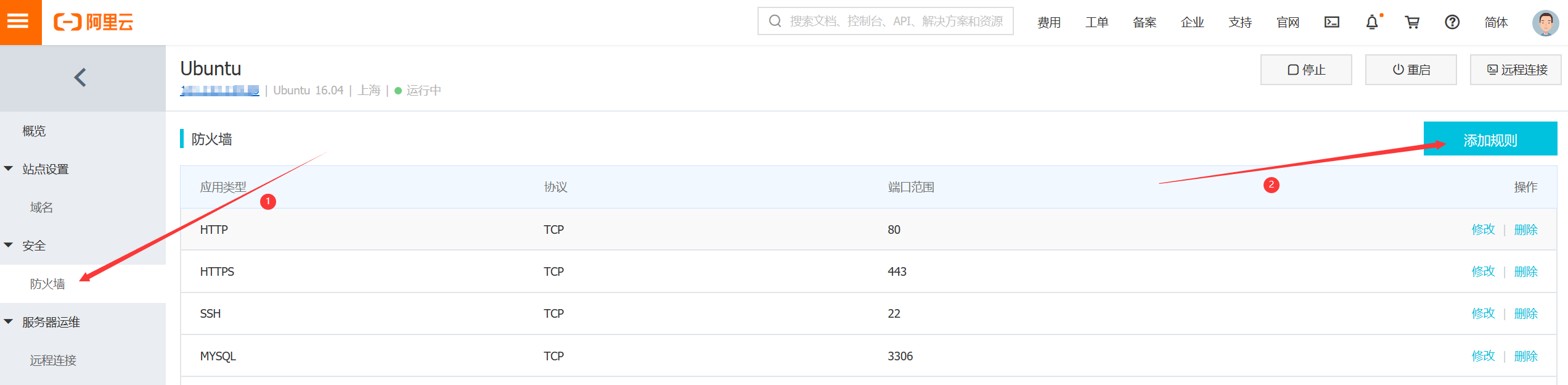
设置99即可
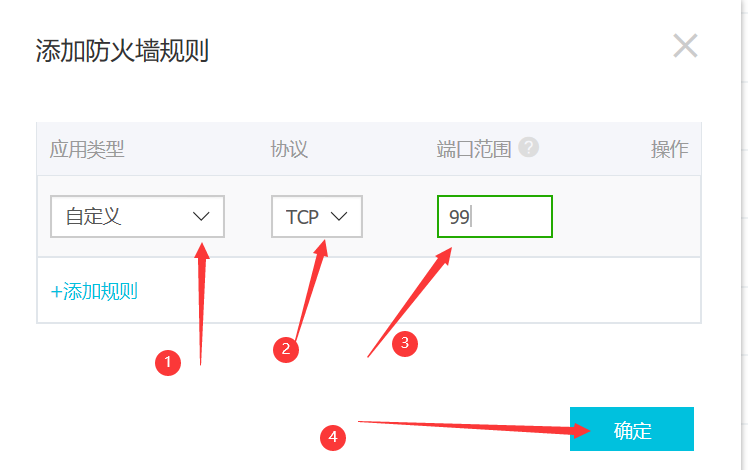
点击确定后即可

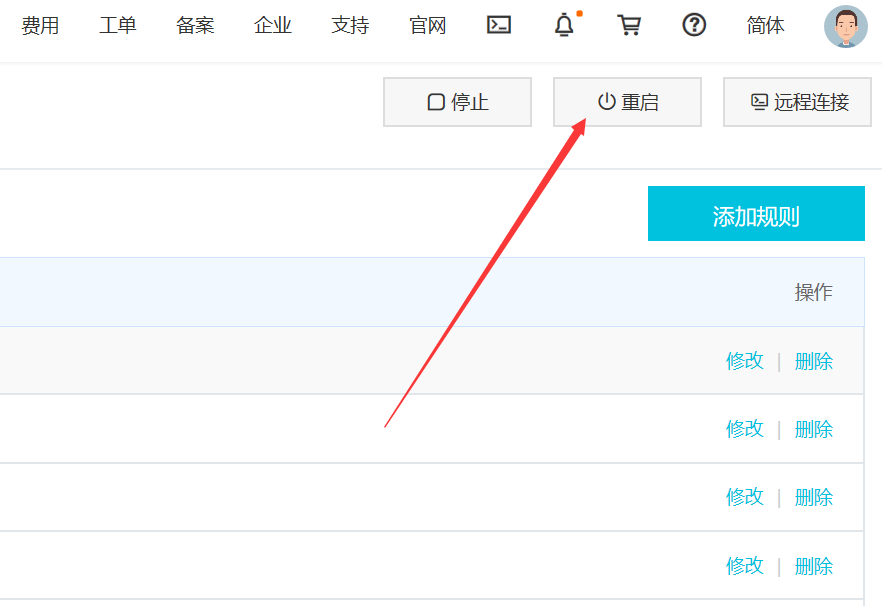
防火墙端口设置完后,重启服务器即可
//
//
//
注意:

    服务器启动tomcat后直接访问,会一直处于等待中,需要等几分钟才能使用,原因是需要等待节点的关闭端口开启后才可以正常访问
tomcat启动后,只有99,100端口开启

需要过几分钟后 102端口才开启
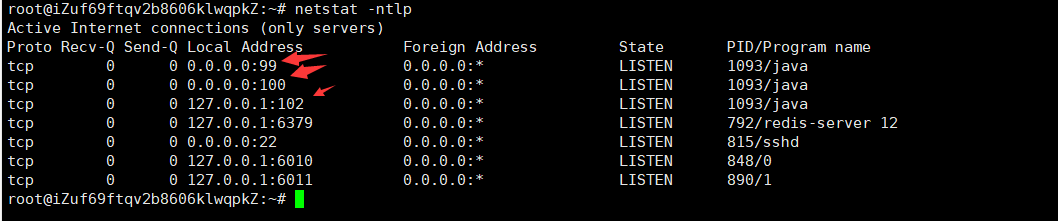
原因不清楚 ,等102开启后才可以被正常访问
5.测试
我在spring boot工程做了个接口
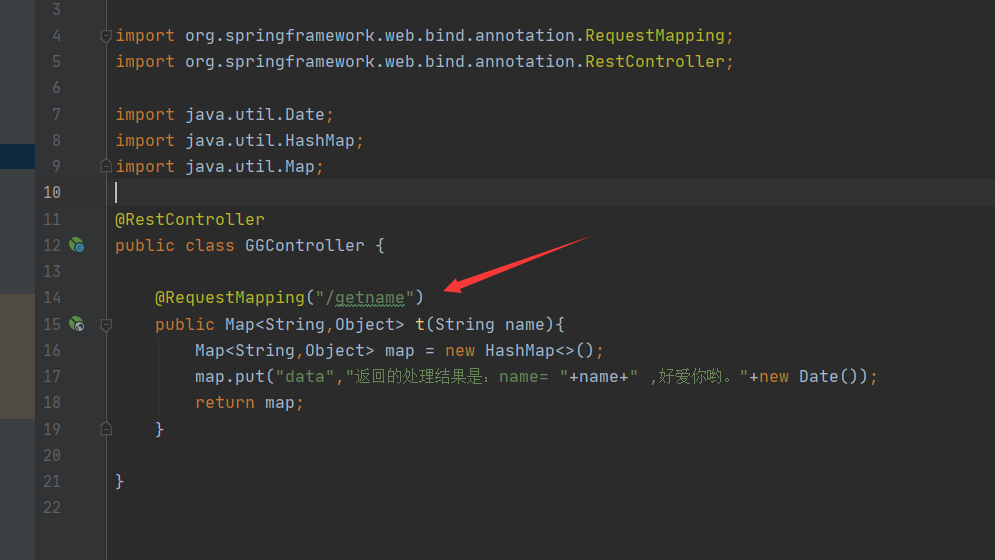
浏览器访问
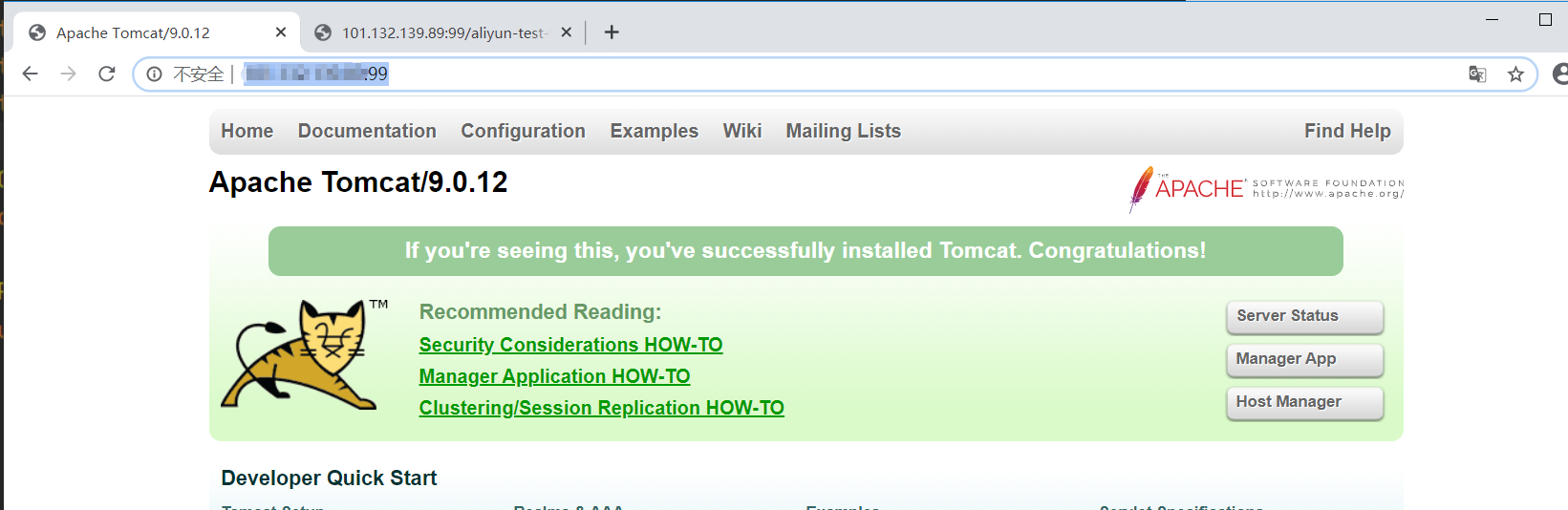
(1)不去除项目名 访问 http://xxx.xxx.xxx.xx:99/ 可以进入tomcat首页
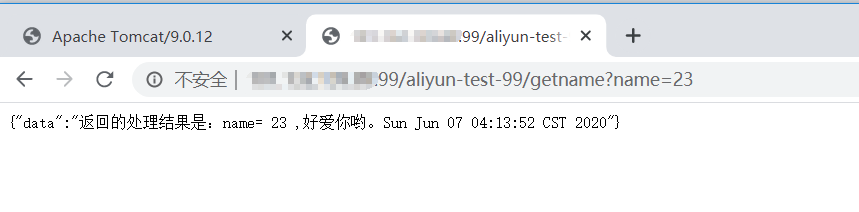
访问 http://xxx.xxx.xxx.xx:99/aliyun-test-99/getname?name=23 ,可以成功调用spring boot工程接口并返回数据
//
//
//
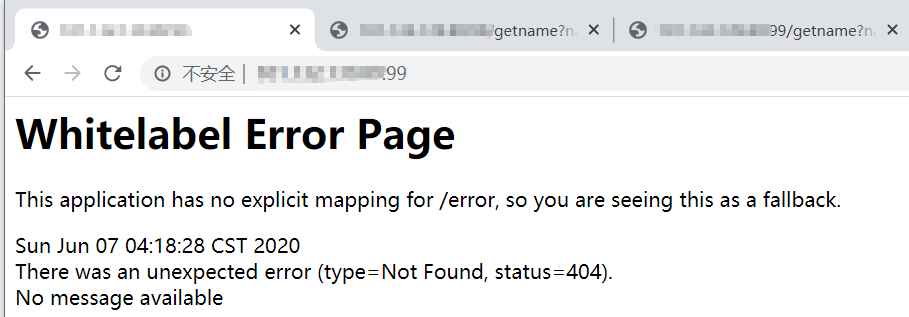
(2)去除项目名 访问 http://xxx.xxx.xxx.xx:99/ 无法进入tomcat首页,找不到提示404
访问 http://xxx.xxx.xxx.xx:99/getname?name=23 ,可以成功调用spring boot工程接口并返回数据
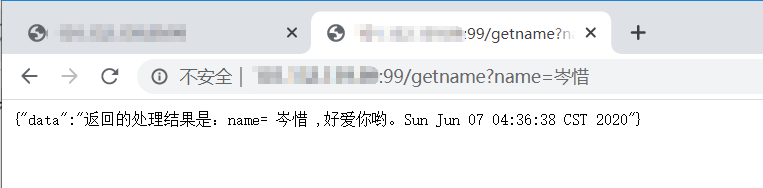
成功,撒花!!!
---------------------
https://blog.csdn.net/yskyj/article/details/38032677
https://baijiahao.baidu.com/s?id=1622422454033168404&wfr=spider&for=pc
https://blog.csdn.net/qq_36659177/article/details/83449723
阿里云服务器 配置 tomcat 发布spring boot项目 的具体操作 【使用公网ip】的更多相关文章
- Tomcat部署spring boot项目
Tomcat部署spring boot项目 需要在启动类做修改
- 阿里云服务器对外开放tomcat端口访问
今天第一次在阿里云服务器ecs上安装完成tomcat,然后启动tomcat之后.在本地输入ip:端口,发现不能访问. 出现这个的原因可能是你购买的服务器是 专有网络 类型的 如果是专有网络类型的服务器 ...
- Ali_Cloud++:阿里云服务器部署【禅道】项目管理系统
1.开源版安装包下载 地址一:百度云下载 10.0 提取码:2dyg 地址二:官方下载 2.直接解压安装包到/opt目录下 注意:这里我安装的是Linux一键安装包官方给出的方法就是直接解压到/o ...
- 携程Apollo(阿波罗)配置中心在Spring Boot项目快速集成
前提:先搭建好本地的单机运行项目:http://www.cnblogs.com/EasonJim/p/7643630.html 说明:下面的示例是基于Spring Boot搭建的,对于Spring项目 ...
- docker在配置tomcat和spring boot远程调试
服务器部署项目后又时可能与本地开发效果不一致,怎么实现远程调试配置? docker中怎么进行配置? docker中tomcat实现远程调试配置 1. 配置docker-compose.yml CATA ...
- 阿里云服务器ecs + tomcat + 域名解析 部署web页面
1.购买ecs:https://www.aliyun.com/product/ecs?spm=5176.12825654.eofdhaal5.2.3bf92c4aYOB7gL&aly_as=A ...
- 阿里云X-Forwarded-For 发现tomcat记录的日志所有来自于SLB转发的IP地址,不能获取到请求的真实IP。
1.背景:阿里云的SLB的负载均衡,在tomcat中获取不到真实IP,而是阿里的内网IP,SLB中俩台或者3台本身是局域网,这里是SLB原理,能够看看.没怎么看懂.呵呵,要细细读下. 2.须要开启to ...
- 【Tomcat】使用Tomcat部署Spring Boot项目生成的jar包
介绍 简单来说,Tomcat是一个免费的,用于Java Web应用以及其它Web应用的一个Web服务器.(简单地概括一下,可能有误) 下载与安装 本文章目标是把Spring Boot Web项目生成的 ...
- [傻瓜式一步到位] 阿里云服务器Centos上部署一个Flask项目
网络上关于flask部署Centos的教程有挺多,不过也很杂乱. 在我第一次将flask上传到centos服务器中遇到了不少问题,也费了挺大的劲. 在参考了一些教程,并综合了几个教程之后才将flask ...
随机推荐
- Java中的循环结构进阶
循环结构进阶 学习本章用到的单词 triangle:三角形 circle:圆形 diamond:钻石 password:密码 row:行.排列 二重循环结构 简单的说:二重循环就是一个循环体内又包含另 ...
- 前端浅谈---协议相关(TCP连接)
TCP连接 http的描述里面,我弱化了交互过程的描述,因为它相对复杂.所以我在此单独描述.客户端和服务端传递数据时过程相对谨慎和复杂,主要是开始和结束的过程.而这整个过程就是TCP连接.连接流程大体 ...
- [WPF] 用 OpacityMask 模仿 UWP 的 Text Shimmer 动画
1. UWP 的 Text Shimmer 动画 在 UWP 的 Windows Composition Samples 中有一个 Text Shimmer 动画,它用于展示如何使用 Composit ...
- CF94A Restoring Password 题解
Content 有一个 \(80\) 位的 \(01\) 字符串,由 \(8\) 个长度为 \(10\) 的 \(01\) 字符串组成,每个小字符串分别对应一个数字.现在,给出这个字符串和 \(0\) ...
- CF1481B New Colony 题解
Content \(n\) 座山排成一行,其中第 \(i\) 座山的高度为 \(h_i\). 有 \(k\) 个巨石依次从第一座山开始滚落.当某个巨石在第 \(i\) 座山时: 如果 \(i=n\), ...
- javascript中的12种循环遍历方法
1.for (自定义条件) 循环 let arr = [1,2,3]; for(let i =0;i<arr.length;i++){ console.log(i,arr[i]) } 2.for ...
- 【LeetCode】1111. Maximum Nesting Depth of Two Valid Parentheses Strings 有效括号的嵌套深度
作者: 负雪明烛 id: fuxuemingzhu 个人博客:http://fuxuemingzhu.cn/ 目录 题目描述 题目讲解 划分规则讲解 返回结果讲解 解题方法 代码 日期 题目地址:ht ...
- 【LeetCode】433. Minimum Genetic Mutation 解题报告(Python & C++)
作者: 负雪明烛 id: fuxuemingzhu 个人博客: http://fuxuemingzhu.cn/ 目录 题目描述 题目大意 解题方法 日期 题目地址: https://leetcode. ...
- light oj 1100 - Again Array Queries(暴力,鸽巢原理)
http://lightoj.com/volume_showproblem.php?problem=1100 刚一看到这题,要询问这么多次,线段树吧,想多了哈哈,根本没法用线段树做. 然后看看数据范围 ...
- codeforce-600C. Make Palindrome(贪心)
http://codeforces.com/problemset/problem/600/C: 题意:给你一个小写字母组成的英文串,将它转换为回文串,要求,改变的字母的个数最小,移动字母不算改变字母. ...