
迁移Report Server DataBase时遇到的坑
1.项目背景
由于历史原因,公司部分系统的Report是基于SQL Server Report Service搭建的,且Reporting Services 和Report Server DataBase是部署在不同的DB上的。因报表数据库所在机器过保,需要将Report Server数据库和ReportServerTempDB数据库迁移至新的Server上。但因项目老旧,研发和运维人员更迭,相关文档不完善,所以,这次迁移过程中,我们还是遇到了一个不小的坑。
迁移要求,如下图所示:
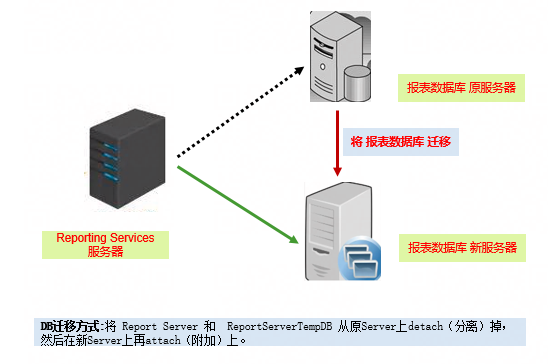
但是很不幸,迁移后,report service 报错。
2.报错信息
service 错误信息如下:
报表服务器数据库的版本格式无效,或无法读取。已找到的版本为“147”,而所需的版本为“C.0.8.54”。若要继续操作,请更新报表服务器数据库的版本并验证其访问权限。 (rsInvalidReportServerDatabase) (rsRPCError) 获取联机帮助
查看report 服务的log,文件 ReportServerService__12_04_2018_18_56_15.log.txt,
完整的信息如下
<Header>

  <Product>Microsoft SQL Server Reporting Services 版本 9.00.5000.00</Product>

  <Locale>zh-CN</Locale>

  <TimeZone>中国标准时间</TimeZone>

  <Path>Z:\Program Files\Microsoft SQL Server\MSSQL.1\Reporting Services\LogFiles\ReportServerService__12_4_2021_18_56_15.log</Path>

  <SystemName>weixinqqyijiaqin113</SystemName>

  <OSName>Microsoft Windows NT 6.1.7601 Service Pack 1</OSName>

  <OSVersion>6.1.7601.65536</OSVersion>

</Header>

ReportingServicesService!library!4!2018/12/4-18:56:15:: i INFO: Initializing ConnectionType to '0'  as specified in Configuration file.

ReportingServicesService!library!4!2018/12/4-18:56:15:: i INFO: Initializing IsSchedulingService to 'True'  as specified in Configuration file.

ReportingServicesService!library!4!2018/12/4-18:56:15:: i INFO: Initializing IsNotificationService to 'True'  as specified in Configuration file.

ReportingServicesService!library!4!2018/12/4-18:56:15:: i INFO: Initializing IsEventService to 'True'  as specified in Configuration file.

ReportingServicesService!library!4!2018/12/4-18:56:15:: i INFO: Initializing PollingInterval to '10' second(s) as specified in Configuration file.

ReportingServicesService!library!4!2018/12/4-18:56:15:: i INFO: Initializing WindowsServiceUseFileShareStorage to 'False'  as specified in Configuration file.

ReportingServicesService!library!4!2018/12/4-18:56:15:: i INFO: Initializing MemoryLimit to '60' percent as specified in Configuration file.

ReportingServicesService!library!4!2018/12/4-18:56:15:: i INFO: Initializing RecycleTime to '720' minute(s) as specified in Configuration file.

ReportingServicesService!library!4!2018/12/4-18:56:15:: i INFO: Initializing MaximumMemoryLimit to '80' percent as specified in Configuration file.

ReportingServicesService!library!4!2018/12/4-18:56:15:: i INFO: Initializing MaxAppDomainUnloadTime to '30' minute(s) as specified in Configuration file.

ReportingServicesService!library!4!2018/12/4-18:56:15:: i INFO: Initializing MaxQueueThreads to '0' thread(s) as specified in Configuration file.

ReportingServicesService!library!4!2018/12/4-18:56:15:: i INFO: Initializing IsWebServiceEnabled to 'True'  as specified in Configuration file.

ReportingServicesService!library!4!2018/12/4-18:56:15:: i INFO: Initializing MaxActiveReqForOneUser to '300' requests(s) as specified in Configuration file.

ReportingServicesService!library!4!2018/12/4-18:56:15:: i INFO: Initializing MaxScheduleWait to '5' second(s) as specified in Configuration file.

ReportingServicesService!library!4!2018/12/4-18:56:15:: i INFO: Initializing DatabaseQueryTimeout to '120' second(s) as specified in Configuration file.

ReportingServicesService!library!4!2018/12/4-18:56:15:: i INFO: Initializing ProcessRecycleOptions to '0'  as specified in Configuration file.

ReportingServicesService!library!4!2018/12/4-18:56:15:: i INFO: Initializing RunningRequestsScavengerCycle to '60' second(s) as specified in Configuration file.

ReportingServicesService!library!4!2018/12/4-18:56:15:: i INFO: Initializing RunningRequestsDbCycle to '60' second(s) as specified in Configuration file.

ReportingServicesService!library!4!2018/12/4-18:56:15:: i INFO: Initializing RunningRequestsAge to '30' second(s) as specified in Configuration file.

ReportingServicesService!library!4!2018/12/4-18:56:15:: i INFO: Initializing CleanupCycleMinutes to '10' minute(s) as specified in Configuration file.

ReportingServicesService!library!4!2018/12/4-18:56:15:: i INFO: Initializing DailyCleanupMinuteOfDay to default value of '120' minutes since midnight because it was not specified in Configuration file.

ReportingServicesService!library!4!2018/12/4-18:56:15:: i INFO: Initializing WatsonFlags to '1064'  as specified in Configuration file.

ReportingServicesService!library!4!2018/12/4-18:56:15:: i INFO: Initializing WatsonDumpOnExceptions to 'Microsoft.ReportingServices.Diagnostics.Utilities.InternalCatalogException,Microsoft.ReportingServices.Modeling.InternalModelingException'  as specified in Configuration file.

ReportingServicesService!library!4!2018/12/4-18:56:15:: i INFO: Initializing WatsonDumpExcludeIfContainsExceptions to 'System.Data.SqlClient.SqlException,System.Threading.ThreadAbortException'  as specified in Configuration file.

ReportingServicesService!library!4!2018/12/4-18:56:15:: i INFO: Initializing SecureConnectionLevel to '0'  as specified in Configuration file.

ReportingServicesService!library!4!2018/12/4-18:56:15:: i INFO: Initializing DisplayErrorLink to 'True'  as specified in Configuration file.

ReportingServicesService!library!4!2018/12/4-18:56:15:: i INFO: Initializing WebServiceUseFileShareStorage to 'False'  as specified in Configuration file.

ReportingServicesService!resourceutilities!4!2018/12/4-18:56:16:: i INFO: Reporting Services starting SKU: Enterprise

ReportingServicesService!resourceutilities!4!2018/12/4-18:56:16:: i INFO: Evaluation copy: 0 days left

ReportingServicesService!library!9!2018/12/4-18:56:16:: i INFO: Catalog SQL Server Edition = Enterprise

ReportingServicesService!library!9!2018/12/4-18:56:16:: i INFO: Current DB Version 147, Instance Version C.0.8.54.

ReportingServicesService!library!9!2018/12/4-18:56:16:: e ERROR: Throwing Microsoft.ReportingServices.Diagnostics.Utilities.InvalidReportServerDatabaseException: 报表服务器数据库的版本格式无效,或无法读取。已找到的版本为“147”,而所需的版本为“C.0.8.54”。若要继续操作,请更新报表服务器数据库的版本并验证其访问权限。, ;

 Info: Microsoft.ReportingServices.Diagnostics.Utilities.InvalidReportServerDatabaseException: 报表服务器数据库的版本格式无效,或无法读取。已找到的版本为“147”,而所需的版本为“C.0.8.54”。若要继续操作,请更新报表服务器数据库的版本并验证其访问权限。

ReportingServicesService!library!9!2018/12/4-18:56:16:: e ERROR: Exception caught while starting service. Error: Microsoft.ReportingServices.Diagnostics.Utilities.InvalidReportServerDatabaseException: 报表服务器数据库的版本格式无效,或无法读取。已找到的版本为“147”,而所需的版本为“C.0.8.54”。若要继续操作,请更新报表服务器数据库的版本并验证其访问权限。

   在 Microsoft.ReportingServices.Library.ConnectionManager.EnsureCorrectDBVersion()

   在 Microsoft.ReportingServices.Library.ConnectionManager.ConnectStorage()

   在 Microsoft.ReportingServices.Library.ServiceController.ServiceStartThread()

ReportingServicesService!library!9!2018/12/4-18:56:16:: e ERROR: Attempting to start service again...
3.错误分析
3.1 简单分析尝试
查看迁移前后两台机器的SQL实例,其版本一致,确实一致,如下:
Microsoft SQL Server 2008 R2 (SP3) - 10.50.6000.34 (X64)
按照提示及大众意见,点击升级数据库也不行
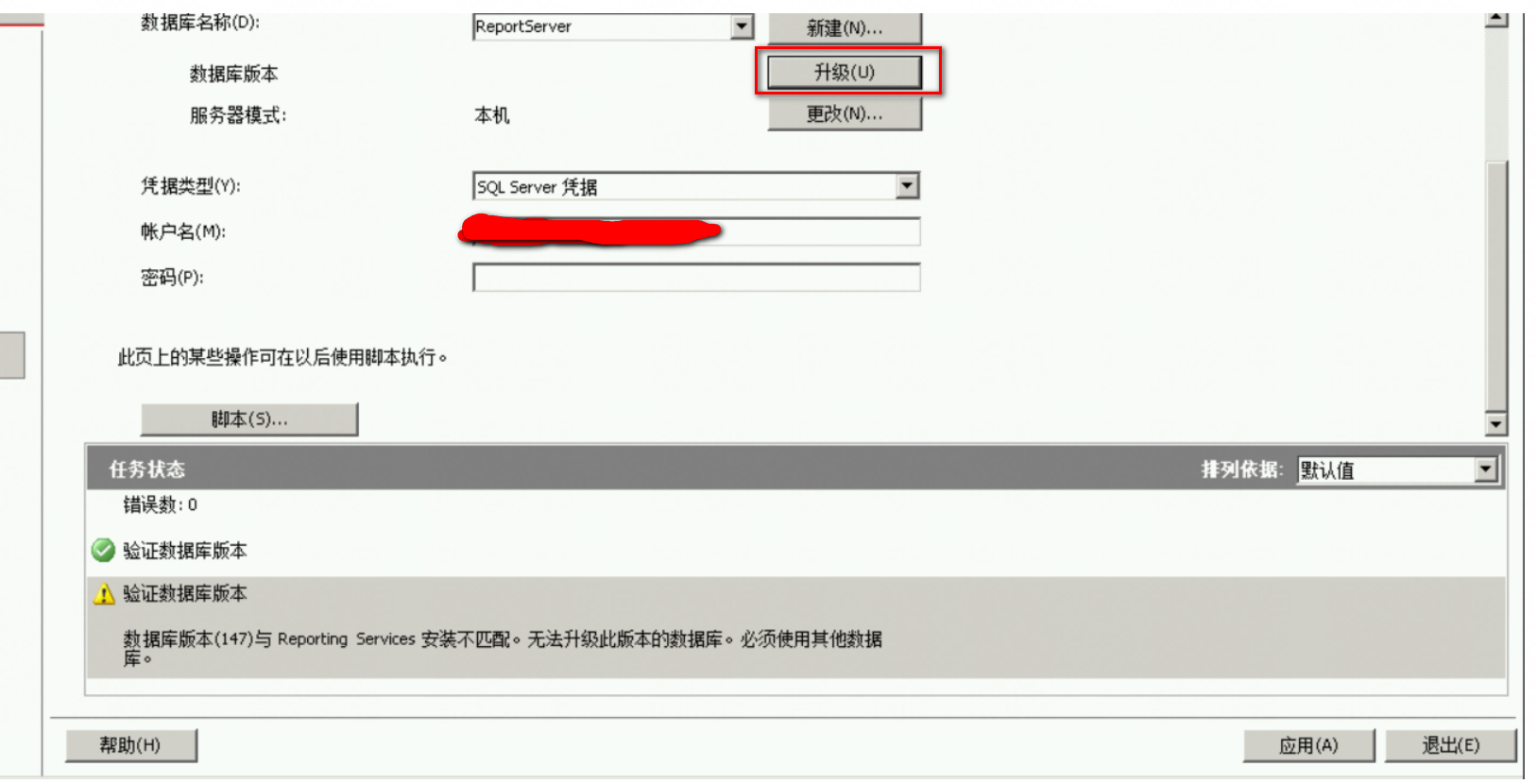
提示数据库的版本验证不通过。
3.2 从版本入手,重点分析版本
错误提示版本不对,那我们找下Report server 和 Report server database的版本信息。下表列出了截至目前(2015/04/29)发布的报表服务器和报表服务器数据库的版本号:
|
Release |
Report server |
Report server database |
|---|---|---|
|
SQL Server 2008 R2 |
10.50.nnnn.nn |
n/a |
|
SQL Server 2008 Service Pack 1 (SP1) |
10.0.2531.00 |
C.0.9.45 |
|
SQL Server 2008 |
10.0.1600.00 |
C.0.9.45 |
|
SQL Server 2005 Reporting Services Service Pack 3 (SP3) |
9.0.4035.00 |
C.0.8.54 |
|
SQL Server 2005 Reporting Services Service Pack 2 (SP2) |
9.0.3042.00 |
C.0.8.54 |
|
SQL Server 2005 Express with Advanced Services |
9.0.3042.00 |
C.0.8.45 |
|
SQL Server 2005 Reporting Services Service Pack 1 (SP1) |
9.0.2049.00 |
C.0.8.43 |
|
SQL Server 2005 Reporting Services |
9.0.1399.01 |
C.0.8.40 |
|
SQL Server 2000 Reporting Services Service Pack 2 (SP2) |
8.00.1038 |
C.0.6.54 |
|
SQL Server 2000 Reporting Services Service Pack 1 (SP1) |
8.00.0878 |
C.0.6.51 |
|
SQL Server 2000 Reporting Services |
8.00.0743 |
C.0.6.43 |
现在来看,Reporting Services Service 应该安装的是2005 SP2 (或者 SP3),但是 Report server database 安装的是2008 R2 SP3。
到此,也应该知道为什么升级版本不对了,当Reporting Services Service 版本 高于 Report server database 版本(的要求)时,可以考虑通过升级解决保存版本不适配问题。我们现在遇到的情况正好相反,Report server database 版本高于Reporting Services Service 版本(的要求)了。
4 方案探究
4.1 问题解决
其实问题清晰了,就是Report server 和 Report server database的版本不适配导致的。
再回到迁移项目本身来看,迁移前后,SQL Server 实例的版本一致(Microsoft SQL Server 2008 R2 (SP3)),迁移前运行OK,迁移后就完犊子了,这说明Report server database的版本还受制于其它因素。
是什么限制的呢?众里寻他千百度,一次又一次,尝试N中方法....
忽然发现,原Report server database所在的Server 没有安装 Reporting Services,而新的Report server database所在的Server 在安装 SQL Server实例时,选择功能时,选择的时是【Select All】,即 新的Server 有安装Reporting Services。这一发现 是通过C:\Program Files\Microsoft SQL Server 路径下的安装文件发现的。
补充一点,新 Server的SQL Server实例安装后,本身有Report Server数据库和ReportServerTempDB数据库,为了迁移,我们是先将DB drop 掉,然后再附加(attach)原DB Server的DB文件。
4.2 方案验证
新安装一个SQL Server实例,但是不安装Reporting Services,即到功能选择时,按照图中标识的选择。
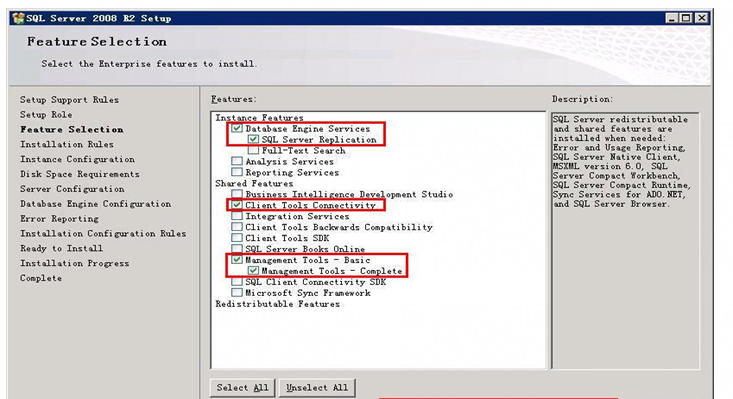
安装后,附加(attach)原DB Server的DB文件(Report Serve和ReportServerTempDB的DB文件),然后配置Reporting Services (主要是配置报表服务器数据库连接),这时OK了,服务正常了。
OK!
OK!
OK!
这也说明,思考的方向是正确的。
4.3 结论或推断
(1)Report server database的版本 与 所在SQL Server 实例的版本不同;
(2)安装SQL Server 实例时,如未安装Reporting Services,则 Report server database(Report Server和ReportServerTempDB)附加到不同版本SQL Server 实例上时,Report server database的版本 不变;
(3)安装SQL Server 实例时,如有安装Reporting Services,则 远程电脑上的Reporting Services 连接 本机的Report server database时,获取的Report server database的版本版本是安装时的版本。虽可 删除、再附加 不同 版本的Report server database,但获取的版本仍是安装时的版本。即,此时符合 (2)的推论 不同。
(4)造成(3)的原因,推测为: 安装SQL Server 实例时安装Reporting Services,有将安装时的Report server database的版本保存到注册表或系统表,远程电脑上的Reporting Services 连接 本机的Report server database时,优先从注册表或系统表 获取信息(,不再读取附加的Report server database的版本)。
5.参考文档
1.升级报表服务器数据库
https://docs.microsoft.com/zh-cn/previous-versions/sql/sql-server-2005/ms403392(v=sql.90)
2.rsInvalidReportServerDatabase
https://docs.microsoft.com/zh-cn/previous-versions/sql/sql-server-2005/bb326494(v=sql.90)?redirectedfrom=MSDN
3.如何检测版本信息 (Reporting Services)---2008
https://docs.microsoft.com/zh-cn/previous-versions/sql/sql-server-2008/bb630446(v=sql.100)
4.如何检测版本信息 (Reporting Services) ---2008R
https://docs.microsoft.com/zh-cn/previous-versions/sql/sql-server-2008-r2/bb630446(v=sql.105)
迁移Report Server DataBase时遇到的坑的更多相关文章
- SQL Server 2012 The report server cannot open a connection to the report server database
案例环境: 操作系统版本: Windows Server 2012 R2 Standard 数据库版本 : SQL SERVER 2012 SP2 案例介绍: 今天进入一台新安装的SQL ...
- Step by step Install a Local Report Server and Remote Report Server Database
原创地址:http://www.cnblogs.com/jfzhu/p/4012097.html 转载请注明出处 前面的文章<Step by step SQL Server 2012的安装 &g ...
- [转]How to: Create a Report Server Database (Reporting Services Configuration)
本文转自:https://docs.microsoft.com/en-us/previous-versions/sql/sql-server-2008-r2/ms157300%28v%3dsql.10 ...
- Web service request SetParameters to Report Server http://host/reportserver failed. Error: 请求因 HTTP 状态 401 失败: Unauthorized
迁移CRM服务器完成后在访问CRM的内部报表时报错,在查看应用服务器的日志时发现报"Web service request SetParameters to Report Server ht ...
- P6 Professional Installation and Configuration Guide (Microsoft SQL Server Database) 16 R1
P6 Professional Installation and Configuration Guide (Microsoft SQL Server Database) 16 R1 May ...
- 解决将Excel表导入到SQL Server数据库时出现Text was truncated or one or more characters had no match in the target code错误
编写python爬虫程序可以在电商.旅游等网站上爬取相关评论数据,这些数据可以用于词云制作.感情词分析.提取关键词等,也可以将爬取下来的数据以自己的方式进行展示.评论数据爬取下来后,就要考虑怎样入库, ...
- 在建立与服务器的连接时出错。在连接到 SQL Server 2005 时,在默认的设置下 SQL Server 不允许进行远程连
在建立与服务器的连接时出错.在连接到 SQL Server 2005 时,在默认的设置下 SQL Server 不允许进行远程连 sql server服务器sqlserver远程连接数据库防火墙在建立 ...
- Report Server multiple value 多值选择
一.项目需求 今天在做项目的时候,有一个需求,具体如下:在Report Server中存在一个报表,报表中有一个参数doctor_name,该参数允许多值,默认全部.但是由于前端页面医生选择时多选没有 ...
- 使用redis-py的两个类Redis和StrictRedis时遇到的坑
使用redis-py的两个类Redis和StrictRedis时遇到的坑 前言: 今天产品经理说,有几个队列排序的功能不能用了.对比了下以前的代码查到了一个原因,这个比较的坑,总结起来也是自己没好好看 ...
随机推荐
- 还不懂 redis 持久化?看看这个
Redis 是一个内存数据库,为了保证数据不丢失,必须把数据保存到磁盘,这就叫做持久化. Redis 有两种持久化方法: RDB 方式以及 AOF 方式 RDB 持久化 前言 RDB持久化把内存中的数 ...
- Python数模笔记-(1)NetworkX 图的操作
1.NetworkX 图论与网络工具包 NetworkX 是基于 Python 语言的图论与复杂网络工具包,用于创建.操作和研究复杂网络的结构.动力学和功能. NetworkX 可以以标准和非标准的数 ...
- 03.28,周六,12:00-17:00,ICPC训练联盟周赛,选用试题:UCF Local Programming Contest 2016正式赛。
A. Majestic 10 题意:三个数均大于10则输出"triple-double",如果两个数大于10则输出"double-double",如果一个大于1 ...
- Ubuntu执行命令时,不sudo提示权限不足,sudo提示找不到该命令
问题:Ubuntu执行命令时,不sudo提示权限不足,sudo提示找不到该命令 补充描述:尝试将命令所在路径添加到/etc/profile中(所有用户环境变量),结果sudo -i切换到root用户后 ...
- Ubuntu切换到root账户
使用命令sudo su或sudo -i然后输入密码就可以切换到root帐号,exit可以退出.
- Pytorch_Part2_数据模块
VisualPytorch beta发布了! 功能概述:通过可视化拖拽网络层方式搭建模型,可选择不同数据集.损失函数.优化器生成可运行pytorch代码 扩展功能:1. 模型搭建支持模块的嵌套:2. ...
- UI设计师、平面设计师常用的网站大全,初学者必备,大家都在用!
UI设计师.平面设计师常用的网站大全,初学者必备,大家都在用! 国外的花瓣--Pinterest • The world's catalog of ideas 颜格视觉--app界面设计大全--电商. ...
- Java集合详解(三):LinkedList原理解析
概述 本文是基于jdk8_271源码进行分析的. LinkedList底层是基于链表实现.链表没有长度限制,内存地址不需要固定长度,也不需要是连续的地址来进行存储,只需要通过引用来关联前后元素即可完成 ...
- Ansible_使用文件模块将修改文件复制到受管主机
一.描述常用文件模块 1.常用文件模块 模块名称 模块说明 blockinfile 插入.更新或删除由可自定义标记线包围的多行文本块 copy 将文件从本地或远程计算机复制到受管主机上的某个位置.类似 ...
- 基于多端口的Web服务
[Centos7.4版本] !!!测试环境我们首关闭防火墙和selinux [root@localhost ~]# systemctl stop firewalld [root@localhost ~ ...