
Swift alert 倒计时
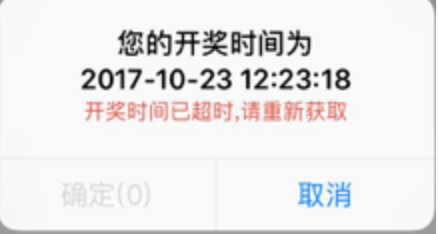
let title: String = "您的开奖时间为"

let time: String = "2017-10-23 12:23:18"

let count_down: NSString = "6" as NSString

var countdown = count_down.integerValue

let timeout: String = "开奖时间已超时,请重新获取"

let alertVc = UIAlertController.init(title: nil, message: title + "\n" + time, preferredStyle: UIAlertControllerStyle.alert)

let alertAction0 = UIAlertAction.init(title: "取消", style: .default, handler: { (action) in

})

let alertAction1 = UIAlertAction.init(title: "确定(\(countdown))", style: .default, handler: { (action) in

    //确定的操作

})

alertVc.addAction(alertAction1)

alertVc.addAction(alertAction0)

weakSelf?.present(alertVc, animated: true, completion: {

})

if countdown != 0 {

    let queue: DispatchQueue = DispatchQueue.global()

    let countdownTimer = DispatchSource.makeTimerSource(flags: [], queue: queue)

    countdown = countdown + 1

    countdownTimer.scheduleRepeating(deadline: .now(), interval: .seconds(1))

    countdownTimer.setEventHandler(handler: {

        countdown = countdown - 1

        if countdown <= 0 {

            countdownTimer.cancel()

            DispatchQueue.main.async {

                alertAction1.setValue("确定(0)", forKey: "title")

                alertAction1.setValue(UIColor.hrgb("CCCCCC"), forKey: "titleTextColor")

                alertAction1.isEnabled = false

                // message

                let one: NSString = "\(title)\n\(time)\n" as NSString

                let two: NSString = "\(timeout)" as NSString

                let message = "\(title)\n\(time)\n\(timeout)"

                let alertControllerMessageStr = NSMutableAttributedString(string: message)

                alertControllerMessageStr.addAttribute(NSForegroundColorAttributeName, value: UIColor.hrgb("DF503C"), range: NSMakeRange(one.length, two.length))

                alertControllerMessageStr.addAttribute(NSFontAttributeName, value: UIFont.systemFont(ofSize: 13), range: NSMakeRange(one.length, two.length))

                alertVc.setValue(alertControllerMessageStr, forKey: "attributedMessage")

            }

        }else {

            DispatchQueue.main.async {

                alertAction1.setValue("确定(\(countdown))", forKey: "title")

            }

        }

    })

    countdownTimer.resume()

}

Swift alert 倒计时的更多相关文章
- Swift - UITableViewCell倒计时重用解决方案
Swift - UITableViewCell倒计时重用解决方案 效果 源码 https://github.com/YouXianMing/Swift-Animations // // CountDo ...
- 纯js实现10分钟倒计时
一个简单实现倒计时的小栗子~ 效果图:简陋的不能再简陋了,捂脸 代码: <!DOCTYPE HTML> <html> <head> <title> 倒计 ...
- php和js一起实现倒计时功能
里获取的php服务端的时间 纯JS是获取客服端时间! <?php //php的时间是以秒算.js的时间以毫秒算 date_default_timezone_set('PRC'); //date_ ...
- js 倒计时 button不可用
function showtime() { fun_timedown(5); } function fun_timedown(time) { $("#timedown").val( ...
- new Date() 倒计时
js中单独调用new Date() 显示的结果是:Fri May 20 2015 20:00:00 GMT+0800这种格式的时间 JS获取当前时间戳的方法 JavaScript 获取当前时间戳: 第 ...
- jQuery倒计时组件(jquery.downCount.js)
//html <span class="days">00</span> <span class="hours">00< ...
- 毫秒倒计时小Demo
Demo截图: Demo:Demo 上代码: <!DOCTYPE html> <html lang="en"> <head> <meta ...
- jquery实现倒计时
<html> <head> <meta charset="utf-8"/> <title>jquery实现倒计时</title ...
- JavaScript学习笔记之BOM对象
目录 1.Window 2.Window Screen 3.Window Location 4.Window History 5.Window Navigator 浏览器对象模型(Browser Ob ...
随机推荐
- 从ACID到CAP及BASE
从ACID到CAP及BASE ACID 说到事务,肯定想到事务的ACID特性,即原子性(Atomicity).一致性(Consistency).隔离性(Isolation).持久性(Durabilit ...
- 『学了就忘』Linux基础命令 — 22、Linux中的硬链接和软链接
目录 1.文件和目录的基本存储 2.In命令介绍 (1)我们来看看ln命令的基本信息 (2)ln命令的基本格式 3.创建硬链接 (1)如何创建硬链接 (2)硬链接特征 (3)硬连接原理 4.创建软链接 ...
- exec系统调用 && 进程的加载过程
exec系统调用会从指定的文件中读取并加载指令,并替代当前调用进程的指令.从某种程度上来说,这样相当于丢弃了调用进程的内存,并开始执行新加载的指令. exec系统调用会保留当前的文件描述符表单.所以任 ...
- 【Go语言学习笔记】为什么要选择Go语言
一门语言的兴起一定有他的原因,所谓天下苦Java久矣,Go的到来可以说很多后端开发的福音,尤其是在微服务.分布式这么火的今天,那么,他的优势到底是什么呢? 首先,我们需要现有后端语言的优势痛点: 其实 ...
- 使用Adobe Acrobat进行Word转PDF遇到的问题及解决方法
软件版本:Adobe Acrobat 9 Pro 使用场景:Word转PDF 问题1: 我以为先要在Adobe Acrobat 9 Pro中打开Word文件,然后在执行类似转换/导出操作.但是始终无法 ...
- FZU ICPC 2020 寒假训练 6 —— 字符串处理
P1603 斯诺登的密码 题目描述 2013年X月X日,俄罗斯办理了斯诺登的护照,于是他混迹于一架开往委内瑞拉的飞机.但是,这件事情太不周密了,因为FBI的间谍早已获悉他的具体位置--但这不是最重要的 ...
- php 图像和水印
生成图像 $img = imagecreate(400,400); imagecolorallocate($img,255,255,255); imageellipse($img,200,200,50 ...
- Java的初始化过程
在刷题的过程中,时常会碰到关于Java中的类的初始化顺序的问题. 总结如下,便于以后复习: 初始化过程: 首先,初始化父类中的静态成员变量和静态代码块,按照在程序中出现的顺序初始化: 然后,初始化子类 ...
- Spark-StructuredStreaming 下的checkpointLocation分析以及对接 Grafana 监控和提交Kafka Lag 监控
一.Spark-StructuredStreaming checkpointLocation 介绍 Structured Streaming 在 Spark 2.0 版本于 2016 年引入, 是基于 ...
- IE 跨域设置
开发的时候会发现IE下跨域无法访问,报错: Failed to load resource: net::ERR_CONNECTION_REFUSED 解决方法有两种: 自己写代理服务,访问代理服务,代 ...