
Swift alert 倒计时
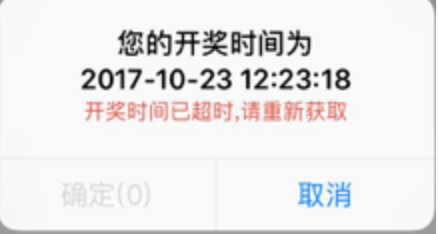
let title: String = "您的开奖时间为"

let time: String = "2017-10-23 12:23:18"

let count_down: NSString = "6" as NSString

var countdown = count_down.integerValue

let timeout: String = "开奖时间已超时,请重新获取"

let alertVc = UIAlertController.init(title: nil, message: title + "\n" + time, preferredStyle: UIAlertControllerStyle.alert)

let alertAction0 = UIAlertAction.init(title: "取消", style: .default, handler: { (action) in

})

let alertAction1 = UIAlertAction.init(title: "确定(\(countdown))", style: .default, handler: { (action) in

    //确定的操作

})

alertVc.addAction(alertAction1)

alertVc.addAction(alertAction0)

weakSelf?.present(alertVc, animated: true, completion: {

})

if countdown != 0 {

    let queue: DispatchQueue = DispatchQueue.global()

    let countdownTimer = DispatchSource.makeTimerSource(flags: [], queue: queue)

    countdown = countdown + 1

    countdownTimer.scheduleRepeating(deadline: .now(), interval: .seconds(1))

    countdownTimer.setEventHandler(handler: {

        countdown = countdown - 1

        if countdown <= 0 {

            countdownTimer.cancel()

            DispatchQueue.main.async {

                alertAction1.setValue("确定(0)", forKey: "title")

                alertAction1.setValue(UIColor.hrgb("CCCCCC"), forKey: "titleTextColor")

                alertAction1.isEnabled = false

                // message

                let one: NSString = "\(title)\n\(time)\n" as NSString

                let two: NSString = "\(timeout)" as NSString

                let message = "\(title)\n\(time)\n\(timeout)"

                let alertControllerMessageStr = NSMutableAttributedString(string: message)

                alertControllerMessageStr.addAttribute(NSForegroundColorAttributeName, value: UIColor.hrgb("DF503C"), range: NSMakeRange(one.length, two.length))

                alertControllerMessageStr.addAttribute(NSFontAttributeName, value: UIFont.systemFont(ofSize: 13), range: NSMakeRange(one.length, two.length))

                alertVc.setValue(alertControllerMessageStr, forKey: "attributedMessage")

            }

        }else {

            DispatchQueue.main.async {

                alertAction1.setValue("确定(\(countdown))", forKey: "title")

            }

        }

    })

    countdownTimer.resume()

}

Swift alert 倒计时的更多相关文章
- Swift - UITableViewCell倒计时重用解决方案
Swift - UITableViewCell倒计时重用解决方案 效果 源码 https://github.com/YouXianMing/Swift-Animations // // CountDo ...
- 纯js实现10分钟倒计时
一个简单实现倒计时的小栗子~ 效果图:简陋的不能再简陋了,捂脸 代码: <!DOCTYPE HTML> <html> <head> <title> 倒计 ...
- php和js一起实现倒计时功能
里获取的php服务端的时间 纯JS是获取客服端时间! <?php //php的时间是以秒算.js的时间以毫秒算 date_default_timezone_set('PRC'); //date_ ...
- js 倒计时 button不可用
function showtime() { fun_timedown(5); } function fun_timedown(time) { $("#timedown").val( ...
- new Date() 倒计时
js中单独调用new Date() 显示的结果是:Fri May 20 2015 20:00:00 GMT+0800这种格式的时间 JS获取当前时间戳的方法 JavaScript 获取当前时间戳: 第 ...
- jQuery倒计时组件(jquery.downCount.js)
//html <span class="days">00</span> <span class="hours">00< ...
- 毫秒倒计时小Demo
Demo截图: Demo:Demo 上代码: <!DOCTYPE html> <html lang="en"> <head> <meta ...
- jquery实现倒计时
<html> <head> <meta charset="utf-8"/> <title>jquery实现倒计时</title ...
- JavaScript学习笔记之BOM对象
目录 1.Window 2.Window Screen 3.Window Location 4.Window History 5.Window Navigator 浏览器对象模型(Browser Ob ...
随机推荐
- Linux 启动/关闭 oracle 数据库
1.启动 1.1 启动监听 :lsnrctl start 1.2 启动数据库:sqlplus /nolog conn /as sysdba(或者两句一起:sqlplus sys/ as sysd ...
- Connected to an idle instance.
Connected to an idle instance:连接到空闲实例 原因:数据库或者监听没启动
- MySQL高级篇 | MySQL逻辑架构
思维导图 架构逻辑视图 每个虚线框为一层,总共三层. 第一层:连接层,所包含的服务并不是MySQL所独有的技术.它们都是服务于C/S程序或者是这些程序所需要的 :连接处理,身份验证,安全性等等. 第二 ...
- vscode 导入第三方jar包(添加外部JAR)
添加 jar包 至根目录下lib文件夹,在 .classpath 文件内添加 jar 路径. 注意:新添加的 jar路径 在"src"和"bin"之间,否则无法 ...
- oracle的 listagg() WITHIN GROUP () 行转列函数的使用
1.使用条件查询 查询部门为20的员工列表 -- 查询部门为20的员工列表 SELECT t.DEPTNO,t.ENAME FROM SCOTT.EMP t where t.DEPTNO ...
- 关于Python中用户输入字符串(与变量名相同)无法作为变量名引用的理解以及解决方案
在用户登录账号时,我需要在字典中查找是否存在其账号名称以及密码是否正确. 所以,我想将用户输入的账号赋值给变量,在字典中查找是否有此指值. 代码如下: 1 Ya = {'姓名': 'Ya', 'pas ...
- 如何用命令行编译c++程序
作为程序员,如果仅仅只懂得如何在IDE上拖控件写程序,而不知道如何直接通过编译器编译程序的话.虽然说也没啥大不了的,但是如果掌握了手动编译的技能,那肯定会是一种炫技般的存在.从客观的角度来讲,一方面, ...
- 尖端之作看逐浪-Zoomla!逐浪CMS python版发布
免费下载:https://www.z01.com/down/3723.shtml Python是跻身于当代IT世界最流行和代码最高效的编程语言之一. 带着对技术的卓越追求.对客户的承诺.对品质的极致追 ...
- 大爽Python入门教程 3-3 循环:`for`、`while`
大爽Python入门公开课教案 点击查看教程总目录 for循环 可迭代对象iterable 不同于其他语言. python的for循环只能用于遍历 可迭代对象iterable 的项. 即只支持以下语法 ...
- Django笔记&教程 6-4 forms进阶操作,重写forms方法
Django 自学笔记兼学习教程第6章第4节--forms进阶操作,重写forms方法 点击查看教程总目录 1 - 重写clean方法 在本章第三节中,我们举了个注册学生账号的例子,里面我们使用模型来 ...