
pytest文档6-allure-pytest
allure-pytest 环境准备
windows环境相关:
python 3.6版本
pytest 4.5.0版本
allure-pytest 2.8.6 最新版
使用pip安装pytest和allure-pytest,加上--index-url地址,下载会快一些
pip install pytest==4.5.0 --index-url https://pypi.douban.com/simple

pip install allure-pytest==2.8.6 --index-url https://pypi.douban.com/simple
安装完成之后,打开一个你之前写的pytest脚本,看能不正常使用,如果报错:AttributeError: module 'allure' has no attribute 'severity_level'
这个是之前 pytest-allure-adaptor 这个插件与 allure-pytest 不能共存,卸载掉 pytest-allure-adaptor
pip uninstall pytest-allure-adaptor
allure命令行工具
allure是一个命令行工具,需要去github上下载最新版https://github.com/allure-framework/allure2/releases
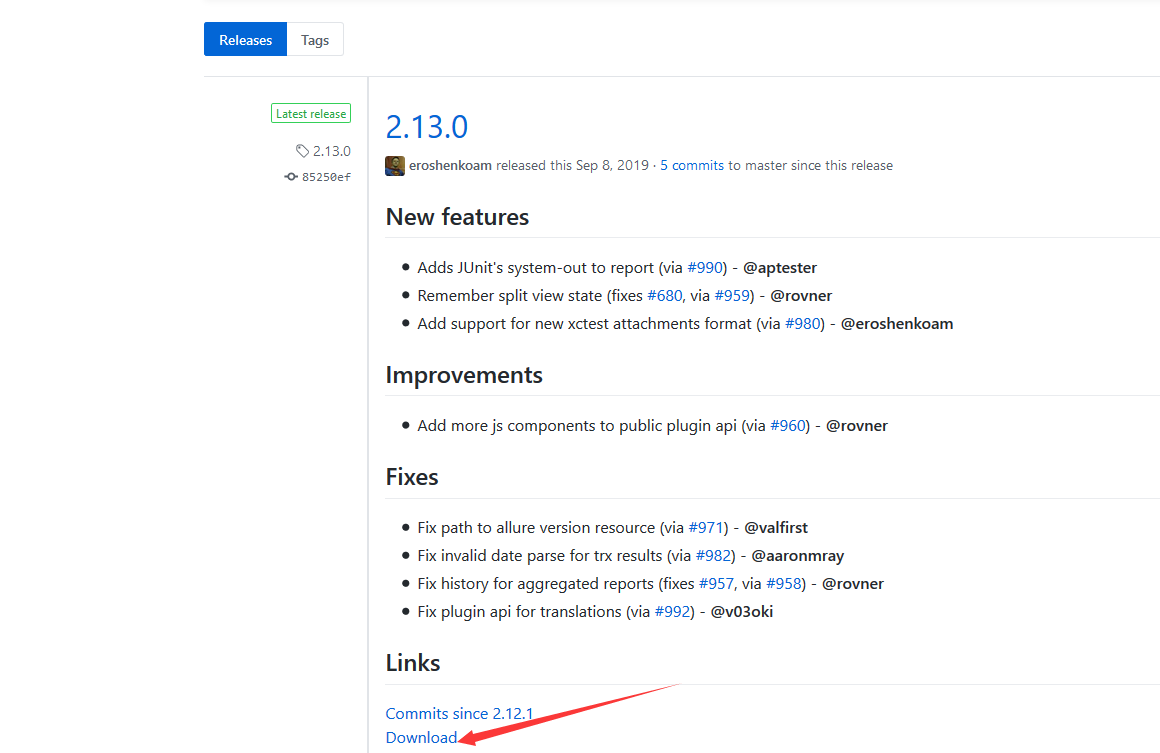
下载完成之后,解压到本地电脑
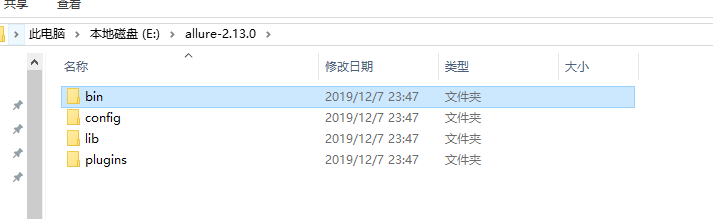
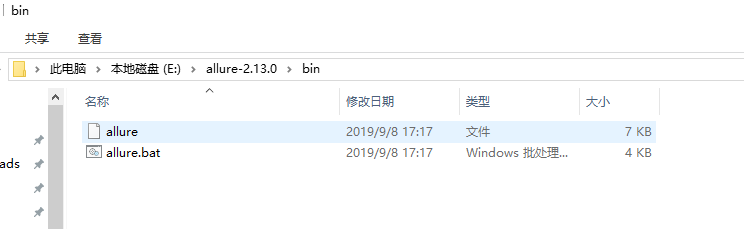
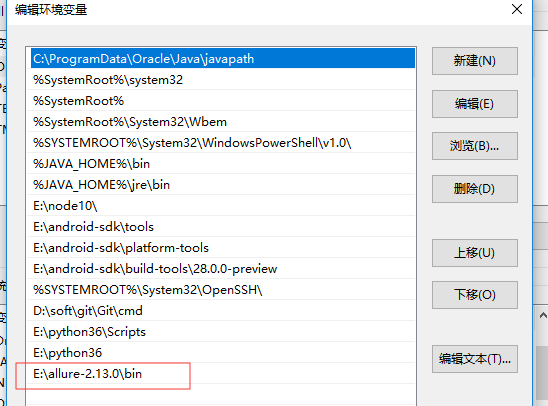
把bin目录添加到环境变量Path下
用例demo
conftest.py内容
import pytest

@pytest.fixture(scope="session")

def login():

    print("用例先登录")
test_allure_demo.py内容
import allure

import pytest

@allure.step("步骤1:点xxx")

def step_1():

    print("111")

@allure.step("步骤2:点xxx")

def step_2():

    print("222")

@allure.feature("编辑页面")

class TestEditPage():

    '''编辑页面'''

    @allure.story("这是一个xxx的用例")

    def test_1(self, login):

        '''用例描述:先登录,再去执行xxx'''

        step_1()

        step_2()

        print("xxx")

    @allure.story("打开a页面")

    def test_2(self, login):

        '''用例描述:先登录,再去执行yyy'''

        print("yyy")
运行用例
cd到test_allure_demo.py所在的目录文件,命令行执行
pytest --alluredir ./report/allure_raw
D:\soft\code\xuexipytest>pytest --alluredir ./report/allure_raw

============================= test session starts =============================

platform win32 -- Python 3.6.0, pytest-4.5.0, py-1.5.4, pluggy-0.13.1

rootdir: D:\soft\code\xuexipytest

plugins: allure-pytest-2.8.6, forked-0.2, html-1.19.0, metadata-1.7.0, repeat-0.7.0, xdist-1.23.2

collected 9 items

case\test_allure_demo.py ..                                              [ 22%]

case\test_x.py ......                                                    [ 88%]

case\test_y.py .                                                         [100%]

============================== 9 passed in 0.21s ==============================
执行完成后,在当前目录下,report目录会生成一个allure_raw的原始文件,这个只是测试报告的原始文件,不能打开成html的报告
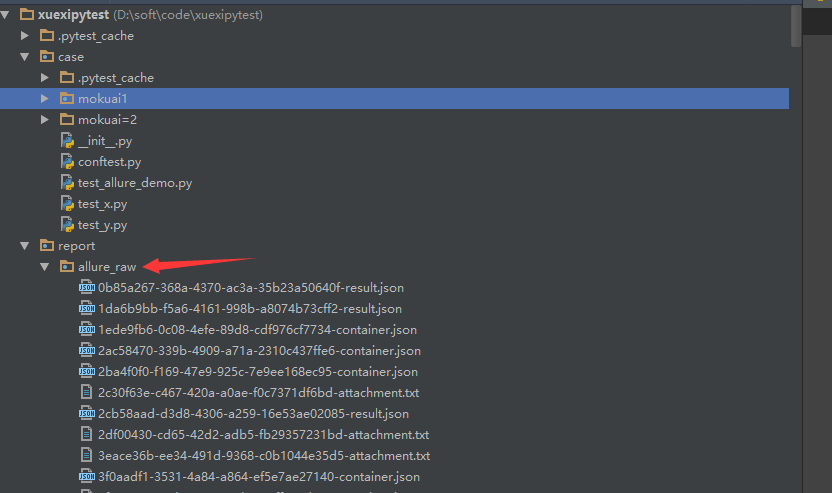
打开html的报告需要启动allure服务,启动命令如下
allure serve report/allure_raw
启动服务,它会自动给个端口,直接用默认浏览器打开了
D:\soft\code\xuexipytest>allure serve report/allure_raw

Generating report to temp directory...

Report successfully generated to C:\Users\dell\AppData\Local\Temp\6056757827461248074\allure-report

Starting web server...

2019-12-08 00:41:09.921:INFO::main: Logging initialized @2228ms to org.eclipse.jetty.util.log.StdErrLog

Server started at <http://192.168.1.125:35346/>. Press <Ctrl+C> to exit
查看报告
浏览器上打开的报告内容
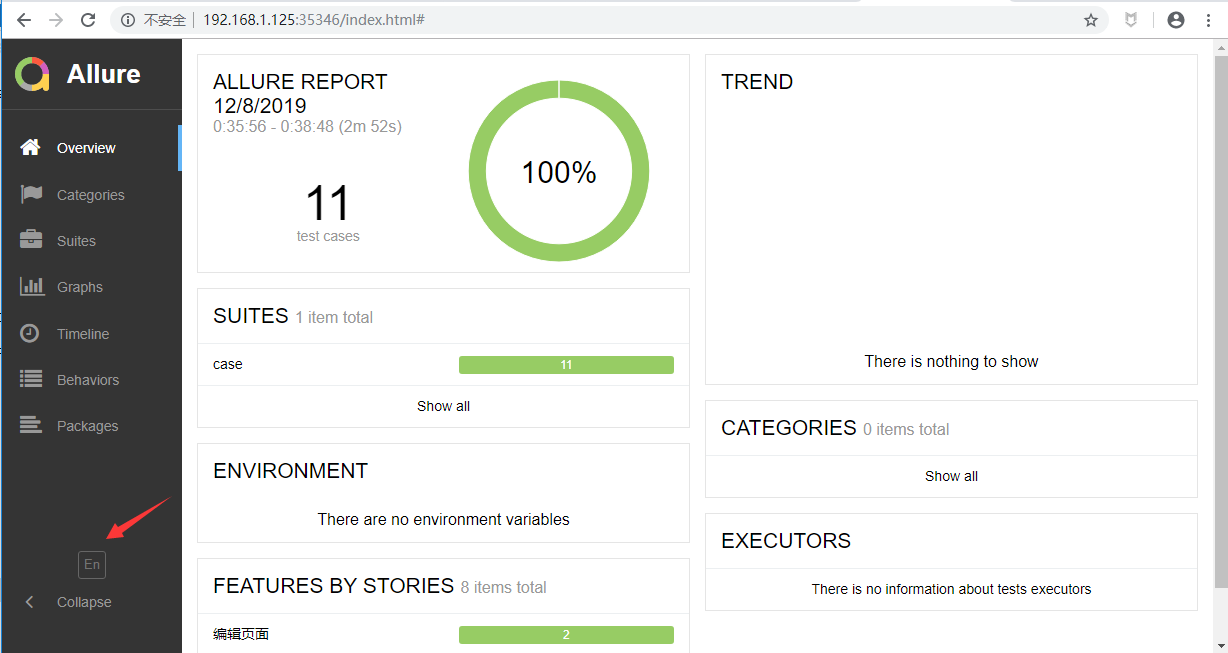
点 EN 按钮可以查看中文报告
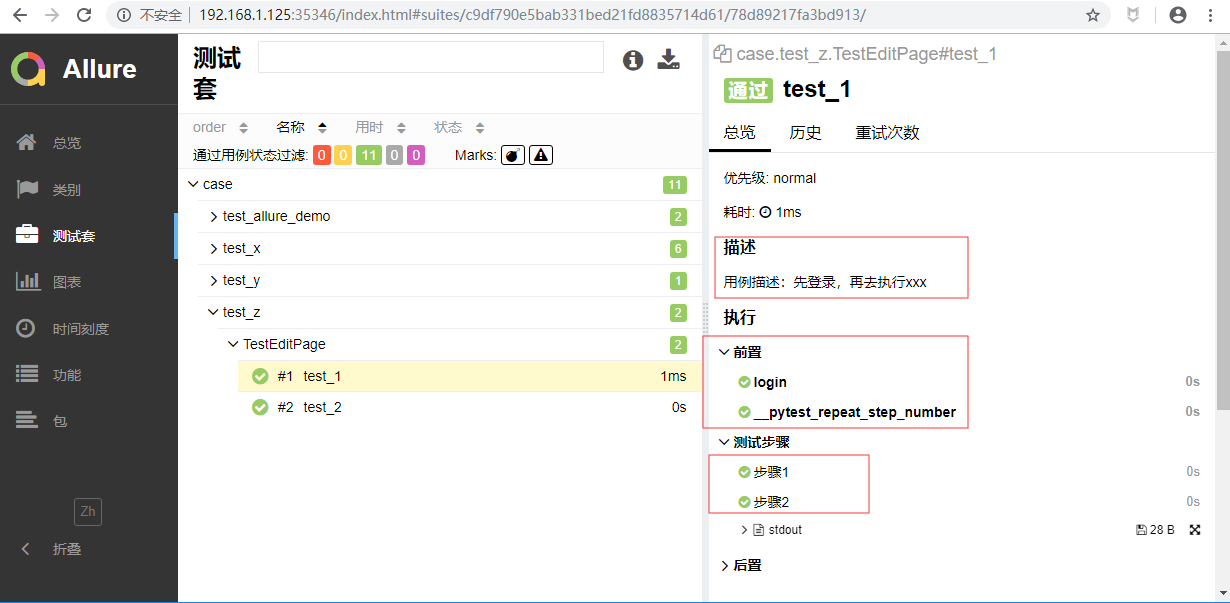
打开测试套件,可以查看报告的详情,显示的还是很详细的
pytest文档6-allure-pytest的更多相关文章
- pytest文档3-pycharm运行pytest
前言 上一篇pytest文档2-用例运行规则已经介绍了如何在cmd执行pytest用例,平常我们写代码在pycharm比较多 写完用例之后,需要调试看看,是不是能正常运行,如果每次跑去cmd执行,太麻 ...
- pytest文档3-pytest+Allure+jenkins+邮箱发送
前言: 虽然网上有很多邮件配置的文章,但还是想自己写一下配置的过程,因为在中间也碰到了不同坑.按照这个文档配置的话,99%都可以成功. 一.jenkins 配置邮箱 1.打开jenkins后进入点 ...
- pytest文档2-pytest+Allure+jenkins+邮箱发送
前言: 上一章节讲解了tomcat+jenkins的环境搭建,这一章节主要讲一下Allure报告在jenkins上的配置 步骤: 1.新建一个item 2.输入项目的名称,选择自由风格,点击保存 3. ...
- pytest文档1-pytest+Allure+jenkins+邮箱发送
前言: 1.pytest+allure是目前很多公司使用较多的一种报告样式,因为它更详细,各种指标更直观(简单的说就是看着更高大上,更能装X). 环境准备: 1.Windows10 2.Allure ...
- pytest文档7-pytest-html生成html报告
前言 pytest-HTML是一个插件,pytest用于生成测试结果的HTML报告.兼容Python 2.7,3.6 pytest-html 1.github上源码地址[https://github. ...
- pytest文档51-内置fixture之cache使用
前言 pytest 运行完用例之后会生成一个 .pytest_cache 的缓存文件夹,用于记录用例的ids和上一次失败的用例. 方便我们在运行用例的时候加上--lf 和 --ff 参数,快速运行上一 ...
- pytest文档19-doctest测试框架
前言 doctest从字面意思上看,那就是文档测试.doctest是python里面自带的一个模块,它实际上是单元测试的一种. 官方解释:doctest 模块会搜索那些看起来像交互式会话的 Pytho ...
- pytest文档1-环境准备与入门
前言 首先说下为什么要学pytest,在此之前相信大家已经掌握了python里面的unittest单元测试框架,那再学一个框架肯定是需要学习时间成本的. 刚开始我的内心是拒绝的,我想我用unittes ...
- pytest文档56-插件打包上传到 pypi 库
前言 pytest 的插件完成之后,可以上传到 github,方便其他小伙伴通过 pip 源码安装.如果我们想通过 pip install packages 这种方式安装的话,需上传到 pypi 仓库 ...
- pytest文档55-plugins插件开发
前言 前面一篇已经学会了使用hook函数改变pytest运行的结果,代码写在conftest.py文件,实际上就是本地的插件了. 当有一天你公司的小伙伴觉得你写的还不错,或者更多的小伙伴想要你这个功能 ...
随机推荐
- log4j添加日志一定记住在工程的web.xml文件下加一些内容
log4j添加日志一定记住在工程的web.xml文件下加如下内容:
- JAVA结合WebSocket实现简单客服聊天功能
说明:该示例只简单的实现了客服聊天功能. 1.聊天记录没有保存到数据库中,一旦服务重启,消息记录将会没有,如果需要保存到数据库中,可以扩展 2.页面样式用的网上模板,样式可以自己进行修改 3.只能由用 ...
- Visual Studio Code常用快捷键
说明 以下快捷键适用于windows环境下, Mac请将ctrl替换为command按键: 部分快捷键或不一样. 查看VSCode快捷键定义: settings -> keymaps. 目前使用 ...
- 第五个知识点 复杂性为NP类是什么意思
第五个知识点 复杂性为NP类是什么意思 原文地址:http://bristolcrypto.blogspot.com/2014/11/52-things-number-5-what-is-meant- ...
- Second Order Optimization for Adversarial Robustness and Interpretability
目录 概 主要内容 (4)式的求解 超参数 Tsiligkaridis T., Roberts J. Second Order Optimization for Adversarial Robustn ...
- [python]MergeTxt按列合并同一个文件下多个txt文件
开发需求:应项目需要,要将记录成txt的实验数据进行按列合并(也即为不同文件上下合并),从而进行机器学习训练. 实验数据类似如此 模拟验证数据 1.txt *****1***** abcdefghij ...
- Java EE数据持久化框架作业目录(作业笔记)
第1章 MyBatis入门>>> 1.1.4 在Eclipse中搭建MyBatis基本开发环境 1.2.5 使用MyBatis查询所有职员信息 1.3.3 获取id值为1的角色信息. ...
- Mysql 设计超市经营管理系统,包括员工信息表(employee)和 员工部门表(department)
互联网技术学院周测机试题(二) 一.需求分析 为进一步完善连锁超市经营管理,提高管理效率,减少管理成本,决定开发一套商品管理系统,用于日常的管理.本系统分为商品管理.员工管理.店铺管理,库存管理等功能 ...
- 论文翻译:2020_Acoustic Echo Cancellation Based on Recurrent Neural Network
论文地址:https://ieeexplore.ieee.org/abstract/document/9306224 基于RNN的回声消除 摘要 本文提出了一种基于深度学习的语音分离技术的回声消除方法 ...
- JSON生成Java实体类
https://www.bejson.com/json2javapojo/new/ 至于效果怎么样,自己试一下就知道了