
Cesium入门6 - Adding Imagery - 添加图层
Cesium入门6 - Adding Imagery - 添加图层
Cesium中文网:http://cesiumcn.org/ | 国内快速访问:http://cesium.coinidea.com/
Cesium应用程序另一个关键元素是Imagery(图层)。瓦片图集合根据不同的投影方式映射到虚拟的三维数字地球表面。依赖于相机指向地表的方向和距离,Cesium会去请求和渲染不同层级的图层详细信息。
多种图层能够被添加、移除、排序和适应到Cesium中。
Cesium提供了一系列方法用于处理图层,比如颜色自适应,图层叠加融合。一些样例代码如下:
- Adding basic imagery添加基本图层
- Adjusting imagery colors自适应图层颜色
- Manipulating and ordering imagery layers控制调整图层顺序
- Splitting imagery layers切割图层
Cesium提供了各种接口支持各样的图层数据源。
支持的图层格式
- wms
- TMS
- WMTS (with time dynamic imagery)
- ArcGIS
- Bing Maps
- Google Earth
- Mapbox
- OpenStreetMap
注意:不同的数据源需要不同的认证 - 需要确保自己能够有权限访问到这些数据源,自然地需要注册特定的认证才可以
默认地,Cesium使用Bing Maps作为默认的图层。这个图层被打包进Viewer中用于演示。Cesium需要您自己创建ion account然后生成一个access key用于访问图层数据。
在接下来的例子中,将使用Cesium ion中的Sentinel-2图层。
去Cesium ion页面,将Sentinel-2图层加入到自己的assets中。点击在导航栏中点击“Asset Depot”
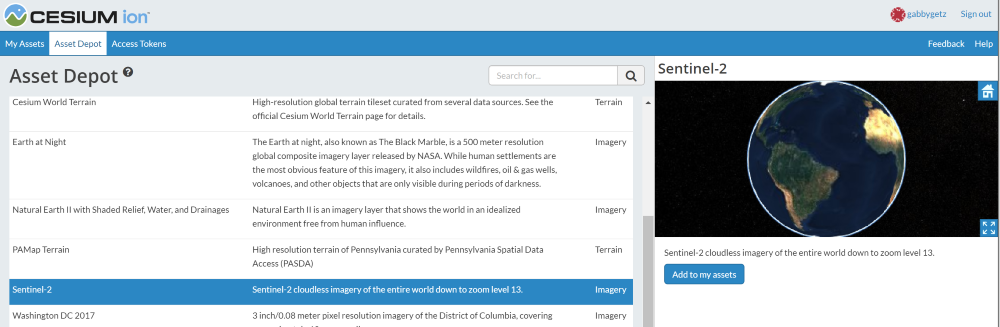
点击“Add to my assets”。Sentinel-2将在你个人用户中的asset列表(My Assets)中出现,此时将在个人的app中图层数据源变得可用。
代码级别:我们创建一个IonImageryProvider,将assetId传给对应的Sentinel-2图层。然后我们将ImageryProvider添加到viewer.imageryLayers。
// Remove default base layer

viewer.imageryLayers.remove(viewer.imageryLayers.get(0));

// Add Sentinel-2 imagery

viewer.imageryLayers.addImageryProvider(new Cesium.IonImageryProvider({ assetId : 3954 }));
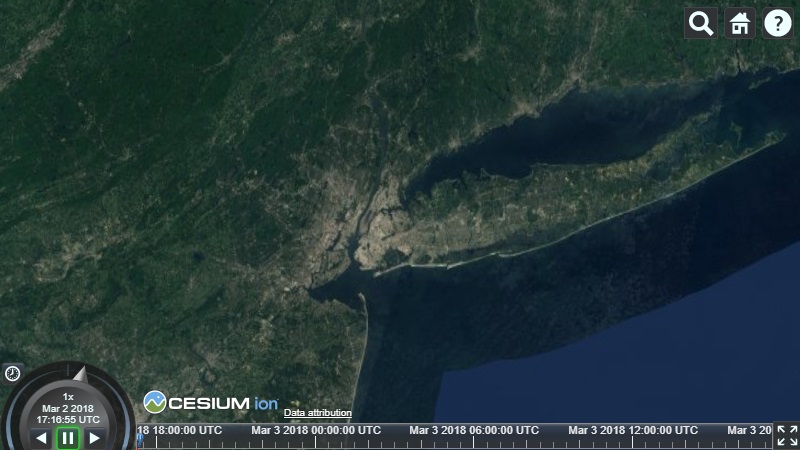
基于上述的代码,我们的Cesium应用程序在缩进zoom in的时候会看到如下图层:
关于图层的更多信息:请访问Imagery Layers Tutorial
Cesium中文网交流QQ群:807482793
Cesium中文网:http://cesiumcn.org/ | 国内快速访问:http://cesium.coinidea.com/
Cesium入门6 - Adding Imagery - 添加图层的更多相关文章
- Cesium入门7 - Adding Terrain - 添加地形
Cesium入门7 - Adding Terrain - 添加地形 Cesium中文网:http://cesiumcn.org/ | 国内快速访问:http://cesium.coinidea.com ...
- Cesium入门9 - Loading and Styling Entities - 加载和样式化实体
Cesium入门9 - Loading and Styling Entities - 加载和样式化实体 Cesium中文网:http://cesiumcn.org/ | 国内快速访问:http://c ...
- Cesium入门10 - 3D Tiles
Cesium入门10 - 3D Tiles Cesium中文网:http://cesiumcn.org/ | 国内快速访问:http://cesium.coinidea.com/ 我们团队有时把Ces ...
- Cesium入门4 - 创建Cesium Viewer
Cesium入门4 - 创建Cesium Viewer Cesium中文网:http://cesiumcn.org/ | 国内快速访问:http://cesium.coinidea.com/ 任何Ce ...
- cesium入门示例-测量工具
作为cesium入门示例级别的最后一篇,参考cesium-长度测量和面积测量实现测量工具封装,修改了其中的距离测量函数,计算贴地距离,并对事件内部处理做了调整.包括贴地距离测量.面积测量.结果清除. ...
- cesium入门示例-矢量化单体分类
实现楼层的分层选择和属性信息展示,该功能基于大雁塔倾斜数据实现单体化分类显示. 数据准备: 1.大雁塔倾斜数据,已转换为3dTiles,参考cesium入门示例-3dTiles加载的第2节osgb数据 ...
- Cesium入门13 - Extras - 附加内容
Cesium入门13 - Extras - 附加内容 Cesium中文网:http://cesiumcn.org/ | 国内快速访问:http://cesium.coinidea.com/ 剩下的代码 ...
- Cesium入门12 - Camera Modes - 相机模式
Cesium入门12 - Camera Modes - 相机模式 Cesium中文网:http://cesiumcn.org/ | 国内快速访问:http://cesium.coinidea.com/ ...
- Cesium入门11 - Interactivity - 交互性
Cesium入门11 - Interactivity - 交互性 Cesium中文网:http://cesiumcn.org/ | 国内快速访问:http://cesium.coinidea.com/ ...
随机推荐
- Django的Form表单验证
Form(from django import forms) 简短理解:后端提供了一个类:from django import forms,继承此类定义子类.子类中定义和form表单中提交到name名 ...
- 直接在filter过滤器代码里加org.apache.struts2.ServletActionContext.getRequest()会出现空指针情况
直接在filter过滤器代码里加org.apache.struts2.ServletActionContext.getRequest()获得request对象请注意啦,会出现空指针情况 请关注此处:
- 【LeetCode】950. Reveal Cards In Increasing Order 解题报告(Python)
作者: 负雪明烛 id: fuxuemingzhu 个人博客: http://fuxuemingzhu.cn/ 目录 题目描述 题目大意 解题方法 模拟 日期 题目地址:https://leetcod ...
- 1119 - Pimp My Ride
1119 - Pimp My Ride PDF (English) Statistics Forum Time Limit: 2 second(s) Memory Limit: 32 MB To ...
- 解决"The remote SSH server rejected X11 forwarding request"问题
今天突然想起来好久没有登录我的vps了,于是下载了xshell,填入地址登录后,看到提示"WARNING! The remote SSH server rejected X11 forwar ...
- Amazing!!CSS 也能实现烟雾效果?
最近利用 CSS 实现了一些看似超出 CSS 能力的效果: 巧用渐变实现高级感拉满的背景光动画 Amazing!!CSS 也能实现极光? 本文继续此系列,本文主要想探讨一下,使用 CSS 能否比较好的 ...
- Linux中架构中的备份服务器搭建(rsync)
本期内容概要 Linux中的备份方式 架构中备份服务器搭建(rsync) 内容详细 1.备份方式 1. cp : 本机复制(只能作用在本机) 2. scp : 远程复制 两种模式: 推 : 本地上传到 ...
- 「双串最长公共子串」SP1811 LCS - Longest Common Substring
知识点: SAM,SA,单调栈,Hash 原题面 Luogu 来自 poj 的双倍经验 简述 给定两字符串 \(S_1, S_2\),求它们的最长公共子串长度. \(|S_1|,|S_2|\le 2. ...
- Inverse/Implicit Function Theorem
目录 4.1 The Inverse Function Theorem The Implicit Function Theorem 4.3 Curves and Surfaces 4.4 The Mo ...
- 代码质量管理sonarqube部署使用
一.sonarqube的部署 1.下载sonaqube:https://www.sonarqube.org/downloads/ 根据需要下载特定版本: 2.如果通过sonar-scanner进行代码 ...