
websocket数据流解析
ceilometer获取数据暂时先不做解答,本篇注重websocket解决浏览器与openstack组件之间的实时状态更新。
大致流程如下:
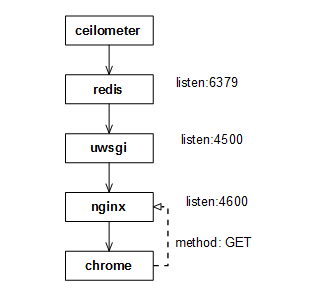
nginx配置的反向代理如下:
/etc/nginx/nginx.conf
include /etc/nginx/conf.d/*.conf;
/etc/nginx/conf.d/openstack.conf
upstream websocket_beijing {

    server 192.168.213.88:4500;

}

server {

    listen 81;

    #server_name horizon.plcloud.com;

    proxy_set_header        Host            $host;

    proxy_set_header        X-Real-IP       $remote_addr;

    proxy_set_header        X-Forwarded-For $proxy_add_x_forwarded_for;

    location / {

        include uwsgi_params;

        uwsgi_pass unix:/var/run/uwsgi/openstack.sock;

    }

    location /static/{

        alias /home/zzw/develop/horizon/static/;

    }

}

server {

    listen 4600;

    location / {

        proxy_pass http://websocket_beijing;

        proxy_http_version 1.1;

        proxy_set_header Upgrade $http_upgrade;

        proxy_set_header Connection "upgrade";

    }

}
日志说明:
/var/log/nginx/access.log #nginx访问日志
/var/log/nginx/error.log #nginx错误日志
uwsgi配置:
websocket.ini -> /home/zzw/develop/ceilometer/etc/ceilometer/websocket.ini
/etc/uwsgi/vassals/openstack.ini
# awcloud horizon uwsgi config file

[uwsgi]

# Django-related settings

# the virtualenv (full path)

# home = /var/plcloud/horizon/.venv

# the base directory (full path)

chdir = /home/zzw/develop/horizon/openstack_dashboard/wsgi

# Django's wsgi file

file = django.wsgi

# maximum number of worker processes

processes = 4

# the socket (use the full path to be safe

socket = /var/run/uwsgi/%n.sock

# with appropriate permissions - may be needed

chmod-socket = 777

daemonize = /var/log/uwsgi/%n.log
日志说明:
/var/log/uwsgi/openstack.log
/var/log/uwsgi/websocket.log
redis配置订阅模式:
/etc/redis.conf
daemonize yes

pidfile /var/run/redis/redis.pid

port 6379

tcp-backlog 511

bind 0.0.0.0

timeout 0

tcp-keepalive 0

loglevel notice

logfile /var/log/redis/redis.log

databases 16

save 900 1

save 300 10

save 60 10000

stop-writes-on-bgsave-error yes

rdbcompression yes

rdbchecksum yes

dbfilename dump.rdb

dir /var/lib/redis/

slave-serve-stale-data yes

slave-read-only yes

repl-disable-tcp-nodelay no

slave-priority 100

appendonly no

appendfilename "appendonly.aof"

appendfsync everysec

no-appendfsync-on-rewrite no

auto-aof-rewrite-percentage 100

auto-aof-rewrite-min-size 64mb

lua-time-limit 5000

slowlog-log-slower-than 10000

slowlog-max-len 128

notify-keyspace-events ""

hash-max-ziplist-entries 512

hash-max-ziplist-value 64

list-max-ziplist-entries 512

list-max-ziplist-value 64

set-max-intset-entries 512

zset-max-ziplist-entries 128

zset-max-ziplist-value 64

hll-sparse-max-bytes 3000

activerehashing yes

client-output-buffer-limit normal 0 0 0

client-output-buffer-limit slave 256mb 64mb 60

client-output-buffer-limit pubsub 32mb 8mb 60

hz 10

aof-rewrite-incremental-fsync yes
日志说明:
/var/log/redis/redis.log
ceilometer配置:
├── ceilometer.conf

├── ceilometertab.ini

├── matchmaker_ring.json

├── pipeline.yaml

├── policy.json

├── sources.json

└── templates

    ├── default.html

    └── default.sms
日志说明:
├── agent-notification.log

├── alarm-evaluator.log

├── alarm-notifier.log

├── api.log

├── auditor.log

├── central.log

├── checker.log

├── collector.log

├── compute.log

├── websocket.log

└── zmq-receiver.log
配置过程报错集锦:
1. uwsgi缺少对openssl支持,/var/log/uwsgi/websocket.log 报错如下:
[pid: |app: |req: /] 192.168.216.48 () { vars in bytes} [Thu Apr :: ] GET /websocket?uid=33d5edff940f4812b5368e54499991e4®ion=lab-test => generated bytes in msecs (HTTP/1.1 ) headers in bytes ( switches on core )
you need to build uWSGI with SSL support to use the websocket handshake api function !!!
解决方法:重新编译uwsgi,支持openssl
cd uwsgi-2.0./

make

stop uwsgi

python setup.py install

start uwsgi
websocket数据流解析的更多相关文章
- WebSocket协议解析
WebSocket协议解析 转载请注明出处:WebSocket解析 现在,很多网站为了实现推送技术,所用的技术都是轮询.轮询是指在特定的时间间隔(如每一秒),由浏览器对服务器发起HTTP请求,然后由服 ...
- iOS swift项目IM实现,从长连接到数据流解析分析之Socket
iOS swift项目IM实现,从长连接到底层数据解析分析之Socket 一:项目简介: 去年开始接手了一个国企移动项目,项目的需求是实现IM即时通讯功能. * 一期版本功能包括了: ...
- Websocket 协议解析
WebSocket protocol 是HTML5一种新的协议.它是实现了浏览器与服务器全双工通信(full-duplex). 现 很多网站为了实现即时通讯,所用的技术都是轮询(po ...
- 萌萌的websocket原理解析
转载自:http://www.zhihu.com/question/20215561 一.WebSocket是HTML5出的东西(协议),也就是说HTTP协议没有变化,或者说没关系,但HTTP是不支持 ...
- 转载-WebSocket协议解析
现在,很多网站为了实现推送技术,所用的技术都是轮询.轮询是指在特定的时间间隔(如每一秒),由浏览器对服务器发起HTTP请求,然后由服务器返回数据给浏览器.由于HTTP协议是惰性的,只有客户端发起请求, ...
- springMVC中数据流解析与装载
最近在看springmvc原理时,看到一篇比较赞的博文,留存学习,如果侵权,请告知,立删. 地址: https://my.oschina.net/lichhao/blog/172562
- pdf 数据流解析
根据这个解释可以认为,/CCITTFaxDecode应该指单色图像(每个像素占8位?还是1位),FlateDecode 指文字或者矢量图片(png) 参考论文:http://www.doc88.co ...
- 通讯框架 t-io 学习——websocket 部分源码解析
前言 前端时间看了看t-io的websocket部分源码,于是抽时间看了看websocket的握手和他的通讯机制.本篇只是简单记录一下websocket握手部分. WebSocket握手 好多人都用过 ...
- WebSocket解析
WebSocket解析 转载请注明出处:WebSocket解析 现在,很多网站为了实现推送技术,所用的技术都是轮询.轮询是指在特定的时间间隔(如每一秒),由浏览器对服务器发起HTTP请求,然后由服务器 ...
随机推荐
- win8 下脚本安装IIS
@echo off echo 正在添加IIS8.0 功能,依据不同的网络速率,全程大约需要5分钟时间... start /w pkgmgr /iu:IIS-WebServerRol ...
- C#中的访问修饰符
1. 简述 private. protected. public. internal 修饰符的访问权限.private : 私有成员, 在类的内部才可以访问.protected : 保护成员,该类内部 ...
- Linux命令--mysqld_safe和mysqld区别
Linux命令--mysqld_safe和mysqld区别 学习了:https://blog.csdn.net/Aaroun/article/details/78143832 mysqld_safe ...
- Required MultipartFile parameter 'file' is not present error
<input type=“file”> 中的name 与id 属性 与 addbanner(@RequestParam("file") MultipartFile ...
- xunsearch使用namespace后bug修复
xunsearch在使用了namespace后会出现不能正常使用 错误例如以下: Fatal error: Uncaught [vendors\xunsearch\lib\XSException] . ...
- .NET--百度百科
.NET是 Microsoft XML Web services 平台.XML Web services 允许应用程序通过 Internet 进行通讯和共享数据,而不管所采用的是哪种操作系统.设备或编 ...
- (转)jquery图片左右滚动
<!DOCTYPE HTML> <html> <head> <title>基于jQuery的控制左右滚动效果_自动滚动版本</title> ...
- iOS 转盘动画效果实现
代码地址如下:http://www.demodashi.com/demo/11598.html 近期公司项目告一段落,闲来无事,看到山东中国移动客户端有个转盘动画挺酷的.于是试着实现一下,看似简单,可 ...
- spring中反射机制和注入的使用
http://www.cnblogs.com/andin/archive/2011/04/30/spring.html spring的一大核心概念是注入, 但是,这存在的一个前提就是类是由spring ...
- 通过windows自带的系统监视器来查看IIS并发连接数(perfmon.msc)
如果要查看IIS连接数,最简单方便的方法是通过“网站统计”来查看,“网站统计”的当前在线人数可以认为是当前IIS连接数.然而,“网站统计”的当前在线人数统计时间较长,一般为10分钟或15分钟,再加上统 ...