
微服务之SpringCloud实战(四):SpringCloud Eureka源码分析
Eureka源码解析:
搭建Eureka服务的时候,我们会再SpringBoot启动类加上@EnableEurekaServer的注解,这个注解做了一些什么,我们一起来看。
点进@EnableEurekaServer这个注解就会看到下面代码:
/*

 * Copyright 2013-2017 the original author or authors.

 *

 * Licensed under the Apache License, Version 2.0 (the "License");

 * you may not use this file except in compliance with the License.

 * You may obtain a copy of the License at

 *

 *      http://www.apache.org/licenses/LICENSE-2.0

 *

 * Unless required by applicable law or agreed to in writing, software

 * distributed under the License is distributed on an "AS IS" BASIS,

 * WITHOUT WARRANTIES OR CONDITIONS OF ANY KIND, either express or implied.

 * See the License for the specific language governing permissions and

 * limitations under the License.

 */

package org.springframework.cloud.netflix.eureka.server;

import java.lang.annotation.Documented;

import java.lang.annotation.ElementType;

import java.lang.annotation.Retention;

import java.lang.annotation.RetentionPolicy;

import java.lang.annotation.Target;

import org.springframework.cloud.client.discovery.EnableDiscoveryClient;

import org.springframework.context.annotation.Import;

/**

 * Annotation to activate Eureka Server related configuration {@link EurekaServerAutoConfiguration}

 *

 * @author Dave Syer

 * @author Biju Kunjummen

 *

 */

@EnableDiscoveryClient

@Target(ElementType.TYPE)

@Retention(RetentionPolicy.RUNTIME)

@Documented

@Import(EurekaServerMarkerConfiguration.class)

public @interface EnableEurekaServer {

}
大家可以清楚的看到@EnableEurekaServer引用了@EnableDiscoveryClient这个注解,源码如下:
/*

 * Copyright 2013-2015 the original author or authors.

 *

 * Licensed under the Apache License, Version 2.0 (the "License");

 * you may not use this file except in compliance with the License.

 * You may obtain a copy of the License at

 *

 *      http://www.apache.org/licenses/LICENSE-2.0

 *

 * Unless required by applicable law or agreed to in writing, software

 * distributed under the License is distributed on an "AS IS" BASIS,

 * WITHOUT WARRANTIES OR CONDITIONS OF ANY KIND, either express or implied.

 * See the License for the specific language governing permissions and

 * limitations under the License.

 */

package org.springframework.cloud.client.discovery;

import java.lang.annotation.Documented;

import java.lang.annotation.ElementType;

import java.lang.annotation.Inherited;

import java.lang.annotation.Retention;

import java.lang.annotation.RetentionPolicy;

import java.lang.annotation.Target;

import org.springframework.context.annotation.Import;

/**

 * Annotation to enable a DiscoveryClient implementation.

 * @author Spencer Gibb

 */

@Target(ElementType.TYPE)

@Retention(RetentionPolicy.RUNTIME)

@Documented

@Inherited

@Import(EnableDiscoveryClientImportSelector.class)

public @interface EnableDiscoveryClient {

    /**

     * If true, the ServiceRegistry will automatically register the local server.

     */

    boolean autoRegister() default true;

}
从这个注解我们可以知道,它主要是用来开启DiscoveryClient实例的,通过搜索DiscoveryClient我们可以看到一个类和一个接口,得到下图关系:
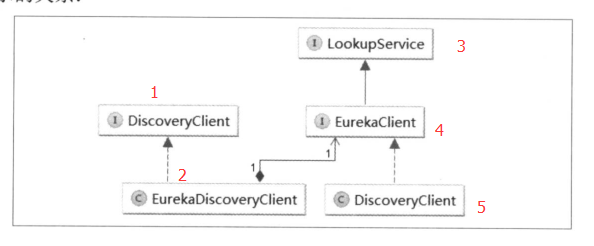
其中,1 是 Spring Cloud 的接口,它定义了用来发现服务的常用抽象方法,通过该接口可以有效的屏蔽服务治理的实现细节,所以使用 Spring Cloud 构建的微服务应用可以方便的切换不同服务治理框架,而不改动程序代码,只需要另外添加一些针对服务治理框架的配置即可。2 是对 1 接口的实现,从命名判断。它实现的是对 Eureka 发现服务的封装。所以 EurekaDiscoveryClient 依赖了 Netflix Eureka 的 EurekaClient 接口,EurekaClient 接口继承了 LookupService 接口,它们都是 Netflix 开源包中的内容,主要定义了针对 Eureka 的发现服务的抽象发放,而真正实现发现服务的则Netflix包中的 DiscoveryClient (5)类。
接下来,我们就详细看看DiscoveryClient类。先看下该类的头部注释,大致内容如下:

在具体研究Eureka Client 负责完成的任务之前,我们先看看在哪里对Eureka Server 的URL列表进行配置。根据配置的属性名 eureka.client.service-url.defaultZone,通过 ServiceURL 可以找到该属性相关的加载属性,但是在SR5 版本中它们都被 @Deprecated 标注为不再建议使用,并 @link 到了替代类 EndpointUtils,所以可以在该类中找到下面这个函数:
public static Map<String, List<String>> getServiceUrlsMapFromConfig(EurekaClientConfig clientConfig, String instanceZone, boolean preferSameZone) {

        LinkedHashMap orderedUrls = new LinkedHashMap();

        String region = getRegion(clientConfig);

        String[] availZones = clientConfig.getAvailabilityZones(clientConfig.getRegion());

        if(availZones == null || availZones.length == 0) {

            availZones = new String[]{"default"};

        }

        logger.debug("The availability zone for the given region {} are {}", region, Arrays.toString(availZones));

        int myZoneOffset = getZoneOffset(instanceZone, preferSameZone, availZones);

        String zone = availZones[myZoneOffset];

        List serviceUrls = clientConfig.getEurekaServerServiceUrls(zone);

        if(serviceUrls != null) {

            orderedUrls.put(zone, serviceUrls);

        }

        int currentOffset = myZoneOffset == availZones.length - 1?0:myZoneOffset + 1;

        while(currentOffset != myZoneOffset) {

            zone = availZones[currentOffset];

            serviceUrls = clientConfig.getEurekaServerServiceUrls(zone);

            if(serviceUrls != null) {

                orderedUrls.put(zone, serviceUrls);

            }

            if(currentOffset == availZones.length - 1) {

                currentOffset = 0;

            } else {

                ++currentOffset;

            }

        }

        if(orderedUrls.size() < 1) {

            throw new IllegalArgumentException("DiscoveryClient: invalid serviceUrl specified!");

        } else {

            return orderedUrls;

        }

    }
Region、Zone
从上面的函数中可以发现,客户端依次加载了两个内容,第一个是Region,第二个是Zone,从其加载逻辑上可以判断它们之间的关系:
- 通过 getRegion 函数,我们可以看到他从配置中读取了一个Region返回,所以一个微服务应用只可以属于一个Region,如果不特别配置,默认为default。若要自己配置,可以通过 eureka.client.region属性来定义。

 public static String getRegion(EurekaClientConfig clientConfig) {

        String region = clientConfig.getRegion();

        if(region == null) {

            region = "default";

        }

        region = region.trim().toLowerCase();

        return region;

    }
- 通过 getAvailabilityZones 函数,可以知道当我们没有特别为 Region 配置 Zone 的时候,默认采用defaultZone , 这才是我们之前配置参数 eureka.client.service-url.defaultZone 的由来。若要为应用指定Zone,可以通过eureka.client.availability-zones 属性来设置。从该函数的 return 内容,可以知道 Zone 能够设置多个,并且通过逗号分隔来配置。由此,我们可以判断Region与Zone 是一对多的关系。
 public String[] getAvailabilityZones(String region) {

        String value = (String)this.availabilityZones.get(region);

        if(value == null) {

            value = "defaultZone";

        }

        return value.split(",");

    }
serviceUrls
在获取了Region 和 Zone 的信息之后,才开始真正加载 Eureka Server 的具体地址。它根据传入的参数按一定算法确定加载位于哪一个Zone配置的serviceUrls。
int myZoneOffset = getZoneOffset(instanceZone, preferSameZone, availZones);

String zone = availZones[myZoneOffset];

List serviceUrls = clientConfig.getEurekaServerServiceUrls(zone);
具体获取serviceUrls 的实现,可以详细查看getEurekaServerServiceUrls 函数的具体实现类 EurekaClientConfigBean,用来加载配置文件中的内容,通过搜索defaultZone,我们可以很容易找到下面这个函数,它具体实现了如何解析该参数的过程,通过此内容,我们可以知道,eureka.client.service-url.defaultZone 属性可以配置多个,并且需要通过逗号分隔。
public List<String> getEurekaServerServiceUrls(String myZone) {

        String serviceUrls = (String)this.serviceUrl.get(myZone);

        if(serviceUrls == null || serviceUrls.isEmpty()) {

            serviceUrls = (String)this.serviceUrl.get("defaultZone");

        }

        if(!StringUtils.isEmpty(serviceUrls)) {

            String[] serviceUrlsSplit = StringUtils.commaDelimitedListToStringArray(serviceUrls);

            ArrayList eurekaServiceUrls = new ArrayList(serviceUrlsSplit.length);

            String[] var5 = serviceUrlsSplit;

            int var6 = serviceUrlsSplit.length;

            for(int var7 = 0; var7 < var6; ++var7) {

                String eurekaServiceUrl = var5[var7];

                if(!this.endsWithSlash(eurekaServiceUrl)) {

                    eurekaServiceUrl = eurekaServiceUrl + "/";

                }

                eurekaServiceUrls.add(eurekaServiceUrl);

            }

            return eurekaServiceUrls;

        } else {

            return new ArrayList();

        }

    }
当我们在微服务应用中使用Ribbon来实现服务调用时,对于Zone的设置可以在负载均衡时实现区域亲和特性:Ribbon的默认策略会优先访问同客户端处于一个Zone中的服务端实例,只有当同一个Zone 中没有可用服务端实例的时候才会访问其他Zone中的实例。所以通过Zone属性的定义,配合实际部署的物理结构,我们就可以有效地设计出对区域性故障的容错集群。
服务注册
在理解了多个服务注册中心信息的加载后,我们再回头看看DiscoveryClient类是如何实现“服务注册”行为的,通过查看它的构造类,可以找到调用了下面这个函数:
private void initScheduledTasks() {

        int renewalIntervalInSecs;

        int expBackOffBound;

        if(this.clientConfig.shouldFetchRegistry()) {

            renewalIntervalInSecs = this.clientConfig.getRegistryFetchIntervalSeconds();

            expBackOffBound = this.clientConfig.getCacheRefreshExecutorExponentialBackOffBound();

            this.scheduler.schedule(new TimedSupervisorTask("cacheRefresh", this.scheduler, this.cacheRefreshExecutor, renewalIntervalInSecs, TimeUnit.SECONDS, expBackOffBound, new DiscoveryClient.CacheRefreshThread()), (long)renewalIntervalInSecs, TimeUnit.SECONDS);

        }

        if(this.clientConfig.shouldRegisterWithEureka()) {

            renewalIntervalInSecs = this.instanceInfo.getLeaseInfo().getRenewalIntervalInSecs();

            expBackOffBound = this.clientConfig.getHeartbeatExecutorExponentialBackOffBound();

            logger.info("Starting heartbeat executor: renew interval is: " + renewalIntervalInSecs);

            this.scheduler.schedule(new TimedSupervisorTask("heartbeat", this.scheduler, this.heartbeatExecutor, renewalIntervalInSecs, TimeUnit.SECONDS, expBackOffBound, new DiscoveryClient.HeartbeatThread(null)), (long)renewalIntervalInSecs, TimeUnit.SECONDS);

            this.instanceInfoReplicator = new InstanceInfoReplicator(this, this.instanceInfo, this.clientConfig.getInstanceInfoReplicationIntervalSeconds(), 2);

            this.statusChangeListener = new StatusChangeListener() {

                public String getId() {

                    return "statusChangeListener";

                }

                public void notify(StatusChangeEvent statusChangeEvent) {

                    if(InstanceStatus.DOWN != statusChangeEvent.getStatus() && InstanceStatus.DOWN != statusChangeEvent.getPreviousStatus()) {

                        DiscoveryClient.logger.info("Saw local status change event {}", statusChangeEvent);

                    } else {

                        DiscoveryClient.logger.warn("Saw local status change event {}", statusChangeEvent);

                    }

                    DiscoveryClient.this.instanceInfoReplicator.onDemandUpdate();

                }

            };

            if(this.clientConfig.shouldOnDemandUpdateStatusChange()) {

                this.applicationInfoManager.registerStatusChangeListener(this.statusChangeListener);

            }

            this.instanceInfoReplicator.start(this.clientConfig.getInitialInstanceInfoReplicationIntervalSeconds());

        } else {

            logger.info("Not registering with Eureka server per configuration");

        }

    }
在上面的函数中,可以看到一个与服务注册相关的判断语句 if(this.clientConfig.shouldRegisterWithEureka())。在该分支内,创建了一个 InstanceInfoReplicator 类的实例,他会执行一个定时任务,而这个定时任务的具体工作可以查看该类的run() 函数,具体如下所示:
public void run() {

        boolean var6 = false;

        ScheduledFuture next2;

        label53: {

            try {

                var6 = true;

                this.discoveryClient.refreshInstanceInfo();

                Long next = this.instanceInfo.isDirtyWithTime();

                if(next != null) {

                    this.discoveryClient.register();

                    this.instanceInfo.unsetIsDirty(next.longValue());

                    var6 = false;

                } else {

                    var6 = false;

                }

                break label53;

            } catch (Throwable var7) {

                logger.warn("There was a problem with the instance info replicator", var7);

                var6 = false;

            } finally {

                if(var6) {

                    ScheduledFuture next1 = this.scheduler.schedule(this, (long)this.replicationIntervalSeconds, TimeUnit.SECONDS);

                    this.scheduledPeriodicRef.set(next1);

                }

            }

            next2 = this.scheduler.schedule(this, (long)this.replicationIntervalSeconds, TimeUnit.SECONDS);

            this.scheduledPeriodicRef.set(next2);

            return;

        }

        next2 = this.scheduler.schedule(this, (long)this.replicationIntervalSeconds, TimeUnit.SECONDS);

        this.scheduledPeriodicRef.set(next2);

    }
这里有个 this.discoveryClient.register(); 这一行,真正触发调用注册的地方就在这里,继续查看register() 的实现内容,如下:
  boolean register() throws Throwable {

        logger.info("DiscoveryClient_" + this.appPathIdentifier + ": registering service...");

        EurekaHttpResponse httpResponse;

        try {

            httpResponse = this.eurekaTransport.registrationClient.register(this.instanceInfo);

        } catch (Exception var3) {

            logger.warn("{} - registration failed {}", new Object[]{"DiscoveryClient_" + this.appPathIdentifier, var3.getMessage(), var3});

            throw var3;

        }

        if(logger.isInfoEnabled()) {

            logger.info("{} - registration status: {}", "DiscoveryClient_" + this.appPathIdentifier, Integer.valueOf(httpResponse.getStatusCode()));

        }

        return httpResponse.getStatusCode() == 204;

    }
可以看出,注册操作也是通过REST请求的方式进行的。同时,我们能看到发起注册请求的时候,传入了一个 instanceInfo 对象,该对象就是注册时客户端给服务端的服务的元数据。
服务获取与服务续约
顺着上面的思路,继续看 DiscoveryClient 的 initScheduledTasks 函数,不难发现在其中还有两个定时任务,分别是 “服务获取” 和 “服务续约” :
private void initScheduledTasks() {

        int renewalIntervalInSecs;

        int expBackOffBound;

        if(this.clientConfig.shouldFetchRegistry()) {

            renewalIntervalInSecs = this.clientConfig.getRegistryFetchIntervalSeconds();

            expBackOffBound = this.clientConfig.getCacheRefreshExecutorExponentialBackOffBound();

            this.scheduler.schedule(new TimedSupervisorTask("cacheRefresh", this.scheduler, this.cacheRefreshExecutor, renewalIntervalInSecs, TimeUnit.SECONDS, expBackOffBound, new DiscoveryClient.CacheRefreshThread()), (long)renewalIntervalInSecs, TimeUnit.SECONDS);

        }

        if(this.clientConfig.shouldRegisterWithEureka()) {

            renewalIntervalInSecs = this.instanceInfo.getLeaseInfo().getRenewalIntervalInSecs();

            expBackOffBound = this.clientConfig.getHeartbeatExecutorExponentialBackOffBound();

            logger.info("Starting heartbeat executor: renew interval is: " + renewalIntervalInSecs);

            this.scheduler.schedule(new TimedSupervisorTask("heartbeat", this.scheduler, this.heartbeatExecutor, renewalIntervalInSecs, TimeUnit.SECONDS, expBackOffBound, new DiscoveryClient.HeartbeatThread(null)), (long)renewalIntervalInSecs, TimeUnit.SECONDS);

            …………

        } else {

            logger.info("Not registering with Eureka server per configuration");

        }

    }
从源码中可以看出,“服务获取” 任务相对于 “服务续约” 和 “服务注册” 任务更为独立。“服务续约” 与 “服务注册” 在同一个 if 逻辑中,这个不难理解,服务注册到Eureka Server 后,需要一个心跳去续约,防止被剔除,所以它们肯定是成对出现的。
而 “服务获取” 的逻辑在一个独立的 if 判断中,而且是由eureka.client.fetch-registry=true 参数控制,它默认为true,大部分情况下不需关心。
继续往下可以发现 “服务获取” 和 “服务续约” 的具体方法,其中 “服务续约” 的实现比较简单,直接以REST请求的方式进行续约:
boolean renew() {

        try {

            EurekaHttpResponse httpResponse = this.eurekaTransport.registrationClient.sendHeartBeat(this.instanceInfo.getAppName(), this.instanceInfo.getId(), this.instanceInfo, (InstanceStatus)null);

            logger.debug("{} - Heartbeat status: {}", "DiscoveryClient_" + this.appPathIdentifier, Integer.valueOf(httpResponse.getStatusCode()));

            if(httpResponse.getStatusCode() == 404) {

                this.REREGISTER_COUNTER.increment();

                logger.info("{} - Re-registering apps/{}", "DiscoveryClient_" + this.appPathIdentifier, this.instanceInfo.getAppName());

                return this.register();

            } else {

                return httpResponse.getStatusCode() == 200;

            }

        } catch (Throwable var3) {

            logger.error("{} - was unable to send heartbeat!", "DiscoveryClient_" + this.appPathIdentifier, var3);

            return false;

        }

    }
而 “服务获取” 则复杂一些,会根据是否是第一次获取发起不同的 REST 请求和相应的处理。
服务注册中心处理
通过上面的源码分析,可以看到所有的交互都是通过 REST 请求发起的。下面看看服务注册中心对这些请求的处理。Eureka Server 对于各类 REST 请求的定义都位于 com.netflix.eureka.resources 包下。
以 “服务注册” 请求为例(在ApplicationResource类中):
@POST

    @Consumes({"application/json", "application/xml"})

    public Response addInstance(InstanceInfo info, @HeaderParam("x-netflix-discovery-replication") String isReplication) {

        logger.debug("Registering instance {} (replication={})", info.getId(), isReplication);

        if(this.isBlank(info.getId())) {

            return Response.status(400).entity("Missing instanceId").build();

        } else if(this.isBlank(info.getHostName())) {

            return Response.status(400).entity("Missing hostname").build();

        } else if(this.isBlank(info.getAppName())) {

            return Response.status(400).entity("Missing appName").build();

        } else if(!this.appName.equals(info.getAppName())) {

            return Response.status(400).entity("Mismatched appName, expecting " + this.appName + " but was " + info.getAppName()).build();

        } else if(info.getDataCenterInfo() == null) {

            return Response.status(400).entity("Missing dataCenterInfo").build();

        } else if(info.getDataCenterInfo().getName() == null) {

            return Response.status(400).entity("Missing dataCenterInfo Name").build();

        } else {

            DataCenterInfo dataCenterInfo = info.getDataCenterInfo();

            if(dataCenterInfo instanceof UniqueIdentifier) {

                String dataCenterInfoId = ((UniqueIdentifier)dataCenterInfo).getId();

                if(this.isBlank(dataCenterInfoId)) {

                    boolean experimental = "true".equalsIgnoreCase(this.serverConfig.getExperimental("registration.validation.dataCenterInfoId"));

                    if(experimental) {

                        String amazonInfo1 = "DataCenterInfo of type " + dataCenterInfo.getClass() + " must contain a valid id";

                        return Response.status(400).entity(amazonInfo1).build();

                    }

                    if(dataCenterInfo instanceof AmazonInfo) {

                        AmazonInfo amazonInfo = (AmazonInfo)dataCenterInfo;

                        String effectiveId = amazonInfo.get(MetaDataKey.instanceId);

                        if(effectiveId == null) {

                            amazonInfo.getMetadata().put(MetaDataKey.instanceId.getName(), info.getId());

                        }

                    } else {

                        logger.warn("Registering DataCenterInfo of type {} without an appropriate id", dataCenterInfo.getClass());

                    }

                }

            }

            this.registry.register(info, "true".equals(isReplication));

            return Response.status(204).build();

        }

    }
在对注册信息进行了一堆校验之后,会调用 org.springframework.cloud.netflix.eureka.server.InstanceRegister 对象中的 register( InstanceInfo info, int leaseDuration, boolean isReplication) 函数来进行服务注册:
 public void register(InstanceInfo info, int leaseDuration, boolean isReplication) {

        this.handleRegistration(info, leaseDuration, isReplication);

        super.register(info, leaseDuration, isReplication);

    }
 private void handleRegistration(InstanceInfo info, int leaseDuration, boolean isReplication) {

        this.log("register " + info.getAppName() + ", vip " + info.getVIPAddress() + ", leaseDuration " + leaseDuration + ", isReplication " + isReplication);

        this.publishEvent(new EurekaInstanceRegisteredEvent(this, info, leaseDuration, isReplication));

    }
在注册函数中,先调用publishEvent 函数,将该新服务注册的事件传播出去,然后调用 com.netflix.eureka.registry.AbstractInstanceRegistry 父类中的注册实现,将 InstanceInfo 中的元数据信息存储在一个 ConcurrentHashMap 对象中。正如之前所说,注册中心存储了两层 Map 结构,第一层的key 存储服务名: InstanceInfo 中的APPName 属性,第二层的 key 存储实例名:InstanceInfo中的 instanceId 属性。
配置详解
在 Eureka 的服务治理体系中,主要分为服务端和客户端两个不同的角色,服务端为服务注册中心,而客户端为各个提供接口的微服务应用。当我们构建了高可用的注册中心之后,该集群中所有的微服务应用和后续将要介绍的一些基础类应用(如配置中心、API网关等)都可以视为该体系下的一个微服务(Eureka客户端)。服务注册中心也一样,只是高可用环境下的服务注册中心除了服务端之外,还为集群中的其他客户端提供了服务注册的特殊功能。所以,Eureka 客户端的配置对象存在于所有 Eureka 服务治理体系下的应用实例中。在使用使用 Spring cloud Eureka 的过程中, 我们所做的配置内容几乎都是对 Eureka 客户端配置进行的操作,所以了解这部分的配置内容,对于用好 Eureka 非常有帮助。
Eureka 客户端的配置主要分为以下两个方面:
- 服务注册相关的配置信息,包括服务注册中心的地址、服务获取的间隔时间、可用区域等。
- 服务实例相关的配置信息,包括服务实例的名称、IP地址、端口号、健康检查路径等。
服务注册类配置
关于服务注册类的配置信息,我们可以通过查看 org.springframework.cloud.netflix.eureka.EurekaClientConfigBean 的源码来获得比官方文档中更为详尽的内容,这些配置信息都已 eureka.client 为前缀。下面针对一些常用的配置信息做进一步的介绍和说明。
指定注册中心
在配置文件中通过 eureka.client.service-url 实现。该参数定义如下所示,它的配置值存储在HashMap类型中,并且设置有一组默认值,默认值的key为 defaultZone、value 为 http://localhost:8761/eureka/,类名为 EurekaClientConfigBean。
private Map<String, String> serviceUrl = new HashMap();

this.serviceUrl.put("defaultZone", "http://localhost:8761/eureka/");

public static final String DEFAULT_URL = "http://localhost:8761/eureka/";

public static final String DEFAULT_ZONE = "defaultZone";
由于之前的服务注册中心使用了 8082 端口,所以我们做了如下配置,来讲应用注册到对应的 Eureka 服务端中。
eureka.client.service-url.defaultZone=http://localhost:8082/eureka/
当构建了高可用的服务注册中心集群时,可以为参数的value 值配置多个注册中心的地址(逗号分隔):
eureka.client.service-url.defaultZone=http://peer1:1111/eureka/,http://peer2:1112/eureka/
另外,为了服务注册中心的安全考虑,很多时候会为服务注册中心加入安全校验。这个时候,在配置serviceUrl时,需要在value 值的 URL 中加入响应的安全校验信息,比如: http://<username>:<password>@localhost:1111/eureka。其中<username>为安全校验信息的用户名,<password>为该用户的密码。
其他配置
这些参数均以 eureka.client 为前缀。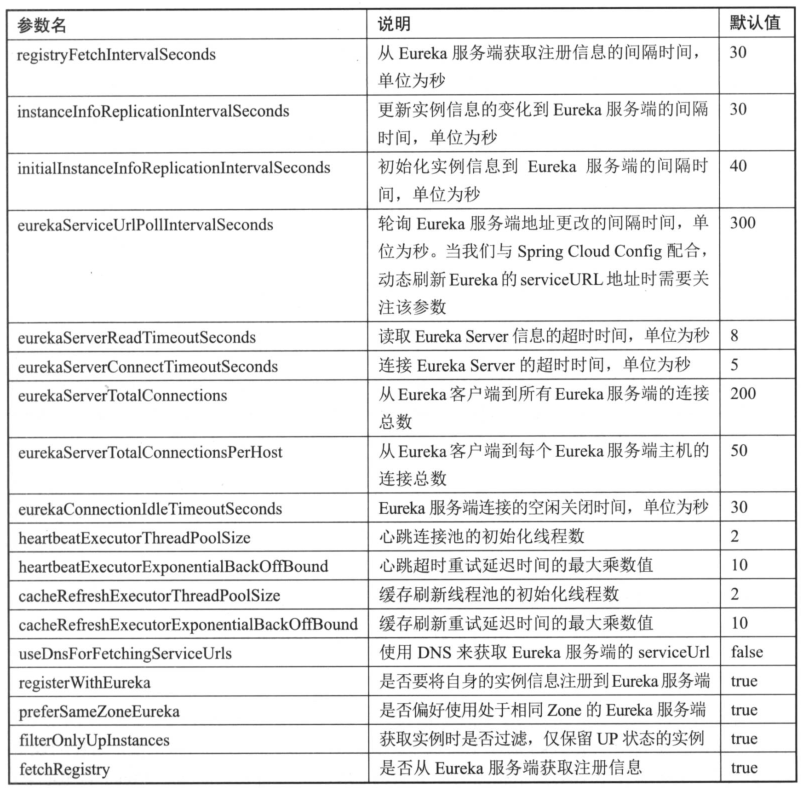
服务实例类配置
关于服务实例类的配置信息,可以通过查看 org.springframework.cloud.netflix.eureka.EurekaInstanceConfigBean 的源码来获取详细内容,这些配置均以 eureka.instance 为前缀。
元数据
在 org.springframework.cloud.netflix.eureka.EurekaInstanceConfigBean 的配置信息中,有一大部分内容都是对服务实例元数据的配置,元数据是 Eureka 客户端在向注册中心发送注册请求时,用来描述自身服务信息的对象,其中包含了一些标准化的元数据,比如服务名称、实例名称、实例IP、实例端口等用于服务治理的重要信息;以及一些用于负载均衡策略或是其他特殊用途的自定义元数据信息。
在使用 Spring Cloud Eureka 的时候,所有的配置信息都通过 org.springframework.cloud.netflix.eureka.EurekaInstanceConfigBean 进行加载,但在真正进行服务注册时,还是会包装成 com.netflix.appinfo.InstanceInfo 对象发送给 Eureka 客户端。这两个类的定义非常相似,可以直接查看 com.netflix.appinfo.InstanceInfo 类中的详细定义来了解原声的 Eureka 对元数据的定义。其中,Map<String, String> metaData = new ConcurrentHashMap<String, String>(); 是自定义的元数据信息,而其他成员变量则是标准化的元数据信息。Spring Cloud 的EurekaInstanceConfigBean 对原生元数据对象做了一些配置优化处理,在后续的介绍中会提到这些内容。
我们可以通过 eureka.instance.<properties>=<value> 的格式对标准化元数据直接进行配置,<properties> 就是 EurekaInstanceConfigBean 对象中的成员变量名。对于自定义元数据,可以通过 eureka.instance.metadataMap.<key>=<value> 的格式来进行配置。
接着,针对一些常用的元数据配置做进一步的介绍和说明。
实例名配置
实例名,即 InstanceInfo 中的 instanceId 参数,它是区分同一服务中不同实例的唯一标识。在NetflixEureka 的原生实现中,实例名采用主机名作为默认值,这样的设置使得在同一主机上无法启动多个相同的服务实例。所以,在 Spring Cloud Eureka 的配置中,针对同一主机中启动多实例的情况,对实例名的默认命名做了更为合理的扩展,它采用了如下默认规则:
${spring.cloud.client.hostname}:${spring.application.name}:${spring.application.instance_id}:${server.port}
对于实例名的命名规则,可以通过eureka.instance.instanceId 参数来进行配置。比如,在本地进行客户端负载均衡调试时,需要启动同一服务的多个实例,如果我们直接启动同一个应用必然会发生端口冲突。虽然可以在命令行中指定不同的server.port 来启动,但这样略显麻烦。可以直接通过设置 server.port=0 或者使用随机数 server.port=${random.int[10000,19999]} 来让Tomcat 启动的时候采用随机端口。但是这个时候会发现注册到 Eureka Server的实例名都是相同的,这会使得只有一个服务实例能够正常提供服务。对于这个问题,就可以通过设置实例名规则来轻松解决:
eureka.instance.instanceId=${spring.application.name}:${random.int}
通过上面的配置,利用应用名+随机数的方式来区分不同的实例,从而实现在同一个主机上,不指定端就能轻松启动多个实例的效果。
微服务之SpringCloud实战(四):SpringCloud Eureka源码分析的更多相关文章
- 【分布式微服务企业快速架构】SpringCloud分布式、微服务、云架构快速开发平台源码
鸿鹄云架构[系统管理平台]是一个大型 企业.分布式.微服务.云架构的JavaEE体系快速研发平台,基于 模块化.微服务化.原子化.热部署的设计思想,使用成熟领先的无商业限制的主流开源技术 (Sprin ...
- Eureka 源码分析之 Eureka Server
文章首发于公众号<程序员果果> 地址 : https://mp.weixin.qq.com/s/FfJrAGQuHyVrsedtbr0Ihw 简介 上一篇文章<Eureka 源码分析 ...
- Java SPI机制实战详解及源码分析
背景介绍 提起SPI机制,可能很多人不太熟悉,它是由JDK直接提供的,全称为:Service Provider Interface.而在平时的使用过程中也很少遇到,但如果你阅读一些框架的源码时,会发现 ...
- java 日志体系(四)log4j 源码分析
java 日志体系(四)log4j 源码分析 logback.log4j2.jul 都是在 log4j 的基础上扩展的,其实现的逻辑都差不多,下面以 log4j 为例剖析一下日志框架的基本组件. 一. ...
- 【SpringCloud技术专题】「Eureka源码分析」从源码层面让你认识Eureka工作流程和运作机制(上)
前言介绍 了解到了SpringCloud,大家都应该知道注册中心,而对于我们从过去到现在,SpringCloud中用的最多的注册中心就是Eureka了,所以深入Eureka的原理和源码,接下来我们要进 ...
- zookeeper服务发现实战及原理--spring-cloud-zookeeper源码分析
1.为什么要服务发现? 服务实例的网络位置都是动态分配的.由于扩展.失败和升级,服务实例会经常动态改变,因此,客户端代码需要使用更加复杂的服务发现机制. 2.常见的服务发现开源组件 etcd—用于共享 ...
- springcloud 入门 5 (feign源码分析)
feign:(推荐使用) Feign是受到Retrofit,JAXRS-2.0和WebSocket的影响,它是一个jav的到http客户端绑定的开源项目. Feign的主要目标是将Java Http ...
- Spring Security(四) —— 核心过滤器源码分析
摘要: 原创出处 https://www.cnkirito.moe/spring-security-4/ 「老徐」欢迎转载,保留摘要,谢谢! 4 过滤器详解 前面的部分,我们关注了Spring Sec ...
- Eureka 源码分析之 Eureka Client
文章首发于微信公众号<程序员果果> 地址:https://mp.weixin.qq.com/s/47TUd96NMz67_PCDyvyInQ 简介 Eureka是一种基于REST(Repr ...
随机推荐
- angular js 模拟获取后台的数据
在这里我们把后台的数据用一个.json文件进行代替. 项目的目录结构如下: puDongLibraryLearning----ui-router-learning ---- data-------pe ...
- 原型prototype与原型链__proto__
在 javascript 中我们会约定俗成,如果一个方法是被 new 出来使用的,那么该方法名首字母通常会大写,例如下面代码块中的 Person. var Person = function(name ...
- iOS 之持久化存储 plist、NSUserDefaults、NSKeyedArchiver、数据库
1.什么是持久化? 本人找了好多文章都没有找到满意的答案,最后是从孙卫琴写的<精通Hibernate:Java对象持久化技术详解>中,看到如下的解释,感觉还是比较完整的.摘抄如下: 狭义的 ...
- 使用vs2010编辑Unity脚本,配置方法
在Unity界面上.选择Edit->Preferences->External Tools,External Script Editor一项即为编译器. 以Unity3D 4.3.4 f1 ...
- android View实现变暗效果
android项目中做一个默认图片变暗,有焦点时变亮的效果.相信大家都能各种办法,各种手段很容易的实现这个效果.这里记录下作者实现这个效果的过程及遇到的问题,仅供参考.见下图(注:因为是eclipse ...
- set .net principle
var ticket = new FormsAuthenticationTicket(1, username, DateTime.Now, DateTime.Now.AddMinutes(FormsA ...
- python学习笔记 序列化
在程序运行的过程中,所有的变量都是在内存中,比如,定义一个dict: d = dict(name='Bob', age=20, score=88) 可以随时修改变量,比如把name改成'Bill',但 ...
- pool.map的第二个参数想传入多个咋整?
from functools import partial from multiprocessing import Pool as ThreadPool pageurls=[] if maxpage: ...
- 【 Linux】脚本导入格式
在从windows文本(*.txt)格式导入到Linux中时,需要注意. 如果是直接将*.txt 导入到Linux系统,然后重命名使用会有问题,建议在linux系统中创建文件,然后直接复制内容到lin ...
- Linux下挂载存储设备
1. 安装iscsi (文件iscsi-initiator-utils-6.2.0.871-0.10.el5.x86_64.rpm在系统光盘可以找到) rpm -ivh iscsi-initiat ...