
C# GDI+编程
窗口刷新的时候,会产生Paint事件,那么我们给这个事件添加一个处理函数。然后在这个函数里画图。就能保证所画的图不被刷新掉,
它可以总是显示。Paint事件对应的委托是:public delegate void PaintEventHandler(object sender, PaintEventArgs e);
示例1:在窗口中间画一根线。(创建WindowsForms应用程序)
            Graphics g = this.CreateGraphics();

            Pen p = new Pen(Color.Black);

            //在屏幕中间画一根线

            g.DrawLine(p, , this.Height / , this.Width, this.Height / );

            //画一个矩形

            g.DrawRectangle(p, , , , );

            //画一个圆

            g.DrawEllipse(p, , , , );

            //手动释放资源

            g.Dispose();

            p.Dispose();
示例2:一个填充矩形
        private void formPaint(Object sender, PaintEventArgs e)

        {

            Graphics graphics = e.Graphics;

            //蓝色画刷

            SolidBrush brush = new SolidBrush(Color.FromArgb(, , ));

            //一个矩形

            Rectangle rect = new Rectangle(, , , );

            //填充一个矩形

            graphics.FillRectangle(brush, rect);

        }
示例3:画一张png图片(用PNG是因为可以显示透明的图片,GIF图片也有这个作用)
        private void formPaint(Object sender, PaintEventArgs e)

        {

            Graphics graphics = e.Graphics;

            //加载图片

            Image img = Image.FromFile(Application.StartupPath+ @"\111.png");

            //图片显示起始位置

            Point strPoint=new Point(,);

            //不限制大小绘制

            graphics.DrawImage(img, strPoint);

            //缩小图片绘制,限制在一个矩形内

            Rectangle rect=new Rectangle(,,,);

            graphics.DrawImage(img, rect);

        }
示例4:用DrawString显示文字
DrawString在Grahpics类里有好几个重载,有的可以让字符串在一个矩形内显示,有的可以使用特定的显示格式。这里就不做详细介绍了。
只讲比较常用的。
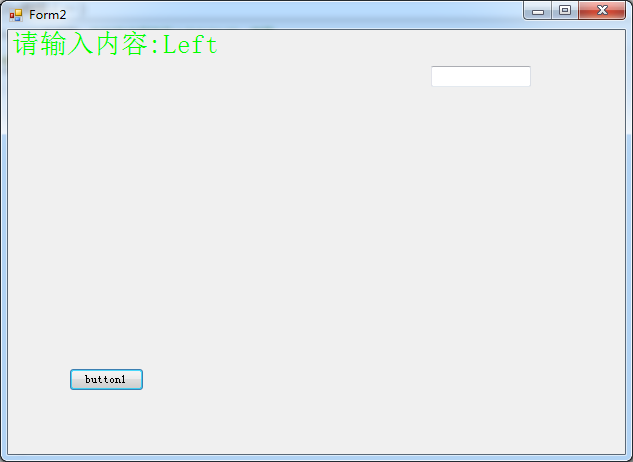
看例子吧,处理键盘输入字符事件,在窗口显示输入的字符。如下:
    public partial class Form2 : Form

    {

        public static String strText = "";

        public Form2()

        {

            InitializeComponent();

            this.Paint += formPaint;

        }

        private void formPaint(Object sender, PaintEventArgs e)

        {

            Graphics graphics = e.Graphics;

            //创建画刷

            SolidBrush brush=new SolidBrush(Color.FromArgb(,,));

            //创建字体

            Font font=new Font("宋体",20f);

            //显示字符串,在一个矩形内

            graphics.DrawString(strText, font, brush, this.ClientRectangle);

        }

        private void Form2_MouseDown(object sender, MouseEventArgs e)

        {

            strText += e.Button.ToString();

            //刷新整个窗口

            this.Invalidate();

        }

    }
效果图如下:
示例5:重写OnPaintBackground绘制背景的方法
public partial class Form1 : Form

    {

        public Form1()

        {

            InitializeComponent();

        }

        //重写OnPaintBackground方法

        protected override void OnPaintBackground(PaintEventArgs e)

        {

            //禁止基类处理,我们自己来绘制背景

            //base.OnPaintBackground(e);

            //透明背景画刷

            SolidBrush brush=new SolidBrush(Color.Transparent);

            //填充整个窗口

            e.Graphics.FillRectangle(brush,this.ClientRectangle);

            //再画一个圆圈

            Pen pen = new Pen(Color.FromArgb(, , ),);

            e.Graphics.DrawEllipse(pen, this.ClientRectangle);

        }

    }
示例6:TextureBursh图片画刷
可以用图片来填充一个形状,如矩形,圆形。图片不够大则平铺显示。
private void formPaint(Object sender, PaintEventArgs e)

        {

            Graphics graphics = e.Graphics;

            //创建图片画刷

            Rectangle rect = new Rectangle(, , , );

            TextureBrush brush = new TextureBrush(Image.FromFile(Application.StartupPath+ @"\111.png"),rect);
       graphics.FillEllipse(brush, , , , );
     }
构造函数最后一个参数,rect表示要用图片的哪部分进行填充,10,10表示图片起始位置(左上角),70,70表示宽度和高度,注意不能超出图片原有范围。整张图片填充的话,则不需要指定rect。构造函数里填一个参数就行了。
C# GDI+编程的更多相关文章
- GDI+编程说明及小结
原文地址:http://blog.csdn.net/byxdaz/article/details/5972759 GDI+(Graphics Device Interface Plus图形设备接口加) ...
- GDI编程
图形设备接口(GDI)是一个可执行程序,它接受Windows应用程序的绘图请求(表现为GDI函数调用),并将它们传给相应的设备驱动程序,完成特定于硬件的输出,象打印机输出和屏幕输出.GDI负责Wind ...
- GDI编程小结
图形设备接口(GDI)是一个可运行程序,它接受Windows应用程序的画图请求(表现为GDI函数调用),并将它们传给对应的设备驱动程序,完毕特定于硬件的输出,象打印机输出和屏幕输出.GDI负责Wind ...
- MFC控件GDI编程
MFC控件GDI编程 一丶学习内容 1.了解常用的GDI函数绘图. 2.使用常用的画笔画刷. 二丶常用的GDI函数绘图 上方则为我们常用的GDI函数了. 画线 矩形. 以及圆 等等. 2.1 画线代码 ...
- C# GDI+编程之剖析startAngle和sweepAngle
以DrawArc为例,它有一种形式如下的构造函数 public void DrawArc(Pen pen, Rectangle rect, float startAngle, float sweepA ...
- GDI+编程小结
GDI+(Graphics Device Interface Plus图形设备接口加)是Windows XP和Windows Server 2003操作系统的子系统,也是.NET框架的重要组成部分,负 ...
- 一篇文章让你彻底弄懂WinForm GDI 编程基本原理
一 GDI编程原理 GDI(Graphics Device Interface,图形设备接口),主要负责Windows系统与绘图程序之间的信息交换,处理所有Windows程序的图形输出. GDI的常用 ...
- GDI 编程基础简介
今天准备重新对GDI的知识进行回顾一下,以便加深认识. 一.GDI 在进行Windows编程时,可能经常会用到设备描述表的类型句柄,例如,最厂家的HDC,它就是图像设备描述类型句柄.因为GDI的绘图函 ...
- GDI编程基础
窗口和视口 视口是基于设备的采用的是设备坐标(单位:像素),窗口是基于程序的采用的是逻辑坐标(单位:像素/毫米/厘米等). 在默认的映射模式下,视口是与窗口等同的.但是如果改变其映射模式,则其对应的单 ...
- C#GDI+编程基础(一:Graphics画布类)
GDI+存在的意义:将变成与具体硬件实现细节分开. GDI+步骤:获取画布,绘制图像.处理图像 命名空间: using System.Drawing;//提供对GDI+基本图形功能的访问 using ...
随机推荐
- tomcat8.5.11的manager页面总是提示403的问题
修改conf/tomcat-users.xml加入: <role rolename="manager"/> <role rolename="manage ...
- 4.6 基于STM32+MC20地图显示路径功能
需要准备的硬件 MC20开发板 1个 https://item.taobao.com/item.htm?id=562661881042 GSM/GPRS天线 1根 https://item.taoba ...
- C#加快Bitmap的访问速度
在对Bitmap图片操作的时候,有时需要用到获取或设置像素颜色方法:GetPixel 和 SetPixel, 如果直接对这两个方法进行操作的话速度很慢,这里我们可以通过把数据提取出来操作,然后操作完在 ...
- 曾经遇到的坑------href="#"和href="javascript:void(0);"、href="javascript:;"
这个是为了 在点击此链接后回到页首,如果你写href="#"那么点击后会回到页首,这样影响操作. <a href="javascript:void 0" ...
- MySQL数据库(2)_MySQL数据库和数据库表操作语句
一.关于数据库操作的sql语句 -- .创建数据库(在磁盘上创建一个对应的文件夹) create database [if not exists] db_name [character set xxx ...
- sql两张表关联更新字段
记录,推荐使用第三种,个人觉得比较好 --第一种写法,之前一直用,没有在意 UPDATE sr_t_TCodeUserReciveCfg SET fUserID=a.fUserID,fImportFl ...
- linux基础三---网络基础&软件包管理
一 ifconfig:显示所有正在启动的网卡的详细信息或设定系统中网卡的IP地址. ifconfig eno16777736 down/up 关闭/开启 eno16777736 网卡 ifconf ...
- iOS_核心动画(二)
目 录: 一.Core Animation开发步骤 二.Core Animation的继承结构 三.CAAnimation常用的属性 四.CAPropertyAnimation(属性动画) 五.CAB ...
- ceph安装各种报错
[ceph_deploy][ERROR ] RuntimeError: Failed to execute command: ceph-disk-activate –mark-init sysvini ...
- 【P2014】选课(树状DP)
蒟蒻的第二道树形DP,话说看了这个题的正常做法之后一脸蒙,森林转二叉树??什么诡异的操作,蒟蒻完全没明白那个原理是啥...可能是当初没好好学吧..不管了,索性直接DP. 不难看出,这个题的DP方程和刚 ...