
使用Microsoft EnterpriseLibrary(微软企业库)日志组件把系统日志写入数据库和xml文件
这里只是说明在项目中如何配置使用微软企业库的日志组件,对数据库方面的配置请参考其他资料。
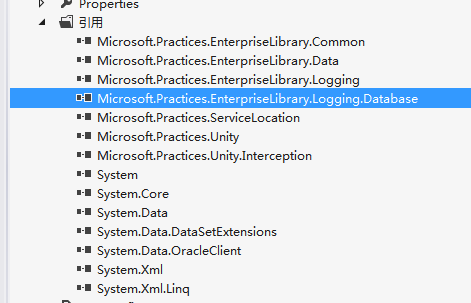
1、在项目中添加Microsoft.Practices.EnterpriseLibrary.Data.dll、Microsoft.Practices.EnterpriseLibrary.Logging.dll、Microsoft.Practices.EnterpriseLibrary.Logging.Database.dll这三个引用。
2、打开EnterpriseLibrary的配置工具EntLibConfig.exe
1)选择菜单“Block->Add Logging Setting"

2)点击“+”号添加Logging Target Listeners,选择Add Database Trace Listener

3、设置Database Trace Listener中的参数,比如数据库连接、插入日志存储过程、插入分类存储过程、选择文本格式等
4、设置Database Setting中的“Connection String”中的数据库连接
5、最后保存配置文件到项目路径中。
设置后的配置文件:
<configuration>
<configSections>
<section name="loggingConfiguration" type="Microsoft.Practices.EnterpriseLibrary.Logging.Configuration.LoggingSettings, Microsoft.Practices.EnterpriseLibrary.Logging, Version=5.0.414.0, Culture=neutral, PublicKeyToken=31bf3856ad364e35" requirePermission="true" />
<section name="dataConfiguration" type="Microsoft.Practices.EnterpriseLibrary.Data.Configuration.DatabaseSettings, Microsoft.Practices.EnterpriseLibrary.Data, Version=5.0.414.0, Culture=neutral, PublicKeyToken=31bf3856ad364e35" requirePermission="true" />
</configSections>
<loggingConfiguration name="" tracingEnabled="true" defaultCategory="General">
<listeners>
<add name="Event Log Listener" type="Microsoft.Practices.EnterpriseLibrary.Logging.TraceListeners.FormattedEventLogTraceListener, Microsoft.Practices.EnterpriseLibrary.Logging, Version=5.0.414.0, Culture=neutral, PublicKeyToken=31bf3856ad364e35"
listenerDataType="Microsoft.Practices.EnterpriseLibrary.Logging.Configuration.FormattedEventLogTraceListenerData, Microsoft.Practices.EnterpriseLibrary.Logging, Version=5.0.414.0, Culture=neutral, PublicKeyToken=31bf3856ad364e35"
source="Enterprise Library Logging" formatter="Text Formatter"
log="" machineName="." traceOutputOptions="None" />
<add name="Database Trace Listener" type="Microsoft.Practices.EnterpriseLibrary.Logging.Database.FormattedDatabaseTraceListener, Microsoft.Practices.EnterpriseLibrary.Logging.Database, Version=5.0.414.0, Culture=neutral, PublicKeyToken=31bf3856ad364e35"
listenerDataType="Microsoft.Practices.EnterpriseLibrary.Logging.Database.Configuration.FormattedDatabaseTraceListenerData, Microsoft.Practices.EnterpriseLibrary.Logging.Database, Version=5.0.414.0, Culture=neutral, PublicKeyToken=31bf3856ad364e35"
databaseInstanceName="Connection String" writeLogStoredProcName="EL_WRITELOG"
addCategoryStoredProcName="EL_ADDCATEGORY" formatter="Text Formatter" />
<add name="XML Trace Listener" type="Microsoft.Practices.EnterpriseLibrary.Logging.TraceListeners.XmlTraceListener, Microsoft.Practices.EnterpriseLibrary.Logging, Version=5.0.414.0, Culture=neutral, PublicKeyToken=31bf3856ad364e35"
listenerDataType="Microsoft.Practices.EnterpriseLibrary.Logging.Configuration.XmlTraceListenerData, Microsoft.Practices.EnterpriseLibrary.Logging, Version=5.0.414.0, Culture=neutral, PublicKeyToken=31bf3856ad364e35"
fileName="test.xml" />
</listeners>
<formatters>
<add type="Microsoft.Practices.EnterpriseLibrary.Logging.Formatters.TextFormatter, Microsoft.Practices.EnterpriseLibrary.Logging, Version=5.0.414.0, Culture=neutral, PublicKeyToken=31bf3856ad364e35"
template="<TIMESTAMP> {timestamp}</TIMESTAMP> {newline} <MESSAGE> {message}</MESSAGE>{newline} <CATEGORY>{category}</CATEGORY>{newline} <PRIORITY>{priority}</PRIORITY>{newline} <EVENTID>{eventid}</EVENTID>{newline} <SEVERITY>{severity}</SEVERITY>{newline} <TITLE>{title}</TITLE>{newline} <MACHINE>{localMachine}</MACHINE>{newline} <APP DOMAIN> {localAppDomain}</APP DOMAIN>{newline} <PROCESSID>{localProcessId}</PROCESSID>{newline} <PROCESS NAME> {localProcessName}</PROCESS NAME> {newline} <THREAD NAME> {threadName}</THREAD NAME>{newline} <WIN32 THREADID>{win32ThreadId}</WIN32 THREADID>{newline} <EXTENDED PROPERTIES> {dictionary(<KEY>{key}</KEY> - <VALUE>{value}</VALUE>{newline})}</EXTENDED PROPERTIES>"
name="Text Formatter" />
</formatters>
<categorySources>
<add switchValue="All" name="General">
<listeners>
<add name="Database Trace Listener" />
<add name="XML Trace Listener" />
</listeners>
</add>
</categorySources>
<specialSources>
<allEvents switchValue="All" name="All Events" />
<notProcessed switchValue="All" name="Unprocessed Category" />
<errors switchValue="All" name="Logging Errors & Warnings">
<listeners>
<add name="Database Trace Listener" />
<add name="XML Trace Listener" />
</listeners>
</errors>
</specialSources>
</loggingConfiguration>
<dataConfiguration defaultDatabase="Connection String" />
<connectionStrings>
<add name="Connection String" connectionString="DATA SOURCE=(DESCRIPTION = (ADDRESS_LIST = (ADDRESS = (PROTOCOL = TCP)(HOST = 127.0.0.1)(PORT = 1521)))(CONNECT_DATA =(SERVER = DEDICATED)(SERVICE_NAME = eifoclog)));PERSIST SECURITY INFO=True;USER ID=FOC;Password=foc"
providerName="System.Data.OracleClient" />
</connectionStrings>
</configuration>
需要注意的是:
在工具中只能选一个监听器,但实际可以有多个监听器同时监听。
<categorySources>
<add switchValue="All" name="General">
<listeners>
<add name="Database Trace Listener" />
<add name="XML Trace Listener" />
</listeners>
</add>
</categorySources>
在项目中使用:
    class Program

    {

        static void Main(string[] args)

        {

            LogEntry logEntry = new LogEntry();

            logEntry.EventId = ;

            logEntry.Priority = ;

            logEntry.Severity = System.Diagnostics.TraceEventType.Error;

            logEntry.Title = "标题";

            logEntry.Message = "test";

            logEntry.Categories.Add("C#学习");

            logEntry.Categories.Add("Microsoft Enterprise Library学习");

            Logger.Writer.Write(logEntry, "General");

            Console.WriteLine("日志写入完成!");

        }

    }
本文参考博客地址:http://www.cnblogs.com/huangcong/archive/2010/06/04/1751087.html
示例代码地址:http://files.cnblogs.com/qiu2013/ConsoleApplication1.zip
使用Microsoft EnterpriseLibrary(微软企业库)日志组件把系统日志写入数据库和xml文件的更多相关文章
- 在数据库访问项目中使用微软企业库Enterprise Library,实现多种数据库的支持
在我们开发很多项目中,数据访问都是必不可少的,有的需要访问Oracle.SQLServer.Mysql这些常规的数据库,也有可能访问SQLite.Access,或者一些我们可能不常用的PostgreS ...
- 基于微软企业库的AOP组件(含源码)
软件开发,离不开对日志的操作.日志可以帮助我们查找和检测问题,比较传统的日志是在方法执行前或后,手动调用日志代码保存.但自从AOP出现后,我们就可以避免这种繁琐但又必须要实现的方式.本文是在微软企业库 ...
- 权限管理系统源码分析(ASP.NET MVC 4.0 + easyui + EF6.0 + MYSQL/MSSQLSERVER +微软企业库5.0+日志绶存)
系统采用最先进技术开发: (ASP.NET MVC 4.0 + easyui + EF6.0 + MYSQL/MSSQLSERVER +微软企业库5.0+日志绶存) 大家可以加我QQ讨论 309159 ...
- 微软企业库Microsoft Enterprise Library的相关文章链接
微软企业库4.1学习笔记 http://blog.csdn.net/anyqu/article/category/1228691/3 黄聪:Enterprise Library 5.0 系列教程 ww ...
- [EntLib]微软企业库5.0 学习之路——第一步、基本入门
话说在大学的时候帮老师做项目的时候就已经接触过企业库了但是当初一直没明白为什么要用这个,只觉得好麻烦啊,竟然有那么多的乱七八糟的配置(原来我不知道有配置工具可以进行配置,请原谅我的小白). 直到去年在 ...
- 微软企业库5.0学习-Security.Cryptography模块
一.微软企业库加密应用模块提供了两种加密: 1.Hash providers :离散加密,即数据加密后无法解密 2.Symmetric Cryptography Providers:密钥(对称)加密法 ...
- 微软企业库的Cache
微软企业库的Cache 通常,应用程序可以将那些频繁访问的数据,以及那些需要大量处理时间来创建的数据存储在内存中,从而提高性能.基于微软的企业库,我们的快速创建一个缓存的实现. 新建PrismSamp ...
- Prism6下的MEF:基于微软企业库的Cache
通常,应用程序可以将那些频繁访问的数据,以及那些需要大量处理时间来创建的数据存储在内存中,从而提高性能.基于微软的企业库,我们的快速创建一个缓存的实现. 新建PrismSample.Infrastru ...
- .NET 类库研究必备参考 添加微软企业库源码
前不久,为大家提供了一个.NET 类库参考源码的网站,扣丁格鲁(谐音“coding guru”),使用了段时间,发现一些不方便的地方,特意做了一些更改,希望大家多提意见,下面是此次更改的地方. 更改1 ...
随机推荐
- substr在oracle和mysql中的应用和区别
Oracle: 书写格式: (1)Select substr(字段名(string) , 起始位置(int) , 截取长度(int)) 示例: selectsubstr('123456',0,3)a ...
- JQuery实现注册表单验证
效果图如下: 注册页面HTML代码如下: <!DOCTYPE html PUBLIC "-//W3C//DTD XHTML 1.0 Transitional//EN" &qu ...
- vue项目苹果微信端使用this.$router.go(-1)返回上一页,上一页并不会重新加载的问题
window.addEventListener('pageshow', function(e) { // 通过persisted属性判断是否存在 BF Cache if (e.persisted) { ...
- virtual box 故障修复
vmware ,virtual box等虚拟化环境为一台系统同时允许运行多台系统成为可能准备了技术支持. 通过软件化的平台虚构出硬件设备的驱动,可谓虚拟化技术应用非常广泛. 在平常的虚拟机启动过程中经 ...
- ES6、7、8、9新语法新特性
前言 如果你擅长这种扩散式学习方式,不妨再进一步温习一下整个 ES6 引入的新特性,笔者强烈推荐阮一峰老师的 ECMAScript 6 入门 一书. ES2018 引入的特性还太新,单在对 ES6 特 ...
- springcloud生态图
springcloud生态图
- ELK 分布式日志实战
一. ELK 分布式日志实战介绍 此实战方案以 Elk 5.5.2 版本为准,分布式日志将以下图分布进行安装部署以及配置. 当Elk需监控应用日志时,需在应用部署所在的服务器中,安装Filebeat ...
- Xshell6破解
链接: https://pan.baidu.com/s/1P9kMmGdLfpPPxEgUxNXrhw 提取码: s3js
- python应用:经纬度匹配
需要安装第三方包:requests 本次经纬度匹配采用高德地图api,首先将gps坐标转化为高德地图的经纬度坐标,然后再根据转化后的坐标进行匹配. 本次匹配主要是获取距离给定经纬度最近的poi点地址信 ...
- (数据科学学习手札04)Python与R在自定义函数上的异同
自编函数是几乎每一种编程语言的基础功能,有些时候我们需要解决的问题可能没有完全一致的包中的函数来进行解决,这个时候自编函数就成了一样利器,而Python与R在这方面也有着一定的差别,下面举例说明: P ...