
Centos 7 自动安装系统-pxe
一、简介
PXE(Pre-boot Execution Environment,预启动执行环境)是由Intel公司开发的最新技术,工作于Client/Server的网络模式,支持工作站通过网络从远端服务器下载映像,并由此支持通过网络启动操作系统,在启动过程中,终端要求服务器分配IP地址,再用TFTP(trivial file transfer protocol)或MTFTP(multicast trivial file transfer protocol)协议下载一个启动软件包到本机内存中执行,由这个启动软件包完成终端基本软件设置,从而引导预先安装在服务器中的终端操作系统。
二、实验环境
虚拟平台:VMware workstation 12 pro
操作系统:Linux 3.10.0-514.el7.x86_64(centos 7) 最小化安装
网 络: NAT模式
IP:192.168.30.134
全部服务在一台服务器上实现 (DHCP,TFTP,TFP,HTTP,SYSLINUX)
禁用selinux ,iptables 规则清空
三、开 始
http:
yum instll httpd # 安装httpd服务

systemctl enable httpd #开机启动
mkdir /var/www/html/centos/7 -pv #本地yum安装系统源
mkdir /mnt/centos7
mount -r /dev/cdrom /mnt/centos7
mount --bind /mnt/centos7 /var/www/html/centos/7
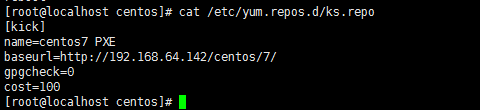
把ks.cfg 放在 web服务器上的centos目录下
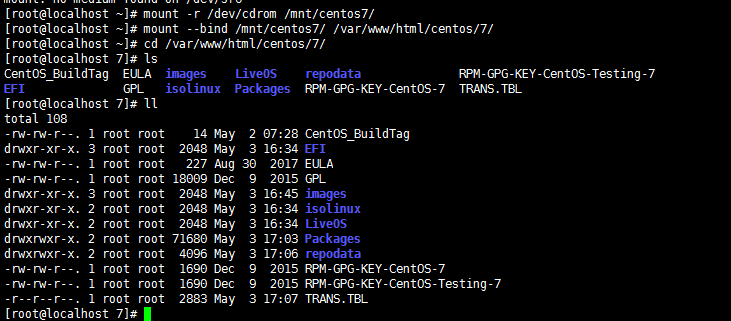
ks.cfg文件:
#cdrom
# Install OS instead of upgrade
install
# Use network installation
url --url=http://192.168.64.142/centos/7/
# Use graphical install
graphical
# Run the Setup Agent on first boot
firstboot --enable
#ignoredisk --only-use=sda
# Keyboard layouts
keyboard --vckeymap=cn --xlayouts='cn'
# System language
lang zh_CN.UTF-8
# Network information
network --bootproto=dhcp --device=ens33 --onboot=off
# Root password
rootpw --iscrypted $1$jod2vomD$MQYnlBtG90rQ6wQiyA45m0
# System timezone
timezone Asia/Shanghai --isUtc
# System bootloader configuration
bootloader --append=" crashkernel=auto" --location=mbr --boot-drive=sda
# Partition clearing information
clearpart --none --initlabel
# Disk partitioning information
part /boot --fstype="ext4" --size=1024
part / --fstype="ext4" --size=50000
part swap --fstype="swap" --size=2048
%packages
@^minimal
@core
kexec-tools
vim
wget
httpd
%end
%addon com_redhat_kdump --enable --reserve-mb='auto'
%end
selinux --disabled #禁用selinux
reboot
DHCP:
yum install dhcp -y
systemctl start dhcpd
systemctl enable dhcpd
]# cp /usr/share/doc/dhcp-4.2.5/dhcpd.conf.example /etc/dhcp/dhcpd.conf
vim /etc/dhcp/dhcpd.conf
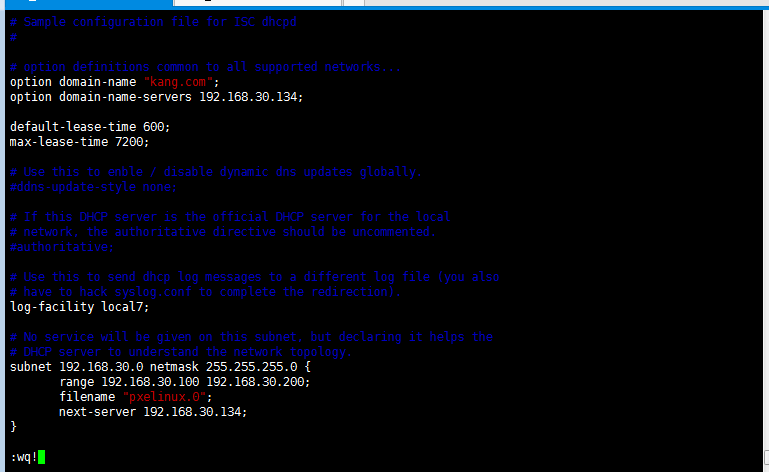
tfpt:
yum install tftp-server tftp syslinux -y
systemctl start tftp
systemctl enable tftp
cd /var/lib/tftpboot
mkdir pxelinux.cfg
cp /var/www/html/centos/7/isolinux/isolinux.cfg ./pxelinux.cfg/default
cp /var/www/html/centos/7/images/pxeboot/{initrd.img,vmlinuz} ./
cp /usr/share/syslinux/{chain.c32,menu.c32,mboot.c32,memdisk} ./

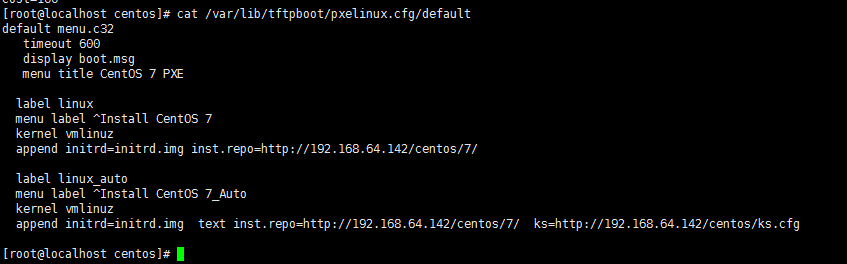
vim pxelinux.cfg/default
default menu.c32
prompt 10
timeout 30
menu title Centos 7 PXE Menu
label linux
menu label Install Centos7
kernel vmlinuz
append initrd=initrd.img
四、测试
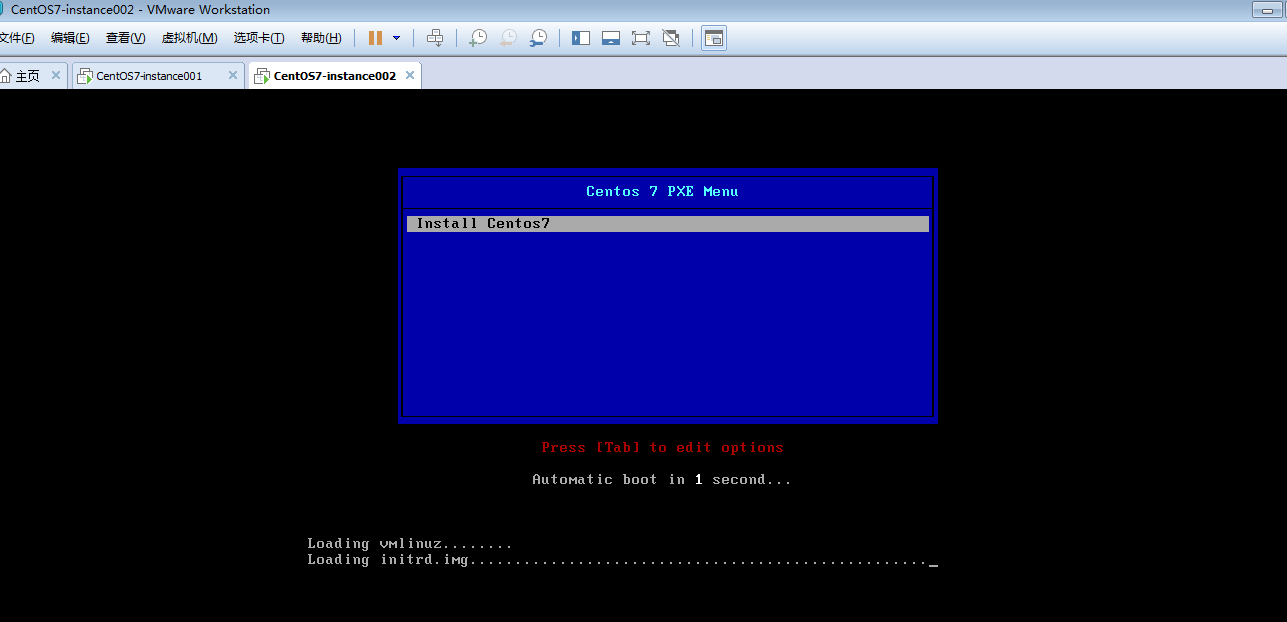
五、(自动安装系统)
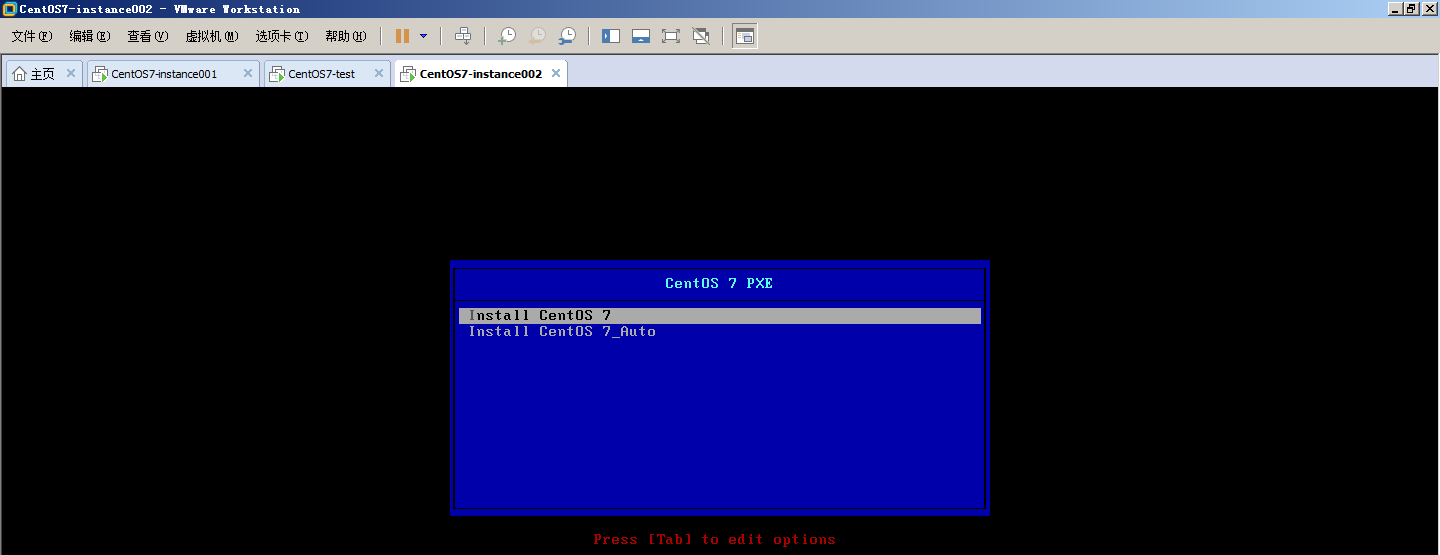
安装成功
Centos 7 自动安装系统-pxe的更多相关文章
- DHCP服务+PXE自动安装系统
DHCP服务+PXE自动安装系统 DHCP安装 安装DHCP服务器 yum install dhcp -y 安装完dhcp默认无法启动,需要编辑配置文件设置分配地址范围等相关信息,服务器自身IP地址要 ...
- CentOS 6.9 CentOS 7.4 自动安装系统 kickstart
通过ks文件 实现 CentOS 6.9 & 7.4 自动安装系统 环境: VMware 14.0 Pro版 光盘镜像: CentOS-6.9-x86_64-minimal.iso ks文件生 ...
- s32 kickstart 批量自动安装系统
1. 自动安装操作系统 http://blog.oldboyedu.com/autoinstall-kickstart/ 自动安装操作系统的解决方案:kickstart.cobbler(披着web ...
- CentOS 7.2 下 PXE+kickstart 自动安装系统
一.简单概述 1.1 Kickstart 概述 对于网络安装系统,在linux 下面最熟悉的应该就是 Kickstart 以及 cobbler.写这篇文章的目的在于我公司目前使用的就是 Kicksta ...
- linux系统PXE+Kickstart自动安装系统
一.PXEPXE(Pre-boot Execution Environment,预启动执行环境)是由Intel公司开发的最新技术,工作于Client/Server的网络模式,支持工作站通过网络从远端服 ...
- cobbler自动安装系统
一.简介 Cobbler是一个快速网络安装linux的服务,而且在经过调整也可以支持网络安装windows.该工具使用python开发,小巧轻便(才15k行python代码),使用简单的命令即可完成P ...
- cobbler自动安装系统(Centos7.X)
环境: [root@kickstart ~]# cat /etc/redhat-release CentOS Linux release (Core) [root@kickstart ~]# unam ...
- 在xp下无人值守自动安装系统
无人值守安装可以大大缩短安装系统的时间.我在虚拟机测试成功. 先给文件链接https://files.cnblogs.com/files/sishenzaixian/%E8%87%AA%E5%8A%A ...
- 使用msi自动安装系统
在实际生活中, 还是要尽量使用 自动化 脚本 等来处理/执行问题, 那样更快更省力省时间 要多使用 网络工具, 网络工具在 管理/ 使用网络的过程 中还是很有用的. 要有这种 "多使用网络工 ...
随机推荐
- 飞思卡尔K60时钟分析
推荐:NXP官方软件config tool,图形化界面可导出代码 K60芯片的时钟系统由振荡器(OSC).实时振荡器(RTC OSC).多功能时钟发生器(MCG).系统集成模块(SIM)和电源管理器( ...
- golang中的定向通道(Directional channels)
好像第一次看到这个知识点,作个记录. 注意通道在只能发射或只能接收信息时,<-这个符号放置的位置. package main import "fmt" import &quo ...
- 8. java 面向对象
一.面向对象特征 1. 封装 方法就是一种封装 关键字private也是一种封装 封装就是讲一些逻辑细节信息隐藏起来,对于外界不可见:外界只需调用我即可: 一旦使用了private进行修饰,那么本类当 ...
- expect实现非交互下的ssh连接, expect简单使用整理
1. shell中使用ssh远程连接服务器做一些事情通常需要交互输入些信息, 可使用expect语句解决: 2. expect中设置变量语法: set name xxx set age xxx ...
- matlab练习程序(计算图像旋转角度)
比如有图像1,将其旋转n度得到图像2,问如何比较两张图像得到旋转的度数n. 算法思路参考logpolar变换: 1.从图像中心位置向四周引出射线. 2.计算每根射线所打到图像上的像素累计和,得到极坐标 ...
- Codeforces Round #599 (Div. 2) B2. Character Swap (Hard Version) 构造
B2. Character Swap (Hard Version) This problem is different from the easy version. In this version U ...
- Gitlab安装过程
sudo yum install -y curl policycoreutils-pythonopenssh-server sudo systemctl enable sshd sudo system ...
- Python GUI教程一:Hello World
STEP 1:PyQt5基本介绍 Qt是GUI编程中非常受欢迎,也是非常强大的一个工具. PyQt5 是Qt的Python版本.它大概涵盖了620个类,6000多个函数.PyQt5进行双重许可,开发者 ...
- 二、Mapper映射文件
Mapper映射文件 mapper.xml映射文件主要是用来编写SQL语句的,以及一些结果集的映射关系的编写,还有就是缓存的一些配置等等. 在映射文件里面可以配置以下标签: 元素名称 描述 备注 se ...
- hello tensorflow,我的第一个tensorflow程序
上代码: import tensorflow as tf if __name__=='__main__': g = tf.Graph() # add ops to the user created g ...