
cobbler自动安装系统(Centos7.X)
环境:
[root@kickstart ~]# cat /etc/redhat-release

CentOS Linux release 7.4. (Core)

[root@kickstart ~]# uname -r

3.10.-.el7.x86_64

[root@kickstart ~]# getenforce

Disabled

[root@kickstart ~]# systemctl status  firewalld.service

● firewalld.service - firewalld - dynamic firewall daemon

   Loaded: loaded (/usr/lib/systemd/system/firewalld.service; disabled; vendor preset: enabled)

   Active: inactive (dead)

     Docs: man:firewalld()

[root@kickstart ~]# hostname -I

10.0.0.201 172.16.1.201
前言
cobbler安装比较简单,主要是网页操作,点点点,相对于PXE+kickstart网络安装更简单。
如果大家不了解PXE+kickstart网络安装系统过程原理的话,建议大家去看看我写的 <PXE+kickstart网络安装CentOS7.4系统及过程中各种报错> <-- 快戳我
cobbler安装
1、下载cobbler及相关软件
[root@Cobbler ~]# yum -y install cobbler cobbler-web dhcp tftp-server pykickstart httpd
2、检查更改配置
注意:CentOS7上需要启动httpd服务和cobbler服务才能检查
[root@Cobbler ~]# systemctl start cobblerd.service httpd.service

[root@Cobbler ~]# cobbler check

The following are potential configuration items that you may want to fix:

 : The 'server' field in /etc/cobbler/settings must be set to something other than localhost, or kickstarting features will not work.  This should be a resolvable hostname or IP for the boot server as reachable by all machines that will use it.

 : For PXE to be functional, the 'next_server' field in /etc/cobbler/settings must be set to something other than 127.0.0.1, and should match the IP of the boot server on the PXE network.

 : change 'disable' to 'no' in /etc/xinetd.d/tftp

 : Some network boot-loaders are missing from /var/lib/cobbler/loaders, you may run 'cobbler get-loaders' to download them, or, if you only want to handle x86/x86_64 netbooting, you may ensure that you have installed a *recent* version of the syslinux package installed and can ignore this message entirely.  Files in this directory, should you want to support all architectures, should include pxelinux., menu.c32, elilo.efi, and yaboot. The 'cobbler get-loaders' command is the easiest way to resolve these requirements.

 : enable and start rsyncd.service with systemctl

 : debmirror package is not installed, it will be required to manage debian deployments and repositories

 : The default password used by the sample templates for newly installed machines (default_password_crypted in /etc/cobbler/settings) is still set to 'cobbler' and should be changed, try: "openssl passwd -1 -salt 'random-phrase-here' 'your-password-here'" to generate new one

 : fencing tools were not found, and are required to use the (optional) power management features. install cman or fence-agents to use them

Restart cobblerd and then run 'cobbler sync' to apply changes.
根据这些检查条目,进行更改相关的检查项
sed -i 's/server: 127.0.0.1/server: 172.16.1.202/' /etc/cobbler/settings

sed -i 's/next_server: 127.0.0.1/next_server: 172.16.1.202/' /etc/cobbler/settings

sed -i 's/manage_dhcp: 0/manage_dhcp: 1/' /etc/cobbler/settings

sed -i 's/pxe_just_once: 0/pxe_just_once: 1/' /etc/cobbler/settings

sed -ri "/default_password_crypted/s#(.*: ).*#\1\"`openssl passwd -1 -salt 'oldboy' '123456'`\"#" /etc/cobbler/settings

sed -i 's#yes#no#' /etc/xinetd.d/tftp

systemctl start rsyncd

systemctl enable rsyncd

systemctl enable tftp.socket

systemctl start tftp.socket

systemctl restart cobblerd.service
修改dhcp模板配置文件
sed -i.ori 's#192.168.1#172.16.1#g;22d;23d' /etc/cobbler/dhcp.template
同步所有配置
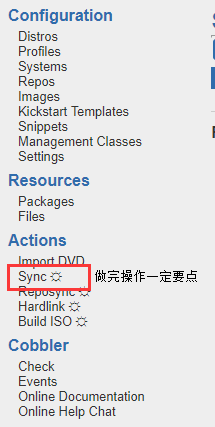
注意:不同步会报错
[root@Cobbler ~]# cobbler sync

task started: --15_101915_sync

task started (id=Sync, time=Wed Nov  :: )

running pre-sync triggers

cleaning trees

removing: /var/lib/tftpboot/grub/images

copying bootloaders

trying hardlink /var/lib/cobbler/loaders/pxelinux. -> /var/lib/tftpboot/pxelinux.

trying hardlink /var/lib/cobbler/loaders/menu.c32 -> /var/lib/tftpboot/menu.c32

trying hardlink /var/lib/cobbler/loaders/yaboot -> /var/lib/tftpboot/yaboot

trying hardlink /usr/share/syslinux/memdisk -> /var/lib/tftpboot/memdisk

trying hardlink /var/lib/cobbler/loaders/grub-x86.efi -> /var/lib/tftpboot/grub/grub-x86.efi

trying hardlink /var/lib/cobbler/loaders/grub-x86_64.efi -> /var/lib/tftpboot/grub/grub-x86_64.efi

copying distros to tftpboot

copying images

generating PXE configuration files

generating PXE menu structure

rendering DHCP files

generating /etc/dhcp/dhcpd.conf

rendering TFTPD files

generating /etc/xinetd.d/tftp

cleaning link caches

running post-sync triggers

running python triggers from /var/lib/cobbler/triggers/sync/post/*

running python trigger cobbler.modules.sync_post_restart_services

running: dhcpd -t -q

received on stdout:

received on stderr:

running: service dhcpd restart

received on stdout:

received on stderr: Redirecting to /bin/systemctl restart dhcpd.service

running shell triggers from /var/lib/cobbler/triggers/sync/post/*

running python triggers from /var/lib/cobbler/triggers/change/*

running python trigger cobbler.modules.scm_track

running shell triggers from /var/lib/cobbler/triggers/change/*

*** TASK COMPLETE ***
一坨
cobbler使用操作
博主使用虚拟机操作
https://10.0.0.202/cobbler_web    浏览器访问网址

账号密码默认均为cobbler
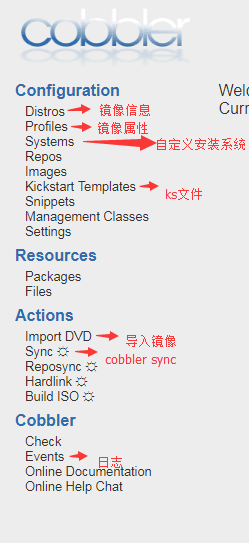
导入镜像(import DVD)
说明:首先虚拟机保证下列以操作
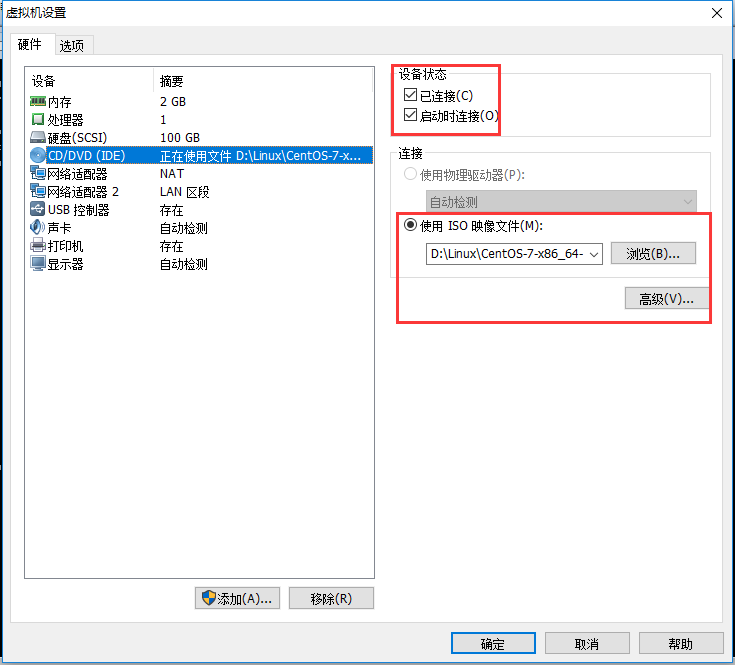
根据镜像位置,进行挂载
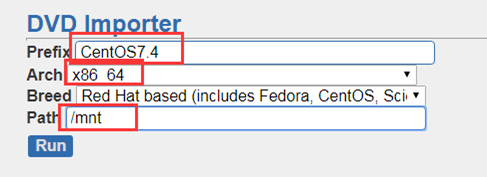
因为镜像位置写的mnt,所以要将镜像挂载到mnt下

[root@Cobbler pxelinux.cfg]# mount /dev/cdrom /mnt/

[root@Cobbler pxelinux.cfg]# df -h

Filesystem      Size  Used Avail Use% Mounted on

/dev/sda3        98G  .8G   93G   % /

devtmpfs        902M       902M   % /dev

tmpfs           912M       912M   % /dev/shm

tmpfs           912M  8.7M  903M   % /run

tmpfs           912M       912M   % /sys/fs/cgroup

/dev/sda1      1014M  135M  880M  % /boot

tmpfs           183M       183M   % /run/user/

/dev/sr0        .3G  .3G      % /mnt

查看进程,看是否在导入

[root@Cobbler ~]# ps -ef|grep rsync

root             : ?    :: /usr/bin/rsync --daemon --no-detach

root        : ?    :: rsync -a /mnt/ /var/www/cobbler/ks_mirror/CentOS7.-x86_64 --progress

root         : ?    :: rsync -a /mnt/ /var/www/cobbler/ks_mirror/CentOS7.-x86_64 --progress

root        : ?    :: rsync -a /mnt/ /var/www/cobbler/ks_mirror/CentOS7.-x86_64 --progress
ks文件组成
命令段
install开头,到%pre
包组段
以%packages开头,以%end结束
脚本段
以%post开头,以%end结束,在安装完系统之后执行的相关Linux命令、脚本
以%pre开头,以%end结束,在安装完系统之前执行的相关Linux命令、脚本
kickstart文件语法检查
下载语法检查软件
yum install pykickstart -y
检查命令
[root@CentOS7 tftpboot]# ksvalidator /var/www/html/ks_config/CentOS--ks.cfg

说明:请记住这个验证工具有其局限性。Kickstart 文件可能会很复杂;ksvalidator 可保证其语法正确,且该文件不包含淘汰的选项,但它无法保证安装会成功。它也不会尝试验证 Kickstart 文件的 %pre、%post 和 %packages 部分。
root加密密码生成
密码:123456
[root@CentOS7 ~]# python -c 'import crypt; print(crypt.crypt("123456"))'

$$02PfimLMqN53z6Io$ov2Xbjm7ZC36X2tFvqnI0HymvqMY0vI/UOCxze0L/zMX722PkDJOz/JTWwVHaksawGf/bfR0k3GCpubodKTdV0
CentOS7的ks文件添加
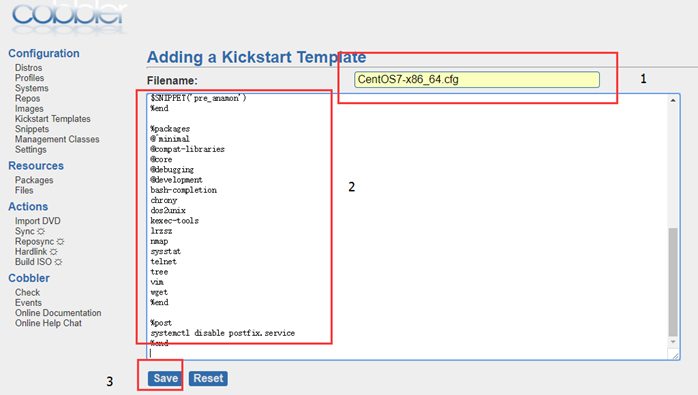
CentOS7 ks文件内容
# Cobbler for Kickstart Configurator for CentOS  by yao zhang

install

url --url=$tree

text

lang en_US.UTF-

keyboard us

zerombr

bootloader --location=mbr --driveorder=sda --append="crashkernel=auto rhgb quiet"

#Network information

$SNIPPET('network_config')

#network --bootproto=dhcp --device=eth0 --onboot=yes --noipv6 --hostname=CentOS7

timezone --utc Asia/Shanghai

authconfig --enableshadow --passalgo=sha512

rootpw  --iscrypted $default_password_crypted

clearpart --all --initlabel

part /boot --fstype xfs --size

part swap --size

part / --fstype xfs --size  --grow

firstboot --disable

selinux --disabled

firewall --disabled

logging --level=info

reboot

%pre

$SNIPPET('log_ks_pre')

$SNIPPET('kickstart_start')

$SNIPPET('pre_install_network_config')

# Enable installation monitoring

$SNIPPET('pre_anamon')

%end

%packages

@^minimal

@compat-libraries

@core

@debugging

@development

bash-completion

chrony

dos2unix

kexec-tools

lrzsz

nmap

sysstat

telnet

tree

vim

wget

%end

%post

systemctl disable postfix.service

%end
ks文件内容
关于ks文件内容的详解在我写的 <PXE+kickstart网络安装CentOS7.4系统及过程中各种报错> 里有解释
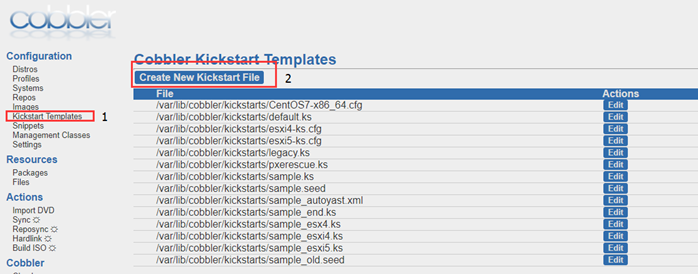
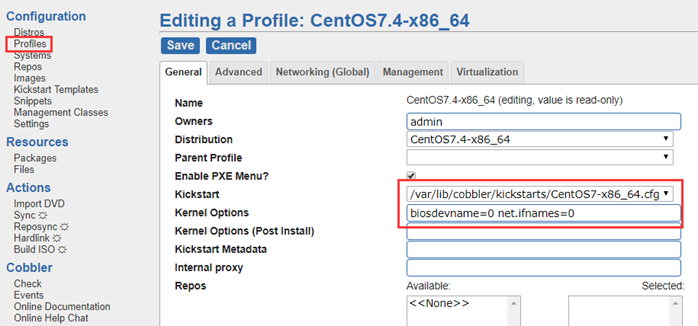
修改镜像变量属性

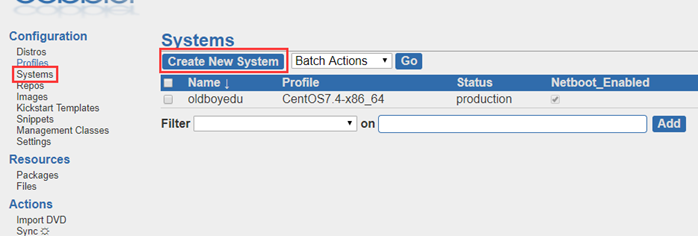
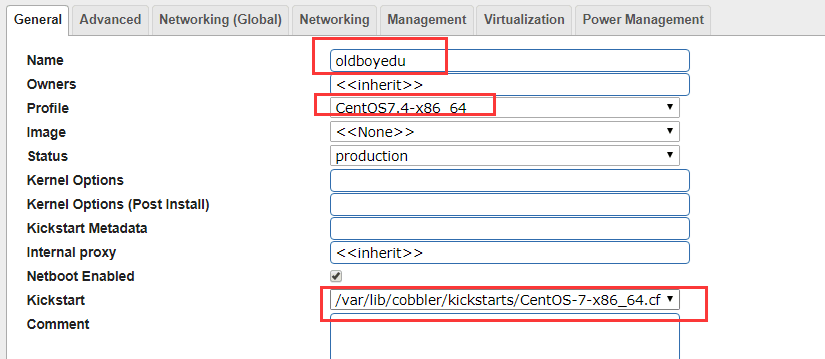
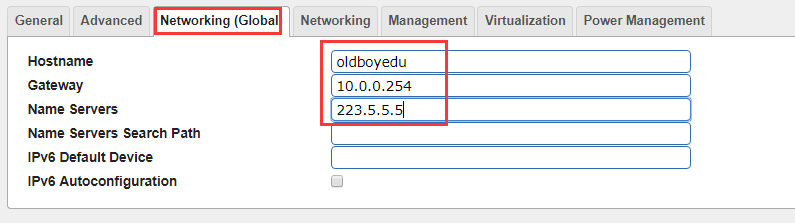
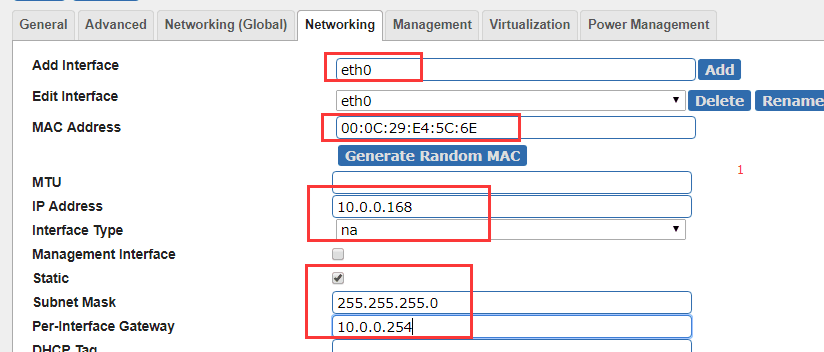
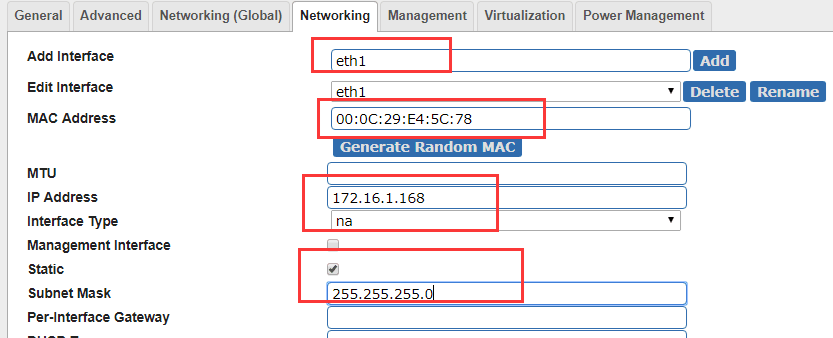
自定义安装系统
cobbler自动安装系统(Centos7.X)的更多相关文章
- cobbler自动安装系统
一.简介 Cobbler是一个快速网络安装linux的服务,而且在经过调整也可以支持网络安装windows.该工具使用python开发,小巧轻便(才15k行python代码),使用简单的命令即可完成P ...
- centos7系统部署cobbler批量安装系统
系统环境: 一.开启两个网卡.一个仅主机模式,一个桥接模式,主机模式对内提供cobbler服务 [root@localhost ~]# ip a 1: lo: <LOOPBACK,UP,LOWE ...
- cobbler 自定义安装系统
1.自定义安装系统(根据mac地址)--name=定义名称--mac=客户端的mac地址--ip-address=需求的ip--subnet=掩码 --gateway=网关--interface=网口 ...
- 其他综合-Cobbler无人值守安装系统 CentOS 7
Cobbler 无人值守安装系统 CentOS 7 1.实验描述 1.1 概述 作为运维,在公司经常遇到一些机械性重复工作要做,例如:为新机器装系统,一台两台机器装系统,可以用光盘.U盘等介质安装,1 ...
- Cobbler自定义安装系统和私有源
1.自定义安装系统(根据mac地址) --name=定义名称 --mac=客户端的mac地址 --ip-address=需求的ip --subnet=掩码 --gateway=网关 --interfa ...
- s32 kickstart 批量自动安装系统
1. 自动安装操作系统 http://blog.oldboyedu.com/autoinstall-kickstart/ 自动安装操作系统的解决方案:kickstart.cobbler(披着web ...
- CentOS 6.9 CentOS 7.4 自动安装系统 kickstart
通过ks文件 实现 CentOS 6.9 & 7.4 自动安装系统 环境: VMware 14.0 Pro版 光盘镜像: CentOS-6.9-x86_64-minimal.iso ks文件生 ...
- Centos 7 自动安装系统-pxe
一.简介 PXE(Pre-boot Execution Environment,预启动执行环境)是由Intel公司开发的最新技术,工作于Client/Server的网络模式,支持工作站通过网络从远端服 ...
- DHCP服务+PXE自动安装系统
DHCP服务+PXE自动安装系统 DHCP安装 安装DHCP服务器 yum install dhcp -y 安装完dhcp默认无法启动,需要编辑配置文件设置分配地址范围等相关信息,服务器自身IP地址要 ...
随机推荐
- SQLMap简单尝试
第一次完成了一个注入呢,虽然是恬不知耻的用sqlmap跑出来的 简单介绍注入时后台的数据等级,有助于后面的理解 ①可以类比成一个装着excel文件的文件夹,每一个excel文件就相当于一个数据库 ②库 ...
- gcc/g++ 命令的经常使用选项
gcc/g++ 命令的经常使用选项格式(选项 解释) -o FILE 指定输出文件名称.在编译为目标代码时,这一选项不是必须的.假设FILE没有指定,缺省文件名称是a.out. -c 仅仅编译生成目标 ...
- 基于QT的异质链表实例
所谓的异质链表就是的节点元素类型能够不同.本实例採用C++抽象类和多态实现. #include <QApplication> #include<QPushButton> #in ...
- NHibernate之旅(13):初探马上载入机制
本节内容 引入 马上载入 实例分析 1.一对多关系实例 2.多对多关系实例 结语 引入 通过上一篇的介绍,我们知道了NHibernate中默认的载入机制--延迟载入.其本质就是使用GoF23中代理模式 ...
- 我的Java开发学习之旅------>Base64的编码思想以及Java实现
Base64是一种用64个字符来表示随意二进制数据的方法. 用记事本打开exe.jpg.pdf这些文件时,我们都会看到一大堆乱码,由于二进制文件包括非常多无法显示和打印的字符.所以,假设要让记事本这种 ...
- Matlab人脸检測方法(Face Parts Detection)具体解释
今天同学让我帮忙制作一个人脸表情识别的样本库,当中主要是对人脸进行裁剪,这里用到了一个相对较新的Matlab人脸检測方法Face Parts Detection.网上百度了一下发现关于Matlab人脸 ...
- Matlab 2014b For Mac安装破解
1.Matlab 2014b 的安装和破解文件下载: 安装文件:http://www.cncrk.com/downinfo/80718.html 破解文件:http://pan.baidu.com/s ...
- Asp.net MVC 生成zip并下载
前面有生成Excel或Word的示例,所以就不再重新写了. 这里只提供将指定文件以ZIP的方式下载. 创建一个 Zip工具类 public class ZIPCompressUtil { public ...
- immutable.js 更新数组(mergeDeepWith)
使用情境: 技术栈为:react + redux + antd (reducer中处理数据使用了immutable.js). 问题:如下图,做一个搜索功能,form表单每改变一次,都会调用一个upda ...
- 关于SQLALCHEMY之(一)
SQLALCHEMY是一个不可靠的方案.对于初级开发者而言,并不如SQL语句来得简明. 或者说,我不知道是不是所有的ORM数据库对象映射方案都存在这么一种情况.纯以开发逻辑而言.下述两段代码的结论是一 ...