
SpringBoot的学习一:入门篇
SpringBoot是什么:
SpringBoot是Spring项目中的一个子工程,是一个轻量级框架。
SpringBoot框架中有两个个非常重要的策略:开箱即用和约定优于配置
一、构建工程
1.开发工具:
IDEA,JDK1.8以上,Maven3.0+
2代码实现:
打开Idea-> new Project ->Spring Initializr ->填写group、artifact ->钩上web(开启web功能)->点next...
建立好项目结构如下:
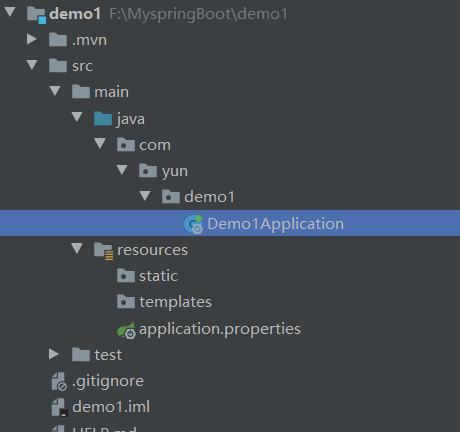
AppLication.java:程序的入口
resources:资源文件
static:放置静态资源,例如css.js等
templates:模板资源
application.properties:配置文件,在这里我用的properties格式文件,SpringBoot还支持另外一种yml格式的配置文件,在后面会讲到配置文件的使用
pom:依赖文件,这里只说明了几个依赖
!--SpringBoot的起步依赖-->
<parent>
    <groupId>org.springframework.boot</groupId>
    <artifactId>spring-boot-starter-parent</artifactId>
    <version>2.2.0.RELEASE</version>
    <relativePath/> <!-- lookup parent from repository -->
</parent>
<!-- SpringBoot要继承SpringMvc的controller的开发,导入的web依赖-->
    <dependency>
        <groupId>org.springframework.boot</groupId>
        <artifactId>spring-boot-starter-web</artifactId>
    </dependency>
<!-- SpringBoot的热部署-->
    <dependency>
        <groupId>org.springframework.boot</groupId>
        <artifactId>spring-boot-devtools</artifactId>
        <optional>true</optional>
    </dependency>
编写Controller内容:
@RestController

public class MyController {

    @RequestMapping("/hello")

    public String index(){

        return "世界";

    }

}
注意;@RestController返回的是json数据类型,而@Controlle返回的是Html页面
运行程序主接口Application.java
浏览器访问http://localhost:8080/hello
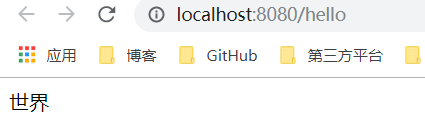
在这里测试了Springboot在启动的时候注入的bean实例
@SpringBootApplication

public class Demo1Application {

    public static void main(String[] args) {

        SpringApplication.run(Demo1Application.class, args);

    }

    @Bean

    public CommandLineRunner commandLineRunner(ApplicationContext applicationContext){

        return args -> {

            System.out.println("springBoot中出现的bean:");

            String[] beanNames = applicationContext.getBeanDefinitionNames();

            Arrays.sort(beanNames);

            for (String benName:beanNames){

                System.out.println(benName);

            }

        };

    }
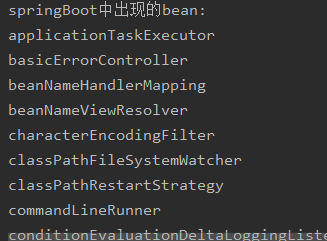
打印结果如上,大概会出现40-50个bean
Springboot开启单元测试
在src/test下的测试入口
package com.yun.demo1.controllet;

/*SpringBoot单元测试开启*/

import com.yun.demo1.Demo1Application;

import org.junit.Before;

import org.junit.Test;

import org.junit.runner.RunWith;

import org.springframework.beans.factory.annotation.Autowired;

import org.springframework.boot.test.context.SpringBootTest;

import org.springframework.boot.test.web.client.TestRestTemplate;

import org.springframework.boot.web.server.LocalServerPort;

import org.springframework.http.ResponseEntity;

import org.springframework.test.context.junit4.SpringRunner;

import static org.junit.Assert.assertThat;

import static org.hamcrest.Matchers.equalTo;

import java.net.URL;

@RunWith(SpringRunner.class)  //单元测试

//RANDOM_PORT : 加载一个EmbeddedWebApplicationContext并提供一个真正的servlet环境。

// 嵌入式servlet容器启动并在随机端口上侦听

@SpringBootTest(webEnvironment = SpringBootTest.WebEnvironment.RANDOM_PORT)

public class TestController {

    @LocalServerPort

    private int port;

    private URL url;

    @Autowired

    private TestRestTemplate testRestTemplate;

    @Before

    public void setUp() throws Exception {

        this.url = new URL("http://localhost:" + port + "/");

    }

    @Test

    public void hello()throws Exception{

        ResponseEntity<String> responseEntity = testRestTemplate.getForEntity(url.toString(),String.class);

        assertThat(responseEntity.getBody(),equalTo("SpringBoot的测试案例"));

    }

}
二、SpringBoot的配置文件详解
当创建SpringBoot工程时,系统会默认创建一个在src/main/resources目录下创建一个application.properties文件,这个文件就是SpringBoot的配置文件
propertions格式:
person.name:=zhangsan
yml文件格式:
person:
  name: tom
  age: 18
这里由于个人习惯,我将application.properties改为application.yml文件
编写controller
@RestController

public class myController {

//    @Value:注入Spring boot application.properties配置的属性的值

    @Value("${person.name}")

    private String name;

    @Value("${person.age}")

    private Integer age;

    @RequestMapping("/hello")

    public String quick(){

        return "格尔曼:"+name+":"+age;

    }

}
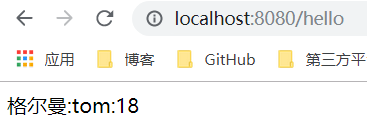
打印结果如下:
SpringBoot加载自定义配置文件使用@ConfigurationProperties
自义定一个配置文件test.yml
yun:

  title: "世界那么大"

  desc:"到处去看看"
编写控制器controller,并启动程序
@RestController

@PropertySource(value = "classpath:test.yml")

@ConfigurationProperties(prefix = "yun")

public class myController2 {

    @Value("${title}")

    private String title;

    @Value("${desc}")

    private String desc;

    @RequestMapping("/hexo")

    public String quick(){

        return title+":"+desc;

    }

}
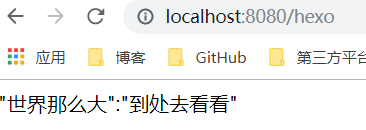
打印结果如下:
三、Springboot使用模板引擎Thymeleaf
SpringBoot不推荐使用jsp,但是支持一些模板引擎,比如Thymeleaf
Thymeleaf模板引擎的优点:
动静结合:在有无网络的环境下皆可运行
开箱即用:提供标准和spring标准两种语言
多放方言支持:可以快速实现表单绑定,属性编辑器等功能
与SpringBoot完美整合:SpringBoot提供了Thymeleaf的默认配置,并且为Thymeleaf设置了视图解析器,我们可以像以前操作jsp一样来操作Thymeleaf。
引入依赖
<dependency>

    <groupId>org.springframework.boot</groupId>

    <artifactId>spring-boot-starter-thymeleaf</artifactId>

</dependency>
Thymeleaf的标准表达式语法
变量表达式
<p>UserName is : <span th:text="${user.name}">xiaoming</span> !</p>
URL表达式
<a th:href="@{http://www.thymeleaf.org}">Thymeleaf</a>
其他表达式请看:https://www.jianshu.com/p/908b48b10702
创建一个用户类,并编写controller
@Controller

public class IndexController {

    @GetMapping("/index")

    public String index(Model model){

        List<user> users = new ArrayList<>();

        for (int i = 0; i<10; i++){

            user u = new user();

            u.setId(i);

            u.setName("yun"+i);

            u.setAddress("世界"+i);

            users.add(u);

        }

        model.addAttribute("users",users);

        return "index";

    }

}
在src/tamplates下创建index.html
<!DOCTYPE html>

<html lang="en" xmlns:th="http://www.thymeleaf.org">

<head>

    <meta charset="UTF-8">

    <title>Title</title>

</head>

<body>

<table border="1">

    <tr>

        <td>编号</td>

        <td>姓名</td>

        <td>地址</td>

    </tr>

    <tr th:each="user:${users}">

        <td th:text="${user.id}"></td>

        <td th:text="${user.name}"></td>

        <td th:text="${user.address}"></td>

    </tr>

</table>

</body>

</html>
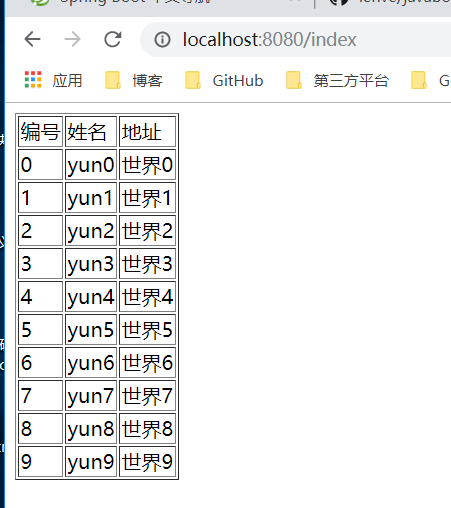
运行程序,打印解结果如下
SpringBoot的学习一:入门篇的更多相关文章
- PHP学习笔记 - 入门篇(5)
PHP学习笔记 - 入门篇(5) 语言结构语句 顺序结构 eg: <?php $shoesPrice = 49; //鞋子单价 $shoesNum = 1; //鞋子数量 $shoesMoney ...
- PHP学习笔记 - 入门篇(4)
PHP学习笔记 - 入门篇(4) 什么是运算符 PHP运算符一般分为算术运算符.赋值运算符.比较运算符.三元运算符.逻辑运算符.字符串连接运算符.错误控制运算符. PHP中的算术运算符 算术运算符主要 ...
- PHP学习笔记 - 入门篇(3)
PHP学习笔记 - 入门篇(3) 常量 什么是常量 什么是常量?常量可以理解为值不变的量(如圆周率):或者是常量值被定义后,在脚本的其他任何地方都不可以被改变.PHP中的常量分为自定义常量和系统常量 ...
- PHP学习笔记--入门篇
PHP学习笔记--入门篇 一.Echo语句 1.格式 echo是PHP中的输出语句,可以把字符串输出(字符串用双引号括起来) 如下代码 <?php echo "Hello world! ...
- netty深入学习之一: 入门篇
netty深入学习之一: 入门篇 本文代码下载: http://download.csdn.net/detail/cheungmine/8497549 1)Netty是什么 Netty是Java NI ...
- Java工程师学习指南 入门篇
Java工程师学习指南 入门篇 最近有很多小伙伴来问我,Java小白如何入门,如何安排学习路线,每一步应该怎么走比较好.原本我以为之前的几篇文章已经可以解决大家的问题了,其实不然,因为我之前写的文章都 ...
- Elasticsearch学习记录(入门篇)
Elasticsearch学习记录(入门篇) 1. Elasticsearch的请求与结果 请求结构 curl -X<VERB> '<PROTOCOL>://<HOST& ...
- PHP学习笔记 - 入门篇(2)
PHP入门篇(2) 什么是变量 变量是用于存储值的容器,如下 $var = @"6666" 如何定义变量 定义变量就是像服务器的内存申请空间,用来存储数据,eg: <?php ...
- RabbitMq学习一入门篇(hello world)
简介 RabbitMQ是一个开源的AMQP实现,服务器端用Erlang语言编写,支持多种客户端,如:Python.Ruby..NET.Java,也是众多消息队列中表现不俗的一员,作用就是提高系统的并发 ...
- labview学习_入门篇(一)
写在前面的话: 在上大学的时候,实验室的老师推荐用labview工具编写上位机软件,当时不想用labview,感觉不写代码心里不踏实,后来用vb和matalb开发了上位机软件.但现在由于部门的几款工具 ...
随机推荐
- 批量bat脚本复制文件或文件夹
主要用于在本地下,复制文件或文件夹到当前文件夹 @echo off echo 复制文件或文件夹到当前文件夹(复制文件选择[],复制文件夹选择[]) set /p num=输入选择的数字: : set ...
- react相关小技巧
一.我们在项目中切换路由的时候可能会遇到 Warning: setState(...): Can only update a mounted or mounting component. This u ...
- mybatis与hibernate的区别持久层对比【面试题】
Mybatis技术特点: 好处: 通过直接编写SQL语句,可以直接对SQL进行性能的优化: 学习门槛低,学习成本低.只要有SQL基础,就可以学习mybatis,而且很容易上手: 由于直接编写SQL语句 ...
- Python高级特性之:List Comprehensions、Generator、Dictionary and set ...
今天帅气的易哥和大家分享的是Pyton的高级特性,希望大家能和我一起学习这门语言的魅力. Python高级特性之:List Comprehensions.Generator.Dictionary an ...
- c# 第26节 Main方法
本节内容: 1:Main方法 2:Main方法的定义 3:测试Main函数传入参数 4:Main的大总结 1:Main方法是什么 2:Main方法的定义 3:测试打印出外部传入Main的参数 clas ...
- pandas分组统计:groupby,melt,pivot_table,crosstab的用法
groupby: 分组 melt: 宽表转长表 pivot_table: 长表转宽表,数据透视表 crosstab: 交叉表 / 列联表,主要用于分组频数统计 import numpy as np i ...
- vim考场配置
syntax on set number set mouse=a set autoread set showmatch set autoindent set smartindent set tabst ...
- CF1146D Frog Jumping
CF1146D Frog Jumping 洛谷评测传送门 题目描述 A frog is initially at position 00 on the number line. The frog ha ...
- 如何运用C语言求(判断)素数。
int i,n; scanf("%d",&n); i=2; //这一步是亮点!! while(i<n) { if(n%i==0) break; i++; } if ...
- [LOJ 6432][PKUSC 2018]真实排名
[LOJ 6432][PKUSC 2018]真实排名 题意 给定 \(n\) 个选手的成绩, 选中其中 \(k\) 个使他们的成绩翻倍. 对于每个选手回答有多少种方案使得他的排名不发生变化. \(n\ ...