
spring学习笔记之---bean属性注入
bean属性注入

(一)构造方法的属性注入
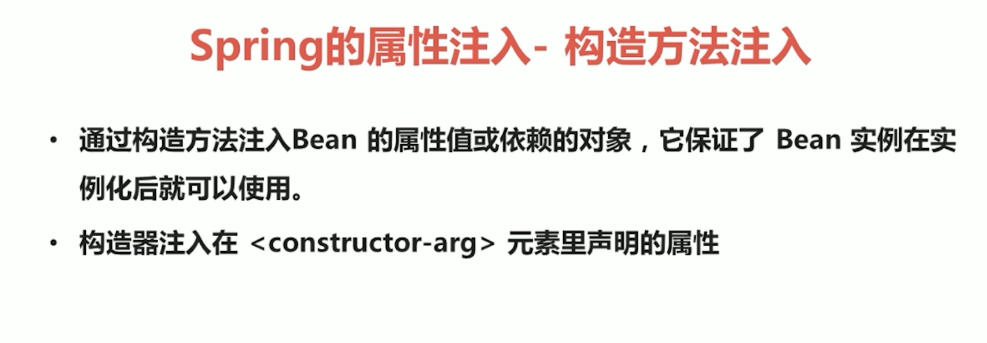
1.Student.java
package entity;

public class Student {

    private String name;

    private String age;

    public Student(String name, String age) {

        this.name = name;

        this.age = age;

    }

    @Override

    public String toString() {

        return "Student{" +

                "name='" + name + '\'' +

                ", age='" + age + '\'' +

                '}';

    }

}
2.applicationContext.xml
<?xml version="1.0" encoding="UTF-8"?>

<beans xmlns="http://www.springframework.org/schema/beans"

       xmlns:xsi="http://www.w3.org/2001/XMLSchema-instance"

       xsi:schemaLocation="http://www.springframework.org/schema/beans http://www.springframework.org/schema/beans/spring-beans.xsd">

    <bean id="student" class="entity.Student">

        <constructor-arg name="name" value="李四"/>

        <constructor-arg name="age" value="21"/>

    </bean>

</beans>
3.StudentTest.java
package Test;

import entity.Student;

import entity.User;

import org.junit.Test;

import org.springframework.context.ApplicationContext;

import org.springframework.context.support.ClassPathXmlApplicationContext;

public class StudentTest {

    @Test

    public void stu(){

        ApplicationContext applicationContext=new ClassPathXmlApplicationContext("applicationContext.xml");

        Student student=(Student)applicationContext.getBean("student");

        System.out.println(student);

    }

}
(二)set方法的属性注入
1.Student.java
package entity;

public class Student {

    private String name;

    private String age;

    public String getName() {

        return name;

    }

    public void setName(String name) {

        this.name = name;

    }

    public String getAge() {

        return age;

    }

    public void setAge(String age) {

        this.age = age;

    }

    @Override

    public String toString() {

        return "Student{" +

                "name='" + name + '\'' +

                ", age='" + age + '\'' +

                '}';

    }

}
2.applicationContext.xml
<?xml version="1.0" encoding="UTF-8"?>

<beans xmlns="http://www.springframework.org/schema/beans"

       xmlns:xsi="http://www.w3.org/2001/XMLSchema-instance"

       xsi:schemaLocation="http://www.springframework.org/schema/beans http://www.springframework.org/schema/beans/spring-beans.xsd">

    <bean id="student2" class="entity.Student">

        <property name="name" value="张三"/>

        <property name="age" value="22"/>

    </bean>

</beans>
3.StudentTest.java
package Test;

import entity.Student;

import entity.User;

import org.junit.Test;

import org.springframework.context.ApplicationContext;

import org.springframework.context.support.ClassPathXmlApplicationContext;

public class StudentTest {

      @Test

    public void stu2(){

        ApplicationContext applicationContext=new ClassPathXmlApplicationContext("applicationContext.xml");

        Student student2=(Student)applicationContext.getBean("student2");

        System.out.println(student2);

    }

}
(三)p名称空间的属性注入

1.Student.java
package entity;

public class Student {

    private String name;

    private String age;

    private Cat cat;

    public String getName() {

        return name;

    }

    public void setName(String name) {

        this.name = name;

    }

    public String getAge() {

        return age;

    }

    public void setAge(String age) {

        this.age = age;

    }

    public Cat getCat() {

        return cat;

    }

    public void setCat(Cat cat) {

        this.cat = cat;

    }

    @Override

    public String toString() {

        return "Student{" +

                "name='" + name + '\'' +

                ", age='" + age + '\'' +

                ", cat=" + cat +

                '}';

    }

}
2.Cat.java
package entity;

public class Cat {

    private String name;

    public String getName() {

        return name;

    }

    public void setName(String name) {

        this.name = name;

    }

    @Override

    public String toString() {

        return "Cat{" +

                "name='" + name + '\'' +

                '}';

    }

}
3.applicationContext.xml
<?xml version="1.0" encoding="UTF-8"?>

<beans xmlns="http://www.springframework.org/schema/beans"

       xmlns:p="http://www.springframework.org/schema/p"

       xmlns:xsi="http://www.w3.org/2001/XMLSchema-instance"

       xsi:schemaLocation="http://www.springframework.org/schema/beans http://www.springframework.org/schema/beans/spring-beans.xsd">

    <bean id="student3" class="entity.Student" p:name="小明" p:age="15" p:cat-ref="cat"/>

    <bean id="cat" class="entity.Cat" p:name="小黄"/>

</beans>
4.StudentTest.java
package Test;

        import entity.Student;

        import entity.User;

        import org.junit.Test;

        import org.springframework.context.ApplicationContext;

        import org.springframework.context.support.ClassPathXmlApplicationContext;

public class StudentTest {

    @Test

    public void stu3(){

        ApplicationContext applicationContext=new ClassPathXmlApplicationContext("applicationContext.xml");

        Student student3=(Student)applicationContext.getBean("student3");

        System.out.println(student3);

    }

}
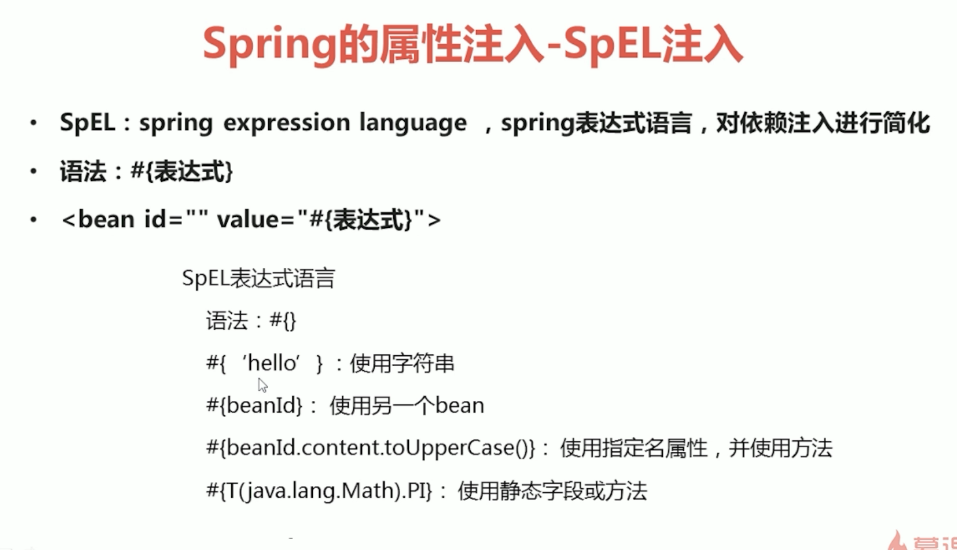
(四)spel的属性注入
1.Student.java
package entity;

public class Student {

    private String name;

    private String age;

    private Cat cat;

    public String getName() {

        return name;

    }

    public void setName(String name) {

        this.name = name;

    }

    public String getAge() {

        return age;

    }

    public void setAge(String age) {

        this.age = age;

    }

    public Cat getCat() {

        return cat;

    }

    public void setCat(Cat cat) {

        this.cat = cat;

    }

    @Override

    public String toString() {

        return "Student{" +

                "name='" + name + '\'' +

                ", age='" + age + '\'' +

                ", cat=" + cat +

                '}';

    }

}
2.Cat.java
package entity;

public class Cat {

    private String name;

    public String getName() {

        return name;

    }

    public void setName(String name) {

        this.name = name;

    }

    @Override

    public String toString() {

        return "Cat{" +

                "name='" + name + '\'' +

                '}';

    }

}
3.applicationContext.xml
<?xml version="1.0" encoding="UTF-8"?>

<beans xmlns="http://www.springframework.org/schema/beans"

       xmlns:p="http://www.springframework.org/schema/p"

       xmlns:xsi="http://www.w3.org/2001/XMLSchema-instance"

       xsi:schemaLocation="http://www.springframework.org/schema/beans http://www.springframework.org/schema/beans/spring-beans.xsd">

    <bean id="student4" class="entity.Student">

        <property name="name" value="#{'大名'}"/>

        <property name="age" value="#{16}"/>

        <property name="cat" value="#{cat}"/>

    </bean>

    <bean id="cat" class="entity.Cat">

        <property name="name" value="#{'大黄'}"/>

    </bean>

</beans>
4.StudentTest.java
package Test;

        import entity.Student;

        import entity.User;

        import org.junit.Test;

        import org.springframework.context.ApplicationContext;

        import org.springframework.context.support.ClassPathXmlApplicationContext;

public class StudentTest {

    @Test

    public void stu4(){

        ApplicationContext applicationContext=new ClassPathXmlApplicationContext("applicationContext.xml");

        Student student4=(Student)applicationContext.getBean("student4");

        System.out.println(student4);

    }

}
(五)复杂类型的属性注入

1.Bean.java
package entity;

import java.util.*;

public class Bean {

    private String arr[];//数组类型

    private List<String > list;//List集合类型

    private Set<String> set;//Set集合类型

    private Map<String,Integer> map;//Map集合类型

    private Properties properties;//属性类型

    public String[] getArr() {

        return arr;

    }

    public void setArr(String[] arr) {

        this.arr = arr;

    }

    public List<String> getList() {

        return list;

    }

    public void setList(List<String> list) {

        this.list = list;

    }

    public Set<String> getSet() {

        return set;

    }

    public void setSet(Set<String> set) {

        this.set = set;

    }

    public Map<String, Integer> getMap() {

        return map;

    }

    public void setMap(Map<String, Integer> map) {

        this.map = map;

    }

    public Properties getProperties() {

        return properties;

    }

    public void setProperties(Properties properties) {

        this.properties = properties;

    }

    @Override

    public String toString() {

        return "Bean{" +

                "arr=" + Arrays.toString(arr) +

                ", list=" + list +

                ", set=" + set +

                ", map=" + map +

                ", properties=" + properties +

                '}';

    }

}
2.applicationContext.xml
<?xml version="1.0" encoding="UTF-8"?>

<beans xmlns="http://www.springframework.org/schema/beans"

       xmlns:p="http://www.springframework.org/schema/p"

       xmlns:xsi="http://www.w3.org/2001/XMLSchema-instance"

       xsi:schemaLocation="http://www.springframework.org/schema/beans http://www.springframework.org/schema/beans/spring-beans.xsd">

   <bean id="bean" class="entity.Bean">

        <!--数组类型-->

        <property name="arr">

            <list >

                <value>aaa</value>

                <value>bbb</value>

                <value>ccc</value>

            </list>

        </property>

        <!--List集合类型-->

        <property name="list">

            <list>

                <value>111</value>

                <value>222</value>

                <value>333</value>

            </list>

        </property>

        <!--Set集合类型-->

        <property name="set">

            <set>

                <value>aaa</value>

                <value>bbb</value>

                <value>ccc</value>

            </set>

        </property>

        <!--Map集合类型-->

        <property name="map">

            <map>

                <entry key="aaa" value="111"/>

                <entry key="bbb" value="222"/>

                <entry key="ccc" value="333"/>

            </map>

        </property>

        <!--属性类型-->

        <property name="properties">

            <props>

                <prop key="username">111</prop>

                <prop key="password">222</prop>

            </props>

        </property>

    </bean>

</beans>
3.BeanTest.java
package Test;

import entity.Bean;

import org.junit.Test;

import org.springframework.context.ApplicationContext;

import org.springframework.context.support.ClassPathXmlApplicationContext;

public class BeanTest {

    @Test

    public void bean(){

        ApplicationContext applicationContext=new ClassPathXmlApplicationContext("applicationContext.xml");

        Bean bean=(Bean)applicationContext.getBean("bean");

        System.out.println(bean);

    }

}
spring学习笔记之---bean属性注入的更多相关文章
- Spring学习笔记(3)——Bean的注入方式
依赖注入 依赖注入支持属性注入.构造函数注入.工厂注入. 属性注入: 属性注入即通过setXxx()方法注入Bean的属性值或依赖对象 属性注入要求Bean提供一个默认的构造函数(无参构造函数),并为 ...
- Spring学习笔记—装配Bean
在Spring中,对象无需自己负责查找或创建与其关联的其他对象.相反,容器负责把需要相互协作的对象引用赋予各个对象.创建应用对象之间协作关系的行为通常称为装配(wiring),这也是依赖注入的本质. ...
- spring学习(三)属性注入
用的是IDEA的maven工程,pom.xml文件导包依赖省略 本文主要写set方式注入 (一).一般类型注入 一.写两个实体类Car.User public class Car { private ...
- spring学习笔记之---bean管理的注解方式
bean管理的注解方式 (一)使用注解定义bean (1)常用注解 (2)实例 1.在pom.xml中进行配置 <dependencies> <dependency> < ...
- Spring学习笔记之Bean的一些属性设置
1.beans 里边配置default-init-method="shunge",有这个方法的会执行,没有也不会报错 2.beans 里边配置default-destroy-met ...
- Spring学习笔记(2)——Bean的配置
要使应用程序中的Spring容器成功启动,需要以下三个方面的条件都具备: 1.Spring框架的类包都已经放到应用程序的类路径下 2.应用程序为Spring提供完备的Bean配置信息 3.Bean的类 ...
- Spring学习笔记之bean配置
1.命名bean 每个bean都有一个或者多个的的标识符.这些标识符必须在加载他们的容器里边唯一.一个bean经常有且只有一个标识符,但是如果需要超过一个的名字,可以考虑额外的别名. 基于xml的配置 ...
- Spring学习笔记之Bean的实例化
一.bean的实例化方法有3种, 1.构造器实例化 2.静态工厂方法实例化 3.实例工厂方法实例化 二.用构造器来实例化 <bean id="ShunDao" class=& ...
- Spring学习笔记——02 Bean的命名及实例化
一.Bean的命名 前一篇讲到IoC是一个管理Bean的容器,Bean多数情况下都是通过XML文件进行配置的,其中Bean的命名有以下几种方式,现在梳理一下. 1. 不指定id,只配置类名 <b ...
随机推荐
- Go - Slice 切片
概述 切片是一种动态数组,比数组操作灵活,长度不是固定的,可以进行追加和删除. len() 和 cap() 返回结果可相同和不同. 声明切片 //demo_7.go package main impo ...
- HTML5新增的表单验证功能
一.HTML5表单的特点: HTML5 表单增加了许多内置的控件和控件属性 XHTML 中需要放在 form 之中的诸如 input/button/select/textarea 等标签元素,在 HT ...
- Fabric1.4源码解析:链码实例化过程
之前说完了链码的安装过程,接下来说一下链码的实例化过程好了,再然后是链码的调用过程.其实这几个过程内容已经很相似了,都是涉及到Proposal,不过整体流程还是要说一下的. 同样,切入点仍然是fabr ...
- Spring Dl解释
在UserService中提供一个get/set的name方法,在beans.xml中通过property去注入 一个实现类的属性 name; 3.1 类路径获得配置文件 3.4 BeanFactor ...
- Jsoup配合 htmlunit 爬取异步加载的网页
加入 jsoup 和 htmlunit 的依赖 <dependency> <groupId>org.jsoup</groupId> <artifactId&g ...
- golang 单元测试&&性能测试
一:单元测试 1.为什么要做单元测试和性能测试 减少bug 快速定位bug 减少调试时间 提高代码质量 2.golang的单元测试 单元测试代码的go文件必须以_test.go结尾 单元测试的函数名必 ...
- Spring Cloud 之 Hystrix.
一.概述 在微服务架构中,我们将系统拆分成了很多服务单元,各单元的应用间通过服务注册与订阅的方式互相依赖.由于每个单元都在不同的进程中运行,依赖通过远程调用的方式执行,这样就有可能因为网络原因或是依 ...
- 好用的在线画图工具processon
ProcessOn是一款基于SaaS的前沿.高效线上作图工具,它将Visio.Xmind等专业作图工具搬到了"云端" 注册链接:https://www.processon.com/ ...
- Neo4j电影关系图Cypher
, tagline:'Welcome to the Real World'}) }) }) }) }) }) }) }) CREATE (Keanu)-[:ACTED_IN {roles:['Neo' ...
- VBox on 14.04: Kernel driver not installed (rc=-1908) [duplicate]
这几天刚刚装上Ubuntu的系统开始写Android代码,真心是流畅了很多,但是也出现了很多的问题. 还好 有大神护佑,童鞋博客首页,点击查看吧. 刚刚又遇到了一个新的问题,那就是我想用genymot ...