
Android Studio 优秀插件: Parcelable Code Generator
这里假设我们已经会使用 Parcelable 序列化一个对象了~~
那么大家会发现 Parcelable 使用起来有些复杂,因为我们要自己复写 几个方法,而且当类的属性比较多的时候,我们就会难受了,又要注意不写错属性名,又要注意写对属性的类型,又要花不少的时间做重复的事情。
那么因为 Parcelable 有使用它的优势,我们又不能放弃,那该怎么办么?
Android Studio 提供给了我们 一个插件用来简化 给一个类 实现 Parcelable 接口的流程。
-----------------------------------------------------------------------------
现在学习下如何使用这个插件:
1、Android Studio 打开一个项目,点击左上角 File -->Settings... 进行设置
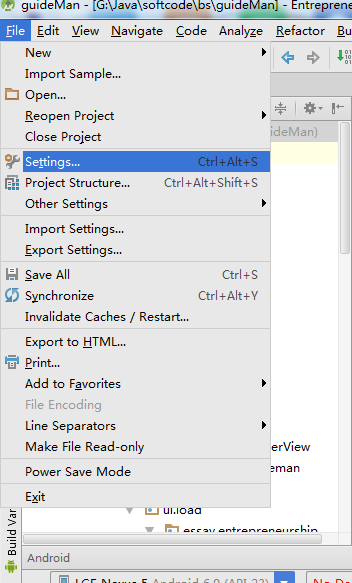
2、选择插件Plugins , 搜索Parcel,如果你没有下载过这个插件,那么搜索框下面会显示“Nothing to show.Click Browse to....”
3、那就点击蓝色字体的 Browse 吧 ,这个时候会出现如下图的界面,我们只需要在左边选中arcel然后点击右面 绿色按钮 "Install plugin" 就可以了
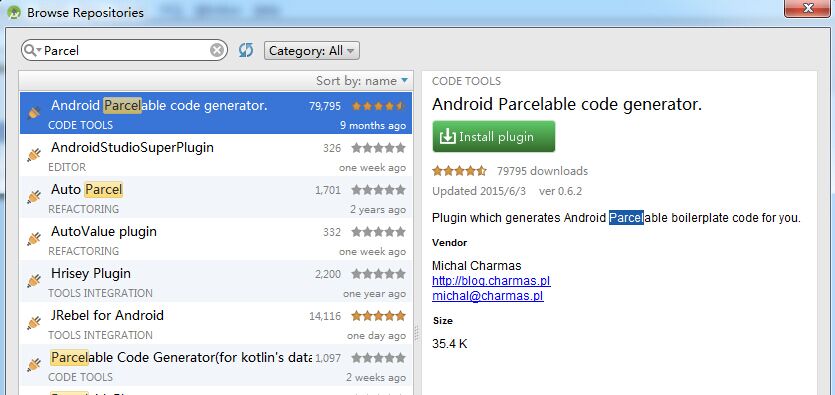
4、完成了上面三个步骤,就可以使用Parcelable Code Generator插件了
怎么用呢,
(1)创建一个类文件,类名是看你需求自定义写的,添加上你需要的属性
(2)快捷键 alt+insert ,会出现如下选择框,选择Parcelable 即可
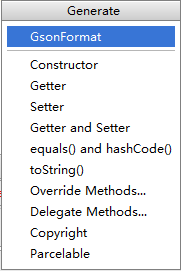
然后我们就看到代码,是不是比我们手动写要快的许多
public class People implements Parcelable {

    private int id;

    private String url;

    private int width;

    private int height;

    private int likeCount;

    private String description;

    private int time;

    private int replyCount;

    private int floorCount;

    private int likeUserCount;

    private int age;

    private String name;

    private String school;

    private int type;

    private String sax;

    private int userid;

    @Override

    public int describeContents() {

        return 0;

    }

    @Override

    public void writeToParcel(Parcel dest, int flags) {

        dest.writeInt(this.id);

        dest.writeString(this.url);

        dest.writeInt(this.width);

        dest.writeInt(this.height);

        dest.writeInt(this.likeCount);

        dest.writeString(this.description);

        dest.writeInt(this.time);

        dest.writeInt(this.replyCount);

        dest.writeInt(this.floorCount);

        dest.writeInt(this.likeUserCount);

        dest.writeInt(this.age);

        dest.writeString(this.name);

        dest.writeString(this.school);

        dest.writeInt(this.type);

        dest.writeString(this.sax);

        dest.writeInt(this.userid);

    }

    public People() {

    }

    protected People(Parcel in) {

        this.id = in.readInt();

        this.url = in.readString();

        this.width = in.readInt();

        this.height = in.readInt();

        this.likeCount = in.readInt();

        this.description = in.readString();

        this.time = in.readInt();

        this.replyCount = in.readInt();

        this.floorCount = in.readInt();

        this.likeUserCount = in.readInt();

        this.age = in.readInt();

        this.name = in.readString();

        this.school = in.readString();

        this.type = in.readInt();

        this.sax = in.readString();

        this.userid = in.readInt();

    }

    public static final Parcelable.Creator<People> CREATOR = new Parcelable.Creator<People>() {

        public People createFromParcel(Parcel source) {

            return new People(source);

        }

        public People[] newArray(int size) {

            return new People[size];

        }

    };

}
Android Studio 优秀插件: Parcelable Code Generator的更多相关文章
- Android项目实战(十九):Android Studio 优秀插件: Parcelable Code Generator
Android Studio 优秀插件系列: Android Studio 优秀插件(一):GsonFormat Android Studio 优秀插件(二): Parcelable Code Gen ...
- Android开发实战(十八):Android Studio 优秀插件:GsonFormat
Android Studio 优秀插件系列: Android Studio 优秀插件(一):GsonFormat Android Studio 优秀插件(二): Parcelable Code Gen ...
- Android Studio 优秀插件汇总
第一部分 插件的介绍 Google 在2013年5月的I/O开发者大会推出了基于IntelliJ IDEA java ide上的Android Studio.AndroidStudio是一个功能齐全的 ...
- 拿走不谢!22 个 Android Studio 优秀插件汇总
Google 在2013年5月的I/O开发者大会推出了基于IntelliJ IDEA java ide上的Android Studio.AndroidStudio是一个功能齐全的开发工具,还提供了第三 ...
- Android Studio 优秀插件:GsonFormat
作为一个Android程序猿,当你看到后台给你的json数据格式时: { "id":123, "url": "http://img.donever.c ...
- Android Studio优秀插件汇总
- Android Studio常用插件续
这个月因为各种事情在忙,包括赶项目,回老家,还有准备旅游的事,所以应该写不了四篇博客了.今天介绍一下关于Android Studio 的几个好用的插件,都是我在用的,它们或能帮你节省时间,或者让你心情 ...
- Android Studio/IDEA插件
1.android parcelable code generator 2.android code generator3.gson format4.android postfix completio ...
- Android Studio 实用插件整理
首先说一下安装方法: 上图片: 首先点击Android stuido 菜单 File->Settings 进入上图界面: 区域1:你当前已经安装了的插件 区域3:在线安装 区域2:其实和区域3是 ...
随机推荐
- codeforces 161 D. Distance in Tree(树形dp)
题目链接:http://codeforces.com/problemset/problem/161/D 题意:给出一个树,问树上点到点的距离为k的一共有几个. 一道简单的树形dp,算是一个基础题. 设 ...
- 2015 省赛 简单的图论问题? bfs
[E] 简单的图论问题? 时间限制: 5000 ms 内存限制: 65535 K 问题描述 给一个 n 行 m 列的迷宫,每个格子要么是障碍物要么是空地.每个空地里都有一个权值.你的 任务是从找一条( ...
- NPOI导出Excel封装
直接上代码 public class ExcelUtils { public static ICellStyle CreateStyle(IWorkbook workbook, string font ...
- jQuery - 02. 样式表属性操作/类操作、动画、显示隐藏、滑入、淡入、停止动画、节点操作、添加对象、清空节点
样式表属性操作.css $("div").css({'width':100,'height':100,'background':'red'}); $("div" ...
- 【LeetCode】524-通过删除字母匹配到字典里最长单词
题目描述 给定一个字符串和一个字符串字典,找到字典里面最长的字符串,该字符串可以通过删除给定字符串的某些字符来得到.如果答案不止一个,返回长度最长且字典顺序最小的字符串.如果答案不存在,则返回空字符串 ...
- Python 为了提升性能,竟运用了共享经济
大家或许知道,Python 为了提高内存的利用效率,采用了一套共用对象内存的分配策略. 例如,对于那些数值较小的数字对象([-5, 256]).布尔值对象.None 对象.较短的字符串对象(通常 是 ...
- 阿里yum源与华为yum源的配置
如何使用华为云提供的CentOS镜像源(x86_64)? 更新时间: 2019/08/16 11:17 查看PDF 分享 微博 分享文档到微博 微信 扫码分享文档 ...
- glusterfs详解及kubernetes 搭建heketi-glusterfs
本文包含: gluster各存储卷详解.创建及使用 gluster-kubernetes搭建glusterfs存储 前言 传统的运维中,往往需要管理员手动先在存储集群分配空间,然后才能挂载到应用中去. ...
- fremark遍历出的li怎么加事件(cforeach循环遍历也同样适用)
遇见这个问题烦了好久好久,网上也没找到答案,琢磨了半天终于找到了方法 1.下面是一个分页信息遍历添加事件,页面跳转 <!-- 分页条信息 --> <div class="c ...
- Linux变量替换技术
1.1.1 ${value:-word} 如果变量value没有定义,则返回word,如果已经赋值则返回value变量的值 result=${jimyy:-UNSET} echo $result ...