
Android Studio 优秀插件:GsonFormat
作为一个Android程序猿,当你看到后台给你的json数据格式时:
{

    "id":123,

    "url": "http://img.donever.com/aa/bb.jpg",

    "width":500,

    "height":500,

    "likeCount":1,

    "description":"嘿嘿",

    "time":1234567890,

    "replyCount":0,

    "floorCount":0,

    "likeUserCount":5,

    "age":14,

    "name":"jack",

    "school":"beijing",

    "type":1,

    "sax":"boy",

    "userid":1223

}
是不是要默默的创建一个类,然后一个个变量的private 一下,然后get()+set()?
如果一个json数据提供的属性20+条或者30+条呢,一个个属性去写,还要保证字母不写错,大小写也没错,是不是既浪费时间又浪费精力,那么就试试使用GsonFormat插件吧
现在学习下如何使用这个插件:
1、Android Studio 打开一个项目,点击左上角 File -->Settings... 进行设置
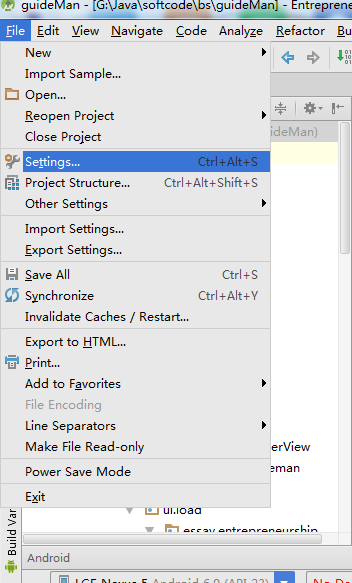
2、选择插件Plugins , 搜索GsonFormat ,如果你没有下载过这个插件,那么搜索框下面会显示“Nothing to show.Click Browse to....”

3、那就点击蓝色字体的 Browse 吧 ,这个时候会出现如下图的界面,我们只需要在左边选中GsonFormat 然后点击右面 绿色按钮 "Install plugin" 就可以了

4、完成了上面三个步骤,就可以使用GsonFormat插件了
怎么用呢,
(1)创建一个类文件,类名是看你需求自定义写的
(2)快捷键 alt+insert ,会出现如下选择框
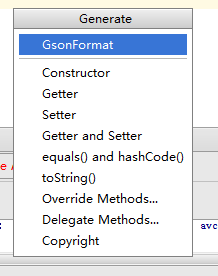
(3)我们点击第一个选项,GsonFormat,就会出现一个新的框,
然后只需要将服务器给你的json数据的 格式复制进去 ,如下所示,点击Ok就可以了(注意json格式不要出错,比如不要少了每个属性后面的逗号)

(4)最后一步,出现这么一个框,这里你可以进行相应的编辑,比如吧一个属性的类型改变,或者 去掉属性前面的蓝底白勾,让类不具有某个属性

效果类:
public class People {

    /**

     * id : 123

     * url : http://img.donever.com/aa/bb.jpg

     * width : 500

     * height : 500

     * likeCount : 1

     * description : 嘿嘿

     * time : 1234567890

     * replyCount : 0

     * floorCount : 0

     * likeUserCount : 5

     * age : 14

     * name : jack

     * school : beijing

     * type : 1

     * sax : boy

     * userid : 1223

     */

    private int id;

    private String url;

    private int width;

    private int height;

    private int likeCount;

    private String description;

    private int time;

    private int replyCount;

    private int floorCount;

    private int likeUserCount;

    private int age;

    private String name;

    private String school;

    private int type;

    private String sax;

    private int userid;

    public static People objectFromData(String str) {

        Gson gson = new Gson();

        return new com.google.gson.Gson().fromJson(str, People.class);

    }

    public void setId(int id) {

        this.id = id;

    }

    public void setUrl(String url) {

        this.url = url;

    }

    public void setWidth(int width) {

        this.width = width;

    }

    public void setHeight(int height) {

        this.height = height;

    }

    public void setLikeCount(int likeCount) {

        this.likeCount = likeCount;

    }

    public void setDescription(String description) {

        this.description = description;

    }

    public void setTime(int time) {

        this.time = time;

    }

    public void setReplyCount(int replyCount) {

        this.replyCount = replyCount;

    }

    public void setFloorCount(int floorCount) {

        this.floorCount = floorCount;

    }

    public void setLikeUserCount(int likeUserCount) {

        this.likeUserCount = likeUserCount;

    }

    public void setAge(int age) {

        this.age = age;

    }

    public void setName(String name) {

        this.name = name;

    }

    public void setSchool(String school) {

        this.school = school;

    }

    public void setType(int type) {

        this.type = type;

    }

    public void setSax(String sax) {

        this.sax = sax;

    }

    public void setUserid(int userid) {

        this.userid = userid;

    }

    public int getId() {

        return id;

    }

    public String getUrl() {

        return url;

    }

    public int getWidth() {

        return width;

    }

    public int getHeight() {

        return height;

    }

    public int getLikeCount() {

        return likeCount;

    }

    public String getDescription() {

        return description;

    }

    public int getTime() {

        return time;

    }

    public int getReplyCount() {

        return replyCount;

    }

    public int getFloorCount() {

        return floorCount;

    }

    public int getLikeUserCount() {

        return likeUserCount;

    }

    public int getAge() {

        return age;

    }

    public String getName() {

        return name;

    }

    public String getSchool() {

        return school;

    }

    public int getType() {

        return type;

    }

    public String getSax() {

        return sax;

    }

    public int getUserid() {

        return userid;

    }

}

People
如果要使用Gson解析的话 ,即 通过Json字符串直接获取对应的类对象
public static People objectFromData(String str) {

        Gson gson = new Gson();

        return gson.fromJson(str, People.class);

    }
记得在build.gradle 中加上
compile 'com.google.code.gson:gson:2.4'
Android Studio 优秀插件:GsonFormat的更多相关文章
- Android开发实战(十八):Android Studio 优秀插件:GsonFormat
Android Studio 优秀插件系列: Android Studio 优秀插件(一):GsonFormat Android Studio 优秀插件(二): Parcelable Code Gen ...
- Android项目实战(十九):Android Studio 优秀插件: Parcelable Code Generator
Android Studio 优秀插件系列: Android Studio 优秀插件(一):GsonFormat Android Studio 优秀插件(二): Parcelable Code Gen ...
- Android Studio安装插件GsonFormat
Android Studio菜单栏File > Settings > plugins' 这个是Android Studio搜索和安装插件的界面,下面直接上动图 : 安装结束后需要关闭重新启 ...
- Android Studio 优秀插件汇总
第一部分 插件的介绍 Google 在2013年5月的I/O开发者大会推出了基于IntelliJ IDEA java ide上的Android Studio.AndroidStudio是一个功能齐全的 ...
- 拿走不谢!22 个 Android Studio 优秀插件汇总
Google 在2013年5月的I/O开发者大会推出了基于IntelliJ IDEA java ide上的Android Studio.AndroidStudio是一个功能齐全的开发工具,还提供了第三 ...
- Android Studio 优秀插件: Parcelable Code Generator
这里假设我们已经会使用 Parcelable 序列化一个对象了~~ 那么大家会发现 Parcelable 使用起来有些复杂,因为我们要自己复写 几个方法,而且当类的属性比较多的时候,我们就会难受了,又 ...
- Android Studio优秀插件汇总
- [Android Studio]SQLScout插件安装破解
以下内容为原创,欢迎转载,转载请注明 来自天天博客:http://www.cnblogs.com/tiantianbyconan/p/5972138.html [Android Studio]SQLS ...
- Android Studio 工具插件
1.Android Studio 翻译插件,可以将英文翻译为中文. https://github.com/Skykai521/ECTranslation 2.Android Studio之Androi ...
随机推荐
- hdu6333 Harvest of Apples 离线+分块+组合数学(求组合数模板)
Problem B. Harvest of Apples Time Limit: 4000/2000 MS (Java/Others) Memory Limit: 262144/262144 K ...
- Linux命令分类
系统信息arch 显示机器的处理器架构(1)uname -m 显示机器的处理器架构(2)uname -r 显示正在使用的内核版本dmidecode -q 显示硬件系统部件 - (SMBIOS / DM ...
- Spring Cloud Alibaba | Sentinel:分布式系统的流量防卫兵基础实战
Spring Cloud Alibaba | Sentinel:分布式系统的流量防卫兵基础实战 Springboot: 2.1.8.RELEASE SpringCloud: Greenwich.SR2 ...
- 基于SSM的在线考试系统
本系统功能非常完善,页面美观大方,技术新颖,选用主流数据库Mysql,表数量及结构适当,如果你需要做在线考试或者其它考试类系统,这个系统将非常有用. 其实,任何考试系统,无非试题不一样,所以如果你是做 ...
- ReentrantReadWriteLock总结
ReentrantReadWriteLock的流程的一些特性: // ReentrantReadWriteLock.WriteLock.lock()特性: • 已持有读锁的线程不能再持有写锁: • 已 ...
- Could not calculate build plan :lugin org.apache.maven.plugins:maven-resources-plugin:2.6 or one of
eclipse中新建maven项目,出现 Could not calculate build plan :lugin org.apache.maven.plugins:maven-resources- ...
- Google工程师亲授 Tensorflow2.0-入门到进阶
第1章 Tensorfow简介与环境搭建 本门课程的入门章节,简要介绍了tensorflow是什么,详细介绍了Tensorflow历史版本变迁以及tensorflow的架构和强大特性.并在Tensor ...
- android 之图片异步加载
一.概述 本文来自"慕课网" 的学习,只是对代码做一下分析 图片异步加载有2种方式: (多线程/线程池) 或者 用其实AsyncTask , 其实AsyncTask底层也是用的多 ...
- Vue-学习笔记0-独立项目搭建
前言 搭建Vue+Webpack项目,使用vue-cli搭建项目. 准备 vue独立项目依赖node的npm包管理器,所以需要先安装node. 相关的npm常用命令文章: Npm-常用命令,点击访问 ...
- .NET Conf 2019 大会上发布.NET Core 3.0
北京时间今天凌晨如期在.NET Conf 上发布.NET Core 3.0,Keynotes 由Scott Hunter 主演,主要围绕.NET Core 3.0的新特性和社区展开. 多功能性是.Ne ...