
Hive部分函数解析
Hive部分函数解析
Hive里的exists ,in ,not exists ,not in 相关函数
表数据准备:
1.选择指定数据库 eg: use bg_database1;
2. 创建表
drop table demo0919 ;

create table demo0919(

 name string

,age int

,sex int

) row format delimited fields terminated by '\001';
3.插入表数据
insert overwrite table demo0919 values('zs',18,1);

insert into table demo0919 values('ls',18,1);

insert into table demo0919 values('nisa',19,0);

insert into table demo0919 values('rina',22,0);

insert into table demo0919 values('zhaoxi',25,1);
4. 根据原表 demo0919 再创建一张表 demo0919_1,用于比对数据。
create table demo0919_1 as select *from demo0919;
5.查看表数据
select *from demo0919;
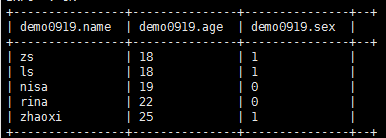
函数测试
in:
in的简单使用(ok,支持):
select name,age,sex from demo0919 where age in (18,22);
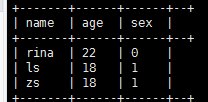
in 里面嵌套子查询 (error ,不支持)
select name,age,sex from demo0919 where age in (select a.age from demo0919_1 a );

not in :
not in 的简单使用(ok, 支持)
select name,age,sex from demo0919 where age not in (18,22);
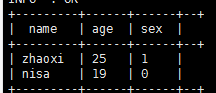
not in 里面嵌套子查询 (error ,不支持)
select name,age,sex from demo0919 where age not in (select a.age from demo0919_1 a);

exists:
exists 基本使用(ok)
select name,age,sex from demo0919 where exists (select 1 from demo0919_1 a where a.age=18 and demo0919.name = a.name);
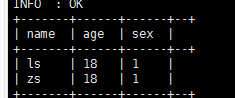
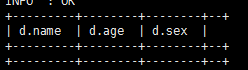
exists子查询里面使用了 外表demo0919中的字段 不等于(> , < , >= , <= , <>) 子查询表中的字段(error 不支持)
select name,age,sex from demo0919 where exists (select 1 from demo0919_1 a where a.age>demo0919.age and demo0919.name = a.name);

处理方案:
根据此段我们可以借助left outer join,left semi join 来实现类似功能 前者允许右表的字段在select或where子句中引用,而后者不允许。
(left semi join :需要注意 使用left semi join时 右侧的表不能被使用,只能在on后面作为条件筛选)
select d.name,d.age,d.sex from demo0919 d left outer join demo0919_1 a on d.name = a.name where a.age>d.age;
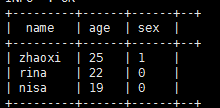
exists子查询里面未使用 外表demo0919中的字段 不等于(> , < , >= , <= , <>) 子查询表中的字段(ok 支持)
select name,age,sex from demo0919 where exists (select 1 from demo0919_1 a where a.age>18 and demo0919.name = a.name);
not exists 与 exist雷同。
Hive数据类型转换函数:
daycount string; daycount表示耗时数据信息,原来定义为string类型
cast(daycount AS FLOAT) 将string类型数据转换为FLOAT类型
Hive日期类型转换函数:
unix_timestamp(countdate) :将日期转换为时间戳, countdate为日期字段
from_unixtime(unix_timestamp(countdate),'yyyy-MM-dd HH:mm:ss') :格式化当前时间
Hive的group by :(这里是因为我们在使用group by时用到了带时分秒的日期字段,hive精确到了毫秒级别,mysql中精确到秒,带有日期字段的数据一起dsitinct 或 group by的时候 数据就会有差异)
因为hive保留了 毫秒位数据,故结果数据会比mysql多
例如: 2019-09-19 12:12:12.1 2019-09-19 12:12:12.2
在hive里面 distinct后这是两个不同的日期 2019-09-19 12:12:12.1 2019-09-19 12:12:12.2
在mysql里面 distinct后 这就是相同的日期了 2019-09-19 12:12:12
Hive部分函数解析的更多相关文章
- [Hive]HiveSQL解析原理
Hive是基于Hadoop的一个数据仓库系统,在各大公司都有广泛的应用.美团数据仓库也是基于Hive搭建,每天执行近万次的Hive ETL计算流程,负责每天数百GB的数据存储和分析.Hive的稳定性和 ...
- hive中解析json数组
-- hive中解析json数组 select t1.status ,substr(ss.col,,) as col ,t3.evcId ,t3.evcLicense ,t3.evcAddress , ...
- hive源代码解析之一hive主函数入口
hive其实做的就是解析一条sql然后形成到mapreduce任务,就是一个代码解释器.hive源代码本身就可以分为ql/metasotre/service/serde 这几块:其中 对于Hive来说 ...
- Hive基本命令解析
1. Hive的分区作用 命令:创建分区 create table t_sz_part(id int, name string) partitioned by (country string) row ...
- hive 元数据解析
在使用Hive进行开发时,我们往往需要获得一个已存在hive表的建表语句(DDL),然而hive本身并没有提供这样一个工具. 要想还原建表DDL就必须从元数据入手,我们知道,hive的元数据并不存放在 ...
- Hive Hadoop 解析 orc 文件
解析 orc 格式 为 json 格式: ./hive --orcfiledump -d <hdfs-location-of-orc-file> 把解析的 json 写入 到文件 ./hi ...
- 如何在 Apache Hive 中解析 Json 数组
我们都知道,Hive 内部提供了大量的内置函数用于处理各种类型的需求,参见官方文档:Hive Operators and User-Defined Functions (UDFs).我们从这些内置的 ...
- hive sql 解析json
在hive中会有很多数据是用json格式来存储的,而我们用数据的时候又必须要将json格式的数据解析成为正常的数据,今天我们就来聊聊hive中是如何解析json数据的. 下面这张表就是json格式的表 ...
- Saiku部分函数解析(八)
Saiku函数解析 1. now() : 获取当前日期 直接使用即可 2. IIF(logic_exp, string, string): IIF判断,logic_exp是逻辑表达式,结果为t ...
随机推荐
- 选择排序 C&&C++
选择排序 选择排序即在每一步中选取最小值重新排列,从而达到排序的目的 流程: (1)先从原始数组选择一个最小数据和第一个位置交换 (2)剩下的n-1个数据选择最小的和第二个位置交换 (3)不断重复 ...
- python为前端提供API
作为一名前端来学习后端语言,有难度啊.这里把第一次尝试的过程做个记录 1.网上看到Python给前端提供API可以使用python的flaskweb框架 #py文件 import json from ...
- [从今天开始修炼数据结构]图的最小生成树 —— 最清楚易懂的Prim算法和kruskal算法讲解和实现
接上文,研究了一下算法之后,发现大话数据结构的代码风格更适合与前文中邻接矩阵的定义相关联,所以硬着头皮把大话中的最小生成树用自己的话整理了一下,希望大家能够看懂. 一.最小生成树 1,问题 最小生成树 ...
- Linux查看文本的第20~30行
一.模拟环境 [root@WT ~]# seq >/data/test.txt [root@WT ~]# xargs -n </data/test.txt 二.实现命令 方法一(head+ ...
- C# WPF有趣的登录加载窗体
时间如流水,只能流去不流回! 点赞再看,养成习惯,这是您给我创作的动力! 本文 Dotnet9 https://dotnet9.com 已收录,站长乐于分享dotnet相关技术,比如Winform.W ...
- pytho GUI编程之Tkinter
摘录 python核心编程s GUI(Graphical User Interface)图形用户界面. Tcl.Tk和Tkinter Tkinter是python的默认GUI库.它基于Tk工具包,该工 ...
- Redis基础知识、命令以及java操作Redis
1 nosql的概念 sql:操作(关系型)数据库的标准查询语言 关系型数据库(rdbms):以关系(由行和列组成的二维表)模型为核心数据库,有表的储存系统.(mysql.oracle.sqlserv ...
- 使用SC命令操作(安装、开启、配置、关闭、删除)Windows下的服务
目录 一.直接使用cmd命令行操作windows服务 二.使用bat批处理-操作windows服务 一.直接使用cmd命令行操作windows服务 1.安装服务 sc create 服务名 binPa ...
- localStorage和sessionStorage的共同点和区别
共同点: 1.localStorage和sessionStorage都是用来存储客户端临时信息的对象. 2.他们均只能存储字符串类型的对象. 3.不同浏览器无法共享localStorage或sessi ...
- Spring Cloud @RefreshScope刷新问题
问题 使用@RefreshScope会刷新在sprign ioc中所有bean中使用@Value的值,但是在配置类中使用方法去配置的其他类参数并不会改变例如 解决方案 //使用此方法监听事件 @Eve ...