
Python学习日记(十一) 内置函数
什么是内置函数?
就是Python中已经写好了的函数,可以直接使用
内置函数图表:
以3.6.2为例
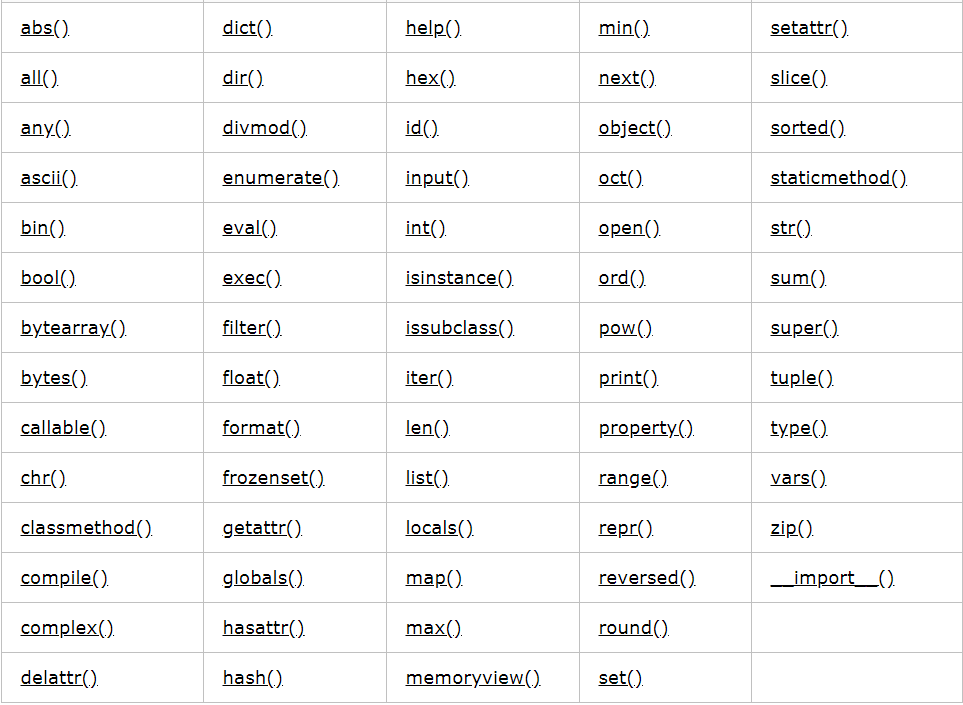
内置函数分类:
一、反射相关
1.hasattr()
2.getattr()
3.setattr()
4.delattr()
二、基础数据类型相关
1.和数字相关
(1)数据类型
a.bool()
把一个值转换成布尔值
li = ['',[],1,12,0]

for i in li:

    print(bool(i))

# False

# False

# True

# True

# False
b.int()
把一个值转换成整型
num = input('Please input a number:')

print(10 + int(num))

# Please input a number:20

#
c.float()
把一个整数或数字字符串转换成带小数点的数
print(float('123.5'),type(float('123.5')))      #123.5 <class 'float'>

print(float(-50.2),type(float(-50.2)))          #-50.2 <class 'float'>
d.complex()
返回一个复数
a = 1 + 2j

b = 2

print(complex(a))   #(1+2j)

print(complex(b))   #(2+0j)

print(complex(2,3)) #(2+3j)
(2)进制转换
a.bin()
将一个数以二进制字符串的方式表示
print(bin(2))   #0b10

print(bin(10))  #0b1010
b.oct()
把一个数转换成八进制的字符串
print(oct(20),type(oct(20)))    #0o24 <class 'str'>

print(oct(8),type(oct(8)))      #0o10 <class 'str'>
c.hex()
把一个数字转换成十六进制的字符串
print(hex(10),type(hex(10)))    #0xa <class 'str'>

print(hex(28),type(hex(28)))    #0x1c <class 'str'>
(3)数学运算
a.abs()
对一个数的值取绝对值,结果不改变原值
a = -5

print(abs(a))   #
b.divmod()
返回一个以商和余数组成的元祖
print(divmod(10,5),type(divmod(10,5)))      #(2, 0) <class 'tuple'>

print(divmod(4,9))                          #(0, 4)
c.round()
将浮点值四舍五入
import math

Pi = math.pi

print(round(Pi,4))      #3.1416
d.pow()
一般情况下给函数两个数可以计算次方,若给定三个数则在幂运算后再取余
print(pow(2,3))     #

print(pow(2,0.5))   #1.4142135623730951

print(pow(3,2,2))   #
e.sum()
print(sum([2,2,3,5,6,2,4]))        #

print(sum([2,2,3,5,6,2,4],10))     #34  这里只是先让10进行sum的运算
f.min()
print(min(-1,-2,2,3))                    #-2

print(min(-1,-2,2,3,key=abs))            #-1

print(min('aab','aaab','bc',key=len))    #bc
g.max()
print(max(-4,-2,2,3))                    #

print(max(-4,-2,2,3,key=abs))            #-4

print(max('aab','aaab','bc',key=len))    #aaab
2.和数据结构相关
(1)序列
<1>列表和元祖
a.list()
将一个元祖或者字符串转化成一个列表
print(list('abcdefg'))  #['a', 'b', 'c', 'd', 'e', 'f', 'g']

print(list((1,2,'l')))  #[1, 2, 'l']
b.tuple()
将一个列表转化为元祖
print(tuple([1,2,3,'h','k'])) #(1, 2, 3, 'h', 'k')
<2>相关内置函数
a.reversed()
函数返回一个反转的迭代器
l = [1,2,3,'h','k',True]

l2 = reversed(l)        #<list_reverseiterator object at 0x0000000001DD5470>

print(l2)               #不改变原列表并返回一个迭代器

for i in l2:

    print(i)

# True

# k

# h

#

#

#
b.slice()
l = ['a',1,2,3,4,8,'h','k']

sli = slice(2,7,2)      #切片顾头不顾尾

print(l[sli])           #[2, 4, 'h']
<3>字符串
a.str()
将对象转化为适合人阅读的格式
tu = (1,2,'h')

dic = {'k1' : 1,'k2' : 2}

li = [1,2,3,'h']

i = 123

print(str(tu),type(tu))     #(1, 2, 'h') <class 'tuple'>

print(str(dic),type(dic))   #{'k1': 1, 'k2': 2} <class 'dict'>

print(str(li),type(li))     #[1, 2, 3, 'h'] <class 'list'>

print(str(i),type(i))       #123 <class 'int'>
b.format()
主要用于格式化输出也可以用于数学方面的研究
value = 'ox123'

tu = ('value1','value2','value3')

print('get value->{0}'.format(value))   #get value->ox123

print('{0} {1} {2}'.format(*tu))        #value1 value2 value3

'''数字格式化'''

a = 12.579

print('{:.2f}'.format(a))               #12.58  保留小数点的后两位

print('{:+.2f}'.format(a))              #+12.58 带符号的保留小数点的后两位

print('{:-.2f}'.format(-a))             #-12.58  带符号的保留小数点的后两位

print('{:.0f}'.format(a))               #13     不带小数返回并对结果四舍五入

print('{:.2%}'.format(a/100))           #12.58% 结果以百分比格式输出

b = 1001

print('{:0>8d}'.format(b))              #00001001   数字补0(填充左边宽度为8)

print('{:*>8d}'.format(b))              #****1001   数字补*(填充左边宽度为8)

print('{:*<8d}'.format(b))              #1001****   数字补*(填充右边宽度为8)

c = 10**10

print('{:,}'.format(c))                 #10,000,000,000    结果以逗号的形式分隔

print('{:.2e}'.format(c))               #1.00e+10          结果以指数标准格式输出

d = 7

print('{:>5d}'.format(d))               #    7      向右对齐

print('{:<5d}'.format(d))               #7          向左对齐

print('{:^5d}'.format(d))               #  7        中间对齐

e = 15

print('{:b}'.format(e))                 #1111       返回二进制

print('{:d}'.format(e))                 #15         返回十进制

print('{:o}'.format(e))                 #17         返回八进制

print('{:x}'.format(e))                 #f          返回十六进制

print('{:#x}'.format(e))                #0xf        返回带格式输出的十六进制小写

print('{:#X}'.format(e))                #0XF        返回带格式输出的十六进制大写
c.bytes()
主要用在网络编程、照片和视频、爬取网页等二进制文件的时候
print(bytes('Python爬虫',encoding='utf-8')) #b'Python\xe7\x88\xac\xe8\x99\xab'
d.bytearray()
返回一个bytes数组
b = bytes('Python爬虫',encoding='utf-8')   #b'Python\xe7\x88\xac\xe8\x99\xab'

print(bytearray(b))                        #bytearray(b'Python\xe7\x88\xac\xe8\x99\xab')
e.memoryview()
在一个缓冲区中查看一个对象,返回值为一个元祖
v = memoryview(bytearray('abcdef','utf-8'))

print(v[2])     #

print(v[-1])    #

print(v[1:5:2]) #<memory at 0x00000000024DE288>

print(v[1:5:2].tobytes())   #b'bd'
f.ord()
以一个字符作为参数返回一个unicode值或者ascii值,返回值为一个对应的十进制整数
print(ord('a'))     #

print(ord('A'))     #

print(ord('az'))    #TypeError 超过给定长度报错
g.chr()
以一个十进制或十六进制的整数作为参数,数字范围为0-1114111(16进制为0x10FFFF),返回值为对应的ASCII字符
print(chr(65))      #A

print(chr(97))      #a

print(chr(0x35))    #
h.ascii()
返回一个ascii字符,如果找不到这个ascii字符则通过repr()使用\x,\u或\U编码的字符
print(ascii(10))     #

print(ascii('a'))    #'a'

print(ascii('中'))    #'\u4e2d'
i.repr()
将对象转化为供解释器读取的形式,返回一个string的格式
name = 'jane'

print('hello %r'%name)  #hello 'jane'

print(repr(''))        #'1'

print(repr(1))          #
(2)数据集合
<1>字典
a.dict()
'''

    dict(mapping) -> new dictionary initialized from a mapping object's

 |      (key, value) pairs

 |  dict(iterable) -> new dictionary initialized as if via:

 |      d = {}

 |      for k, v in iterable:

 |          d[k] = v

 |  dict(**kwargs) -> new dictionary initialized with the name=value pairs

 |      in the keyword argument list.  For example:  dict(one=1, two=2)

'''
mapping为元素容器、iterable为可迭代的对象、**kwargs为关键字
这里的主要语法:
'''映射函数创建字典'''

dict1 = dict(zip(['key1','key2','key3','key4'],[1,2,3]))    #{'key1': 1, 'key2': 2, 'key3': 3}

print(dict1)

'''关键字创建字典'''

dict2 = dict(a = 1,b = 'b',c = None)

print(dict2)        #{'a': 1, 'b': 'b', 'c': None}

'''可迭代创建字典'''

dict3 = dict([('a',1),('b',None),('c','')])

print(dict3)        #{'a': 1, 'b': None, 'c': ''}
<1>集合
a.set()
创建一个无序不重复的元素集合,这里的参数必须是可迭代对象
set1 = set([1,2,2,3,'a','a','b'])

print(set1) #{1, 2, 3, 'a', 'b'}
b.frozenset()
返回一个冻结的集合,之后不能进行添加或修改任何元素
set1 = {1,2,3,'a'}

set1 = frozenset(set1)

print(set1,type(set1))  #frozenset({1, 2, 3, 'a'}) <class 'frozenset'>

set1[0] = 'b'           #TypeError: 'frozenset' object does not support item assignment
(3)相关内置函数
a.len()
返回该对象的长度
print(len(''))           #

print(len([1,2,3,4,5,6]))   #6
b.enumerate()
语法:

    enumerate(sequence, [start=0])

sequence:必须是一个序列、迭代器或者其他支持迭代的对象

start:下标开始位置
names = ['Jane','Mike','Byes','Suke']

iterator = enumerate(names)     #<enumerate object at 0x0000000001E9CA68> 获得一个关于枚举的迭代器

for i in iterator:

    print(i)

# (0, 'Jane')

# (1, 'Mike')

# (2, 'Byes')

# (3, 'Suke')

iterator2 = enumerate(names)

print(list(iterator2))                  #[(0, 'Jane'), (1, 'Mike'), (2, 'Byes'), (3, 'Suke')]

print(list(enumerate(names,start=5)))   #[(5, 'Jane'), (6, 'Mike'), (7, 'Byes'), (8, 'Suke')]
和for循环相关:
for i,e in enumerate(range(4),2):

    print('i = {0},e = {1}'.format(i,e))

# i = 2,e = 0

# i = 3,e = 1

# i = 4,e = 2

# i = 5,e = 3
c.all()
如果给定一个可迭代对象中的元素都为True,则返回True,否则返回False
print(all([1,2,0]))                 #False

print(all([1,2,False]))             #False

print(all([1,2,None]))              #False

print(all([1,2,()]))                #False

print(all([1,2,set()]))             #False

print(all([1,2,{}]))                #False

print(all([1,2,'']))                #False

print(all([1,2,2]))                 #True

print(all([]))                      #True

print(all({}))                      #True
d.any()
如果给定一个可迭代对象中的元素都为False,则返回False,否则返回True
print(any([1,2,0]))                 #True

print(any([1,2,False]))             #True

print(any([1,2,None]))              #True

print(any([1,2,()]))                #True

print(any([1,2,set()]))             #True

print(any([1,2,{}]))                #True

print(any([1,2,'']))                #True

print(any(['',None,()]))            #False

print(any([]))                      #False

print(any({}))                      #False
e.zip()
l1 = ['key1','key2','key3']

l2 = [1,2,3,4]

zipped = zip(l1,l2)

print(zipped)       #<zip object at 0x00000000024EA7C8>

print(dict(zipped)) #{'key1': 1, 'key2': 2, 'key3': 3}
l1 = ['key1','key2','key3']

for i in zip(*l1):

    print(i)

# ('k', 'k', 'k')

# ('e', 'e', 'e')

# ('y', 'y', 'y')

# ('1', '2', '3')
f.filter()
用于过滤序列,过滤掉不合格的元素,返回一个迭代器,不改变原来的值
语法:filter(function,iterable) function:筛选函数 iterable:可迭代的对象
def is_even(x):

    return x % 2 == 0

fiterator = filter(is_even,[1,2,2,3,4,5,6,7])

print(fiterator)        #<filter object at 0x00000000006722E8>

print(list(fiterator))  #[2, 2, 4, 6]
筛选含有字符串的元素:
def is_str(s):

    if type(s) == str and str(s).strip():

        return True

ret = filter(is_str,['h',1,'',None,2,'k','l'])

print(list(ret))        ##['h', 'k', 'l']
g.map()
会根据提供的函数对指定序列做映射
执行前后元素个数不变,值可能发生改变
返回值是一个迭代器
l = [-2,-1,2,0]

ret = map(abs,l)

print(ret)              #<map object at 0x0000000001DA2F60>

print(list(ret))        #[2, 1, 2, 0]
h.sorted()
语法:sorted(iterable,key=None,reverse=False)
iterable:是一个可迭代对象
key:用于比较的元素
reverse:排序规则,reverse=False 升序(默认),反之降序
l = [-2,-2,1,6,-5,-2,4,3]

print(sorted(l))                            #[-5, -2, -2, -2, 1, 3, 4, 6]   升序排列

print(sorted(l,reverse=True))               #[6, 4, 3, 1, -2, -2, -2, -5]   降序排列

print(sorted(l,key=abs))                    #[1, -2, -2, -2, 3, 4, -5, 6]
三、作用域相关
1.locals()
找到当前作用域下所有的变量对应关系,并以字典返回
2.globals()
找到全局作用域下所有的变量对应关系,并以字典返回
a = 1

b = 'hello'

def func():

    c = 3

    print(locals())     #{'c': 3}

    print(globals())    #{'__name__': '__main__', '__loader__': <_frozen_importlib_external.SourceFileLoader object at 0x002A5910>,

                        # 'func': <function func at 0x00527CD8>, '__file__': 'C:/Users/Administrator/PycharmProjects/PYL/生成器/1.py',

                        # '__spec__': None, '__cached__': None, 'a': 1, '__builtins__': <module 'builtins' (built-in)>, 'b': 'hello',

                        # '__doc__': None, '__package__': None}

func()
四、面向对象相关
1.定义特殊方法的装饰器
a.classmethod()
b.property()
c.staticmethod()
2.判断对象/类与类之间的关系
a.isinstance()
b.issubclass()
3.所有类的基类
a.object()
4.继承相关
a.supper()
5.封装相关
a.vars()
6.数据类型相关
a.type()
一个参数时查看类型
print(type(2))      #<class 'int'>

print(type(str))    #<class 'type'>
五、迭代器/生成器相关
1.range()
用于创建一个整数列表,常用在for循环中
li = list(range(0,11,2))

print(li)   #[0, 2, 4, 6, 8, 10]
2.__next__()
一个next对应一个值返回,如果这个迭代器已经没有值可以返回了那么就将报错
li = ['a',1,2]

iterator = li.__iter__()

print(iterator.__next__())      #a

print(iterator.__next__())      #
3.__iter__()
当一个具有可迭代数据使用__iter__()它会返回一个迭代器的内存地址
li = ['a',1,2]

iterator = li.__iter__()

print(iterator)         #<list_iterator object at 0x0000000002202F60>
六、其他
1.输入输出
(1)input()
content = input('请输入一个数:')

print(content)

# 请输入一个数:5

#
(2)print()
特殊字符分隔
print('a','b','c',sep = '&&',end = '') #a&&b&&c
将用户输入的数据直接写入文件
f = open('file',mode='w',encoding='utf-8')

content = input()

print(content,sep=',',end='',file = f,flush=True)  #file默认是输出到屏幕,如果设置文件句柄则输出到文件

                                                   #flush立即将内容输出到文件流,不留缓存

f.close()
2.内存相关
(1)hsah()
这里hash()中用到的参数必须是不可变数据类型,hash()完后结果会返回一串数字
print(hash(133))        #

print(hash('aaaaa'))    #-868214941

print(hash('aaaax'))    #

print(hash((1,2,3)))    #-378539185
最直接的例子就是字典键的值,字典中的key是唯一的并且只能对应一个hash值
(2)id()
返回一个变量的内存地址
a = 5

b = 'hello'

c = [1,2]

print(id(a))    #

print(id(b))    #

print(id(c))    #
3.字符串类型代码的执行
(1)eval()
可以执行字符串类型的代码,有返回值,适用于简单计算
建议一般情况下不要使用eval()除非自己很明确要执行什么
print(eval(''))              #

print(eval('1 + 2 + 3 + 4'))    #
(2)exec()
可以执行字符串类型的代码,无返回值,适用于简单流程控制
print(exec(''))                  #None

print(exec('1 + 2 + 3 + 4 + 5'))    #None

code = '''for i in [1,5,10]:

                print(i*2)'''

exec(code)

#

#

#
(3)complie()
compile(source, filename, mode, flags=0, dont_inherit=False, optimize=-1)

source:字符串或者AST

filename:代码文件的名称,如果不是从文件中读取代码则传递一些可辨认的值。当传入source参数时,filename参数传空即可

model:编译代码的种类 eval属于计算类、exec属于流程类、single属于交互类
计算类:
code = '2*5/10 + 6'

ret = compile(code,'','eval')

print(eval(ret))    #7.0
流程类:
code = '''print([i*i for i in range(10) if i > 5])'''

ret = compile(code,'','exec')

exec(ret)   #[36, 49, 64, 81]
交互类:
code = "name = input('Please input your name:')"

ret = compile(code,'','single')

exec(ret)

print(name)
4.文件操作相关
(1)open()
打开一个文件的相关操作
5.模块相关
(1)__import__()
# import time

time = __import__('time')

print(time.time())
6.帮助
(1)help()
能够查看一个变量或类型的方法
help(bool)

# Help on class bool in module builtins:

#

# class bool(int)

#  |  bool(x) -> bool

#  |

#  |  Returns True when the argument x is true, False otherwise.

#  |  The builtins True and False are the only two instances of the class bool.

#  |  The class bool is a subclass of the class int, and cannot be subclassed.

#  |

#  |  Method resolution order:

#  |      bool

#  |      int

#  |      object

#  |

#  |  Methods defined here:

#  |

#  |  __and__(self, value, /)

#  |      Return self&value.

#  |

#  |  __new__(*args, **kwargs) from builtins.type

#  |      Create and return a new object.  See help(type) for accurate signature.

#  |

#  |  __or__(self, value, /)

#  |      Return self|value.

#  |

#  |  __rand__(self, value, /)

#  |      Return value&self.

#  |

#  |  __repr__(self, /)

#  |      Return repr(self).

#  |

#  |  __ror__(self, value, /)

#  |      Return value|self.

#  |

#  |  __rxor__(self, value, /)

#  |      Return value^self.

#  |

#  |  __str__(self, /)

#  |      Return str(self).

#  |

#  |  __xor__(self, value, /)

#  |      Return self^value.

#  |

#  |  ----------------------------------------------------------------------

#  |  Methods inherited from int:

#  |

#  |  __abs__(self, /)

#  |      abs(self)

#  |

#  |  __add__(self, value, /)

#  |      Return self+value.

#  |

#  |  __bool__(self, /)

#  |      self != 0

#  |

#  |  __ceil__(...)

#  |      Ceiling of an Integral returns itself.

#  |

#  |  __divmod__(self, value, /)

#  |      Return divmod(self, value).

#  |

#  |  __eq__(self, value, /)

#  |      Return self==value.

#  |

#  |  __float__(self, /)

#  |      float(self)

#  |

#  |  __floor__(...)

#  |      Flooring an Integral returns itself.

#  |

#  |  __floordiv__(self, value, /)

#  |      Return self//value.

#  |

#  |  __format__(...)

#  |      default object formatter

#  |

#  |  __ge__(self, value, /)

#  |      Return self>=value.

#  |

#  |  __getattribute__(self, name, /)

#  |      Return getattr(self, name).

#  |

#  |  __getnewargs__(...)

#  |

#  |  __gt__(self, value, /)

#  |      Return self>value.

#  |

#  |  __hash__(self, /)

#  |      Return hash(self).

#  |

#  |  __index__(self, /)

#  |      Return self converted to an integer, if self is suitable for use as an index into a list.

#  |

#  |  __int__(self, /)

#  |      int(self)

#  |

#  |  __invert__(self, /)

#  |      ~self

#  |

#  |  __le__(self, value, /)

#  |      Return self<=value.

#  |

#  |  __lshift__(self, value, /)

#  |      Return self<<value.

#  |

#  |  __lt__(self, value, /)

#  |      Return self<value.

#  |

#  |  __mod__(self, value, /)

#  |      Return self%value.

#  |

#  |  __mul__(self, value, /)

#  |      Return self*value.

#  |

#  |  __ne__(self, value, /)

#  |      Return self!=value.

#  |

#  |  __neg__(self, /)

#  |      -self

#  |

#  |  __pos__(self, /)

#  |      +self

#  |

#  |  __pow__(self, value, mod=None, /)

#  |      Return pow(self, value, mod).

#  |

#  |  __radd__(self, value, /)

#  |      Return value+self.

#  |

#  |  __rdivmod__(self, value, /)

#  |      Return divmod(value, self).

#  |

#  |  __rfloordiv__(self, value, /)

#  |      Return value//self.

#  |

#  |  __rlshift__(self, value, /)

#  |      Return value<<self.

#  |

#  |  __rmod__(self, value, /)

#  |      Return value%self.

#  |

#  |  __rmul__(self, value, /)

#  |      Return value*self.

#  |

#  |  __round__(...)

#  |      Rounding an Integral returns itself.

#  |      Rounding with an ndigits argument also returns an integer.

#  |

#  |  __rpow__(self, value, mod=None, /)

#  |      Return pow(value, self, mod).

#  |

#  |  __rrshift__(self, value, /)

#  |      Return value>>self.

#  |

#  |  __rshift__(self, value, /)

#  |      Return self>>value.

#  |

#  |  __rsub__(self, value, /)

#  |      Return value-self.

#  |

#  |  __rtruediv__(self, value, /)

#  |      Return value/self.

#  |

#  |  __sizeof__(...)

#  |      Returns size in memory, in bytes

#  |

#  |  __sub__(self, value, /)

#  |      Return self-value.

#  |

#  |  __truediv__(self, value, /)

#  |      Return self/value.

#  |

#  |  __trunc__(...)

#  |      Truncating an Integral returns itself.

#  |

#  |  bit_length(...)

#  |      int.bit_length() -> int

#  |

#  |      Number of bits necessary to represent self in binary.

#  |      >>> bin(37)

#  |      '0b100101'

#  |      >>> (37).bit_length()

#  |      6

#  |

#  |  conjugate(...)

#  |      Returns self, the complex conjugate of any int.

#  |

#  |  from_bytes(...) from builtins.type

#  |      int.from_bytes(bytes, byteorder, *, signed=False) -> int

#  |

#  |      Return the integer represented by the given array of bytes.

#  |

#  |      The bytes argument must be a bytes-like object (e.g. bytes or bytearray).

#  |

#  |      The byteorder argument determines the byte order used to represent the

#  |      integer.  If byteorder is 'big', the most significant byte is at the

#  |      beginning of the byte array.  If byteorder is 'little', the most

#  |      significant byte is at the end of the byte array.  To request the native

#  |      byte order of the host system, use `sys.byteorder' as the byte order value.

#  |

#  |      The signed keyword-only argument indicates whether two's complement is

#  |      used to represent the integer.

#  |

#  |  to_bytes(...)

#  |      int.to_bytes(length, byteorder, *, signed=False) -> bytes

#  |

#  |      Return an array of bytes representing an integer.

#  |

#  |      The integer is represented using length bytes.  An OverflowError is

#  |      raised if the integer is not representable with the given number of

#  |      bytes.

#  |

#  |      The byteorder argument determines the byte order used to represent the

#  |      integer.  If byteorder is 'big', the most significant byte is at the

#  |      beginning of the byte array.  If byteorder is 'little', the most

#  |      significant byte is at the end of the byte array.  To request the native

#  |      byte order of the host system, use `sys.byteorder' as the byte order value.

#  |

#  |      The signed keyword-only argument determines whether two's complement is

#  |      used to represent the integer.  If signed is False and a negative integer

#  |      is given, an OverflowError is raised.

#  |

#  |  ----------------------------------------------------------------------

#  |  Data descriptors inherited from int:

#  |

#  |  denominator

#  |      the denominator of a rational number in lowest terms

#  |

#  |  imag

#  |      the imaginary part of a complex number

#  |

#  |  numerator

#  |      the numerator of a rational number in lowest terms

#  |

#  |  real

#  |      the real part of a complex number
7.调用相关
(1)callable()
判断参数是否是一个可调用的函数名,若是则True,不是则False
a = 1

print(callable(a))  #False

def func():

    return 5

print(callable(func))     #True

print(callable(func()))   #False
8.查看内置属性
(1)dir()
查看一个参数或变量的属性
print(dir([])) #['__add__', '__class__', '__contains__', '__delattr__', '__delitem__', '__dir__', '__doc__', '__eq__', '__format__', '__ge__', '__getattribute__', '__getitem__', '__gt__', '__hash__', '__iadd__', '__imul__', '__init__', '__iter__', '__le__', '__len__', '__lt__', '__mul__', '__ne__', '__new__', '__reduce__', '__reduce_ex__', '__repr__', '__reversed__', '__rmul__', '__setattr__', '__setitem__', '__sizeof__', '__str__', '__subclasshook__', 'append', 'clear', 'copy', 'count', 'extend', 'index', 'insert', 'pop', 'remove', 'reverse', 'sort']
Python学习日记(十一) 内置函数的更多相关文章
- python学习日记(内置函数)
目前所有内置函数 http://www.runoob.com/python3/python3-built-in-functions.html *菜鸟教程* 内置函数分类 作用域相关globals(). ...
- python学习日记(内置函数补充)
剩余匿名函数 序列 序列——列表和元组相关的:list和tuple 序列——字符串相关的:str,format,bytes,bytearry,memoryview,ord,chr,ascii,repr ...
- Python学习第二阶段day1 内置函数,序列化,软件目录开发规范
内置函数 1.abs() 求绝对值 2.all() 所有元素为真才返回真 all( [1,1,2,3,-1] ) 值为True 3.any() 所有元素为假才返回假 any([0,0,0 ...
- Python学习笔记-Day3-python内置函数
python内置函数 1.abs 求绝对值 2.all 判断迭代器中的所有数据是否都为true 如果可迭代的数据的所有数据都为true或可迭代的数据为空,返回True.否则返回False 3.a ...
- [Python学习笔记-001] 内置函数getattr()
如果某个实例foo有多个方法, 当对foo的每一个方法我们都需要使用try ... except ...进行包装的时候,内置函数getattr()可以用来精简代码. 1. getattr()的用法 # ...
- Python学习笔记011——内置函数exec()
1 描述 把一个字符串当成语句执行 exec() 执行储存在字符串或文件中的 Python 语句,相比于 eval() , exec() 可以执行更复杂的 Python 代码. exec函数和ev ...
- Python学习笔记-常用内置函数
输出:print() 功能:输出打印 语法:print(*objects, sep=' ', end='\n', file=sys.stdout) 参数:objects----复数,表示可以一次输出多 ...
- python学习笔记011——内置函数pow()
1 语法 pow(x, y[, z]) x -- 数值表达式. y -- 数值表达式. z -- 数值表达式. 函数是计算 x 的 y 次方,如果 z 在存在,则再对结果进行取模,其结果等效于pow( ...
- python学习日记(内置、匿名函数练习题)
用map来处理字符串列表 用map来处理字符串列表,把列表中所有水果都变成juice,比方apple_juice fruits=['apple','orange','mango','watermelo ...
随机推荐
- jeff dean的主页
https://ai.google/research/people/jeff/ 上面有他的很多论文和ppt 很不错 我于1999年中期加入Google,目前是研究小组的Google高级研究员,负责Go ...
- MySQL count
https://www.jianshu.com/p/1b0a1f641e80] 不同引擎count(*)实现方式不同 MyISAM引擎把一个表的总行数记录在了磁盘上,执行count(*)会直接返回这个 ...
- <div> <p> <span>的用法和区别
<div> 标签可以把文档分割为独立的.不同的部分.它可以用作严格的组织工具,并且不使用任何格式与其关联. 更重要的意义是在网页的动态实现过程中,对划分的区域统一处理,例如换背景色.字体等 ...
- Tomcat 配置虚拟目录以及虚拟主机
目录 虚拟目录 虚拟主机 虚拟目录 虚拟目录的功能 一般情况下,我们的打包后的项目都是放到tomcat/webapps目录下的,然后通过localhost:8080/project_name这个链接进 ...
- Qt编写控件属性设计器11-导入xml
一.前言 上一篇文章负责把设计好的控件数据导出到了xml文件,本偏文章负责把导出的xml数据文件导入,然后在画布上自动生成对应的控件,Qt内置的xml数据解析功能,非常强大,都封装在QtXml组件中, ...
- springboot 整合Elasticsearch
Elasticsearch Elasticsearch 是一个分布式.可扩展.实时的搜索与数据分析引擎. 它能从项目一开始就赋予你的数据以搜索.分析和探索的能力,可用于实现全文搜索和实时数据统计. 在 ...
- MUD游戏开发教程视频
MUD游戏开发教程视频 https://space.bilibili.com/476328540/channel/detail?cid=91187
- eclipse :代码自动补全不生效解决办法
参考文章:https://blog.csdn.net/qq_35033270/article/details/79285821 请见下图! 恢复缺省值即可!
- .Net Core 定时任务TimeJob
转载自:https://blog.csdn.net/u013711462/article/details/53449799 定时任务 Pomelo.AspNetCore.TimedJob Pomelo ...
- Ansible-Hoc--样例
一.常用场景 1. 列出支持的模块及模块功能说明: 2. sudo用法: 3. 检查服务器存活,复制本地文件到远程: 4. 多线程判断服务器的存活: 5. 显示所有主机的hostname: 6. 列 ...