
【使用DIV+CSS重写网站首页案例】步骤分析与代码实现
使用DIV+CSS重写网站首页案例
步骤分析:
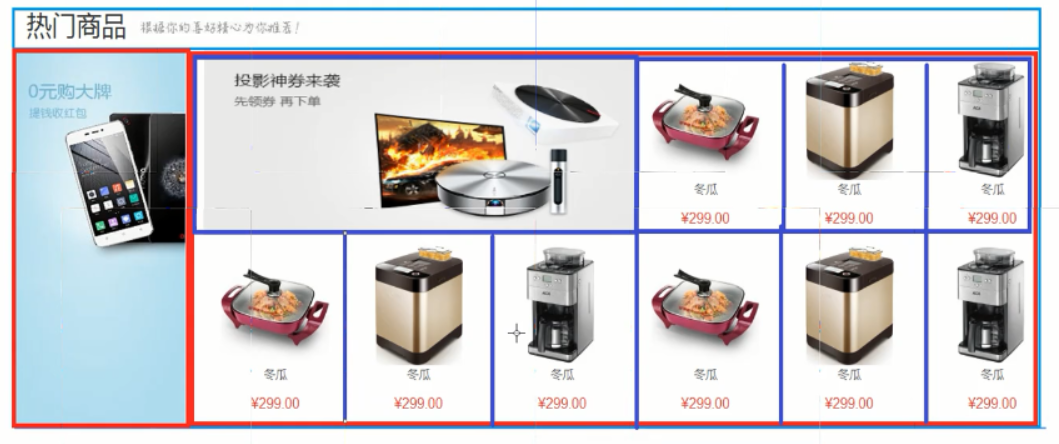
 ,选择要调整的元素;
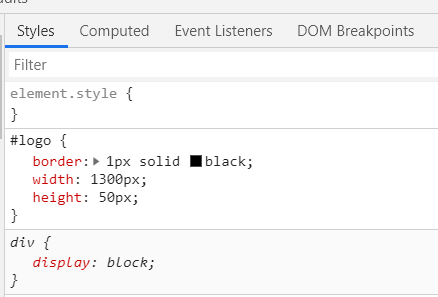 ,上下箭头按键进行调整;
调整效果ok,F11按键关闭,在html文件中调整相应的数值;
代码:
<!DOCTYPE html>
<html> <head>
<meta charset="UTF-8">
<title>首页</title>
<style>
#father {
border: 1px solid red;
width: 1300px;
height: 2200px;
/*margin可以设置为自动*/
margin: auto;
}
/*方法一:加上这个框<div id="logo">,
把下面三个小div和menu隔离开*/
/*#logo {
border: 1px solid black;
width: 1299px;
height: 50px;
}*/ .top {
border: 1px solid blue;
width: 431px;
height: 50px;
float: left;
}
/*设置内边距,可根据页面F11做调整*/ #top {
padding-top: 12px;
/*注意取值:height=50px-12px*/
height: 38px;
} #menu {
border: 1px solid red;
width: 1300px;
height: 50px;
background-color: black;
}
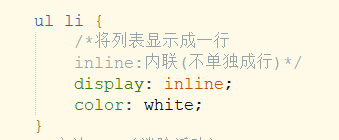
/*设置列表的项*/ ul li {
/*将列表显示成一行
inline:内联(不单独成行)*/
display: inline;
color: white;
}
/*方法二:(消除浮动)
* 如果没有<div id="logo">的框,
* 三个小div(left浮动)和menu(不浮动)是并列关系,
* 会覆盖menu*/ #clear {
clear: both;
} #product {
border: 1px solid red;
width: 1300px;
height: 556px;
} #product_top {
border: 1px solid blue;
width: 100%;
height: 45px;
padding-top: 8px
} #product_bottom {
border: 1px solid green;
width: 1300px;
height: 500px;
}
/*要让product_bottom_left和product_bottom_right并列,
两个都要加上float: left*/ #product_bottom_left {
border: 1px solid red;
width: 200px;
height: 500px;
float: left;
} #product_bottom_right {
border: 1px solid blue;
width: 1096px;
height: 500px;
float: left;
} #big {
border: 1px solid red;
width: 544px;
height: 248px;
float: left;
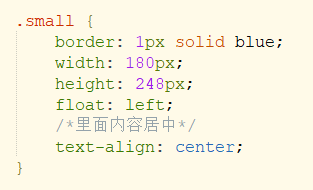
} .small {
border: 1px solid blue;
width: 180px;
height: 248px;
float: left;
/*里面内容居中*/
text-align: center;
} #bottom {
text-align: center;
}
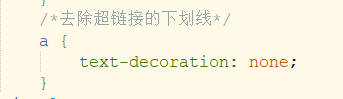
/*去除超链接的下划线*/ a {
text-decoration: none;
}
</style>
</head> <body>
<div id="father">
<!--1.logo--> <!--方法一:-->
<div id="logo">
<div class="top">
<img src="../../img/logo2.png" height="46px" />
</div>
<div class="top">
<img src="../../img/header.png" height="46px" />
</div>
<div class="top" id="top">
<a href="#">登录</a>
<a href="#">注册</a>
<a href="#">购物车</a>
</div>
</div> <!--方二:-->
<div id="clear"> </div>
<!--2.导航栏-->
<div id="menu">
<ul>
<a href="#">
<li style="font-size:20px;">首页</li>
</a>
<a href="#">
<li>手机数码</li>
</a>
<a href="#">
<li>家用电器</li>
</a>
<a href="#">
<li>鞋靴箱包</li>
</a>
<a href="#">
<li>孕婴保健</li>
</a>
</ul>
</div>
<!--3.轮播图片-->
<div id="">
<img src="../../img/1.jpg" width="100%" />
</div>
<!--4.最新商品-->
<div id="product">
<div id="product_top">
<span style="font-size:25px;">最新商品
<img src="../../img/title2.jpg" />
</span>
</div>
<div id="product_bottom">
<div id="product_bottom_left">
<img src="../../img/big01.jpg" width="100%" height="100%" />
</div>
<div id="product_bottom_right">
<div id="big">
<a href=#><img src="../../img/middle01.jpg" width="100%" height="100%" /> </a>
</div>
<div class="small">
<img src="../../img/small03.jpg" />
<a href="#">
<p style="color:grey;">电炖锅</p>
</a>
<p style="color: red;">$399</p>
</div>
<div class="small">
<img src="../../img/small03.jpg" />
<a href="#">
<p style="color:grey;">电炖锅</p>
</a>
<p style="color: red;">$399</p>
</div>
<div class="small">
<img src="../../img/small03.jpg" />
<a href="#">
<p style="color:grey;">电炖锅</p>
</a>
<p style="color: red;">$399</p>
</div>
<div class="small">
<img src="../../img/small03.jpg" />
<a href="#">
<p style="color:grey;">电炖锅</p>
</a>
<p style="color: red;">$399</p>
</div>
<div class="small">
<img src="../../img/small03.jpg" />
<a href="#">
<p style="color:grey;">电炖锅</p>
</a>
<p style="color: red;">$399</p>
</div>
<div class="small">
<img src="../../img/small03.jpg" />
<a href="#">
<p style="color:grey;">电炖锅</p>
</a>
<p style="color: red;">$399</p>
</div>
<div class="small">
<img src="../../img/small03.jpg" />
<a href="#">
<p style="color:grey;">电炖锅</p>
</a>
<p style="color: red;">$399</p>
</div>
<div class="small">
<img src="../../img/small03.jpg" />
<a href="#">
<p style="color:grey;">电炖锅</p>
</a>
<p style="color: red;">$399</p>
</div>
<div class="small">
<img src="../../img/small03.jpg" />
<a href="#">
<p style="color:grey;">电炖锅</p>
</a>
<p style="color: red;">$399</p>
</div>
</div>
</div>
</div>
<!--5.广告图片-->
<div id="">
<img src="../../img/ad.jpg" width="100%" />
</div>
<!--6.热门商品-->
<div id="">
<div id="product_top">
<span style="font-size:25px;">热门商品
<img src="../../img/title2.jpg" />
</span>
</div>
<div id="product_bottom">
<div id="product_bottom_left">
<img src="../../img/big01.jpg" width="100%" height="100%" />
</div>
<div id="product_bottom_right">
<div id="big">
<a href=#><img src="../../img/middle01.jpg" width="100%" height="100%" /> </a>
</div>
<div class="small">
<img src="../../img/small03.jpg" />
<a href="#">
<p style="color:grey;">电炖锅</p>
</a>
<p style="color: red;">$399</p>
</div>
<div class="small">
<img src="../../img/small03.jpg" />
<a href="#">
<p style="color:grey;">电炖锅</p>
</a>
<p style="color: red;">$399</p>
</div>
<div class="small">
<img src="../../img/small03.jpg" />
<a href="#">
<p style="color:grey;">电炖锅</p>
</a>
<p style="color: red;">$399</p>
</div>
<div class="small">
<img src="../../img/small03.jpg" />
<a href="#">
<p style="color:grey;">电炖锅</p>
</a>
<p style="color: red;">$399</p>
</div>
<div class="small">
<img src="../../img/small03.jpg" />
<a href="#">
<p style="color:grey;">电炖锅</p>
</a>
<p style="color: red;">$399</p>
</div>
<div class="small">
<img src="../../img/small03.jpg" />
<a href="#">
<p style="color:grey;">电炖锅</p>
</a>
<p style="color: red;">$399</p>
</div>
<div class="small">
<img src="../../img/small03.jpg" />
<a href="#">
<p style="color:grey;">电炖锅</p>
</a>
<p style="color: red;">$399</p>
</div>
<div class="small">
<img src="../../img/small03.jpg" />
<a href="#">
<p style="color:grey;">电炖锅</p>
</a>
<p style="color: red;">$399</p>
</div>
<div class="small">
<img src="../../img/small03.jpg" />
<a href="#">
<p style="color:grey;">电炖锅</p>
</a>
<p style="color: red;">$399</p>
</div>
</div>
</div>
</div>
<!--7.广告图片-->
<div id="">
<img src="../../img/footer.jpg" width="100%" />
</div>
<!--7.友情链接和版权信息-->
<div id="bottom">
<td align="center">
<a href="#">关于我们</a>
<a href="#">联系我们</a>
<a href="#">法律声明</a>
<a href="#">...</a> <p>
Copyright ...
</p>
</td>
</div>
</div>
</body> </html>
结果:(未细调)
用到的CSS内容:
- margin: auto;
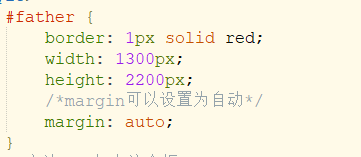
- 注意盒子模型的取值计算
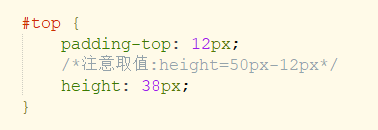
- 内联: display: inline;
- 内容居中:text-align: center;
- 去除超链接的下划线
【使用DIV+CSS重写网站首页案例】步骤分析与代码实现的更多相关文章
- 【使用DIV+CSS重写网站首页案例】CSS选择器
使用表格<table></table>对网站首页进行布局有缺陷,不能拖动版块,不灵活. DIV Div是一个html的标签,单独使用没有意义,必须结合CSS使用: 是一个块级元 ...
- 【使用DIV+CSS重写网站首页案例】CSS浮动
CSS浮动: 浮动的框可以向左或向右移动,直到它的外边缘碰到包含框或另一个浮动框的边缘为止 由于浮动框不在文件的普通流中,所以文档的普通流中的块框表现得就像浮动框不存在一样. 选择器之 float属性 ...
- 【使用DIV+CSS重写网站首页案例】CSS引入方式
CSS引入方式(3种) *就近原则:行内引入可以覆盖内部引入的效果 内部引入: * type="text/css" 为默认可以不写 例子: <!DOCTYPE h ...
- 【使用DIV+CSS重写网站首页案例】CSS盒子模型
CSS盒子模型 取值问题: 默认情况,padding.border.margin都为0: 设定区域内容的width和height,是区域内容框的尺寸: 如果设定padding/border/margi ...
- DIV+CSS布局网站基本框架
html代码 <!DOCTYPE html PUBLIC "-//W3C//DTD XHTML 1.0 Transitional//EN" "http://www. ...
- PHP.5-DIV+CSS布局网站首页实例
DIV+CSS布局网站首页实例 网站页面布局 http://www.sj33.cn/digital/wyll/201501/42379.html[页头.页脚.侧边栏和内容区域] #避免各浏览器对CSS ...
- HTML&CSS——使用DIV和CSS完成网站首页重构
1.DIV 相关的技术 Div 它是一个 html 标签,一个块级元素(单独显示一行).它单独使用没有任何意义,必须结合CSS来使用.它主要用于页面的布局. Span 它是一个 html 标签,一个内 ...
- 使用DIV+CSS布局网站的优点和缺陷
随着WEB2.0标准化设计理念的普及,国内很多大型门户网站已经纷纷采用DIV+CSS制作方法,从实际应用情况来看,此种方法绝对好于表格制作页面的方法. 如今大部分网站仍然采用表格嵌套内容的方式来制作网 ...
- 对石家庄铁道大学网站首页进行UI分析
对石家庄铁道大学网站首页进行UI界面分析首先,铁道大学的网页首页分为图文热点,学校新闻,校内公告,媒体看铁大,学术咨询等等模块.通过分析这些模块,可以看出,学校网站首页针对的使用对象有很多,包括学校领 ...
随机推荐
- ES6-Generator使用与改写
用Generator封装Symbol中的iterator方法: 注意:Generator的function后必须写* config:分别有3个txt文件,两个文件写路径,一个文件写要输出的内容 前置写 ...
- ES6-Generator基础用法
Generator简介: 生成器,本身是函数,执行后返回迭代对象,函数内部要配合yield使用Generator函数会分段执行,遇到yield暂停. 使用Generator注意点:function 和 ...
- Mac下Sublime Text常用插件
Mac下Sublime Text常用插件 SideBarEnhancements 右键菜单增强插件 BracketHighlighter 括号.引号.标签高亮插件 Pretty JSON JSON美化 ...
- 重启nova-scheduler服务,报错Login was refused using authentication mechanism AMQPLAIN
问题描述 运行 systemctl restart openstack-nova-scheduler.service 失败,查看日志报错如下: 2019-12-22 14:52:27.426 1513 ...
- 【IntelliJ IDEA学习之三】IntelliJ IDEA常用快捷键
版本:IntelliJIDEA2018.1.4 按场景列举一.打开设置CTRL + ALT + S:打开设置(File-->Settings...)Ctrl + Shift + Alt + S: ...
- storm并行
Storm并行度 wordcount 统计job代码 public class WordCountTopology { private static final String SENTENCE_SPO ...
- php开始,html应用的一些不错收藏
来源:http://happymc.iteye.com/link?tag=%E4%B8%AA%E4%BA%BA%E6%94%B6%E8%97%8F%E7%9A%84%E5%A5%BD%E7%BD%91 ...
- 【题解】Luogu P5471 [NOI2019]弹跳
原题传送门 先考虑部分分做法: subtask1: 暴力\(O(nm)\)枚举,跑最短路 subtask2: 吧一行的点压到vector中并排序,二分查找每一个弹跳装置珂以到达的城市,跑最短路 sub ...
- python turtle画花
turtle是一个功能强调大的绘图的库,可以用来绘制各种所需要的图案,但是在使用时需要计算好角度等一系列的问题. 代码(源自<Python语言程序设计>)如下: 运行结果:
- C#里面如何判断一个Object是否是某种类型
第一种方法 var isA = oldObject.GetType() == typeof(Dictionary<string, string>) 第二种方法 var isB = oldO ...