
python:使用Djangorestframework编写post和get接口
1、安装django
pip install django
2、新建一个django工程
python manage.py startproject cainiao_monitor_api
3、新建一个app
python manage.py startapp monitor
4、安装DRF
pip install djangorestframework
5、编写视图函数
views.py
from rest_framework.views import APIView

import json

import cx_Oracle

from django.http import HttpResponse

# Create your views here.

class MonitorMsg(APIView):

    # 此处方法名只能为post或者get等名称,这个名称就是接口类型

    def post(self, request):

        """

        查询某一天的数据;

        此方法请求类型为post,根据urls.py中的配置,该接口地址为:/monitorMsg,

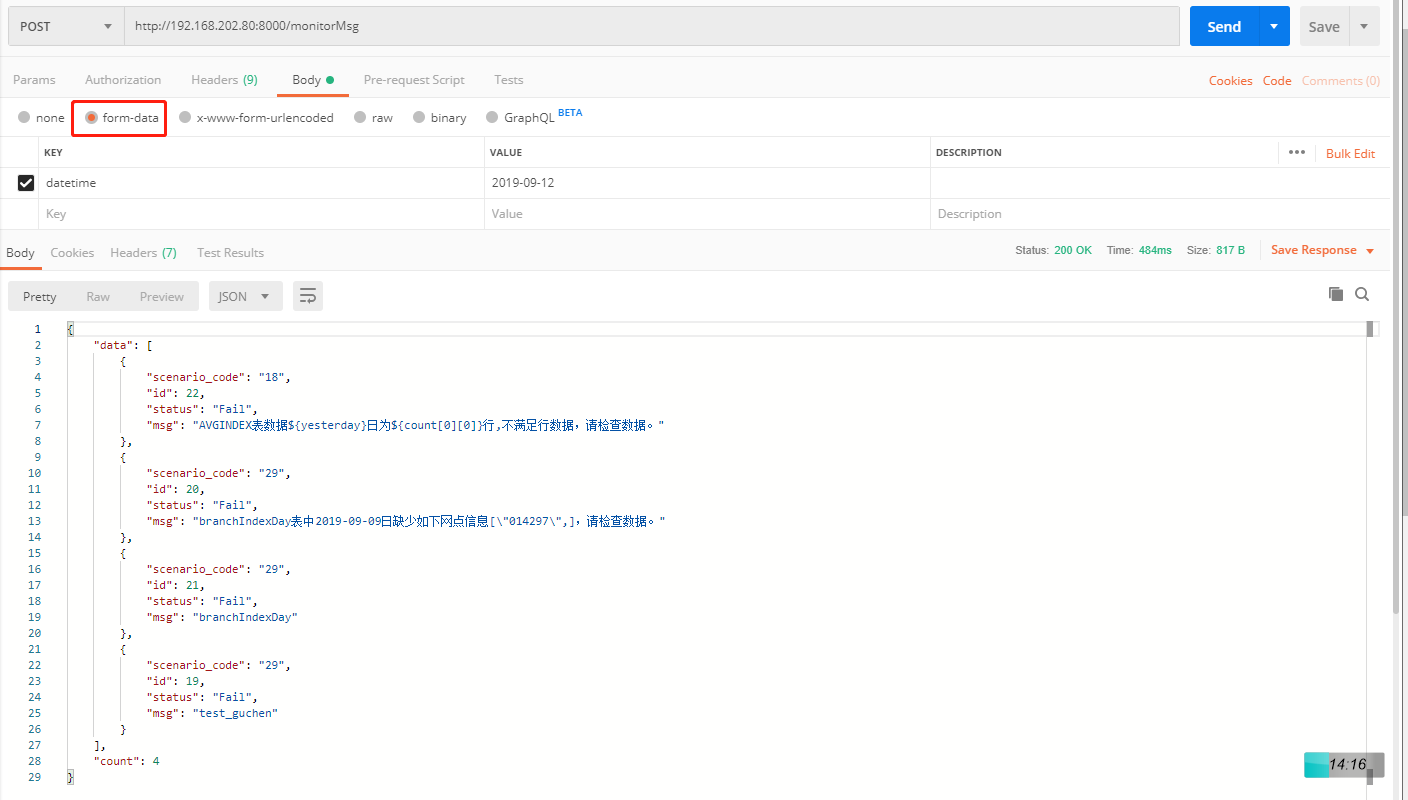
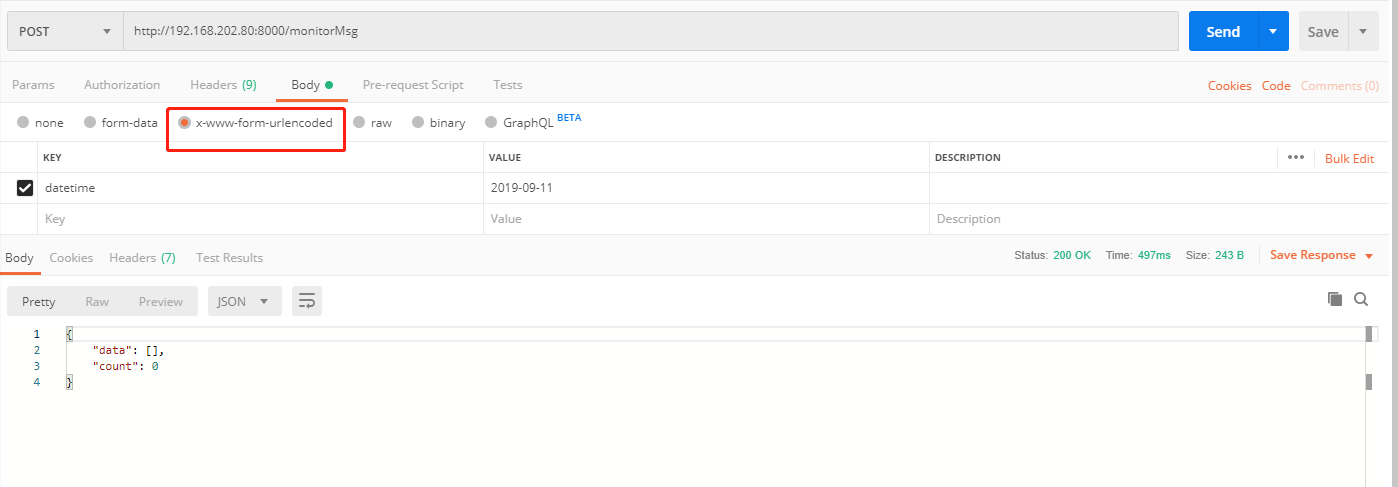
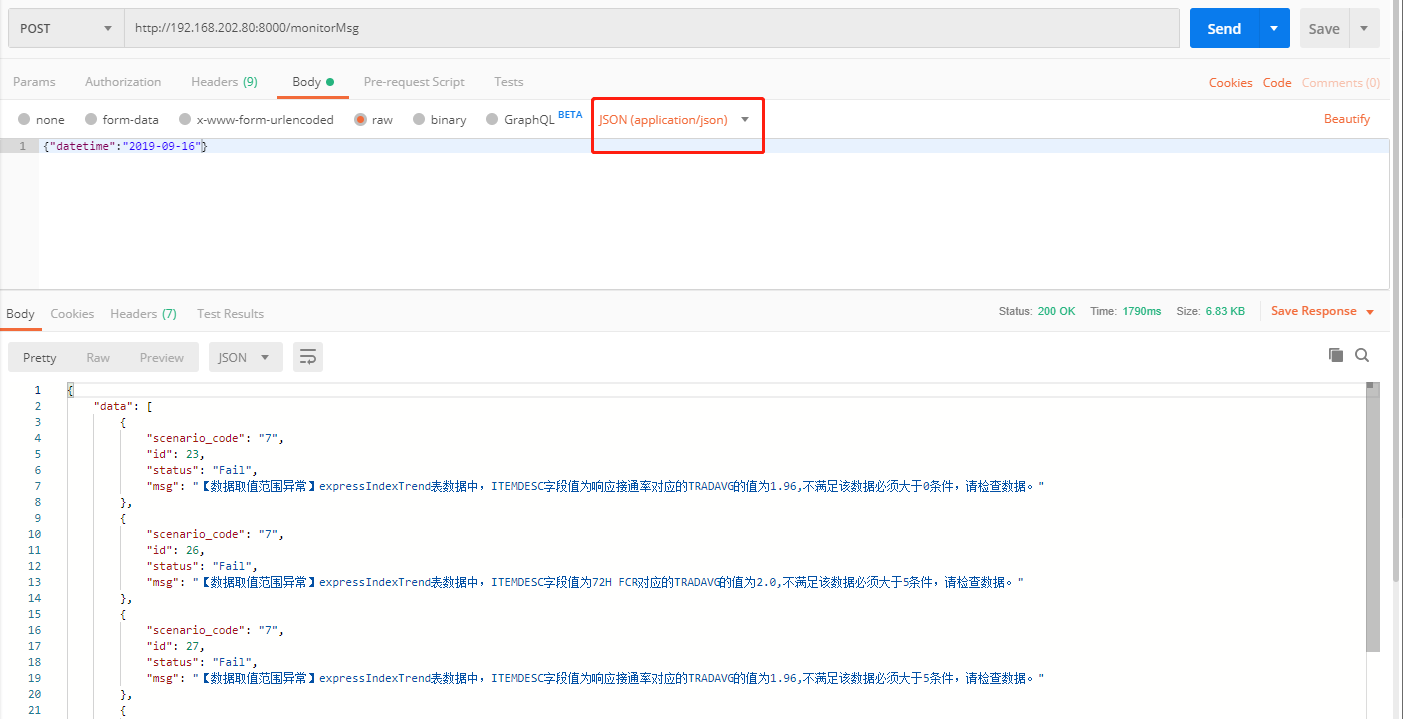
        传入参数方式以下三种都可以:json方式或者form-data或者x-www-form-urlencoded,

        request.data['datetime']方式都可以解析到入参的值

        :param request:

        :return: 返回CAINIAO_MONITOR_MSG表中所有的异常信息

        """

        # 如果前台通过form-data格式传入参数,则使用request.POST['key']此方法获取参数的值

        # datetime = request.POST['datetime']

        # 【推荐】如果前台通过json方式或者form-data或者x-www-form-urlencoded传入参数,则使用request.data['key']方法均可获取对应的value

        datetime = request.data['datetime']

        print(request.data)

        sql = "select * from CAINIAO_MONITOR_MSG t WHERE to_char(t.CREATE_TIME,'yyyy-MM-dd') like '%s' " % datetime

        # 连接数据库

        conn = cx_Oracle.connect('name', 'pwd', '10.*.*.*:1521/sid')

        # 创建游标

        cursor = conn.cursor()

        # 执行sql语句

        cursor.execute(sql)

        # 提交数据

        conn.commit()

        # 获取查询数据类型为list

        data = cursor.fetchall()

        # 关闭游标

        cursor.close()

        # 断开数据库连接

        conn.close()

        # 新建空列表用来放数据

        msg_list = []

        # 遍历查询到的数据

        for i in data:

            # 创建空的字典,存放对应的字段信息

            msg_dict = {}

            # 将查询到的数据作为value对应到字典相应key

            msg_dict['id'] = i[0]

            msg_dict['scenario_code'] = i[1]

            msg_dict['msg'] = i[2]

            msg_dict['status'] = i[4]

            # 将遍历的数据存放到list中

            msg_list.append(msg_dict)

        # 定义最终的返回数据样式

        res_data = {'count': len(msg_list), 'data': msg_list}

        # 将res_data序列化为json对象,并返回

        return HttpResponse(json.dumps(res_data), content_type="application/json")
6、编写路由
urls.py
from django.contrib import admin

from django.urls import path

from monitor.views import MonitorMsg

urlpatterns = [

    path('admin/', admin.site.urls),

    # 接口的url:http://127.0.0.1:8000/monitorMsg

    path('monitorMsg', MonitorMsg.as_view()),

]
7、启动服务
python manage.py runserver
8、访问测试
python:使用Djangorestframework编写post和get接口的更多相关文章
- 【Python】djangorestframework 基于django框架的接口开发
官网:http://www.django-rest-framework.org/#installation 下载:https://pypi.python.org/pypi/djangorestfram ...
- Python OS模块标准库的系统接口及操作方法
Python OS模块标准库的系统接口及操作方法 os.name 返回当前操作系统名,定义了'posix','nt','mac','os2','ce','java'(我使用win7/python3.1 ...
- Python网络编程——编写一个简单的回显客户端/服务器应用
今天将python中socket模块的基本API学习完后,照着书上的实例编写一个套接字服务器和客户端.采用python3.5版本,在注释中会标明python2和python3的不同之处. 1.代码 ( ...
- 用python + hadoop streaming 编写分布式程序(一) -- 原理介绍,样例程序与本地调试
相关随笔: Hadoop-1.0.4集群搭建笔记 用python + hadoop streaming 编写分布式程序(二) -- 在集群上运行与监控 用python + hadoop streami ...
- 用python + hadoop streaming 编写分布式程序(二) -- 在集群上运行与监控
写在前面 相关随笔: Hadoop-1.0.4集群搭建笔记 用python + hadoop streaming 编写分布式程序(一) -- 原理介绍,样例程序与本地调试 用python + hado ...
- 用python + hadoop streaming 编写分布式程序(三) -- 自定义功能
又是期末又是实训TA的事耽搁了好久……先把写好的放上博客吧 相关随笔: Hadoop-1.0.4集群搭建笔记 用python + hadoop streaming 编写分布式程序(一) -- 原理介绍 ...
- Linux 下Python调用C++编写的动态库
在工程中用到使用Python调用C++编写的动态库,结果报如下错误: OSError: ./extract_str.so: undefined symbol: _ZNSt8ios_base4InitD ...
- vue-cli3.x中使用axios发送请求,配合webpack中的devServer编写本地mock数据接口(get/post/put/delete)
vue-cli3.x中使用axios发送请求,配合webpack中的devServer编写本地mock数据接口(get/post/put/delete) 手把手式笔记 Axios配置 安装 axios ...
- python调用腾讯云短信接口
目录 python调用腾讯云短信接口 账号注册 python中封装腾讯云短信接口 python调用腾讯云短信接口 账号注册 去腾讯云官网注册一个腾讯云账号,通过实名认证 然后开通短信服务,创建短信应用 ...
随机推荐
- CodeForces - 83D:Numbers (数学&递归 - min25筛 )
pro:给定三个整数L,R,P求[L,R]区间的整数有多少个是以P为最小因子的.L,R,P<2e9; sol: 一: 比较快的做法是,用函数的思想递归. 用solve(N,P)表示求1到N有多少 ...
- JSON—去除JSON数据中的所有HTML标…
package com.linoer.utils; import java.util.ArrayList; import java.util.List; import java.util.regex. ...
- npm包之npm-check-updates
检查npm的依赖包是否有比较新的版本 安装 npm i -g npm-check-updates 使用 ncu --help // 查看相关命令 ncu // 检查当前项目中有没有哪些依赖包可更新 n ...
- LeetCode 947. Most Stones Removed with Same Row or Column
原题链接在这里:https://leetcode.com/problems/most-stones-removed-with-same-row-or-column/ 题目: On a 2D plane ...
- php正则表示中的元字符
元字符 抛出问题: \d 代表匹配一个字符.而我现在想要匹配十个八个,任意多个数字肿么办? 这个时候我们就要用到元字符.在使用原子的时候,发现只能够匹配一个字符,可是要匹配多个字符就出现了问题.大理石 ...
- Python爬虫 | IP池的使用
一.简介 - 爬虫中为什么需要使用代理 一些网站会有相应的反爬虫措施,例如很多网站会检测某一段时间某个IP的访问次数,如果访问频率太快以至于看起来不像正常访客,它可能就会禁止这个IP的访问.所以我们需 ...
- SQL基础-汇总统计及GROUP BY
一.汇总统计 1.聚集函数 COUNT() 计算总数 SUM() 求和 MAX() 最大值 MIN() 最小值 AVG() 平均值 2.聚集函数使用 总共有多少名学生? SELECT COUNT(*) ...
- render函数、createElement函数与vm.$slots
1.render函数.createElement函数 Vue.component('es-header', { render: function (createElement) { return cr ...
- 微信小程序与云开发
微信小程序基础概念 小程序云开发的三大基础能力:云数据库.云函数.云存储 Java.NodeJS.JavaScript.HTML5.CSS3.VueJs.ReactJs.前端工程化.前端架构 小程序开 ...
- 【06NOIP普及组】数列(信息学奥赛一本通 1937)(洛谷 1062)
[题目描述] 给定一个正整数k(3≤k≤15),把所有k的方幂及所有有限个互不相等的k的方幂之和构成一个递增的序列,例如,当k=3时,这个序列是: 1,3,4,9,10,12,13,… (该序列实际上 ...